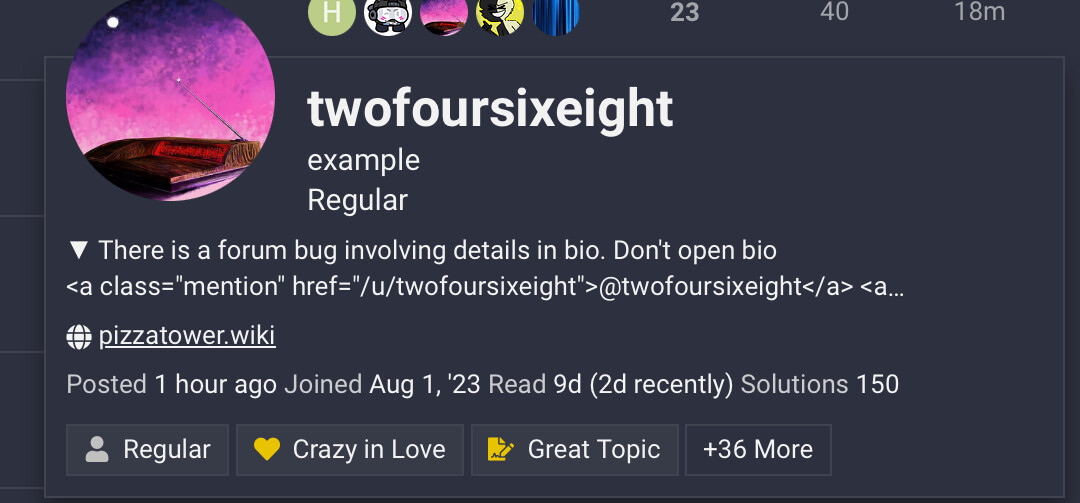
If you put a details section in your bio and open it, the HTML properties don’t work. Happens even on the latest discourse.
AI-generated summary
Users reported that HTML elements like mentions and emojis don’t render properly inside <details> sections in user bios on Discourse, even on the latest version. twofoursixeight and bob_the_tomato demonstrated the issue visually and with code, showing that content inside <details> appears as raw HTML (e.g., <br> tags) when expanded. Richie questioned whether this was intentional design rather than a bug. zogstrip clarified that while security limits styling/markdown in user cards, allowing <details> tags themselves is unintended and qualifies as a bug. In post 9, zogstrip explained the root cause: the excerpt parser was misinterpreting <details> tags. The fix replaces the entire <details> block in excerpts with a collapsed indicator — “ summary” — mirroring default browser behavior. This change was implemented via GitHub PR #30229.

1 Like

When using the details feature in discourse, and putting it in your bio [first 2 lines], when you click it, it shows as:
[text put in] <br>
Is this not by design, rather than a bug? 
For obvious security reasons, we support a very limited set of styling / markdown in the user card.
While this doesn’t look like a security issue, I think it’s a bug since we should not allow <details> tags.
4 Likes
Turns out the issue was our excerpt parser which was trying to be too clever with <details>.
I decided it doesn’t quite make sense to have those in the excerpt and instead replaced the whole content of the <details> block with “▶ summary” (“summary” being what’s written as the summary of the details block), like how they appear in the browser by default.
2 Likes
This topic was automatically closed after 13 hours. New replies are no longer allowed.