Wasn’t that merged into core recently?
לייק 1
There is a basic form of it. It looks like the component was renamed to Advanced Search Banner.
Not sure if the Air theme is using the component or core. The same with the light/dark toggle option was merged in core
Detail here for the component & core update
I imagine the Air theme is still using the component as it would if not mistaken require some updates to the Air theme for the banner mods and instructions to enable the banner in site settings
לייק 1
that worked - thank you much - I removed the sub-header and the H1 is font-size 64px. How do I reduce that?
לייק 1
I was looking at the common CSS in the GitHub link. Having a bit of trouble identifying element.
But if you can identify the element you should be able to create a custom component and use something like
font-size: 44px !important;
To override the H1 size in the banner.
If you have better CSS knowledge then myself you might have an easier time identifying the element. Try inspect element as I am using a mobile with the insoect element in a browser but it is not as good as using a desktop browser’s insoect element. You can test modifying size there.
Posting In the advance Search Banner topic asking how to change the H1 size you might also get some guidance on how to achieve it as well.
לייק 1
Okay I haven’t tested this but give this a try create a new Customization > Theme component
Edit CSS Common and add this code. I was looking at the Air Theme source in GitHub
// custom search banner customizations
.custom-search-banner-wrap {
   h1 {
    Font-size: 44px !important;
    }
}
The first section in the Air theme Common CSS has mods for the customer banner. So I was able to use that as a guide for the code above.
אני לא מצליח להבין איך להציג תתקטגוריות בכל מקום חוץ מרשימת התפריט של תת-הקטגוריה. האם יש דרך להראות אותן בעמודי תצוגה כללית?
Hello,
I am looking to reduce the number of characters in the topic summaries
I can’t see the parameter
Thank you
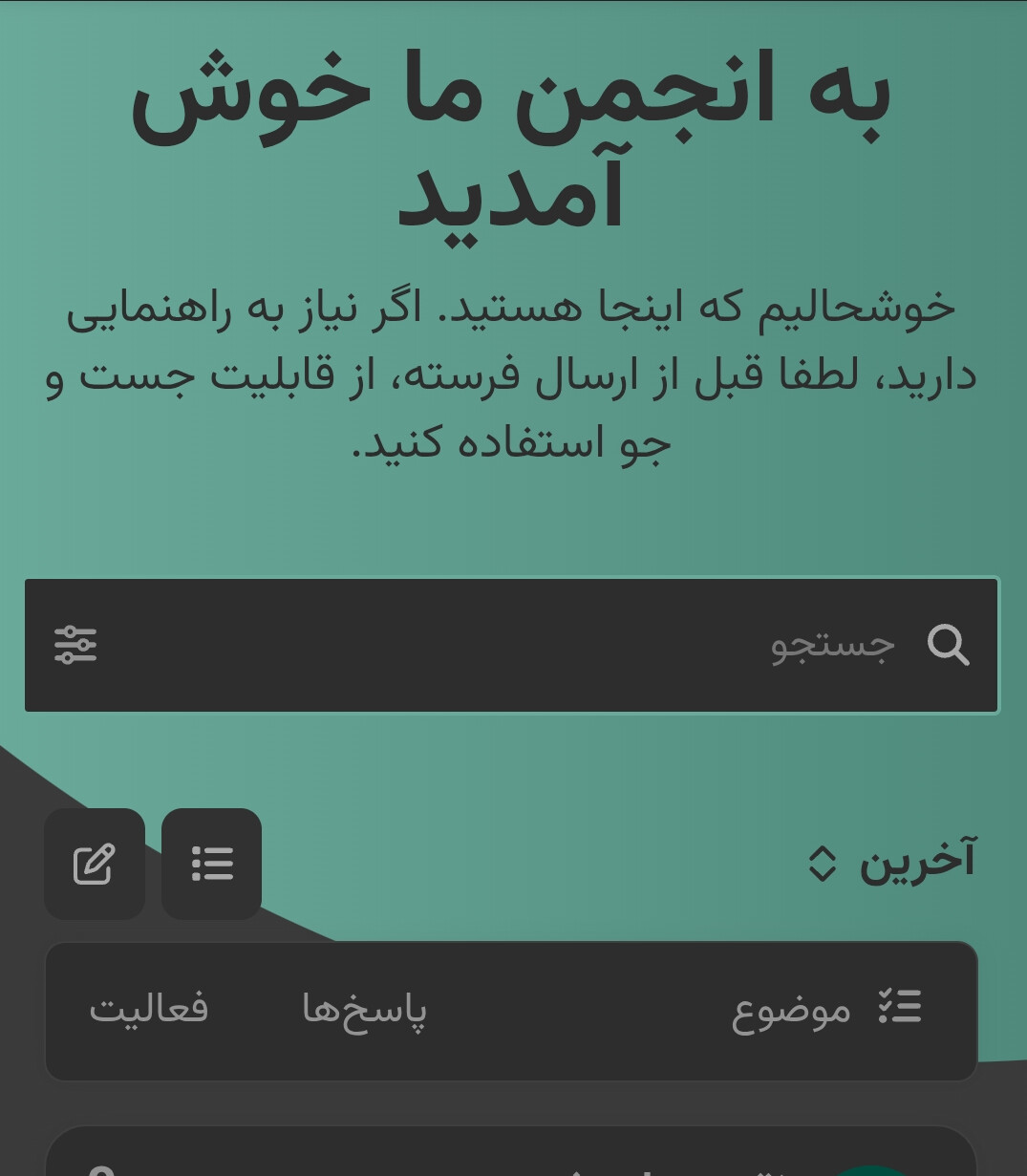


Subject: Issues with Air Theme on Categories Homepage (Admin vs Non-Admin View)
Hi
I am using the Air theme on my Discourse forum. My forum’s default homepage is set to display Categories. I’ve encountered a few display issues related to this theme in mobile view, specifically differences in layout and functionality depending on whether the user is an administrator or a regular user.
Here are the specific problems:
- Missing View Switcher for Admins: When logged in as an administrator, there is no visible button or control to switch between the “Categories”, “Latest”, or “hot” views on the homepage. The Categories view is displayed, but I cannot easily navigate to the others from this page.
- Invisible/Blank View Switcher for Non-Admins (Categories View): When logged in as a non-admin user, a button does appear below the search bar, seemingly intended for switching views. However, when the forum is in the default “Categories” view, this button appears as a large, empty rectangle with no text label indicating its function (e.g., “Latest”, “hot”). This makes it confusing for users. This issue does not occur when the homepage is already set to “Latest” or “hot” for non-admins; the button correctly shows the text for switching back to “Categories”.
- Different Category Box Width (Admin vs Non-Admin): The display box for category names and descriptions appears narrower when viewed as an administrator compared to how it looks for a non-admin user. This affects the layout and presentation of the category list.
I have attached screenshots illustrating these issues (Irrelevant parts of the images have been blurred or removed)
Has anyone else experienced similar problems with the Air theme, particularly when the default homepage is set to Categories? Any insights or potential CSS fixes would be greatly appreciated.
Thanks!
לייק 1
אני יכול לאשר את התיבה הריקה בערכת הנושא Air. למרות שיש לי את זה אפילו כמנהל.
אני יכול לאשר שנראה שזה בתוך ערכת הנושא Air עצמה ולא ברכיב קבוצות הקטגוריות המודרניות.
למרות זאת, עליך ליצור נושא בקטגוריה Bug עם תגית air-theme ואולי גם תגית נוספת ux
יש לי ערכת נושא שהיא העתק של ערכת הנושא Air ואבדוק אם אוכל לזהות אולי את שינוי הקוד, אבל אני עדיין מתחיל.
לייק 1
ייתכן שהשורה הזו ב-CSS לנייד קשורה לעניין. ב-GitHub השורה הזו נראית כך:
.navigation-categories .navigation-container,
.categories-list .navigation-container {
  border-bottom: 0 !important;
}
כפי שציינתי, העתקתי את ה-CSS של ערכת העיצוב Air כדי ליצור ערכת עיצוב מותאמת אישית. זהו הקוד המקורי לשורה הזו, שימו לב ל-“px” החסר:
.navigation-categories .navigation-container,
.categories-list .navigation-container {
  border-bottom: 0px !important;
}
לצערי, זה עתה נבדק וזה לא פתר את הבעיה. נראה שה-px חייב להיות ברירת מחדל אם לא מציינים אותו.
לייק 1
@Northern , אני חייב לומר שאני מסכים עם @qingfeng1024 . מדריך על איך להתאים אותו בצורה כל כך נחמדה יהיה ממש בעל ערך
On mobile the topics are not wide enough. Is there an easy CSS fix to remove that padding on the sides? The Horizon theme does that padding better on mobile.
לייק 1
איך משיגים את החלק שיש בו תפריט נפתח עם:
כלים
אודות
משאבים?
Probably using
, but you can also take a look at
לייק 1
אין לי רכיבים מותאמים אישית או CSS, אבל מסיבה כלשהי הרוחב כשאני במסך הניהול (רחב יותר) לעומת מסך הבית (צר יותר) שונה.
האם יש דרך להפוך אותם לזהים? אני מעדיף את הרוחב הרחב יותר.
An error occurred: The theme screenshots must be in one of the following formats: .jpg,.jpeg,.gif,.png. The screenshot light.webp has an invalid format.
Error when trying to update to latest.
@REALITY, it looks like you haven’t updated your site to the latest version, which has the updated list:
just to be sure - are you trying to update Air Theme to latest?
לייק 1

Are you referring to this lack of space?

If not, is there anything else you feel looks terrible? Specific call outs would help us fix the issue you are having. Thanks!
2 לייקים
Yup that space, and the text “Aktivnosti” is not good aligned.
Maybe the buttons could be with full text eg “New topic”
The forum theme is very nice, but this little things needs to be fixed.