downey
2021 年3 月 10 日 22:56
22
感谢这些提示。
我尝试了第二个示例:
internal~加入 X 群组!~快来加入我们要 formerly 绝密的群组。~https://example.com/~group-x
……然后分别在匿名会话中,以及模拟一个非管理员且非 group-x 成员的用户账户进行了检查。不幸的是,两个预览都没有显示出来,包括这个二次确认的预览。对于我的管理员账户,看起来一切正常,正如预期那样直接显示在“internal”分类 slug 的上方,链接目标等信息也都正确。
我们在分类显示方面确实存在一些不太寻常的情况,所以这可能与那有关,除非其他人也发现了类似的非预期行为。
2 个赞
tshenry
2021 年3 月 10 日 23:09
23
奇怪的是,它仅对管理员显示,而本应看到它的其他用户却看不到。为确认起见,您的 internal 类别是否对匿名用户和非 group-x 用户可见?
3 个赞
downey
2021 年3 月 10 日 23:24
24
感谢这个提示!我之前误解了字符串中第一个字段的用途。我一直将其与“仅限会员的类别”关联,认为它与群组会员身份有关。
当我把第一个字段改为一个已存在的、公开的、对所有人开放的类别后,一切就按预期运行了。
news~加入群组 X!~快来加入我们要公开的秘密群组。~/pub/membershipinfo~group-x
TLDR(就我当时的理解而言)——我需要明白,第一个字段是指你希望“预览”广告在类别列表中显示的位置。(在本例中,就是公开类别“新闻”的正上方。)
3 个赞
我真的很感谢你这么说。我原以为设置中的分类 slug 是指一个现有的私有分类,我想将其拉入分类菜单。但实际上,我意识到这个主题组件基本上只是允许我们在分类列表中的特定分类上方放置一个自定义链接,而且这个链接实际上不必与现有分类相关。例如,我刚输入了 welcome~访问 Google!~这是分类列表中的一个自定义链接~https://www.google.com,它就生效了。
我认为是我被“分类预览”这个名字搞糊涂了,没有理解它的功能,所以谢谢你指出来。
另外,我注意到这似乎只出现在分类列表视图中,而不是在分类下拉菜单或搜索中。
2 个赞
f1r4s
2022 年2 月 9 日 08:04
26
@tshenry 能否找出如何使此类别具有带框样式的私有化?
2 个赞
tshenry
2022 年2 月 11 日 05:11
27
运气的是,我刚刚添加了对“带子分类的框”桌面分类页面样式
committed 04:00AM - 11 Feb 22 UTC
请注意,“带特色主题的框”尚不支持。
7 个赞
tshenry
2022 年2 月 14 日 21:24
28
Richie
2022 年12 月 23 日 12:23
29
@tshenry 有办法将这些隐藏起来不让员工看到吗?
看到真实分类和虚假分类在一起非常令人困惑,我们总是点击错误的分类
即使是 CSS 隐藏技巧也可以
1 个赞
oca
2023 年1 月 26 日 08:54
30
我明白 slug 是紧邻这个假分类标签下方的分类。然后需要有一个可访问的分类在其下方。at-last 这样的特殊 slug,可以将其完全放在所有内容之下?
编辑:我找到了一个解决方法。display=\"none\" 隐藏了这个分类,并使其出现在最后。这完全不令人满意,但是……效果很好。
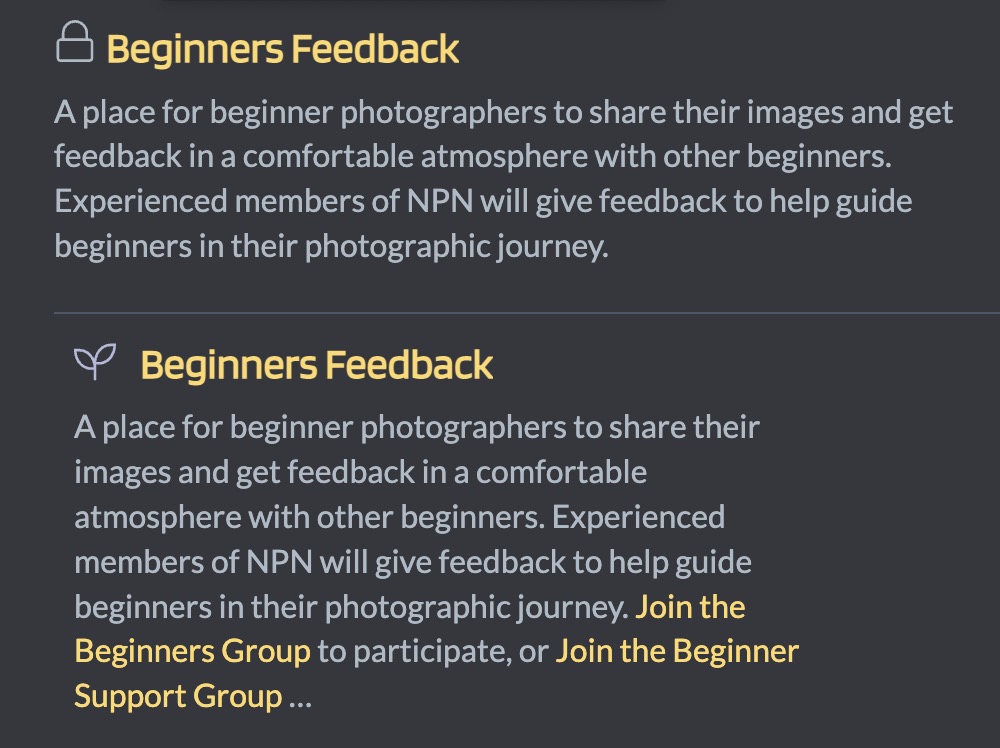
这是一个很棒的组件,但我遇到了一个问题,它没有隐藏实际的类别。我尝试使用非管理员帐户和匿名用户进行测试。下面是我看到的内容以及我的设置。是我做错了什么还是存在 bug?
类别 URL:https://community.naturephotographers.network/c/beginners/147
类别预览条目:
beginners~Beginners Feedback~A place for beginner photographers to share their images and get feedback in a comfortable atmosphere with other beginners. Experienced members of NPN will give feedback to help guide beginners in their photographic journey.~/g/Beginners~Beginners,Beginner_Support
1 个赞
Richie
2023 年2 月 18 日 10:39
32
2 个赞
pfaffman
2023 年2 月 19 日 20:03
34
您可以配置它以显示用户可以看到 的类别。这有点令人困惑(我不得不读了好几遍)。我相信它应该在您的情况下起作用。(请注意配置字段描述中的“重要”一词)
1 个赞
Richie
2023 年2 月 19 日 20:22
35
哎呀,两个“重要”消息中的第二个是这么说的:
**重要提示:**所选组的配置必须将“谁可以看到此组?”的可见性设置设为“组所有者、成员”或更宽松的设置。
顺便说一句,我认为“组所有者、成员”实际上应该说“组所有者、成员和版主”。
我想知道主题是否可以修改为在组设置为“组所有者”时也能正常工作。
1 个赞
pfaffman
2023 年2 月 19 日 23:10
36
您附加消息的类别必须允许人们看到它。您想宣传的类别则不行。或者至少我是这么理解的。
1 个赞
您好 @tshenry ,
我正在按照您的指示,在不同的用户组中进行测试。除了管理员之外,没有用户可以看到类别预览。我哪里做错了?
private-lounge~Private Lounge Preview~Private lounge reserved for our experts and contributors.~https://example.com~group_a,group_b,group_c
A、B、C 组都可以被所有人查看。
感谢您的帮助!
tgrosinger
2024 年2 月 18 日 00:53
38
我看到这似乎与“带有子类别的框”兼容,并且我的安装中已启用该功能,但是,一旦我启用 air 主题 ,类别预览就会消失。有没有办法让它与该主题一起使用?谢谢!
我已经开始进行一些调试,可以看到它进入了这个块 ,并且应该将 previewData 添加到渲染中,但它甚至没有出现在页面上的 HTML 输出中。
1 个赞
这看起来正是我所需要的:一个给用户输入分类时的醒目警告。
但这似乎不适用于_子分类_。我尝试输入了以下模式:
sub-categoryparent-sub-categoryparent:sub-categoryparent/sub-category
没有一个奏效。但 parent 可以正常工作(只是我不想在那里显示分类预览)。
您知道是否有可用的模式,或者是否可以支持此功能吗?
1 个赞
Heliosurge
2024 年8 月 18 日 04:14
43
您需要使用 Customization > Theme component
2 个赞