# Composer tip under specific tag topics
**URL:** https://meta.discourse.org/t/composer-tip-under-specific-tag-topics/255618
**Category:** Theme component
**Created:** [February 19, 2023, 5:42pm UTC](https://meta.discourse.org/t/composer-tip-under-specific-tag-topics/255618 "2023-02-19T17:42:33Z")
**Posts on this page:** 20
**Page:** 1
### Author:  [@Lhc\_fl](https://meta.discourse.org/u/Lhc_fl)
#### Post date: [February 19, 2023, 5:42pm UTC](https://meta.discourse.org/t/composer-tip-under-specific-tag-topics/255618/1 "2023-02-19T17:42:34Z")
| | | |
| --- | --- | --- |
| ℹ | **Summary** | This theme component provides a description of specific tagged topics in composer |
| 🛠 | **Repository** | [GitHub - Lemon-planting-light/discourse-composer-tip: Add tips to discourse composer when in topic with special tags · GitHub](https://github.com/Lemon-planting-light/discourse-composer-tip) |
| ❓ | **Install Guide** | [How to install a theme or theme component](https://meta.discourse.org/t/how-do-i-install-a-theme-or-theme-component/63682) |
| 📖 | **New to Discourse Themes?** | [Beginner’s guide to using Discourse Themes](https://meta.discourse.org/t/beginners-guide-to-using-discourse-themes/91966) |
Install this theme component
## Summary
> ⚠ This theme component occupies the bottom right corner of Composer. If you have other plugins or theme components that occupy that location, it may not be compatible with it.
>
> > [@Lhc\_fl](#):
> >
> > Maybe you have to manually add a line of css to the site… I have no intention of adapting those plugins that take up the same space, hmm
> >
> > ```plaintext
> > .topic-tag-desc-container {
> > text-align: left;
> > }
> >
> > ```
Sometimes, for topics marked by certain tags, you may wish to have something visually indicate to you what rules your replies should follow.
The theme component allows you to do just that. It provides a description of specific tagged topics in composer.
It also provides a concise and easy-to-understand json\_schema edit box, making it very easy to modify settings.
At the same time, it provides two modes, I call them Details Mode and Modal Mode


As you saw above, since I am developing for my forum, the component names and configuration examples provided by default are in Chinese. You may need to change them yourself. I apologize for any inconvenience caused to you.
## Details Mode


## Modal Mode


---
### Author:  [@mattdm](https://meta.discourse.org/u/mattdm)
#### Post date: [February 19, 2023, 5:54pm UTC](https://meta.discourse.org/t/composer-tip-under-specific-tag-topics/255618/2 "2023-02-19T17:54:40Z")
This looks amazingly useful!
One suggestion: “Display for OP” and “Hide for replier” have opposite senses. How hard would it be to make these both go in the same direction, like:
“Display for First Post” / “Display for Replies”
or
“Hide for First Post” / “Hide for Replies”
?
---
### Author:  [@Canapin](https://meta.discourse.org/u/Canapin)
#### Post date: [February 19, 2023, 7:53pm UTC](https://meta.discourse.org/t/composer-tip-under-specific-tag-topics/255618/3 "2023-02-19T19:53:07Z")
As a Grammarly user, the composer’s component would be partially hidden by Grammarly’s (interactable) icons:

I suppose it could easily be modified with CSS, but maybe a setting to change the alignement would be useful.
---
### Author:  [@mattdm](https://meta.discourse.org/u/mattdm)
#### Post date: [February 19, 2023, 7:58pm UTC](https://meta.discourse.org/t/composer-tip-under-specific-tag-topics/255618/4 "2023-02-19T19:58:46Z")
Would it be possible to have this theme component also work for categories? That seems nicer than adding template text as instructions.
I would be satisfied with simply the option to configure categories in the same way as tags in your existing theme component — but it’d be even more useful to be able to have it work in all of these ways:
1. for a tag, regardless of category
2. for a category, regardless of tag
3. specifically for a given tag and category together
And, in the third case, it’d be nice if that overrode any of the first and second. (That is, there could be general text for a category, but if you pick a certain tag, you’d get something else. Or, general text for a tag, except when used in a given category.)
---
### Author:  [@mattdm](https://meta.discourse.org/u/mattdm)
#### Post date: [February 19, 2023, 8:20pm UTC](https://meta.discourse.org/t/composer-tip-under-specific-tag-topics/255618/5 "2023-02-19T20:20:37Z")
Hmmm — I’ve installed this, but it is only showing for replies, not the first post — no matter how I set “display for OP”.
---
### Author:  [@Lhc\_fl](https://meta.discourse.org/u/Lhc_fl)
#### Post date: [February 20, 2023, 2:13am UTC](https://meta.discourse.org/t/composer-tip-under-specific-tag-topics/255618/6 "2023-02-20T02:13:29Z")
Ahhh, I think maybe because I am not a native English speaker, I have a problem understanding the vocabulary?
These two setting items respectively refer to “Whether visible to whom posted `post_number = 1`” and “Do not display to those who have already replied once”
I re-tested this on my test forum and it seems to work fine
---
### Author:  [@Lhc\_fl](https://meta.discourse.org/u/Lhc_fl)
#### Post date: [February 20, 2023, 2:26am UTC](https://meta.discourse.org/t/composer-tip-under-specific-tag-topics/255618/7 "2023-02-20T02:26:44Z")
I’ve pushed a fix for this, thanks for the suggestion!
(Note: The setting JSON items has been modified, and the old setting item needs to be filled in again)
---
### Author:  [@mattdm](https://meta.discourse.org/u/mattdm)
#### Post date: [February 20, 2023, 3:29am UTC](https://meta.discourse.org/t/composer-tip-under-specific-tag-topics/255618/8 "2023-02-20T03:29:22Z")
In my testing, I can only get it to work for replies. It does not appear when composing the first post in a new topic.
---
### Author:  [@Lhc\_fl](https://meta.discourse.org/u/Lhc_fl)
#### Post date: [February 20, 2023, 3:54am UTC](https://meta.discourse.org/t/composer-tip-under-specific-tag-topics/255618/9 "2023-02-20T03:54:03Z")
Ah, I see what you mean, it’s by design, because I originally designed it so that the respondent could tell at a glance what norms a reply should follow, but the OP doesn’t need to know - because they are the ones who choose the norm
---
### Author:  [@mattdm](https://meta.discourse.org/u/mattdm)
#### Post date: [February 20, 2023, 4:14am UTC](https://meta.discourse.org/t/composer-tip-under-specific-tag-topics/255618/10 "2023-02-20T04:14:58Z")
Oh — so “Hide for OP” means that they don’t see the message on replies to _their own posts_? I misunderstood! (But I also see the use of this setting now!)
Here is the use case I have in mind. If someone chooses something like `#contribute:bug` or `#help`, there could be a link to a guide to writing good problem reports — for the first post. (This would be nice per-category in addition to a tag-based approach.)
And, perhaps _replies_ to that (by other people, not the OP) could give a link to helpful resources for writing good answers. (But for this use case, it is the first post that is more important.)
Or, a different use case: if the topic is a news story or blog post, the text in replies could remind people to comment on the _substance_ of the text, giving links for reporting typos or other errors (and therefore hopefully keeping the replies more helpful while reducing moderator load).
---
### Author:  [@Heliosurge](https://meta.discourse.org/u/Heliosurge)
#### Post date: [February 20, 2023, 1:37pm UTC](https://meta.discourse.org/t/composer-tip-under-specific-tag-topics/255618/11 "2023-02-20T13:37:33Z")
This is pretty cool. Would you consider as asked making this work on first post? Can yoy use Align left to wrap. text? as I use plugin chars required and it disolays in the right.
---
### Author:  [@Jagster](https://meta.discourse.org/u/Jagster)
#### Post date: [February 20, 2023, 8:44pm UTC](https://meta.discourse.org/t/composer-tip-under-specific-tag-topics/255618/12 "2023-02-20T20:44:43Z")
Could the short description accept html? Basic `` would make it more clearer 😉 Sure, it can be achieved using CSS but html would be easier solution.
---
### Author:  [@Lhc\_fl](https://meta.discourse.org/u/Lhc_fl)
#### Post date: [February 21, 2023, 1:36am UTC](https://meta.discourse.org/t/composer-tip-under-specific-tag-topics/255618/13 "2023-02-21T01:36:59Z")
Yes, it supports.
Not only that, but it uses full HTML, not HTMLsafe
---
### Author:  [@Heliosurge](https://meta.discourse.org/u/Heliosurge)
#### Post date: [February 21, 2023, 2:09am UTC](https://meta.discourse.org/t/composer-tip-under-specific-tag-topics/255618/14 "2023-02-21T02:09:35Z")
How would I make the tip on both align left? I use Characters required plugin. Which displays lower right.
---
### Author:  [@Lhc\_fl](https://meta.discourse.org/u/Lhc_fl)
#### Post date: [February 21, 2023, 2:20am UTC](https://meta.discourse.org/t/composer-tip-under-specific-tag-topics/255618/15 "2023-02-21T02:20:23Z")
Maybe you have to manually add a line of css to the site… I have no intention of adapting those plugins that take up the same space, hmm
```css
.topic-tag-desc-container {
text-align: left;
}
```
---
### Author:  [@Heliosurge](https://meta.discourse.org/u/Heliosurge)
#### Post date: [February 21, 2023, 2:29am UTC](https://meta.discourse.org/t/composer-tip-under-specific-tag-topics/255618/16 "2023-02-21T02:29:45Z")
You would likely need to target them with css much like your targetting your element here.
In UX category there is a neat idea code that moves the composer menu on mobile to bottom with rhe gear having Options replace composer icons scrolling left to right. It would also have a placement issue with your component and chars requirement plugin.
Thanks for the speedy reply.
Here is the topic if your interested.
> [@Composer button bar suggestions](https://meta.discourse.org/t/composer-button-bar-suggestions/251059):
>
> Hello, This is a common issue on our forum. The native mobile context menu and selection is make complicate to use the editor button bar. So I made some hacky changes (need more work) but I think this is good, for an idea… slightly_smiling_face I show an example. Context menu covers the editor button bar. Selection and contextmenu covers the options popup menu I moved the editor button bar…
---
### Author:  [@Jagster](https://meta.discourse.org/u/Jagster)
#### Post date: [February 21, 2023, 3:18am UTC](https://meta.discourse.org/t/composer-tip-under-specific-tag-topics/255618/17 "2023-02-21T03:18:04Z")
Really? I couldn’t get any tags working. Not even basic ones like ``.
---
### Author:  [@Heliosurge](https://meta.discourse.org/u/Heliosurge)
#### Post date: [February 21, 2023, 3:26am UTC](https://meta.discourse.org/t/composer-tip-under-specific-tag-topics/255618/18 "2023-02-21T03:26:19Z")
Keep in mind the tag tips do not show on Op/post 1. It shows on Post #2 etc..
You need to use the editor in the component to add and define short &/or long descriptions.


Testing topic
I have applied hus css fix so my tag tip is on the left.
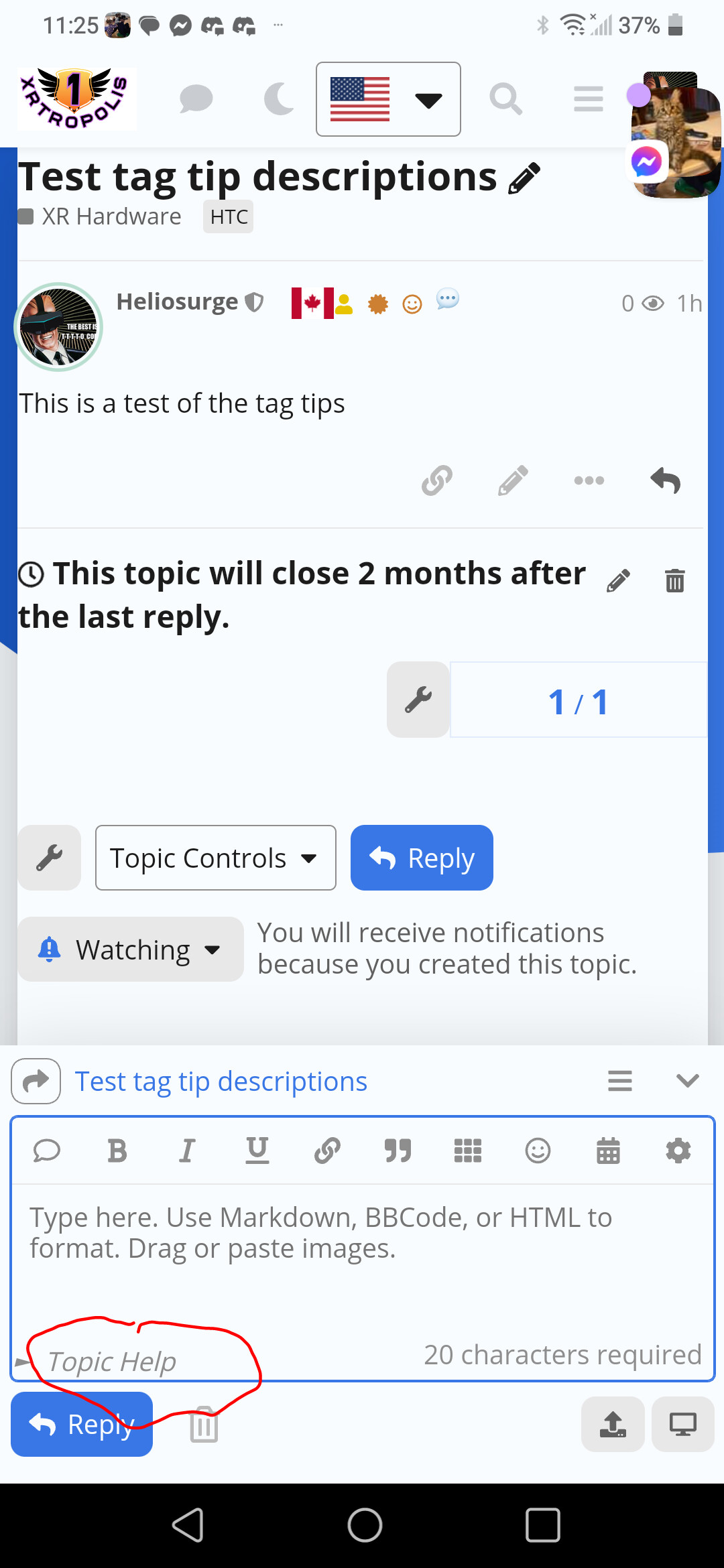
Circled is my tag tip if I click on it as I have ir on Modal it will call up the long description in a closeable box.
---
### Author:  [@Lhc\_fl](https://meta.discourse.org/u/Lhc_fl)
#### Post date: [February 21, 2023, 3:27am UTC](https://meta.discourse.org/t/composer-tip-under-specific-tag-topics/255618/19 "2023-02-21T03:27:32Z")
Hmm… In my case it works fine


---
### Author:  [@Heliosurge](https://meta.discourse.org/u/Heliosurge)
#### Post date: [February 21, 2023, 3:28am UTC](https://meta.discourse.org/t/composer-tip-under-specific-tag-topics/255618/20 "2023-02-21T03:28:44Z")
I am guessing he has not edited a taf in the editor and just trying defaults with no tags matching your sample.
[Next page](https://meta.discourse.org/t/composer-tip-under-specific-tag-topics/255618.md?page=2)