Discourse Vincent theme

This post is a WIP

Beta testers needed for a new theme.


Theme repo:

GitHub - discourse/discourse-vincent-theme: v0.77 · GitHub

Compressed Screenshots:

will look much better on your screen, image compression cases artifacts / blur. Also, I will update the screenshots as the theme takes shape

Homepage

Composer

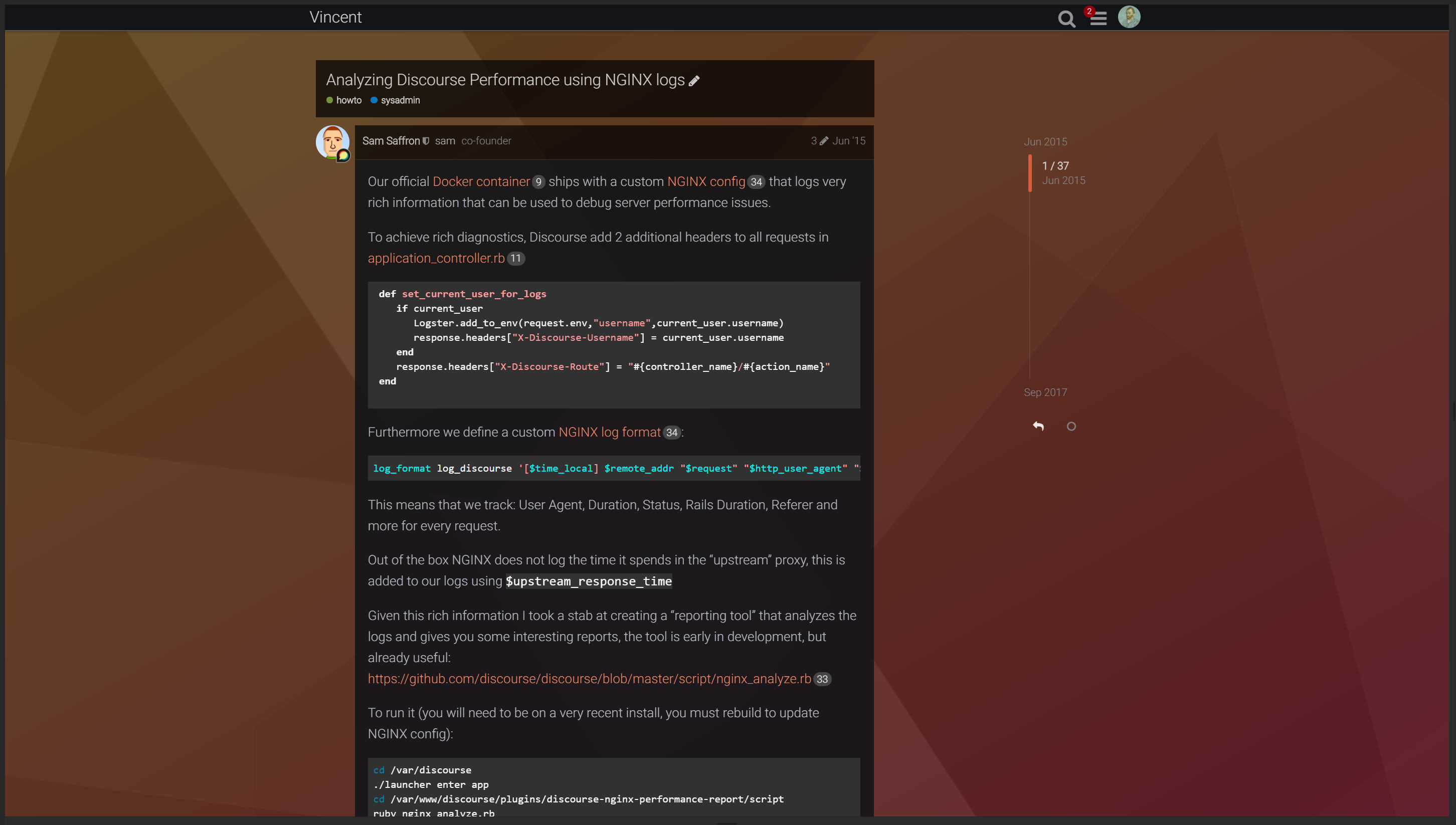
Topic page

Topic replies


Color schemes

Vincent Dark Blue

Vincent Dark Red

Vincent Dark Green

Vincent Dark Magenta

Vincent Dark Orange

Vincent Dark Teal


custom backgrounds

(these are samples only, you need to provide your own background images)


Installation:

Don’t forget to set the color scheme to one of the color schemes that come with the theme


The thin header is optional. If you want the thin header you need to add a theme component which you can find here:


This is a beta theme. Kindly report any issues in this post.

Feedback / suggestions welcome

42개의 좋아요

카테고리를 만들 때 문제가 있는 분 계신가요? 햄버거 메뉴를 클릭할 때마다 그 아래에 "+"만 추가되고, 어디로도 이동하지 않습니다.

4개의 좋아요

여기서도 같은 증상이 나타납니다 :frowning:

오래된 카테고리를 만들지 않아서 알아채지 못했습니다.

3개의 좋아요

방금 테스트해 보았는데 동일한 문제를 겪고 있습니다. Discourse에서 카테고리 관리자 드롭다운을 생성하는 데 사용되는 코드가 변경된 것으로 보입니다. 드롭다운 생성에 다음 코드를 사용하도록 테마를 업데이트하면 문제가 해결되는 것 같습니다:

{{#if showCategoryAdmin}}
    {{categories-admin-dropdown
    onChange=(action "selectCategoryAdminDropdownAction")
  }}
{{/if}}

조금만 기다려 주시면 이 문제를 매우 빠르게 수정하겠습니다.

8개의 좋아요

초보자 질문인데, 이걸 어디에 적용해야 하나요?

1개의 좋아요

테마의 /head 섹션을 편집하여 적용했습니다. 다음 코드 블록을:

  {{#if showCategoryAdmin}}
    {{categories-admin-dropdown
      create=createCategory
      reorder=reorderCategories}}
  {{/if}}

다음으로 교체했습니다:

  {{#if showCategoryAdmin}}
      {{categories-admin-dropdown onChange=(action "selectCategoryAdminDropdownAction") }}
  {{/if}}

다만, 테마를 수동으로 편집해야 하는 것은 이상적이지 않습니다. 테마의 “최신 버전으로 업데이트” 버튼을 클릭하여 변경 사항을 적용할 수 있도록 이 문제를 수정할 예정입니다.

5개의 좋아요

이 테마의 기본 텍스트 색상을 변경하는 방법은 무엇인가요?

또한 이 문제는 여전히 계속되고 있습니다:

원본 Discourse 테마와 마찬가지로, 새 토픽이 있을 때만 ‘‘new’’(새로움)와 ‘‘unread’’(읽지 않음) 메뉴가 표시되어야 합니다.

아직 진행 중인가요?

네, 저한테도 같은 일이 있었어요. 다른 테마로 전환한 뒤 카테고리를 만들고, 다시 Vincent 테마로 돌아오면서 문제를 해결했습니다.

원본 스레드에 표시된 추가 색상 스킴에 접근하는 방법은 무엇인가요? 다크 그린으로 전환하고 싶은데 설정에서는 Vincent Dark만 보입니다.

이 주제가 #customization:theme:broken-theme 으로 이동되었으므로, 이 테마는 더 이상 유지보수되지 않는 것으로 보입니다. 저는 vincent 테마가 자체적으로 충분히 잘 작동했지만, 자체 포크를 유지보수할 자원이 없어서 포럼에서 크롬 확장 프로그램으로 사용하는 일련의 수정 사항(tweaks)을 가지고 있습니다. 이 수정 사항들은 다소 주관적인 취향에 기반하여 개인적인 취향에 맞게 조정되어 있고, 모든 것을 다루지는 않으며, 이제 공식적으로 수정된 버그를 해결하기 위한 것일 수도 있어 다소 오래되었을 수 있지만, 누군가에게는 유용할 수 있습니다.

/************************************ 
모바일 전용 수정 / 조정
************************************/

/* 잘못된 패딩 수정 */
.form-vertical, 
.user-main .about .primary,
.user-main .about .secondary,
.user-main .user-content {
    padding: 15px;
}

/* 헤더 로고가 아래쪽에서 잘리는 문제 수정 */
.d-header #site-logo {
    max-height: 2.6em;
}

/* 일관되지 않은 크기의 잠금/비공개 해제 메시지 수정, 스레드 오른쪽의 신비로운 여백 문제 수정 */
.small-action {
    width: 100%;
}

/* YouTube 임베드가 가운데 정렬되지 않는 문제 수정 */
.lazyYT-container {
    margin: 12px 20px;
}

/* 태블릿에서 토픽 목록 패딩 수정 */
#list-area .contents tbody td {
    padding: 10px 15px;
}

/************************************
일반 및 데스크톱 전용 수정 / 조정 
************************************/

/* html에서 .font-helvetica에 의해 폰트가 덮어쓰이는 문제 수정 */
html {
    font-family: "Assistant", sans-serif !important;
}

/* 사각형 카테고리 색상 배지 */
span.badge-category-bg, span.badge-category-parent-bg, span.badge-category-parent-bg+.badge-category-bg {
    border-radius: 0;
}

.badge-wrapper.bullet .badge-category-parent-bg,
.badge-wrapper.bullet .badge-category-parent-bg+.badge-category-bg,
.extra-info-wrapper .badge-wrapper.bullet .badge-category-parent-bg {
    width: 4px;
    min-width: 4px;
}

span.badge-category-parent-bg {
    border-right: 1px solid rgba(0,0,0,0.2);
}

span.badge-category-parent-bg+.badge-category-bg {
    border-left: 1px solid rgba(0,0,0,0.2);
}

/* 스레드가 너무 좁고 페이지 하단 컨트롤과 이상하게 정렬되는 문제 수정 */
.topic-post {
    max-width: 758px;
}

.topic-post .embedded-posts {
    width: 758px;
}

#topic-title .title-wrapper {
    margin-left: 0;
    margin-right: 0;
    width: 758px;
}

#topic-title, .posts-wrapper {
    margin: 0;
    width: 758px;
}

html.desktop-view.not-mobile-device .topic-body {
    max-width: 758px;
}

.topic-body {
    width: 100%;
}

/* 새 스레드 배너가 표시될 때 스레드 목록 정렬 라벨의 낮은 대비 수정 */
.show-more.has-topics .alert {
    background: rgba(40,42,49,1);
}

.alert.alert-info {
    background: rgba(19,20,24,1);
}

/* 코드 블록이 더 잘 어울리도록 수정 */
p>code, li>code, pre>code {
    background: rgba(255,255,255,0.09);
}

/* YouTube 임베드 패딩 누락 수정 */
.lazyYT.lazyYT-container {
    width: 100% !important;
}

/* 카테고리 왼쪽 색상 줄이 카테고리 컨테이너 하단까지 도달하지 않는 문제 수정 */
.category-list tbody .category {
    display: table-cell;
}

/* 더 나은 하위 카테고리 레이아웃 (데스크톱 전용) */
.not-mobile-device .category-list .subcategories {
    display: flex;
    flex-direction: column;
}

.not-mobile-device .category-list .subcategories .subcategory .badge.new-posts {
    display: inline-block;
    margin: 0 5px;
}

.not-mobile-device .category-list .subcategories .subcategory {
    height: 21px;
    align-items: center;
}

/* 고정된 게시물 강조 */
.topic-list-item.pinned  {
    background: rgba(200,200,255,0.06);
}

.topic-list tbody tr:nth-of-type(even).pinned {
    background: rgba(200,200,255,0.04);
}

/* 비활성화된 새 토픽 버튼의 더 나은 외관과 대비 */

.list-controls #create-topic[disabled],
.list-controls #create-topic.disabled {
    background-color: rgba(255,255,255,0.04);
    color: #888
}

.list-controls #create-topic[disabled]:hover,
.list-controls #create-topic.disabled:hover {
    background-color: rgba(255,255,255,0.06);
}

.list-controls #create-topic[disabled] svg,
.list-controls #create-topic.disabled svg {
    color: inherit;
}

/* 더 나은 가독성을 위한 더 큰 글자 간격 */
* {
    letter-spacing: 0.2px;
}

/* 더 나은 가독성을 위한 더 큰 폰트 */
a {
    font-size: 95%; /* 테마는 90%로 설정 */
}

.search-link .blurb {
    font-size: 1em;
}

/* 검색 페이지에서 잘못 색칠된 UI 수정 */
.search-container .search-advanced-sidebar .search-advanced-title,
.search-container .search-advanced-sidebar .search-advanced-filters {
    background: rgba(255,255,255,0.04);
}

.search-container .search-advanced-sidebar .search-advanced-title.btn {
    background: rgba(255,255,255,0.04);
}

.search-advanced-options {
    background: rgba(0,0,0,0.3);
    margin-bottom: 10px;
}

/* 프로필 소개를 위한 컴포저 주변의 떠 있는 테두리 수정 */
.user-preferences .bio-composer {
    border: none;
}

/* 프로필 페이지에서 접기 버튼이 프레임에서 벗어나는 문제 수정 */
.user-main .about .details .primary,
.user-main .about.collapsed-info .details .primary {
    width: auto;
}

/* 게시물 공지 크기 및 테두리 색상 수정 */
.post-notice {
    width: calc(100% - 1.6em);
    border-top: none;
}

/* 게시물 링크 컨테이너 크기 수정 */
.post-links-container {
    margin-left: 0;
}

/* 소개 스크롤 바가 오른쪽에 있지 않는 문제 수정 */
.user-main .about .details .primary .bio {
    max-width: none;
}

/* 카테고리 링크 하이라이팅 */
.category-list .subcategories .subcategory .badge-wrapper:hover .category-name {
    color: white;
}

.category-list .subcategories .subcategory .badge-wrapper .category-name {
    transition: color 0.3s;
}

/* 숨겨진 게시물이 해제 링크에 의해 수평으로 나뉘는 문제 수정 */
.post-hidden {
    position: relative;
}

.post-hidden .expand-hidden {
    position: absolute;
    top: 36px;
    left: 0;
    z-index: 1;
}

.post-hidden .post-menu-area,
.post-hidden .expand-hidden {
    opacity: 0.5;
}
}
3개의 좋아요

고쳐지면 꼭 한번 사용해 보고 싶습니다.

1개의 좋아요

가장 아름다운 테마 중 하나입니다. :heart_eyes:

왜 테마 개발을 중단하셨나요, @Johani? 저나 다른 누군가가 우리를 위해 작업을 계속할 수 있다면, 제가 돈을 지원할 수 있습니다.

11개의 좋아요

참고로, 이 테마를 사용할 때 나타나는 최근의 표시 문제를 발견했습니다: Hosted: Message body resizing while scrolling.

테마 저장소에 21일 전에 커밋이推送되었던 것을 보니, 아직 유지 관리되고 있는 것으로 보입니다: Commits · discourse/discourse-vincent-theme · GitHub.

3개의 좋아요


이것에 대한 해결책이 있나요?

2개의 좋아요

몇 달이나 늦은 답변인 걸 알지만요…

요즘은 이런 문제들이 없는 프로젝트의 자체 포크를 사용하고 있습니다. 하지만 간단한 CSS 해결책이 필요하시다면, 이전의 수정 사항 중 몇 가지는 여전히 가지고 있습니다.

아래는 관련이 있을 수 있는 수정 사항들입니다:

/* 페이지 상단의 과도한 패딩을 수정합니다.
 * 참고: 이는 페이지 내용과 페이지 상단 사이의 큰 간격을 제거하는 데 도움이 될 것입니다.
 */
#main-outlet {
    padding-top: 1.8em;
}

/* Wrap은 중앙 정렬되어야 하며, 화면 너비의 특정 부분만 차지해야 합니다.
 * 참고: 이 특정 수정은 주제/게시물 레이아웃 문제를 해결하는 데 도움이 될 수 있습니다!
 */
.wrap {
    max-width: 1110px;
    /* max-width: 60vw;*/
}

/* 카테고리 목록의 레이아웃 문제를 수정합니다.
 * 참고: 이보다 훨씬 나은 방법이 많이 있습니다.
 */
#topic-footer-buttons, .top-title-buttons, .user-badge, #user-card.show-badges .more-user-badges, .category-list tbody .category, .nav-pills>li, .layouts-nav-button>li {
    display: revert;
}
.nav-pills>li {
    display: flex;
}

/* 굵게 표시된 텍스트가 실제로 굵게 보이도록 합니다. 
 * 참고: 대신 테마의 기본 font-weight를 400으로 변경할 수도 있습니다.
 * 원본 프로젝트는 모든 것이 사용하는 기본 가중치로 300을 설정하고 있어, 굵게/강조 텍스트는 "bolder"로 설정되어 400과 같은 값을 사용하게 됩니다.
 * 대부분의 폰트에서 이는 300과 구별할 수 없을 정도로 비슷합니다.
 */
b, strong {
    font-weight: 700;
}

/* 게시물 아래에 나열된 내부 크로스링크 컨테이너의 마진을 제거합니다. */
.post-links-container {
    margin-left: 0;
}

/* 주제 목록의 "마지막 방문" 텍스트 디자인을 개선합니다. */
.topic-list .topic-list-item-separator .topic-list-data span {
    color: var(--primary);
    border: 1px solid var(--secondary-very-high);
    font-weight: bold;
}
.topic-list .topic-list-item-separator .topic-list-data span {
    background-color: var(--secondary);
}

/* 주제 게시물의 "마지막 방문" 텍스트 디자인을 개선합니다. */
.small-action.topic-post-visited .topic-post-visited-line {
    border-bottom: none;
}
.small-action.topic-post-visited .topic-post-visited-line .topic-post-visited-message {
    color: var(--primary);
    border: none;
    font-weight: bold;
}
.small-action.topic-post-visited .topic-post-visited-line .topic-post-visited-message {
    background-color: transparent;
}
4개의 좋아요

Vincent 테마를 모바일에서 사용할 때 버그가 발생합니다.


또한 어떤 이유인지 모르겠지만 테마 선택기가 없습니다:

다른 테마와 비교하면:

1개의 좋아요

그렇게 하니까 오히려 더 나빠진 것 같습니다.

2개의 좋아요

이 테마는 현재 broken 태그가 지정되어 있어 최신 버전이나 테마 구성 요소와 호환되지 않을 가능성이 높습니다.

3개의 좋아요

정말 아쉬워요. 이 테마는 잘 작동할 때 정말 좋았거든요.

2개의 좋아요

어떤 이유에선지, 이 주제의 위에서 게시된 그 CSS(테두리 문제를 수정하는 것)를 사용하면서, 제가 오늘 어리석게도 새로운 업데이트를 확인하기 전까지는 평소와 똑같이 작동하고 있었습니다…

이제 오류가 발생한다고 합니다.

Error: @use rules must be written before any other rules. ╷ 4 │ @use "sass:math"; │ ^^^^^^^^^^^^^^^^ ╵ /var/www/discourse/common.scss 4:1 root stylesheet

그리고 지금은 완전히, 정말 완전히 깨져버렸네요 ㅋㅋ.

만약 당신의 설치 환경이 제 것과 마찬가지로 이전에는 정상적으로 작동했다면, 수정하기가 쉽습니다. GitHub에서 테마를 다운로드하고, common.css 파일을 열어 다음 내용을

// functions  --------------------------------------------------------------------------------

// Calculate brightness value
@use "sass:math";

@function brightness($color) {
  @return math.div(red($color) + green($color) + blue($color), 255 * 3);
}

// to base color

(이것이 문제를 일으킨 새로운 변경 사항입니다) 아래처럼 원래의 형태로 되돌리세요.

// functions  --------------------------------------------------------------------------------

// Calculate brightness value
@function brightness($color) {
  @return (red($color) + green($color) + blue($color)) / (255 * 3);
}

// to base color

이것이 원래의 상태였습니다. 이후 파일을 압축하여 사이트에 업로드하고, 직접 설치한 새 버전을 사용하시면 됩니다. 또는 그가 무엇을 하려 했는지 확인하기 위해 그가 깨뜨린 부분을 직접 수정해 볼 수도 있습니다.

이렇게 하면 완전히 새로운 테마로 업로드되므로, 향후 업데이트가 있을 경우 더 이상 GitHub와 연결되지 않습니다. 따라서 나중에 수정되거나 지원이 재개될 경우를 대비하여 원래의 설치(선택 불가능한 상태로)를 유지해 두는 것이 좋습니다. 반면, 직접 설치하면 더 이상 능동적으로 관리되지 않으므로 원하는 대로 수정하거나 변경할 수 있습니다.

3개의 좋아요