# Filtered Topic Lists
**URL:** https://meta.discourse.org/t/filtered-topic-lists/321031
**Category:** Theme component
**Created:** [August 10, 2024, 1:30pm UTC](https://meta.discourse.org/t/filtered-topic-lists/321031 "2024-08-10T13:30:28Z")
**Posts on this page:** 15
**Page:** 1
### Author:  [@gormus](https://meta.discourse.org/u/gormus)
#### Post date: [August 10, 2024, 1:30pm UTC](https://meta.discourse.org/t/filtered-topic-lists/321031/1 "2024-08-10T13:30:28Z")
| | | |
| --- | --- | --- |
| ℹ | **Summary** | Allows creating custom topic list using filters. The lists then can be displayed in selected plugin outlet for selected pages. |
| 👓 | **Preview** | [Theme Creator](https://discourse.theme-creator.io/theme/gormus/filtered-topic-lists) |
| 🛠 | **Repository** | [https://github.com/gormus/discourse-filtered-topic-lists](https://github.com/gormus/discourse-filtered-topic-lists) |
| ❓ | **Install Guide** | [How to install a theme or theme component](https://meta.discourse.org/t/how-do-i-install-a-theme-or-theme-component/63682) |
| 📖 | **New to Discourse Themes?** | [Beginner’s guide to using Discourse Themes](https://meta.discourse.org/t/beginners-guide-to-using-discourse-themes/91966) |
Install this theme component
Allows creating custom topic lists using the topic filters. The lists then can be displayed on selected pages, in selected plugin-outlets.
You can create as many lists as you need, define their headings, how many topics should be listed, what filters should be used for the query, and above all what pages they should be displayed on, and where on those pages.

Make sure to review the experimental topic list filter feature, and supported filters:
> [@Topics list filter feature](https://meta.discourse.org/t/experimental-topics-list-filter-feature/263641):
>
> We have recently introduced an innovative [/filter](https://meta.discourse.org/filter) route, enabling more sophisticated filtering of the topics list. Significantly, this marks the initial step towards a unified topic filtering language for both search and filtering. Additionally, the dedicated route for topic list filtering enhances the customizability of the sidebar, as users can now incorporate links as [custom section links](https://meta.discourse.org/t/custom-sidebar-sections-being-tested-on-meta/255303) within the sidebar. How it works The [/filter](https://meta.discourse.org/filter) has an input field which users can input a query string to …
#### Settings
- **Title** : An optional heading text; when provided it is displayed above the topic list.
- **Length** : The number of topics to display.
- **Query** : The query to filter the list
- **Plugin Outlet** : The curated topic lists can be placed in following plugin outlets/regions:
- **Show on** : The page to display the list on.
- **Selected categories** : When `show on` setting is set to `selected_categories`, the categories selected in this field are used. The topic list will be shown on these category pages only.
- **Selected tags** : When `show on` setting is set to `selected_tags`, the tags selected in this field are used. The topic list will be shown on these tag pages only.
#### Plugin Outlets
All available plugin outlets are rendered with red dashed rule around them.
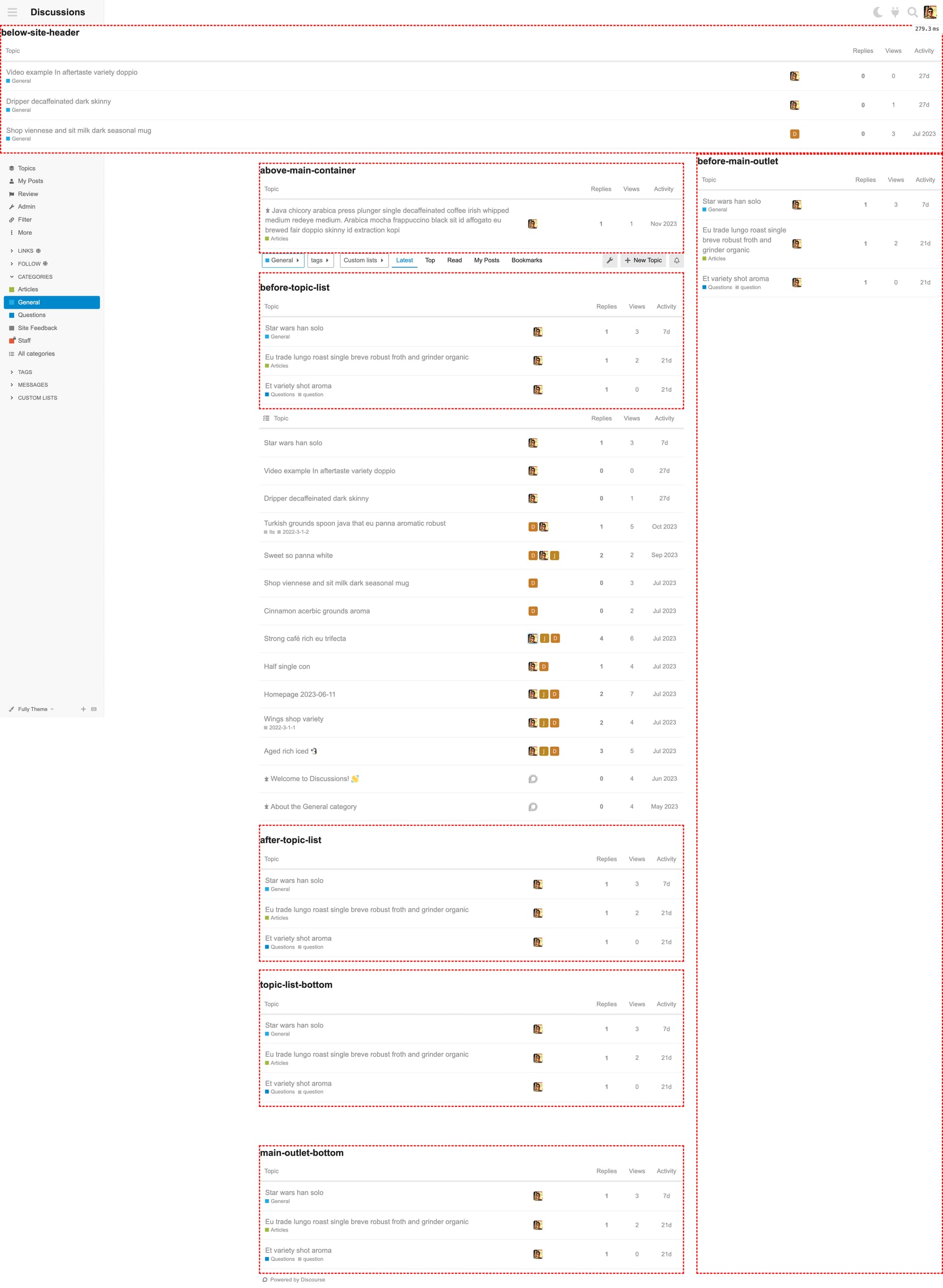
#### Inspiration
I was inspired by the Featured Lists theme-component. But at the end, I needed a less-opinionated, and more flexible solution for my project.
Make sure to check it out:
> [@Featured Lists](https://meta.discourse.org/t/featured-lists/288916):
>
> information_sourceSummary Create and feature custom topic listshammer_and_wrenchRepository [Manuel Kostka / Discourse / Components / Featured Lists · GitLab](https://gitlab.com/manuelkostka/discourse/components/featured-lists)questionInstall Guide [How to install a theme or theme component](https://meta.discourse.org/t/how-do-i-install-a-theme-or-theme-component/63682)open_bookNew to Discourse Themes? [Beginner’s guide to using Discourse Themes](https://meta.discourse.org/t/beginners-guide-to-using-discourse-themes/91966) Install this theme component The component lets you filter custom topic lists and showcase them on your forum. Default look Settings Editor Stylin…
---
### Author:  [@Heliosurge](https://meta.discourse.org/u/Heliosurge)
#### Post date: [August 11, 2024, 12:25am UTC](https://meta.discourse.org/t/filtered-topic-lists/321031/2 "2024-08-11T00:25:55Z")
This is pretty cool
Does it use the same targetable classes so you can style your component?
Could you add a couple of samples of custom lists in a couple of outlets?
Thanks
---
### Author:  [@gormus](https://meta.discourse.org/u/gormus)
#### Post date: [August 11, 2024, 11:34am UTC](https://meta.discourse.org/t/filtered-topic-lists/321031/3 "2024-08-11T11:34:13Z")
> [@Heliosurge](#):
>
> Does it use the same targetable classes so you can style your component?
Yes, the filtered topic list tables use the same CSS classes as the main topic-list table. Additionally, there are wrapping DIV elements with classes which would help you customize the topic-list tables in any plugin-outlet.
Below you can see the hierarchy, and note that the `.topic-list` is the default identifier for the TABLE element. You can also target specific plugin-outlet to apply different styles if you need; see the second code block;
```scss
.filtered-topics-list {
&__wrapper {
}
&__header {
h2 {
}
}
&__content.topic-list {
}
}
.filtered-topics-list {
&.below-site-header,
&.above-main-container,
&.before-topic-list,
&.after-topic-list,
&.topic-list-bottom,
&.main-outlet-bottom,
&.before-main-outlet {
&__wrapper {
}
&__header {
h2 {
}
}
&__content.topic-list {
}
}
}
```
> [@Heliosurge](#):
>
> Could you add a couple of samples of custom lists in a couple of outlets?
I don’t have a demo site to show you that, but I shared a screenshot displaying all available plugin-outlets with various filtered topic lists.
Please ignore the red dashed rules around them, I only added them to highlight tables, and the regions they are in.
---
### Author:  [@bekircem](https://meta.discourse.org/u/bekircem)
#### Post date: [August 28, 2024, 5:40pm UTC](https://meta.discourse.org/t/filtered-topic-lists/321031/4 "2024-08-28T17:40:03Z")
I’m using /latest as the homepage. I added latest topics from specific categories to my homepage with this component, but I want to remove the standard and infinite scrolling Discourse’s latest topic component. I did this with CSS, but it’s affecting other pages as well. Is it possible to target latest topics component with CSS selectors only the homepage?
---
### Author:  [@manuel](https://meta.discourse.org/u/manuel)
#### Post date: [September 3, 2024, 7:24am UTC](https://meta.discourse.org/t/filtered-topic-lists/321031/5 "2024-09-03T07:24:52Z")
I believe you need to query the route and add a custom class using javascript. Here’s an example you could follow:
[https://gitlab.com/manuelkostka/discourse/helpers/css-classes/-/blob/main/javascripts/discourse/api-initializers/css-classes.js?ref\_type=heads](https://gitlab.com/manuelkostka/discourse/helpers/css-classes/-/blob/main/javascripts/discourse/api-initializers/css-classes.js?ref_type=heads)
---
### Author:  [@jrgong](https://meta.discourse.org/u/jrgong)
#### Post date: [September 15, 2024, 12:14pm UTC](https://meta.discourse.org/t/filtered-topic-lists/321031/6 "2024-09-15T12:14:07Z")
Found a bug (or expectded behaviour?):
setting `Default List Filter: no subcategories` in a category prevents any filtered topic lists to be displayed in any of the outlets.
Tested on latest stable 3.3.1.
---
### Author:  [@gormus](https://meta.discourse.org/u/gormus)
#### Post date: [September 15, 2024, 1:10pm UTC](https://meta.discourse.org/t/filtered-topic-lists/321031/7 "2024-09-15T13:10:25Z")
Hi @jrgong could you share a screenshot of your preset?
---
### Author:  [@jrgong](https://meta.discourse.org/u/jrgong)
#### Post date: [October 3, 2024, 10:44am UTC](https://meta.discourse.org/t/filtered-topic-lists/321031/8 "2024-10-03T10:44:38Z")
Sent you a PM with my preset
---
### Author:  [@jrgong](https://meta.discourse.org/u/jrgong)
#### Post date: [October 6, 2024, 9:16am UTC](https://meta.discourse.org/t/filtered-topic-lists/321031/9 "2024-10-06T09:16:10Z")
One more question: What would be the best way to hide the core topic list when displaying the filtered list in a specific category?
The only way that I found via CSS, is to target the span tag, but it might trigger on different occasions:
```css
span + table.topic-list.topic-thumbnails-grid {
display: none;
}
```
---
### Author:  [@gormus](https://meta.discourse.org/u/gormus)
#### Post date: [October 12, 2024, 4:30pm UTC](https://meta.discourse.org/t/filtered-topic-lists/321031/10 "2024-10-12T16:30:35Z")
> [@jrgong](#):
>
> setting `Default List Filter: no subcategories` in a category prevents any filtered topic lists to be displayed in any of the outlets.
Hi @jrgong I can confirm your findings.
### Steps to reproduce:
1. Create a category and subcategory. i.e `Top Level Category` and `Top Level Category > Sub Category`
2. Edit `Top Level Category` settings (`/c/top-level-category/edit/settings`)
3. Under Appearance, find the `Default List Filter` setting.
4. Change the value from `all topics` to `no subcategories`
5. Configure a new preset in Filtered Topics Lists component to list its content on those both top level and sub categories;
1. Set `Show on = selected_categories`
2. Set `Selected categories = Top Level Category, Sub Category`
3. Set `Plugin Outlet = (any)`
6. View each category pages
### What is expected?
Both category pages to show the configured preset results on selected plugin outlet.
### What is found?
1. Any category with `Default List Filter = no subcategories` setting, doesn’t show the Filtered Topics Lists; whether it has any subcategories or not.
2. However, if `Show on = everywhere` is set, the Filtered Topics List is displayed in selected outlet.
### Similar issues:
> [@Routing issue when adjusting topic list filters](https://meta.discourse.org/t/routing-issue-when-adjusting-topic-list-filters/213880):
>
> There is currently a routing bug reproducible under fairly specific conditions: Prerequisites Category with a subcategory Default List Filter category setting should be “no subcategories” for the parent category Solved plugin installed show\_filter\_by\_solved\_status site setting enabled enable solved globally or at least for the involved categories Repro steps Change the solved/unsolved filter from the default of “all” to “solved” Change the subcategory filter from the default of “none”…
> [@Events: If subcategories hidden, so is the events calendar](https://meta.discourse.org/t/events-if-subcategories-hidden-so-is-the-events-calendar/246179):
>
> If you have an events\_calendar\_categories set in that category’s settings set Default List Filter to be no subcategories then the events calendar is not displayed. I discovered this when making a subcategory to house expired events (as an alternative to deleting them).
---
### Author:  [@MihirR](https://meta.discourse.org/u/MihirR)
#### Post date: [June 13, 2025, 2:34pm UTC](https://meta.discourse.org/t/filtered-topic-lists/321031/11 "2025-06-13T14:34:18Z")
When I add a custom field, let’s say a filter named X, with 10 recent topics, and when those 10 topics are scrolled through, and let’s say Latest starts and if one or more of those topics are still there, they get shown in both. Is there a way to hide them from the latest or the filter?
---
### Author:  [@agemo](https://meta.discourse.org/u/agemo)
#### Post date: [August 18, 2025, 1:03pm UTC](https://meta.discourse.org/t/filtered-topic-lists/321031/12 "2025-08-18T13:03:13Z")
Great plugin functionality! 👍
Q: **Plugin Outlet : before-main-outlet**
How do we get this to display, I don’t see it. Do I need to enable/disable something in the standard theme for it to inhabit the right side of the screen as per layton gfx?
---
### Author:  [@agemo](https://meta.discourse.org/u/agemo)
#### Post date: [August 19, 2025, 9:59am UTC](https://meta.discourse.org/t/filtered-topic-lists/321031/13 "2025-08-19T09:59:56Z")
Hmm I found it or at least spotted it briefly, as it is appearing at the bottom of the infinite scroll, not on the right side as anticipated or expected from the visual guide.
---
### Author:  [@Hyteller](https://meta.discourse.org/u/Hyteller)
#### Post date: [December 21, 2025, 2:03pm UTC](https://meta.discourse.org/t/filtered-topic-lists/321031/14 "2025-12-21T14:03:08Z")
Page infinitely duplicated itself in component’s admin page after saving settings in Object settings editor.
---
### Author:  [@Moin](https://meta.discourse.org/u/Moin)
#### Post date: [December 22, 2025, 9:22am UTC](https://meta.discourse.org/t/filtered-topic-lists/321031/15 "2025-12-22T09:22:47Z")
The error displayed in the browser console could be helpful for identifying the cause.