### Author:  [@maxtim](https://meta.discourse.org/u/maxtim)
#### Post date: [July 2, 2024, 10:03pm UTC](https://meta.discourse.org/t/how-to-post-pictures-via-api/314282/4 "2024-07-02T22:03:39Z")
So I thought I’d try a different approach by using the S3 storage. I followed the instructions [here](https://meta.discourse.org/t/set-up-file-and-image-uploads-to-s3/7229) to setup an AWS S3 bucket. Here are my settings:
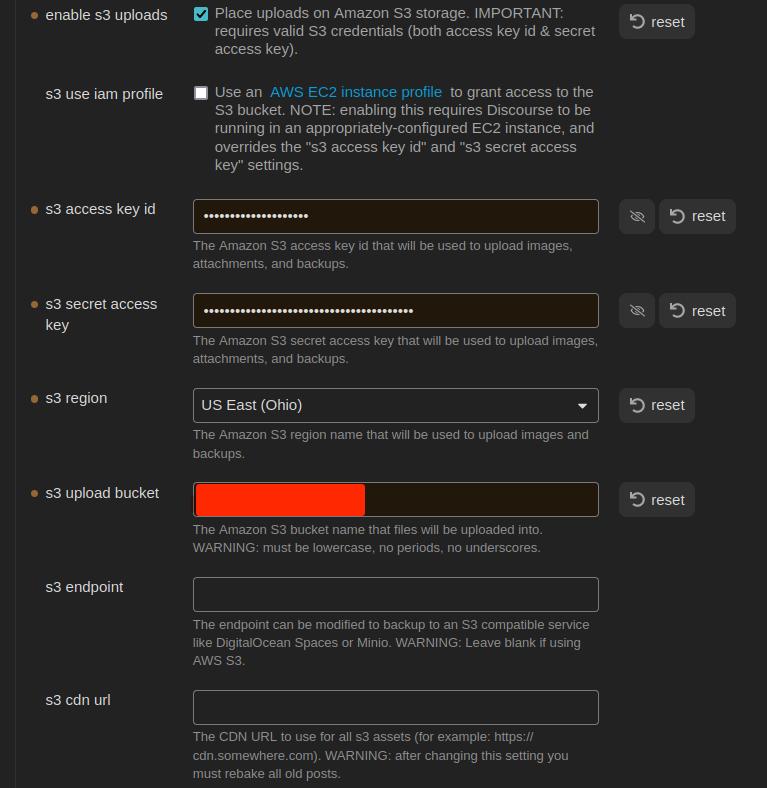
And here is my code:
```javascript
async uploadExternalImage(imageReferences: string[]): Promise {
const imageUrls: string[] = [];
for (const ref of imageReferences) {
const filePath = this.app.metadataCache.getFirstLinkpathDest(ref, this.activeFile.name)?.path;
if (filePath) {
const file = this.app.vault.getAbstractFileByPath(filePath) as TFile;
if (file) {
try {
const url = `${this.settings.baseUrl}/uploads/generate-presigned-put.json`;
//const imgfile = await this.app.vault.readBinary(file);
const img = {
type: "composer",
file_name: file.name,
file_size: file.stat.size,
}
console.log(JSON.stringify(img));
const headers = {
"Content-Type": "application/json",
"Api-Key": this.settings.apiKey,
"Api-Username": this.settings.disUser,
};
const response = await requestUrl({
url: url,
method: "POST",
body: JSON.stringify(img),
throw: false,
headers: headers
})
console.log(response.json)
} catch (error) {
console.error(`Error uploading: ${error}`);
//console.log(response.json)
}
} else {
console.error('error')
}
} else {
console.error('error')
}
}
return imageUrls;
}
```
Now, I realize this currently won’t work because I’m not actually uploading the file yet. From what I read in the [docs](https://docs.discourse.org/#tag/Uploads/operation/generatePresignedPut), I would send a json object containing the type, file\_name, and file\_size. The api should reply with a key and a url for me to use for the actual file transfer. But at this point, I’m getting the following error:
```plaintext
{
"errors": [
"The requested URL or resource could not be found."
],
"error_type": "not_found"
}
```
```plaintext
[
"The requested URL or resource could not be found."
]
```
I looked into my API key to make sure it had permissions, it does. But I created a new one anyways. And a global one. None are working. Same error code. What am I doing wrong?
Edit, here’s the img object:
```plaintext
{"type":"composer","file_name":"face2.jpg","file_size":17342}
```
---
### Author:  [@RGJ](https://meta.discourse.org/u/RGJ)
#### Post date: [July 2, 2024, 10:59pm UTC](https://meta.discourse.org/t/how-to-post-pictures-via-api/314282/5 "2024-07-02T22:59:22Z")
> [@maxtim](#):
>
> I’ve been working on a [plugin](https://github.com/maxtimbo/discourse-sync) for Obsidian and have been banging my head against the wall trying to get images to upload
I’m not too familiar with that ecosystem, but maybe this helps?
> [@How to upload images via API with Node.js?](https://meta.discourse.org/t/how-to-upload-images-via-api-with-node-js/172605/2):
>
> I got this to work, like this: import Axios from "axios"; import FormData from "form-data"; import fs from "fs"; const http = Axios.create({ baseURL: "https://forum.zeebe.io", headers: { "Api-Key": "...", "Api-Username": "...", "Content-Type": "application/json", Accept: "application/json", }, }); http.interceptors.request.use((config) =\> { if (config.data instanceof FormData) { Object.assign(config.headers, config.data.getHeaders()); } return config; }); …
---
### Author:  [@maxtim](https://meta.discourse.org/u/maxtim)
#### Post date: [July 3, 2024, 12:51am UTC](https://meta.discourse.org/t/how-to-post-pictures-via-api/314282/6 "2024-07-03T00:51:29Z")
CORS error…
---
### Author:  [@thoka](https://meta.discourse.org/u/thoka)
#### Post date: [July 3, 2024, 4:37am UTC](https://meta.discourse.org/t/how-to-post-pictures-via-api/314282/7 "2024-07-03T04:37:06Z")
Did you follow
> [@Setup Cross-Origin Resource Sharing (CORS)](https://meta.discourse.org/t/setup-cross-origin-resource-sharing-cors/270819):
>
> notebook_with_decorative_cover This is a #how-to guide that will guide you through the process of setting up Cross-Origin Resource Sharing (CORS) in Discourse. CORS is a mechanism that allows many resources (e.g., fonts, JavaScript, etc.) on a web page to be requested from another domain outside the domain from which the resource originated. Here’s how you can set up CORS on your Discourse site: Prerequisites Before getting started, the DISCOURSE\_ENABLE\_CORS environmental variable must be …
?
---
### Author:  [@simon](https://meta.discourse.org/u/simon)
#### Post date: [July 3, 2024, 6:35am UTC](https://meta.discourse.org/t/how-to-post-pictures-via-api/314282/8 "2024-07-03T06:35:22Z")
I’m guessing a bit here, but I don’t think configuring CORS will work for this case. The origin (at least from the Obsidian Desktop app) is `'app://obsidian.md'`. I _think_ CORS can only be configured on Discourse to deal with HTTP requests.
@maxtim, do you need this to work from mobile, or would just being able to post to Discourse from the desktop app be good enough? I’m again guessing a bit, but… my understanding is that the desktop app is an Electron app. It’s running on a combination of Chromium and Node.js. You might be able to use [`node-fetch`](https://www.npmjs.com/package/node-fetch) to make server-side requests to Discourse. If that works, it would take care of the CORS issue and let you use FormData in requests.
---
### Author:  [@maxtim](https://meta.discourse.org/u/maxtim)
#### Post date: [July 3, 2024, 5:20pm UTC](https://meta.discourse.org/t/how-to-post-pictures-via-api/314282/9 "2024-07-03T17:20:28Z")
> [@thoka](#):
>
> Did you follow
I went ahead and tried (proverbial throwing wet noodles to see what sticks). But I was already apprehensive and @simon is correct.
> [@simon](#):
>
> do you need this to work from mobile, or would just being able to post to Discourse from the desktop app be good enough?
Ideally, the plugin would be available on mobile as well. But for now, if Desktop only is what we get, it’s what we get.
Of course, another solution might be: Obsidian Vault on mobile → sync to Desktop → cli to upload to Discourse. But that does seem a little convoluted.
Basically, the ideal situation is that the Discourse forum replaces the Obsidian Vault. That way users who prefer the forum, can use the forum. Users who prefer (or indeed need an off-line solution) can use Obsidian. I already have some ideas on how a bi-directional sync might work. But I think images/files need to handles in some way first.
Edit:
I’m fairly convinced this will work, but I can’t seem to be able to get the parameters correct:
```javascript
try {
const imgfile = await this.app.vault.readBinary(file);
const boundary = genBoundary();
const sBoundary = '--' + boundary + '\r\n';
let body = '';
body += `${sBoundary}Content-Disposition: form-data; name="type"\r\n\r\ncomposer\r\n`;
body += `${sBoundary}Content-Disposition: form-data; name="synchronous"\r\n\r\ntrue\r\n`;
body += `${sBoundary}Content-Disposition: form-data; name="files[]"; filename="${file.name}"\r\nContent-Type: image/jpg\r\n`;
const eBoundary = '\r\n--' + boundary + '--\r\n';
const bodyArray = new TextEncoder().encode(body);
const endBoundaryArray = new TextEncoder().encode(eBoundary);
const formDataArray = new Uint8Array(bodyArray.length + imgfile.byteLength + endBoundaryArray.length);
formDataArray.set(bodyArray, 0);
formDataArray.set(new Uint8Array(imgfile), bodyArray.length);
formDataArray.set(endBoundaryArray, bodyArray.length + imgfile.byteLength);
const url = `${this.settings.baseUrl}/uploads.json`;
const headers = {
"Api-Key": this.settings.apiKey,
"Api-Username": this.settings.disUser,
"Content-Type": `multipart/form-data; boundary=${boundary}`
};
const response = await requestUrl({
url: url,
method: "POST",
body: formDataArray,
throw: false,
headers: headers,
});
if (response.status == 200) {
const jsonResponse = response.json();
console.log(`Upload Image jsonResponse: ${JSON.stringify(jsonResponse)}`);
imageUrls.push(jsonResponse.url);
} else {
new NotifyUser(this.app, `Error uploading image: ${response.status}`).open();
console.error(`Error uploading image: ${JSON.stringify(response.json)}`);
}
```
---
### Author:  [@maxtim](https://meta.discourse.org/u/maxtim)
#### Post date: [July 4, 2024, 6:01pm UTC](https://meta.discourse.org/t/how-to-post-pictures-via-api/314282/10 "2024-07-04T18:01:18Z")
Aye!! I did it!
```javascript
async uploadImages(imageReferences: string[]): Promise {
const imageUrls = [];
for (const ref of imageReferences) {
const filePath = this.app.metadataCache.getFirstLinkpathDest(ref, this.activeFile.name)?.path;
if (filePath) {
const file = this.app.vault.getAbstractFileByPath(filePath) as TFile;
if (file) {
try {
const imgfile = await this.app.vault.readBinary(file);
const boundary = genBoundary();
const sBoundary = '--' + boundary + '\r\n';
const imgForm = `${sBoundary}Content-Disposition: form-data; name="file"; filename="${file.name}"\r\nContent-Type: image/${file.extension}\r\n\r\n`;
let body = '';
body += `\r\n${sBoundary}Content-Disposition: form-data; name="type"\r\n\r\ncomposer\r\n`;
body += `${sBoundary}Content-Disposition: form-data; name="synchronous"\r\n\r\ntrue\r\n`;
const eBoundary = '\r\n--' + boundary + '--\r\n';
const imgFormArray = new TextEncoder().encode(imgForm);
const bodyArray = new TextEncoder().encode(body);
const endBoundaryArray = new TextEncoder().encode(eBoundary);
const formDataArray = new Uint8Array(imgFormArray.length + imgfile.byteLength + bodyArray.length + endBoundaryArray.length);
formDataArray.set(imgFormArray, 0);
formDataArray.set(new Uint8Array(imgfile), imgFormArray.length);
formDataArray.set(bodyArray, imgFormArray.length + imgfile.byteLength);
formDataArray.set(endBoundaryArray, imgFormArray.length + bodyArray.length + imgfile.byteLength);
const url = `${this.settings.baseUrl}/uploads.json`;
const headers = {
"Api-Key": this.settings.apiKey,
"Api-Username": this.settings.disUser,
"Content-Type": `multipart/form-data; boundary=${boundary}`,
};
const response = await requestUrl({
url: url,
method: "POST",
body: formDataArray.buffer,
throw: false,
headers: headers,
});
if (response.status == 200) {
const jsonResponse = response.json;
console.log(`Upload Image jsonResponse: ${JSON.stringify(jsonResponse)}`);
imageUrls.push(jsonResponse.url);
} else {
new NotifyUser(this.app, `Error uploading image: ${response.status}`).open();
console.error(`Error uploading image: ${JSON.stringify(response.json)}`);
}
} catch (error) {
new NotifyUser(this.app, `Exception while uploading image: ${error}`).open();
console.error("Exception while uploading image:", error);
}
} else {
new NotifyUser(this.app, `File not found in vault: ${ref}`).open();
console.error(`File not found in vault: ${ref}`);
}
} else {
new NotifyUser(this.app, `Unable to resolve file path for: ${ref}`).open();
console.error(`Unable to resolve file path for: ${ref}`);
}
}
return imageUrls;
}
```
The problem was the order in which I was constructing the form-data. I need it to go:
- img params
- img binary
- params
I was previously putting the params ahead of the img.
I solved this by analyzing a successful upload using python:
```python
import requests
from requests_toolbelt.multipart.encoder import MultipartEncoder
from requests.models import PreparedRequest
class Discourse:
def __init__ (self):
self.base_url = "CENSORED"
self.api_key = "CENSORED"
self.api_username = "CENSORED"
self.category = 2
def post_uploads(self, file_path):
headers = {
"Content-Type": "multipart/form-data",
"Api-Key": self.api_key,
"Api-Username": self.api_username
}
multi = MultipartEncoder(
fields = {
'file': ('filename', open(file_path, 'rb'), 'image/jpg'),
'type': 'composer',
'synchronous': 'true'
}
)
headers['Content-Type'] = multi.content_type
request = requests.Request(
method = "POST",
url = f"{self.base_url}/uploads.json",
headers = headers,
data = multi
)
prepared_request = request.prepare()
print("Headers:")
for k, v in prepared_request.headers.items():
print(f"{k}: {v}")
print(multi.to_string())
response = requests.post(
f"{self.base_url}/uploads.json",
headers=headers,
params=params,
data=m
)
return response.json()
if __name__ == " __main__":
ds = Discourse()
response = ds.post_uploads("/home/tfinley/Pictures/face2.jpg")
print(response)
```
Now how do I delete orphaned uploads ^\_o
---
### Author:  [@thoka](https://meta.discourse.org/u/thoka)
#### Post date: [July 4, 2024, 7:35pm UTC](https://meta.discourse.org/t/how-to-post-pictures-via-api/314282/11 "2024-07-04T19:35:29Z")
> [@maxtim](#):
>
> Now how do I delete orphaned uploads
To my understanding, discourse will handle that for you:
> [@Auto purge uploads from old deleted posts](https://meta.discourse.org/t/auto-purge-uploads-from-old-deleted-posts/51306/1):
>
> Discourse already automatically removes orphan unreferenced uploads.
---
### Author:  [@maxtim](https://meta.discourse.org/u/maxtim)
#### Post date: [July 4, 2024, 7:47pm UTC](https://meta.discourse.org/t/how-to-post-pictures-via-api/314282/12 "2024-07-04T19:47:08Z")
> [@thoka](#):
>
> discourse will handle that for you
Yep saw that. GG EZ WP
---
### Author:  [@Lhc\_fl](https://meta.discourse.org/u/Lhc_fl)
#### Post date: [July 5, 2024, 2:16am UTC](https://meta.discourse.org/t/how-to-post-pictures-via-api/314282/13 "2024-07-05T02:16:13Z")
I’m late to the party, but I’ve written a third-party discourse-api for nodejs before:
> **[DiscourseApi | node-discourse-api](https://lhcfl.github.io/node-discourse-api/classes/api.DiscourseApi.html#createUpload)**
>
> Create a upload | Documentation for node-discourse-api
With this library you can easily create uploads. Just do this:
```js
const { DiscourseApi } = require("node-discourse-api");
const api = new DiscourseApi("https://discourse.example.com");
api.options.api_username = "API_USERNAME";
api.options.api_key = "API_KEY";
api.createUpload(file_path_or_buffer, { filename: "filename" })
```
(Note: This library is not complete)
---
### Author:  [@system](https://meta.discourse.org/u/system)
#### Post date: [August 4, 2024, 2:16am UTC](https://meta.discourse.org/t/how-to-post-pictures-via-api/314282/14 "2024-08-04T02:16:20Z")
This topic was automatically closed 30 days after the last reply. New replies are no longer allowed.