API를 통해 사진을 게시하는 방법은?

Obsidian용 플러그인을 개발하고 있는데, 이미지를 업로드하는 문제로 고생하고 있습니다. 현재까지 작성한 코드는 다음과 같습니다:

	async uploadImages(imageReferences: string[]): Promise<string[]> {
		const imageUrls = [];
		for (const ref of imageReferences) {
			const filePath = this.app.metadataCache.getFirstLinkpathDest(ref, this.activeFile.name)?.path;
			if (filePath) {
				const file = this.app.vault.getAbstractFileByPath(filePath) as TFile;
				if (file) {
					try {
						const arrayBuffer = await this.app.vault.readBinary(file);
						const blob = new Blob([arrayBuffer]);
						const boundary = '----WebKitFormBoundary7MA4YWxkTrZu0gW';
						let body = '';

						body += `--${boundary}\r\n`;
						body += `Content-Disposition: form-data; name="type"\r\n\r\n`;
						body += "composer\r\n";
						body += `--${boundary}\r\n`;
						body += `Content-Disposition: form-data; name="synchronous"\r\n\r\n`;
						body += "true\r\n";

						body += `--${boundary}\r\n`;
						body += `Content-Disposition: form-data; name="files[]"; filename="${file.name}"\r\n`;
						body += `Content-Type: image/jpg\r\n\r\n`
						body += blob + '\r\n';
						body += `--${boundary}--\r\n`;
						console.log(body)
						const formData = new TextEncoder().encode(body)

						const url = `${this.settings.baseUrl}/uploads.json`;
						const headers = {
							"Api-Key": this.settings.apiKey,
							"Api-Username": this.settings.disUser,
							"Content-Type": `multipart/form-data; boundary=${boundary}`
						};

						const response = await requestUrl({
							url: url,
							method: "POST",
							body: formData,
							throw: false,
							headers: headers,
						});

						//const response = await fetch(url, {
						//	method: "POST",
						//	body: formData,
						//	headers: new Headers(headers),
						//});

						console.log(`Upload Image response: ${response.status}`);
						//if (response.ok) {
						if (response.status == 200) {
							const jsonResponse = response.json();
							console.log(`Upload Image jsonResponse: ${JSON.stringify(jsonResponse)}`);
							imageUrls.push(jsonResponse.url);
						} else {
							new NotifyUser(this.app, `Error uploading image: ${response.status}`).open();
							console.error(`Error uploading image: ${JSON.stringify(response.json)}`);
							//console.error("Error uploading image:", response.status, await response.text());
						}
					} catch (error) {
						new NotifyUser(this.app, `Exception while uploading image: ${error}`).open();
						console.error("Exception while uploading image:", error);
					}
				} else {
					new NotifyUser(this.app, `File not found in vault: ${ref}`).open();
					console.error(`File not found in vault: ${ref}`);
				}
			} else {
				new NotifyUser(this.app, `Unable to resolve file path for: ${ref}`).open();
				console.error(`Unable to resolve file path for: ${ref}`);
			}
		}
		return imageUrls;
	}

requestURL()이 formData()를 매개변수로 받을 수 없기 때문에 multipart/form-data를 수동으로 구성하고 있습니다. 허용되는 타입은 string 또는 arrayBuffer뿐입니다. fetch()를 사용하면 CORS 오류가 발생하여 사용할 수 없습니다. 이 코드(그리고 body에 대한 여러 가지 미세한 조정)를 사용하면 다음과 같은 오류가 발생합니다:

Error uploading image: {“errors”:[“You supplied invalid parameters to the request: Discourse::InvalidParameters”],“error_type”:“invalid_parameters”}
이제 다른 오류 메시지가 나와서 업데이트를 먼저 진행하겠습니다:

	async uploadImages(imageReferences: string[]): Promise<string[]> {
		const imageUrls = [];
		for (const ref of imageReferences) {
			const filePath = this.app.metadataCache.getFirstLinkpathDest(ref, this.activeFile.name)?.path;
			if (filePath) {
				const file = this.app.vault.getAbstractFileByPath(filePath) as TFile;
				if (file) {
					try {
						const imgfile = await this.app.vault.readBinary(file);
						const boundary = genBoundary();
						const sBoundary = '--' + boundary + '\r\n';
						let body = '';
						body += `${sBoundary}Content-Disposition: form-data; name="type"\r\n\r\ncomposer\r\n`;
						body += `${sBoundary}Content-Disposition: form-data; name="synchronous"\r\n\r\ntrue\r\n`;
						body += `${sBoundary}Content-Disposition: form-data; name="files[]"; filename="${file.name}"\r\nContent-Type: image/jpg`;
						console.log(body);

						const eBoundary = '\r\n--' + boundary + '--\r\n';
						const bodyArray = new TextEncoder().encode(body);
						const endBoundaryArray = new TextEncoder().encode(eBoundary);

						const formDataArray = new Uint8Array(bodyArray.length + imgfile.byteLength + endBoundaryArray.length);
						formDataArray.set(bodyArray, 0);
						formDataArray.set(new Uint8Array(imgfile), bodyArray.length);
						formDataArray.set(endBoundaryArray, bodyArray.length + imgfile.byteLength);

						const url = `${this.settings.baseUrl}/uploads.json`;
						const headers = {
							"Api-Key": this.settings.apiKey,
							"Api-Username": this.settings.disUser,
							"Content-Type": `multipart/form-data; boundary=${boundary}`
						};

						const response = await requestUrl({
							url: url,
							method: "POST",
							body: formDataArray.buffer,
							throw: false,
							headers: headers,
						});

						console.log(`Upload Image response: ${response.status}`);
						if (response.status == 200) {
							const jsonResponse = response.json();
							console.log(`Upload Image jsonResponse: ${JSON.stringify(jsonResponse)}`);
							imageUrls.push(jsonResponse.url);
						} else {
							new NotifyUser(this.app, `Error uploading image: ${response.status}`).open();
							console.error(`Error uploading image: ${JSON.stringify(response.json)}`);
						}
					} catch (error) {
						new NotifyUser(this.app, `Exception while uploading image: ${error}`).open();
						console.error("Exception while uploading image:", error);
					}
				} else {
					new NotifyUser(this.app, `File not found in vault: ${ref}`).open();
					console.error(`File not found in vault: ${ref}`);
				}
			} else {
				new NotifyUser(this.app, `Unable to resolve file path for: ${ref}`).open();
				console.error(`Unable to resolve file path for: ${ref}`);
			}
		}
		return imageUrls;
	}

현재 받는 오류 메시지는 다음과 같습니다:

Exception while uploading image: SyntaxError: Unexpected token ‘I’, “Invalid request” is not valid JSON

API 문서에는 multipart/form-data를 보내야 한다고 되어 있는데, 왜 잘못된 JSON이라고 하는지 이해가 가지 않습니다. requestAPI()와 관련이 있을지도 모르겠습니다.

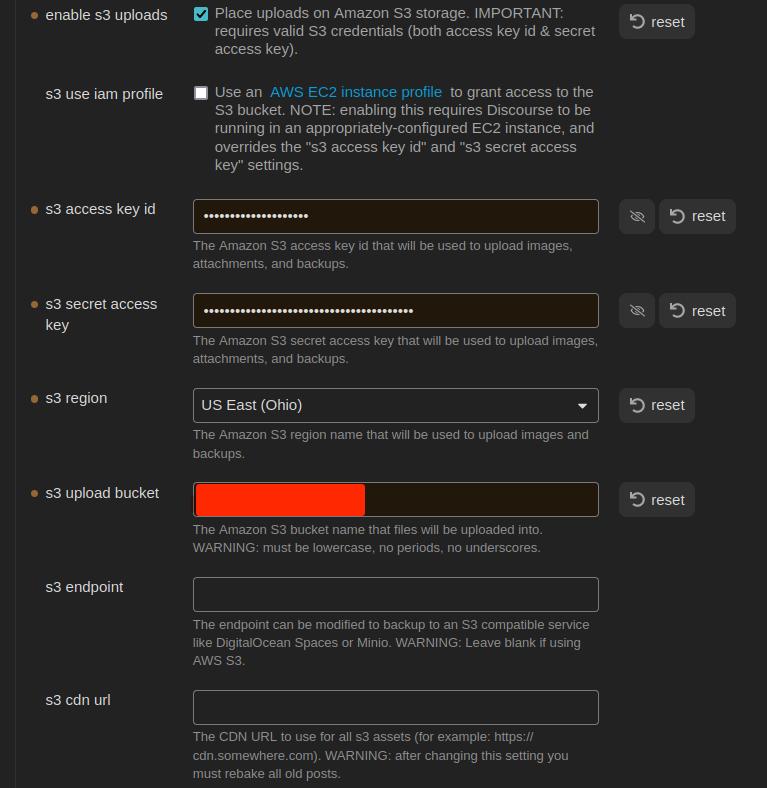
그래서 S3 스토리지를 사용하여 다른 방법을 시도해 보았습니다. 여기의 설명을 따라 AWS S3 버킷을 설정했습니다. 제 설정은 다음과 같습니다:

그리고 제 코드는 다음과 같습니다:

	async uploadExternalImage(imageReferences: string[]): Promise<string[]> {
		const imageUrls: string[] = [];
		for (const ref of imageReferences) {
			const filePath = this.app.metadataCache.getFirstLinkpathDest(ref, this.activeFile.name)?.path;
			if (filePath) {
				const file = this.app.vault.getAbstractFileByPath(filePath) as TFile;
				if (file) {
					try {
						const url = `${this.settings.baseUrl}/uploads/generate-presigned-put.json`;
						//const imgfile = await this.app.vault.readBinary(file);
						const img = {
							type: "composer",
							file_name: file.name,
							file_size: file.stat.size,
						}
						console.log(JSON.stringify(img));
						const headers = {
							"Content-Type": "application/json",
							"Api-Key": this.settings.apiKey,
							"Api-Username": this.settings.disUser,
						};
						const response = await requestUrl({
							url: url,
							method: "POST",
							body: JSON.stringify(img),
							throw: false,
							headers: headers
						})
						console.log(response.json)
					} catch (error) {
						console.error(`Error uploading: ${error}`);
						//console.log(response.json)
					}
				} else {
					console.error('error')
				}
			} else {
				console.error('error')
			}
		}
		return imageUrls;
	}

현재는 실제로 파일을 업로드하지 않고 있으므로 작동하지 않는다는 것을 깨달았습니다. 문서에서 읽은 바로는, type, file_name, file_size를 포함하는 json 객체를 보내야 합니다. 그러면 API가 실제 파일 전송에 사용할 키와 url을 반환해야 합니다. 하지만 이 시점에서 다음과 같은 오류가 발생합니다:

{
    "errors": [
        "The requested URL or resource could not be found."
    ],
    "error_type": "not_found"
}
[
    "The requested URL or resource could not be found."
]

API 키에 권한이 있는지 확인해 보았지만, 권한은 있습니다. 그래도 새로 만들었고, 전역 키도 만들었습니다. 하지만 아무것도 작동하지 않습니다. 동일한 오류 코드가 나옵니다. 제가 무엇을 잘못하고 있나요?

수정: 여기 img 객체가 있습니다:

{"type":"composer","file_name":"face2.jpg","file_size":17342}

해당 생태계에 대해 잘 알지는 못하지만, 혹시 이 정보가 도움이 될까요?

CORS 오류…

을(를) 따라 해 보셨나요?

여기서 조금 추측을 해보겠습니다만, 이 경우 CORS를 설정하는 것으로는 해결되지 않을 것 같습니다. 출처(최소한 Obsidian 데스크톱 앱의 경우)는 'app://obsidian.md'입니다. 제 생각에 CORS는 HTTP 요청에 대응하기 위해 Discourse에서만 설정할 수 있을 것입니다.

@maxtim, 모바일에서도 작동해야 하나요, 아니면 데스크톱 앱에서 Discourse에 게시할 수만 있으면 충분할까요? 다시 한번 추측을 해보지만… 제 이해로는 데스크톱 앱이 Electron 앱이라고 알고 있습니다. Chromium과 Node.js의 조합으로 실행됩니다. node-fetch를 사용하여 Discourse로 서버 사이드 요청을 보낼 수 있을 것입니다. 그렇게 되면 CORS 문제를 해결할 수 있고 요청에서 FormData를 사용할 수 있게 될 것입니다.

그래서 일단 시도해 봤습니다(속담으로 말하면, 젖은 국수를 던져서 어디에 붙어 보자는 식이었죠). 하지만 처음부터 좀 불안했고 @simon 님의 말씀이 맞습니다.

이상적으로는 플러그인이 모바일에서도 사용 가능해야 합니다. 하지만 당장 데스크톱 전용이 우리가 얻을 수 있는 전부라면, 그렇게 받아들일 것입니다.

물론 다른 해결책도 있을 수 있습니다: 모바일의 Obsidian Vault → 데스크톱으로 동기화 → CLI를 통해 Discourse에 업로드. 하지만 그것은 좀 복잡해 보입니다.

기본적으로 이상적인 상황은 Discourse 포럼이 Obsidian Vault를 대체하는 것입니다. 그러면 포럼을 선호하는 사용자는 포럼을 사용하고, Obsidian을 선호하는(또는 실제로 오프라인 솔루션이 필요한) 사용자는 Obsidian을 사용할 수 있습니다. 양방향 동기화가 어떻게 작동할지에 대해 이미 몇 가지 아이디어가 있습니다. 하지만 먼저 이미지/파일을 어떤 방식으로든 처리해야 한다고 생각합니다.

수정:

이것이 작동할 것이라고 꽤 확신하지만, 매개변수를 올바르게 설정하는 것 같습니다:

					try {
						const imgfile = await this.app.vault.readBinary(file);
						const boundary = genBoundary();
						const sBoundary = '--' + boundary + '\r\n';
						let body = '';
						body += `${sBoundary}Content-Disposition: form-data; name="type"\r\n\r\ncomposer\r\n`;
						body += `${sBoundary}Content-Disposition: form-data; name="synchronous"\r\n\r\ntrue\r\n`;
						body += `${sBoundary}Content-Disposition: form-data; name="files[]"; filename="${file.name}"\r\nContent-Type: image/jpg\r\n`;

						const eBoundary = '\r\n--' + boundary + '--\r\n';
						const bodyArray = new TextEncoder().encode(body);
						const endBoundaryArray = new TextEncoder().encode(eBoundary);

						const formDataArray = new Uint8Array(bodyArray.length + imgfile.byteLength + endBoundaryArray.length);
						formDataArray.set(bodyArray, 0);
						formDataArray.set(new Uint8Array(imgfile), bodyArray.length);
						formDataArray.set(endBoundaryArray, bodyArray.length + imgfile.byteLength);

						const url = `${this.settings.baseUrl}/uploads.json`;
						const headers = {
							"Api-Key": this.settings.apiKey,
							"Api-Username": this.settings.disUser,
							"Content-Type": `multipart/form-data; boundary=${boundary}`
						};

						const response = await requestUrl({
							url: url,
							method: "POST",
							body: formDataArray,
							throw: false,
							headers: headers,
						});

						if (response.status == 200) {
							const jsonResponse = response.json();
							console.log(`Upload Image jsonResponse: ${JSON.stringify(jsonResponse)}`);
							imageUrls.push(jsonResponse.url);
						} else {
							new NotifyUser(this.app, `Error uploading image: ${response.status}`).open();
							console.error(`Error uploading image: ${JSON.stringify(response.json)}`);
						}

야!! 성공했어!

	async uploadImages(imageReferences: string[]): Promise<string[]> {
		const imageUrls = [];
		for (const ref of imageReferences) {
			const filePath = this.app.metadataCache.getFirstLinkpathDest(ref, this.activeFile.name)?.path;
			if (filePath) {
				const file = this.app.vault.getAbstractFileByPath(filePath) as TFile;
				if (file) {
					try {
						const imgfile = await this.app.vault.readBinary(file);
						const boundary = genBoundary();
						const sBoundary = '--' + boundary + '\r\n';
						const imgForm = `${sBoundary}Content-Disposition: form-data; name="file"; filename="${file.name}"\r\nContent-Type: image/${file.extension}\r\n\r\n`;


						let body = '';
						body += `\r\n${sBoundary}Content-Disposition: form-data; name="type"\r\n\r\ncomposer\r\n`;
						body += `${sBoundary}Content-Disposition: form-data; name="synchronous"\r\n\r\ntrue\r\n`;

						const eBoundary = '\r\n--' + boundary + '--\r\n';
						const imgFormArray = new TextEncoder().encode(imgForm);
						const bodyArray = new TextEncoder().encode(body);
						const endBoundaryArray = new TextEncoder().encode(eBoundary);

						const formDataArray = new Uint8Array(imgFormArray.length + imgfile.byteLength + bodyArray.length + endBoundaryArray.length);
						formDataArray.set(imgFormArray, 0);
						formDataArray.set(new Uint8Array(imgfile), imgFormArray.length);
						formDataArray.set(bodyArray, imgFormArray.length + imgfile.byteLength);
						formDataArray.set(endBoundaryArray, imgFormArray.length + bodyArray.length + imgfile.byteLength);

						const url = `${this.settings.baseUrl}/uploads.json`;
						const headers = {
							"Api-Key": this.settings.apiKey,
							"Api-Username": this.settings.disUser,
							"Content-Type": `multipart/form-data; boundary=${boundary}`,
						};

						const response = await requestUrl({
							url: url,
							method: "POST",
							body: formDataArray.buffer,
							throw: false,
							headers: headers,
						});

						if (response.status == 200) {
							const jsonResponse = response.json;
							console.log(`Upload Image jsonResponse: ${JSON.stringify(jsonResponse)}`);
							imageUrls.push(jsonResponse.url);
						} else {
							new NotifyUser(this.app, `Error uploading image: ${response.status}`).open();
							console.error(`Error uploading image: ${JSON.stringify(response.json)}`);
						}
					} catch (error) {
						new NotifyUser(this.app, `Exception while uploading image: ${error}`).open();
						console.error("Exception while uploading image:", error);
					}
				} else {
					new NotifyUser(this.app, `File not found in vault: ${ref}`).open();
					console.error(`File not found in vault: ${ref}`);
				}
			} else {
				new NotifyUser(this.app, `Unable to resolve file path for: ${ref}`).open();
				console.error(`Unable to resolve file path for: ${ref}`);
			}
		}
		return imageUrls;
	}

문제는 form-data를 구성하는 순서였어. 이렇게 되어야 해:

  • img 파라미터
  • img 바이너리
  • 파라미터

그동안은 img 앞에 파라미터를 넣고 있었거든.

이 문제는 파이썬으로 성공적인 업로드를 분석해서 해결했어:

import requests
from requests_toolbelt.multipart.encoder import MultipartEncoder
from requests.models import PreparedRequest


class Discourse:
    def __init__(self):
        self.base_url = "CENSORED"
        self.api_key = "CENSORED"
        self.api_username = "CENSORED"
        self.category = 2

    def post_uploads(self, file_path):
        headers = {
            "Content-Type": "multipart/form-data",
            "Api-Key": self.api_key,
            "Api-Username": self.api_username
        }

        multi = MultipartEncoder(
            fields = {
                'file': ('filename', open(file_path, 'rb'), 'image/jpg'),
                'type': 'composer',
                'synchronous': 'true'
            }
        )

        headers['Content-Type'] = multi.content_type

        request = requests.Request(
            method = "POST",
            url = f"{self.base_url}/uploads.json",
            headers = headers,
            data = multi
        )
        prepared_request = request.prepare()

        print("Headers:")
        for k, v in prepared_request.headers.items():
            print(f"{k}: {v}")

        print(multi.to_string())

        response = requests.post(
            f"{self.base_url}/uploads.json",
            headers=headers,
            params=params,
            data=m
        )

        return response.json()


if __name__ == "__main__":
    ds = Discourse()
    response = ds.post_uploads("/home/tfinley/Pictures/face2.jpg")
    print(response)

자, 이제 고아(orphaned) 업로드 파일들은 어떻게 삭제하지 ^_o

제 이해로는 Discourse가 이를 자동으로 처리해 줍니다:

그래, 봤어. GG EZ WP

늦게 합류했지만, 이전에 nodejs용 서드파티 discourse-api를 작성한 적이 있습니다:

이 라이브러리를 사용하면 업로드를 쉽게 생성할 수 있습니다. 이렇게 하면 됩니다:

const { DiscourseApi } = require("node-discourse-api");
const api = new DiscourseApi("https://discourse.example.com");
api.options.api_username = "API_USERNAME";
api.options.api_key = "API_KEY";

api.createUpload(file_path_or_buffer, { filename: "filename" })

(참고: 이 라이브러리는 완성된 것이 아닙니다)