# Install the WP Discourse Wordpress plugin
**URL:** https://meta.discourse.org/t/install-the-wp-discourse-wordpress-plugin/223489
**Category:** Administrators
**Tags:** wordpress, video, how-to
**Created:** [April 6, 2022, 12:52pm UTC](https://meta.discourse.org/t/install-the-wp-discourse-wordpress-plugin/223489 "2022-04-06T12:52:08Z")
**Posts on this page:** 7
**Page:** 1
### Author:  [@angus](https://meta.discourse.org/u/angus)
#### Post date: [April 6, 2022, 12:52pm UTC](https://meta.discourse.org/t/install-the-wp-discourse-wordpress-plugin/223489/1 "2022-04-06T12:52:08Z")
The first step in using the [WP Discourse](https://github.com/discourse/wp-discourse) plugin is installing it on your Wordpress. When you’re ready to go, watch this short video, or follow the instructions below.
https://www.loom.com/embed/d8845ce1fa254fdd8f4a86231926da04?sharedAppSource=team_library
## Next Step
Once the plugin is installed, head over to [Connect WP Discourse to Discourse](https://meta.discourse.org/t/connect-wp-discourse-to-discourse/223490/1) for the next step.
* * *
## Instructions
### Install from your WordPress dashboard
1. Visit ‘Plugins \> Add New’
2. Search for ‘[WP Discourse](https://github.com/discourse/wp-discourse)’
3. Activate [WP Discourse](https://github.com/discourse/wp-discourse) from your Plugins page
### Install from [WordPress.org](http://WordPress.org)
You can find the plugin at [WP Discourse – WordPress plugin | WordPress.org](https://wordpress.org/plugins/wp-discourse/).
1. Download [WP Discourse](https://github.com/discourse/wp-discourse)
2. Upload the ‘wp-discourse’ directory to your ‘/wp-content/plugins/’ directory
3. Activate [WP Discourse](https://github.com/discourse/wp-discourse) from your Plugins page
### Install with Composer
If you’re using Composer to manage WordPress, add WP-Discourse to your project’s dependencies. Run:
```plaintext
composer require discourse/wp-discourse ~1.6.1
```
Or manually add it to your `composer.json`:
```plaintext
{
"require": {
"php": ">=5.4.0",
"discourse/wp-discourse": "~1.6.1"
}
}
```
---
### Author:  [@tantramar](https://meta.discourse.org/u/tantramar)
#### Post date: [March 26, 2024, 9:26pm UTC](https://meta.discourse.org/t/install-the-wp-discourse-wordpress-plugin/223489/2 "2024-03-26T21:26:04Z")
What format are these videos? “No video with supported format and MIME type found.” in Firefox; just the .gif with no message in Safari.
---
### Author:  [@simon](https://meta.discourse.org/u/simon)
#### Post date: [March 26, 2024, 11:19pm UTC](https://meta.discourse.org/t/install-the-wp-discourse-wordpress-plugin/223489/3 "2024-03-26T23:19:58Z")
> [@tantramar](#):
>
> What format are these videos?
They’re embedded from Loom. The video in this topic isn’t playing for me either (latest Chrome on Ubuntu.) Maybe rebaking the post would fix it. There was a change recently to how Discourse handles Loom embeds: [https://meta.discourse.org/t/loom-embedded-videos-not-playing-loading-it-was-working-fine-before/297498/46?u=simon](https://meta.discourse.org/t/loom-embedded-videos-not-playing-loading-it-was-working-fine-before/297498/46).
---
### Author:  [@Lilly](https://meta.discourse.org/u/Lilly)
#### Post date: [March 26, 2024, 11:28pm UTC](https://meta.discourse.org/t/install-the-wp-discourse-wordpress-plugin/223489/4 "2024-03-26T23:28:25Z")
I rebuilt the HTML and it seems to be working now. Thanks for the heads up :slight_smile:
---
### Author:  [@tantramar](https://meta.discourse.org/u/tantramar)
#### Post date: [March 27, 2024, 4:18pm UTC](https://meta.discourse.org/t/install-the-wp-discourse-wordpress-plugin/223489/5 "2024-03-27T16:18:30Z")
Sweet! Thanks so much. :smiling_face_with_sunglasses::+1:
---
### Author:  [@CAX.DO](https://meta.discourse.org/u/CAX.DO)
#### Post date: [April 22, 2025, 6:24am UTC](https://meta.discourse.org/t/install-the-wp-discourse-wordpress-plugin/223489/6 "2025-04-22T06:24:10Z")
Hi @angus Thank you for your work. I’d like to ask if it is possible to synchronize WordPress posts to different categories.
---
### Author:  [@angus](https://meta.discourse.org/u/angus)
#### Post date: [April 22, 2025, 6:49am UTC](https://meta.discourse.org/t/install-the-wp-discourse-wordpress-plugin/223489/7 "2025-04-22T06:49:47Z")
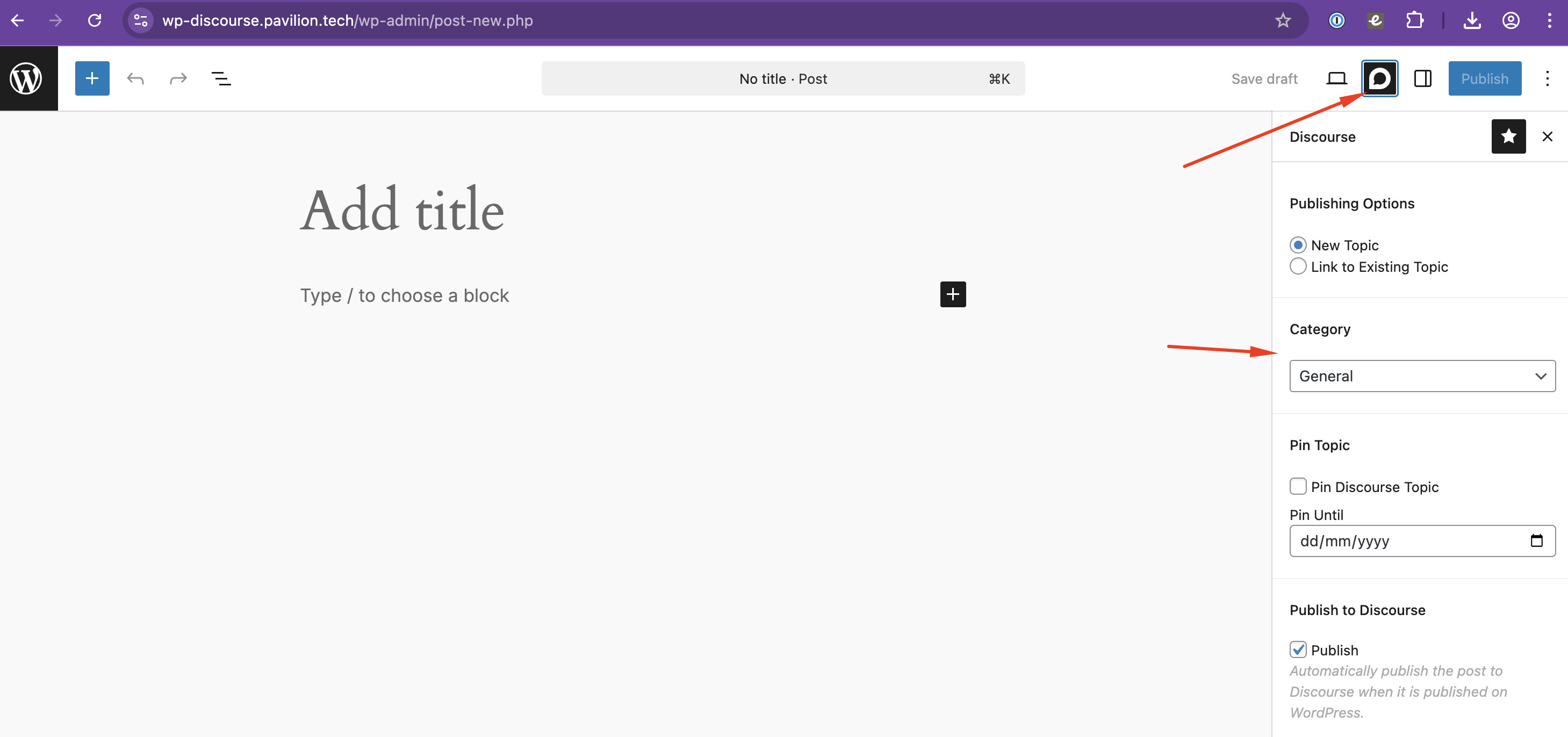
Hello @CAX.DO, you can select the category you wish the Wordpress post to be published to when you’re composing the post in Wordpress. If you’re using the new Gutenberg composer check out the Discourse sidebar on the right.
See further:
> [@Use WP Discourse to publish posts from Wordpress to Discourse](https://meta.discourse.org/t/use-wp-discourse-to-publish-posts-from-wordpress-to-discourse/223492):
>
> You can use the [WP Discourse](https://github.com/discourse/wp-discourse) Plugin to Publish Wordpress Posts to your Discourse so your community can talk about your Wordpress content. Before you can set up Publishing you first have to [install the WP Discourse plugin on Wordpress](https://meta.discourse.org/t/install-the-wp-discourse-plugin/223489) and [connect it to your Discourse](https://meta.discourse.org/t/connect-wp-discourse-to-discourse/223490). If you’re ready to get started, start by watching this short video, or follow the instructions below. Next Step Once you’ve set up publishing, you may want to check out the following topics [Using Discourse for Wordpress Comment…](https://meta.discourse.org/t/wp-discourse-and-commenting/223493)