# Notification Banners
**URL:** https://meta.discourse.org/t/notification-banners/325279
**Category:** Theme component
**Created:** [September 6, 2024, 8:47am UTC](https://meta.discourse.org/t/notification-banners/325279 "2024-09-06T08:47:28Z")
**Posts on this page:** 20
**Page:** 1
### Author:  [@gormus](https://meta.discourse.org/u/gormus)
#### Post date: [September 6, 2024, 8:47am UTC](https://meta.discourse.org/t/notification-banners/325279/1 "2024-09-06T08:47:28Z")
| | | |
| --- | --- | --- |
| ℹ | **Summary** | The Notification Banners theme-component provides a customizable and flexible way to share messages on your site. |
| 👓 | **Preview** | [Theme Creator](https://discourse.theme-creator.io/theme/gormus/notification-banners) |
| 🛠 | **Repository** | [https://github.com/gormus/discourse-notification-banners](https://github.com/gormus/discourse-notification-banners) |
| ❓ | **Install Guide** | [How to install a theme or theme component](https://meta.discourse.org/t/how-do-i-install-a-theme-or-theme-component/63682) |
| 📖 | **New to Discourse Themes?** | [Beginner’s guide to using Discourse Themes](https://meta.discourse.org/t/beginners-guide-to-using-discourse-themes/91966) |
Install this theme component
The Notification Banners theme-component provides a customizable and flexible way to share messages on your site.
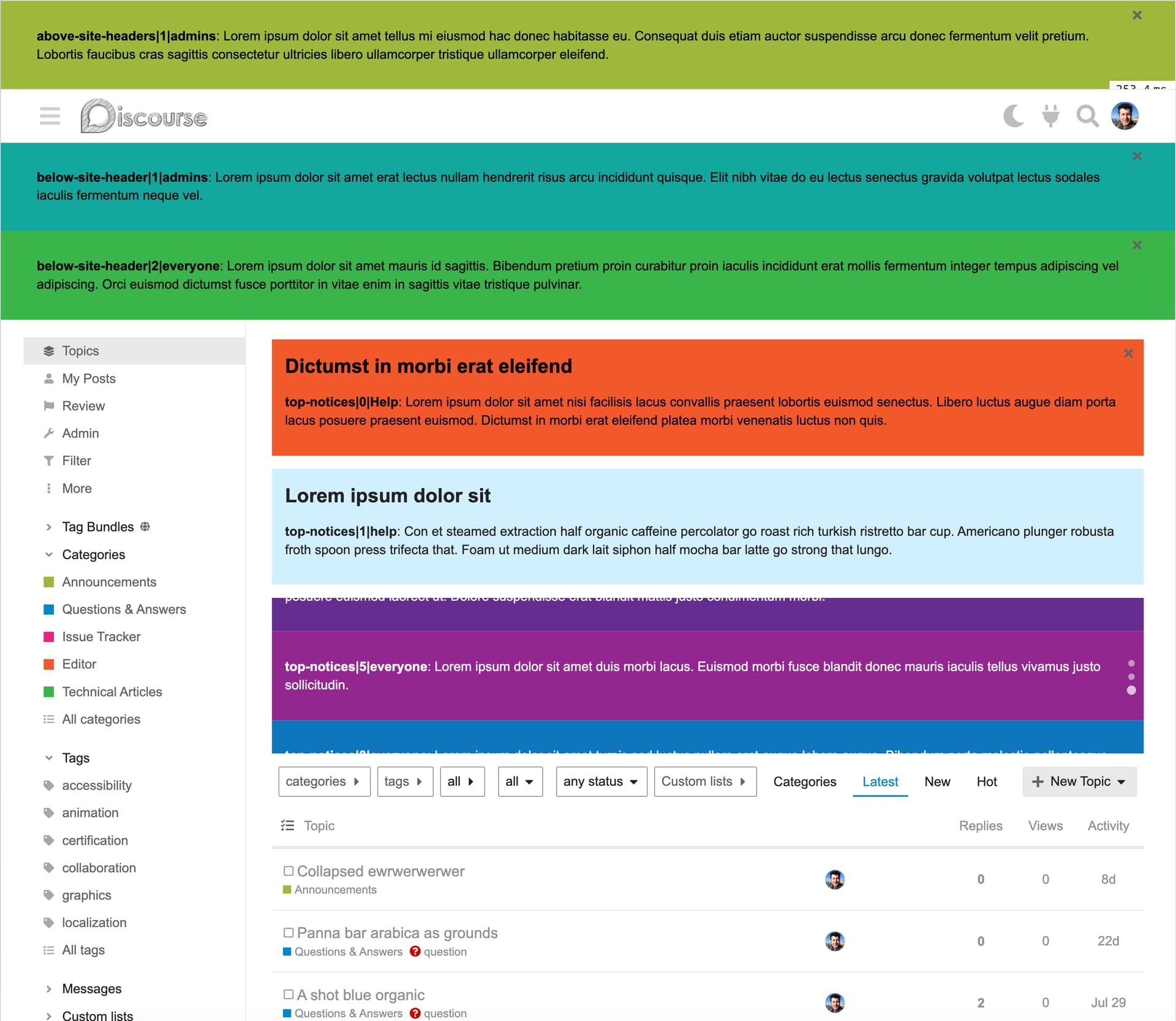

Here are some key features:
- **Fully Customizable** : Tailor each banner to suit your needs, including content, style, and behavior.
- **Flexible Display Options** : Show banners stacked or as a rotating carousel for easy browsing.
- **Targeted Messaging** : Display banners only to specific user groups, ensuring personalized communication.
- **Theme Support** : Banners automatically adjust to light or dark themes, or you can set custom colors.
- **Markdown Support** : Use Markdown to format your banner messages easily.
- **Carousel Powered by Splide** : The carousel feature is powered by the [Splide](https://splidejs.com/) JavaScript library, with individual settings for each banner.
- **Scheduling** : Set specific start and end dates for when banners should appear.
- **Easy Display Order** : Control the order in which banners are shown with simple settings.
This component makes it easy to engage your audience with visually appealing, personalized, and well-organized notifications.
## Installation
1. Follow the official instructions to add this theme-component to your theme:
[https://meta.discourse.org/t/beginners-guide-to-using-discourse-themes/91966#add-theme-components-to-a-theme-9](https://meta.discourse.org/t/beginners-guide-to-using-discourse-themes/91966#add-theme-components-to-a-theme-9)
2. Change [`theme authorized extensions`](https://meta.discourse.org/admin/site_settings/category/files?filter=theme%20authorized%20extensions) setting to include `css` and `js` file extensions.
## Features
Each notification banner may have the following features:
- **Title** , optional, displayed as a H2 heading above the message
- **Message** , 500 character long simple notification message. Markdown is supported.
- **Audience** , select the user groups as audience for the notification.
- **Categories** ; select categories to display the banner on. Leave empty to display on all categories.
- **Background color** , can be set to differantiate the banner from others.
- **Plugin outlet** , set notifications above or below the site header, or use the top-notices outlet to display along with native topic banners.
- **Display in a carousel** , when selected, all the banners in each outlet are displayed in a carousel. Requires minimum 2 banners to be selected for any outlet.
- **Dismissable** , when selected, the users will be able to dismiss the banner, and it will be hidden for them.
- **Starting and Last dates** , when defined, banner’s visibility obeys to those dates. So you can set a banner in advance, but it will become visible to selected audience only on set date and time; or similarly you can automatically remove the banner by the last date it should show.
- **Display order** , define which banner should be displayed top, which should be at bottom. As of v1.3.0, using the native [re-ordering](https://meta.discourse.org/t/objects-type-for-theme-setting/305009/30) buttons.
## The Carousel
The slideshow, or the carousel functionality is provided by [Splide](https://splidejs.com/) library; it is licensed under [MIT](https://github.com/Splidejs/splide/blob/d7e1f08e6b4f4b02a7c6ccbfbeb2d569d85715e6/LICENSE).
Each carousel can be configured on the theme-component page using the [Splide options](https://splidejs.com/guides/options/).
## Banner Colors
By default, the banners will use same colors as the banner-topic:
```scss
.notification-banner {
background: var(--tertiary-low);
color: var(--primary);
}
```
However, when a background color is defined in banner settings, depending on its luminosity, black or white is automatically selected as the foreground color.
## Available CSS Classes
```scss
.notification-banners--above-site-header,
.notification-banners--below-site-header,
.notification-banners--top-notices {
.notification-banner {
&__wrapper {
}
&__close {
}
&__header {
}
&__content {
}
}
&.splide {
.notification-banner {
}
}
}
.notification-banners--top-notices {
.notification-banner {
&__content {
}
}
}
```
## v1.3.0 has breaking changes (for some)
Don’t forget to test the changes, and check your customizations before updating your production sites.
> [@Notification Banners](https://meta.discourse.org/t/notification-banners/325279/32):
>
> I’ve been considering this idea to better target an audience using the Trust Levels: I think I have something for you all to check out. Though, I recommend testing this on a non-production environment first as it introduces a breaking change. To install this version, use the staging branch of [Notification Banners](https://github.com/gormus/discourse-notification-banners): Breaking change When the banner visibility is evaluated using the Audience field values, all the trust\_level\_\* roles of …
---
### Author:  [@nathank](https://meta.discourse.org/u/nathank)
#### Post date: [September 6, 2024, 9:03am UTC](https://meta.discourse.org/t/notification-banners/325279/2 "2024-09-06T09:03:36Z")
Wow! This looks amazing - and super flexible.
Have you considered being able to restrict it to a category / categories?
---
### Author:  [@gormus](https://meta.discourse.org/u/gormus)
#### Post date: [September 6, 2024, 9:12am UTC](https://meta.discourse.org/t/notification-banners/325279/3 "2024-09-06T09:12:03Z")
Thank you!
Actually I considered to include what I previously did with my [Filtered Topic Lists](https://meta.discourse.org/t/filtered-topic-lists/321031) theme-component; see the “Show on” section.
I was concerned it may make it more complicated, that’s why I didn’t include that option. Instead I opted in to use the user-groups as the audience for the banners.
But I’d be happy to include it if there would be a need for it.
---
### Author:  [@Lilly](https://meta.discourse.org/u/Lilly)
#### Post date: [September 6, 2024, 2:23pm UTC](https://meta.discourse.org/t/notification-banners/325279/4 "2024-09-06T14:23:12Z")
Very nice @gormus, thanks for sharing this component with the community. :discourse: 👏
---
### Author:  [@gormus](https://meta.discourse.org/u/gormus)
#### Post date: [September 7, 2024, 11:56am UTC](https://meta.discourse.org/t/notification-banners/325279/5 "2024-09-07T11:56:43Z")
Thanks @Lilly it’s my pleasure : )
---
### Author:  [@toanvoc](https://meta.discourse.org/u/toanvoc)
#### Post date: [September 8, 2024, 6:28am UTC](https://meta.discourse.org/t/notification-banners/325279/6 "2024-09-08T06:28:03Z")
when i click the X button to close this banner popup, is there any mode to make it show again? I have selected in banner background repeat: repeat; repeat-x; repeat-y but it doesn’t work?
---
### Author:  [@nathank](https://meta.discourse.org/u/nathank)
#### Post date: [September 9, 2024, 7:52am UTC](https://meta.discourse.org/t/notification-banners/325279/7 "2024-09-09T07:52:18Z")
> [@gormus](#):
>
> But I’d be happy to include it if there would be a need for it.
Great! I’ll give it a real world whirl and see if it is actually needed or not before pestering you about it.
---
### Author:  [@gormus](https://meta.discourse.org/u/gormus)
#### Post date: [September 9, 2024, 8:00am UTC](https://meta.discourse.org/t/notification-banners/325279/8 "2024-09-09T08:00:32Z")
> [@toanvoc](#):
>
> when i click the X button to close this banner popup, is there any mode to make it show again?
Currently not. I didn’t consider any user would like to restore a dismissed notification.
Do you think there should be an option for it?
> [@toanvoc](#):
>
> I have selected in banner background repeat: repeat; repeat-x; repeat-y but it doesn’t work?
Could you clarify what you mean?
---
### Author:  [@toanvoc](https://meta.discourse.org/u/toanvoc)
#### Post date: [September 10, 2024, 1:34am UTC](https://meta.discourse.org/t/notification-banners/325279/9 "2024-09-10T01:34:55Z")
> [@gormus](#):
>
> Currently not. I didn’t consider any user would like to restore a dismissed notification.
> Do you think there should be an option for it?
I see what you mean, thank you!
---
### Author:  [@ked](https://meta.discourse.org/u/ked)
#### Post date: [September 16, 2024, 2:32am UTC](https://meta.discourse.org/t/notification-banners/325279/10 "2024-09-16T02:32:53Z")
> [@gormus](#):
>
> But I’d be happy to include it if there would be a need for it.
I’d be interested in this feature also (available to specific Category(s) that is). Thank you for considering.
---
### Author:  [@gormus](https://meta.discourse.org/u/gormus)
#### Post date: [September 17, 2024, 11:59am UTC](https://meta.discourse.org/t/notification-banners/325279/11 "2024-09-17T11:59:10Z")
> [@nathank](#):
>
> Have you considered being able to restrict it to a category / categories?
> [@ked](#):
>
> I’d be interested in this feature also (available to specific Category(s) that is).
Categories are now supported as target audience. Single, or multiple categories can be selected per banner.
Please let me know what you think : )
---
### Author:  [@hoangphuctran93](https://meta.discourse.org/u/hoangphuctran93)
#### Post date: [October 13, 2024, 2:20pm UTC](https://meta.discourse.org/t/notification-banners/325279/12 "2024-10-13T14:20:42Z")
Currently my discourse page is running ver 3.4.0.beta3-dev and has an error that does not display the page when installing the banner. You can check again and have early updates for the community. Thank you for your sharing.
---
### Author:  [@gormus](https://meta.discourse.org/u/gormus)
#### Post date: [October 13, 2024, 7:08pm UTC](https://meta.discourse.org/t/notification-banners/325279/13 "2024-10-13T19:08:24Z")
Hi @hoangphuctran93,
Thanks for reporting the issue, I was able to confirm it via a clean install of Notification Banners on a Discourse 3.4.0.beta3-dev ([d3f09f8f61](https://github.com/discourse/discourse/commits/d3f09f8f61ac33f107fe1503fb4fd928877cfcd4))
I just pushed a fix, please update the instance on your site, hard refresh the page if necessary.
---
### Author:  [@hoangphuctran93](https://meta.discourse.org/u/hoangphuctran93)
#### Post date: [October 13, 2024, 7:32pm UTC](https://meta.discourse.org/t/notification-banners/325279/14 "2024-10-13T19:32:05Z")
thank you, they worked well, looking forward to your new ideas and updates. i have some suggestions as follows.
1. Expand the input box
2. allow quick selection of images besides designing with html.
3. Add a data field to name the banner instead of using it with the title, this helps to categorize and manage when multiple banners are applied.
This is the result of the application on [our discourse page](https://businesslab.vn).

---
### Author:  [@Beth](https://meta.discourse.org/u/Beth)
#### Post date: [November 19, 2024, 7:25pm UTC](https://meta.discourse.org/t/notification-banners/325279/15 "2024-11-19T19:25:13Z")
> [@gormus](#):
>
> Change [`theme authorized extensions`](https://meta.discourse.org/admin/site_settings/category/files?filter=theme%20authorized%20extensions) setting to include `css` and `js` file extensions.
I’m having trouble with this part - the link is broken here. How can I authorize those extensions on my site?
Thanks!
---
### Author:  [@Moin](https://meta.discourse.org/u/Moin)
#### Post date: [November 19, 2024, 7:42pm UTC](https://meta.discourse.org/t/notification-banners/325279/16 "2024-11-19T19:42:16Z")
You need to replace `meta.discourse.org` with the URL of your forum. You cannot access the admin area here.
`https://meta.discourse.org/admin/site_settings/category/files?filter=theme%20authorized%20extensions`
Or you can navigate to your site settings and search for `theme authorized extensions`
---
### Author:  [@Beth](https://meta.discourse.org/u/Beth)
#### Post date: [November 19, 2024, 8:43pm UTC](https://meta.discourse.org/t/notification-banners/325279/17 "2024-11-19T20:43:33Z")
Ah yes, thank you 🙂
---
### Author:  [@Beth](https://meta.discourse.org/u/Beth)
#### Post date: [November 19, 2024, 9:00pm UTC](https://meta.discourse.org/t/notification-banners/325279/18 "2024-11-19T21:00:49Z")
Another question here - when you say scheduling, is there a way to have the banner appear the same time every week? We have weekly recurring office hours that I would like this banner to display during those times, so anyone on the site can see office hours is currently happening and join if they want to
---
### Author:  [@gormus](https://meta.discourse.org/u/gormus)
#### Post date: [November 20, 2024, 8:19am UTC](https://meta.discourse.org/t/notification-banners/325279/19 "2024-11-20T08:19:45Z")
You can enable a banner to start showing at a defined date and time, and removed at another.
So you can only have one schedule for starting and ending date and time.
What you are asking requires a more elaborate scheduling feature which Notification Banners doesn’t provide.
However you may still achieve what you need by creating copies of the same banner using different starting and ending dates.
I’d strongly recommend you to test this scenario before going live on production though.
And remember, regardless which time zone you are in, the datetime values must be entered in UTC, and must match the format seen in field descriptions.
---
### Author:  [@Beth](https://meta.discourse.org/u/Beth)
#### Post date: [November 20, 2024, 2:13pm UTC](https://meta.discourse.org/t/notification-banners/325279/20 "2024-11-20T14:13:52Z")
Thanks for the input!
Was hoping for a more automated solution here, as we have 3 different office hour sessions a week, every week, so would be quite a bit of manual work to make duplicate banners for all of these sessions.
I looked at the Automations plugin as another option, but the banner automation also only allows for “point in time”. and not “recurring” actions.
[Next page](https://meta.discourse.org/t/notification-banners/325279.md?page=2)