# We cannot detect if your account was created, please ensure you have cookies enabled
**URL:** https://meta.discourse.org/t/we-cannot-detect-if-your-account-was-created-please-ensure-you-have-cookies-enabled/109626
**Category:** Support
**Created:** [20 februari 2019 om 08:19 UTC](https://meta.discourse.org/t/we-cannot-detect-if-your-account-was-created-please-ensure-you-have-cookies-enabled/109626 "2019-02-20T08:19:00Z")
**Posts on this page:** 20
**Page:** 4
### Author:  [@eatcodetravel](https://meta.discourse.org/u/eatcodetravel)
#### Post date: [19 juli 2019 om 16:32 UTC](https://meta.discourse.org/t/we-cannot-detect-if-your-account-was-created-please-ensure-you-have-cookies-enabled/109626/62 "2019-07-19T16:32:58Z")
> [@Lykos](#):
>
> One of our users with the error has tracked this down…
>
> ```plaintext
> boards.neocron.org/:1 Refused to load the script 'https://boards.neocron.org/cdn-cgi/apps/head/QNWX_8GN-3K7wUr6Qa73LdoD3JI.js' because it violates the following Content Security Policy directive: "script-src 'unsafe-eval' 'report-sample' https://boards.neocron.org/logs/ https://boards.neocron.org/sidekiq/ https://boards.neocron.org/mini-profiler-resources/ https://boards.neocron.org/assets/ https://boards.neocron.org/brotli_asset/ https://boards.neocron.org/extra-locales/ https://boards.neocron.org/highlight-js/ https://boards.neocron.org/javascripts/ https://boards.neocron.org/plugins/ https://boards.neocron.org/theme-javascripts/ https://boards.neocron.org/svg-sprite/ https://www.google-analytics.com/analytics.js". Note that 'script-src-elem' was not explicitly set, so 'script-src' is used as a fallback.
>
> account-created:1 Refused to load the script 'https://boards.neocron.org/cdn-cgi/apps/head/QNWX_8GN-3K7wUr6Qa73LdoD3JI.js' because it violates the following Content Security Policy directive: "script-src 'unsafe-eval' 'report-sample' https://boards.neocron.org/logs/ https://boards.neocron.org/sidekiq/ https://boards.neocron.org/mini-profiler-resources/ https://boards.neocron.org/assets/ https://boards.neocron.org/brotli_asset/ https://boards.neocron.org/extra-locales/ https://boards.neocron.org/highlight-js/ https://boards.neocron.org/javascripts/ https://boards.neocron.org/plugins/ https://boards.neocron.org/theme-javascripts/ https://boards.neocron.org/svg-sprite/ https://www.google-analytics.com/analytics.js". Note that 'script-src-elem' was not explicitly set, so 'script-src' is used as a fallback.
>
> ```
>
> I take it the new forum isn’t hooked to our accounts as the old php one was? because apparently my account…
>
> Looks to be a CORS problem possibly, I’m going to look into that deeper but wanted to ask if @eatcodetravel had any CORS settings or issues also?
This is great info. I haven’t seen CORS issue specifically, but I’ll dig more on this. If I find anything I’ll post it here.
After seeing the scripts looks like is related to Cloudflare, are you using Cloudflare? [https://boards.neocron.org/cdn-cgi/apps/head/QNWX\_8GN-3K7wUr6Qa73LdoD3JI.js](https://boards.neocron.org/cdn-cgi/apps/head/QNWX_8GN-3K7wUr6Qa73LdoD3JI.js). We are not using that so probably we haven’t seen this specific issue.
Thanks!
---
### Author:  [@Lykos](https://meta.discourse.org/u/Lykos)
#### Post date: [19 juli 2019 om 16:38 UTC](https://meta.discourse.org/t/we-cannot-detect-if-your-account-was-created-please-ensure-you-have-cookies-enabled/109626/63 "2019-07-19T16:38:14Z")
Digging into it, we had `Settings->Security->content security policy` enabled.
Once we disabled that, users were able to register. We tried adding the URLs found in that report above to the whitelisted script sources but it would not solve the issue.
Chrome apparently has beefed up their CSP. → [Manifest - Content Security Policy | Chrome Extensions | Chrome for Developers](https://developer.chrome.com/extensions/contentSecurityPolicy#relaxing)
---
### Author:  [@eatcodetravel](https://meta.discourse.org/u/eatcodetravel)
#### Post date: [19 juli 2019 om 16:40 UTC](https://meta.discourse.org/t/we-cannot-detect-if-your-account-was-created-please-ensure-you-have-cookies-enabled/109626/64 "2019-07-19T16:40:16Z")
mmm I’m afraid we have that disabled, it should be another thing for us causing this issue
---
### Author:  [@Lykos](https://meta.discourse.org/u/Lykos)
#### Post date: [19 juli 2019 om 16:41 UTC](https://meta.discourse.org/t/we-cannot-detect-if-your-account-was-created-please-ensure-you-have-cookies-enabled/109626/65 "2019-07-19T16:41:48Z")
Apologies ☹
We have DISCOURSE\_ENABLE\_CORS set to true, and we have our cors origins set to the following…
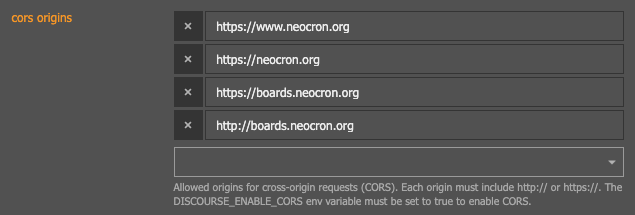
Don’t know if any of that could help you or might be different than your setup?
---
### Author:  [@eatcodetravel](https://meta.discourse.org/u/eatcodetravel)
#### Post date: [19 juli 2019 om 16:46 UTC](https://meta.discourse.org/t/we-cannot-detect-if-your-account-was-created-please-ensure-you-have-cookies-enabled/109626/66 "2019-07-19T16:46:02Z")
We have the CORS flag enable too, but not sure if this is related.
---
### Author:  [@supermathie](https://meta.discourse.org/u/supermathie)
#### Post date: [23 juli 2019 om 00:40 UTC](https://meta.discourse.org/t/we-cannot-detect-if-your-account-was-created-please-ensure-you-have-cookies-enabled/109626/67 "2019-07-23T00:40:04Z")
This is a CSP problem, not CORS.
Is this a subfolder setup?
EDIT: having come back around and looked at this again, I see what’s going on.
> [@eatcodetravel](#):
>
> ```plaintext
> boards.neocron.org/:1 Refused to load the script 'https://boards.neocron.org/cdn-cgi/apps/head/QNWX_8GN-3K7wUr6Qa73LdoD3JI.js' because it violates the following Content Security Policy directive: "script-src 'unsafe-eval' 'report-sample' https://boards.neocron.org/logs/ https://boards.neocron.org/sidekiq/ https://boards.neocron.org/mini-profiler-resources/ https://boards.neocron.org/assets/ https://boards.neocron.org/brotli_asset/ https://boards.neocron.org/extra-locales/ https://boards.neocron.org/highlight-js/ https://boards.neocron.org/javascripts/ https://boards.neocron.org/plugins/ https://boards.neocron.org/theme-javascripts/ https://boards.neocron.org/svg-sprite/ https://www.google-analytics.com/analytics.js". Note that 'script-src-elem' was not explicitly set, so 'script-src' is used as a fallback.
>
> account-created:1 Refused to load the script 'https://boards.neocron.org/cdn-cgi/apps/head/QNWX_8GN-3K7wUr6Qa73LdoD3JI.js' because it violates the following Content Security Policy directive: "script-src 'unsafe-eval' 'report-sample' https://boards.neocron.org/logs/ https://boards.neocron.org/sidekiq/ https://boards.neocron.org/mini-profiler-resources/ https://boards.neocron.org/assets/ https://boards.neocron.org/brotli_asset/ https://boards.neocron.org/extra-locales/ https://boards.neocron.org/highlight-js/ https://boards.neocron.org/javascripts/ https://boards.neocron.org/plugins/ https://boards.neocron.org/theme-javascripts/ https://boards.neocron.org/svg-sprite/ https://www.google-analytics.com/analytics.js". Note that 'script-src-elem' was not explicitly set, so 'script-src' is used as a fallback.
>
> ```
> [@eatcodetravel](#):
>
> After seeing the scripts looks like is related to Cloudflare, are you using Cloudflare?
I can confirm this was injected by CF.
> [@Lykos](#):
>
> Once we disabled [CSP], users were able to register.
We STRONGLY recommend against disabling CSP on a production site. Instead, turn off Cloudflare if possible (we have had [MANY, MANY](https://meta.discourse.org/search?q=cloudflare) support cases about CF negatively affecting Discourse’s JS) or at least disable all [Cloudflare optimizations](https://meta.discourse.org/search?q=cloudflare+optimizations).
---
### Author:  [@codinghorror](https://meta.discourse.org/u/codinghorror)
#### Post date: [23 juli 2019 om 02:34 UTC](https://meta.discourse.org/t/we-cannot-detect-if-your-account-was-created-please-ensure-you-have-cookies-enabled/109626/69 "2019-07-23T02:34:52Z")
> [@Lykos](#):
>
> Digging into it, we had `Settings->Security->content security policy` enabled.
>
> Once we disabled that, users were able to register.
This opens massive security holes on your site. We STRONGLY RECOMMEND that you DO NOT do that. It’s very bad advice.
---
### Author:  [@eatcodetravel](https://meta.discourse.org/u/eatcodetravel)
#### Post date: [23 juli 2019 om 13:28 UTC](https://meta.discourse.org/t/we-cannot-detect-if-your-account-was-created-please-ensure-you-have-cookies-enabled/109626/70 "2019-07-23T13:28:46Z")
Hey @supermathie,
We don’t use Cloudflare and we are seeing this issue now with 2 users. The workaround we are giving them is to use incognito or another browser but maybe there are more users that are not reporting this issue to us.
Our community is mostly non-tech people, so I don’t think they have weird browser setups.
> [@Stephen](#):
>
> The message mentions cookies, but it has occurred on machines where cookies are enabled because the contents of a hidden `` are being tampered with.
Can you provide more info on what’s triggering this issue? maybe I can go from there to find a solution.
Thanks!
---
### Author:  [@supermathie](https://meta.discourse.org/u/supermathie)
#### Post date: [30 juli 2019 om 14:58 UTC](https://meta.discourse.org/t/we-cannot-detect-if-your-account-was-created-please-ensure-you-have-cookies-enabled/109626/71 "2019-07-30T14:58:06Z")
> [@eatcodetravel](#):
>
> Can you provide more info on what’s triggering this issue?
I wish _we_ knew exactly.
There’s a hidden input field on the “Account Creation” screen that is checked for integrity at account creation time.
If this field is tampered with, the account creation fails.
Can you please ask your users to disable their plugins one-by-one until they locate the culprit?
We also have a ticket open with the Chrome project to investigate this behaviour.
> [@eatcodetravel](#):
>
> Our community is mostly non-tech people, so I don’t think they have weird browser setups.
Let me remind you of this screenshot from a non-technical user’s computer:
[ ](https://www.flickr.com/photos/30592906@N00/1924189728/)
You can’t assume anything 🙂
---
### Author:  [@eatcodetravel](https://meta.discourse.org/u/eatcodetravel)
#### Post date: [1 augustus 2019 om 20:36 UTC](https://meta.discourse.org/t/we-cannot-detect-if-your-account-was-created-please-ensure-you-have-cookies-enabled/109626/72 "2019-08-01T20:36:57Z")
Yeah I mean is not 2000 anymore, browser security and malware prevention are better now (I believe). Another user reported this today, I’ll try to get more info from them and hopefully find something.
Thanks!
---
### Author:  [@supermathie](https://meta.discourse.org/u/supermathie)
#### Post date: [1 augustus 2019 om 20:45 UTC](https://meta.discourse.org/t/we-cannot-detect-if-your-account-was-created-please-ensure-you-have-cookies-enabled/109626/73 "2019-08-01T20:45:05Z")
Fantastic. We really want to nail this down so let us know.
---
### Author:  [@undeadcorvid](https://meta.discourse.org/u/undeadcorvid)
#### Post date: [4 augustus 2019 om 12:31 UTC](https://meta.discourse.org/t/we-cannot-detect-if-your-account-was-created-please-ensure-you-have-cookies-enabled/109626/74 "2019-08-04T12:31:31Z")
I’ve got a friend experiencing this problem too - I’m trying to bring him on as a moderator. When I sign up on an incognito window, it works fine, but he can’t even in an incognito window. So I’m confident it’s not a problem with my install (I’m using plugins with my Discourse, but only official ones) but with his browser somewhere.
I’m working with him to pin down the problem, but if it’s not a plugin problem, I’m _wondering_ if there’s something with our Chrome versions - whether something’s going on under the browser hood I’m unaware of, but I can’t say for sure yet. Currently trying to get hold of his version number for comparison but he’s Californian and so if he’s sensible, he’s asleep 😛
---
### Author:  [@undeadcorvid](https://meta.discourse.org/u/undeadcorvid)
#### Post date: [4 augustus 2019 om 13:29 UTC](https://meta.discourse.org/t/we-cannot-detect-if-your-account-was-created-please-ensure-you-have-cookies-enabled/109626/75 "2019-08-04T13:29:34Z")
OK, not sensible, but he’s awake and informative. He updated from 75.0.3770.142 to 76.0.3808.87 (64 bit), which did not help on its own in the main window, but after clearing cache and cookies, he was able to sign up on an incognito window. He’s using an entirely vanilla Chrome set-up aside from Adblocker.
EDIT: I couldn’t tell you if clearing cache or cookies would work on 75.0.3770.142 without being able to repro it (I can’t), but I do find it interesting that it did at least seem to help my friend.
---
### Author:  [@John\_Heeter](https://meta.discourse.org/u/John_Heeter)
#### Post date: [15 augustus 2019 om 18:32 UTC](https://meta.discourse.org/t/we-cannot-detect-if-your-account-was-created-please-ensure-you-have-cookies-enabled/109626/76 "2019-08-15T18:32:17Z")
Hello, I just setup a fresh instance today at [community.boid.com](http://community.boid.com) and came across this error message after trying to register a second account (both inside my normal chrome window as well as incognito). I was able to resolve the issue by manually deleting the autofill passwords from my google account and not using any of the auto-fill options on the signup form. I noticed that Chrome was suggesting many different authentication options for autofill from other unrelated websites. I haven’t seen this behavior on other sites so just wanted to mention my experience.
As far as I can tell, this does seem to be related to google chrome autofill.
---
### Author:  [@codinghorror](https://meta.discourse.org/u/codinghorror)
#### Post date: [22 augustus 2019 om 09:41 UTC](https://meta.discourse.org/t/we-cannot-detect-if-your-account-was-created-please-ensure-you-have-cookies-enabled/109626/78 "2019-08-22T09:41:50Z")
I have one way to repro this, but it’s obtuse. You’ll need two browser windows.
- Load your site in incognito mode, bring up the “create new user” dialog.
- In a second browser window, log in as admin. Go to the site settings. Enable “invite only”, which disables public registration.
- In the incognito browser, attempt to complete signup as the new user via that create new user dialog you brought up earlier.
You won’t be able to, because new user creation is no longer allowed, so you’ll see.. our old pal..

At least we have that repro, though it is .. insane. 🤪
I’ve never, ever been able to repro this in any other way, nor has anyone in this topic ever been able to provide a set of repro steps on a default instance of Chrome with no plugins. If you can, please step right up and provide those repro steps..
---
### Author:  [@GirionMagKenni](https://meta.discourse.org/u/GirionMagKenni)
#### Post date: [26 augustus 2019 om 16:36 UTC](https://meta.discourse.org/t/we-cannot-detect-if-your-account-was-created-please-ensure-you-have-cookies-enabled/109626/79 "2019-08-26T16:36:58Z")
I reproduced this error on [try.discourse.org](http://try.discourse.org):

Just enjoy the video of all process: [https://drive.google.com/file/d/19s20cgdz78XYpgHePkWRBFXseY-Znt\_P/view?usp=sharing](https://drive.google.com/file/d/19s20cgdz78XYpgHePkWRBFXseY-Znt_P/view?usp=sharing)
This happened EVERY time when I used the suggested generated password.
So… How we can fix this problem for our clients?
---
### Author:  [@codinghorror](https://meta.discourse.org/u/codinghorror)
#### Post date: [26 augustus 2019 om 21:36 UTC](https://meta.discourse.org/t/we-cannot-detect-if-your-account-was-created-please-ensure-you-have-cookies-enabled/109626/80 "2019-08-26T21:36:28Z")
OK, very good, that’s a repro we can work with, thanks for that.
However, note that it still takes manual user action – right click in the password field at new account creation / sign up and press “suggest”. I have to f5 refresh the page before initiating the signup dialog to get this to appear reliably, but then it does.
Now that we have a kind of repro @sam maybe we can assign the work?
---
### Author:  [@sam](https://meta.discourse.org/u/sam)
#### Post date: [28 augustus 2019 om 06:43 UTC](https://meta.discourse.org/t/we-cannot-detect-if-your-account-was-created-please-ensure-you-have-cookies-enabled/109626/82 "2019-08-28T06:43:59Z")
We have 2 mechanisms in play for stopping bots from registering accounts blindly.
1. We pretend to have a “password confirm” field which is in fact a “trick”, we expect it to be a very specific value. It is an INPUT box that is not rendered on the screen, it is in a hidden div.
2. We have a challenge string that we expect the JavaScript to process and echo back.
If either (1) or (2) don’t happen right then we treat the request as suspicious and do not register an account.
What the Chrome password manager is doing is “filling in” the password in the new-account-confirm field:
`{{input type="password" value=accountPasswordConfirm id="new-account-confirmation" autocomplete="new-password"}}`
This `INPUT` is hidden and not rendered on the screen.
We have 2 alternatives here.
1. Remove this protection and just treat it as a fact of life that password managers mess up here. They do not bother checking a “confirm password” field is actually visible prior to filling it up.
2. Ask Chrome team to stop doing this, filling in information in INPUTs that are not visible is not nice. ([I did that](https://bugs.chromium.org/p/chromium/issues/detail?id=987293))
I don’t know … I guess we can go with (1) it is an easy change. I could remove the protection and make the JS client calculate a hash bitcoin style to prove it is around doing work. For example I give the client a string and tell it to append numbers to it until the md5 ends with `00` at least it will be punishing to bots and ultra cheap to confirm on the server.
Getting bots to blindly compute MD5s, I guess, is one way of getting them to literally pay the bills and fund my Bahamas retirement .
---
### Author:  [@GirionMagKenni](https://meta.discourse.org/u/GirionMagKenni)
#### Post date: [28 augustus 2019 om 08:49 UTC](https://meta.discourse.org/t/we-cannot-detect-if-your-account-was-created-please-ensure-you-have-cookies-enabled/109626/83 "2019-08-28T08:49:32Z")
> [@codinghorror](#):
>
> No such feature exists for signup user “spam” prevention. While it is an interesting theory, it has no basis in reality. Sorry.
Is it possible to completely disable such a mechanism and enable the good old Google CAPTCHA? I think this will maintain security and, at the same time, allow more users to register.
Or we can wait for the your hotfix. Which option seems best to you? We launch a large stream of our partners at our forum at the beginning of next week.
---
### Author:  [@Dane2](https://meta.discourse.org/u/Dane2)
#### Post date: [28 augustus 2019 om 09:00 UTC](https://meta.discourse.org/t/we-cannot-detect-if-your-account-was-created-please-ensure-you-have-cookies-enabled/109626/84 "2019-08-28T09:00:05Z")
I’ve just created a new account, with ZERO anti-spam / spyware / software on the browser and I encountered the same problem. I solved it by using the ‘log in with google’ method and it worked after that.
[Previous page](https://meta.discourse.org/t/we-cannot-detect-if-your-account-was-created-please-ensure-you-have-cookies-enabled/109626.md?page=3)
[Next page](https://meta.discourse.org/t/we-cannot-detect-if-your-account-was-created-please-ensure-you-have-cookies-enabled/109626.md?page=5)