main ← editor-toolbar-adju
opened 10:42PM - 07 Sep 22 UTC
We've been having some problems with toolbar overflow when there are many button…s present, so I did some refactoring in an attempt to avoid the issue and simplify...
Relevant topic (there are a couple customer reports as well): https://meta.discourse.org/t/toolbar-of-composer-is-too-wide-at-least-on-ipad/234743/14
Part of the issue is that we use different positioning for the cog dropdown on iOS and desktop, so we can't hide overflow without also hiding/breaking the dropdown menu on iOS. (We use different positioning on iOS because it has trouble with fixed position elements)
In this PR I've approached the "too many buttons" issue and the "can't hide overflow" issue in a few different ways:
1. I updated the way we hide menu items from `site.mobileView` to `capabilities.touch` — this means that iPads are now included in the mobile behavior of showing fewer icons. They were previously left out and had some issues due to narrower widths.
It's possible some large touch devices get caught up in this, but showing too many icons on iPad (and causing overflow issues) seems more problematic than hiding some options within the cog dropdown. (Alternatively we could check viewport width instead of relying on mobileView.)
2. I moved the preformatted text button to be hidden within the cog menu on mobile. This is most often used for code, and it seems less likely that someone's sharing code on a mobile device.
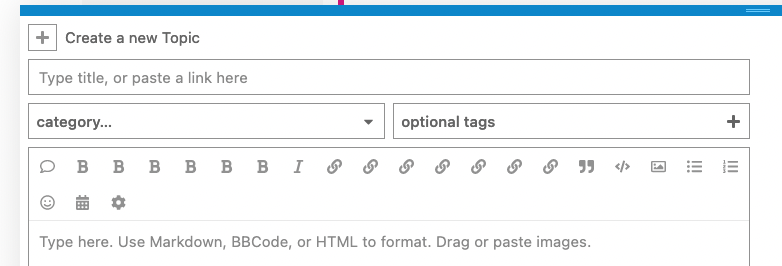
3. I'm allowing the buttons to wrap. This isn't ideal, but better than breaking the cog menu and might make admins think twice about how many buttons they have here
4. I updated the layout of the button bar from flex to grid. This allows us to use auto-fill/fit, simplify our CSS, and allow for easier equal spacing when wrapping. I also removed the dividers because grid containers want all children to be in an equal-width column. I don't think these were doing much for us other than occupying more space, but if we want to add them back I can use CSS psuedo selectors.
Default:
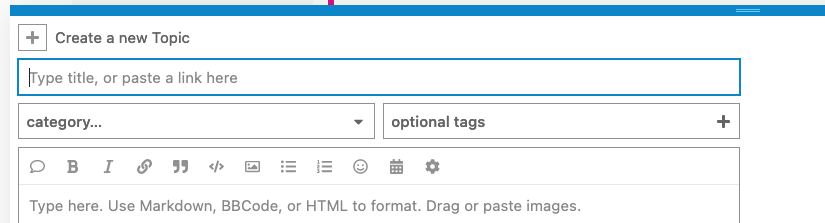
Too many buttons wrap:
Mobile default:

More mobile buttons can fill the space:

Too many mobile buttons:

iPad default:
