Update 2018-11-30: The CSS to hide the Activity and Messages tabs is here.
tl;dr – what CSS can I use to remove the Activity and Messages tabs on a group detail page (e.g., … /groups/YourGroupName/)?
My question was already asked in July 2017 here and didn’t get a response. So I’m asking in a different category and with different eyeballs available.
Sam told me it was possible to hide the Activity and Messages tabs on the group detail page. As it is, the Activity tab in each group shows the general forum activity for all members in the group – which is really confusing to people who are used to Facebook groups and just generally counter-intuitive to many of our community members.
Since we have direct messaging to groups turned off for all our groups, the presence of the Messages tab also is a distraction for us.
What’s the CSS code to hide the Activity and Messages tabs in the screen shot above?
You also get bonus points if you know how to hide certain columns like Posted and Seen on the Members tab of the groups detail page (e.g., found at … /groups/YourGroupName/).
Thanks in advance for the help, wonderful Discourse folks!
I added your CSS in the Common section of the default theme (e.g., … /admin/customize/themes/1/common/scss/edit) and had two different experiences in desktop and mobile view.
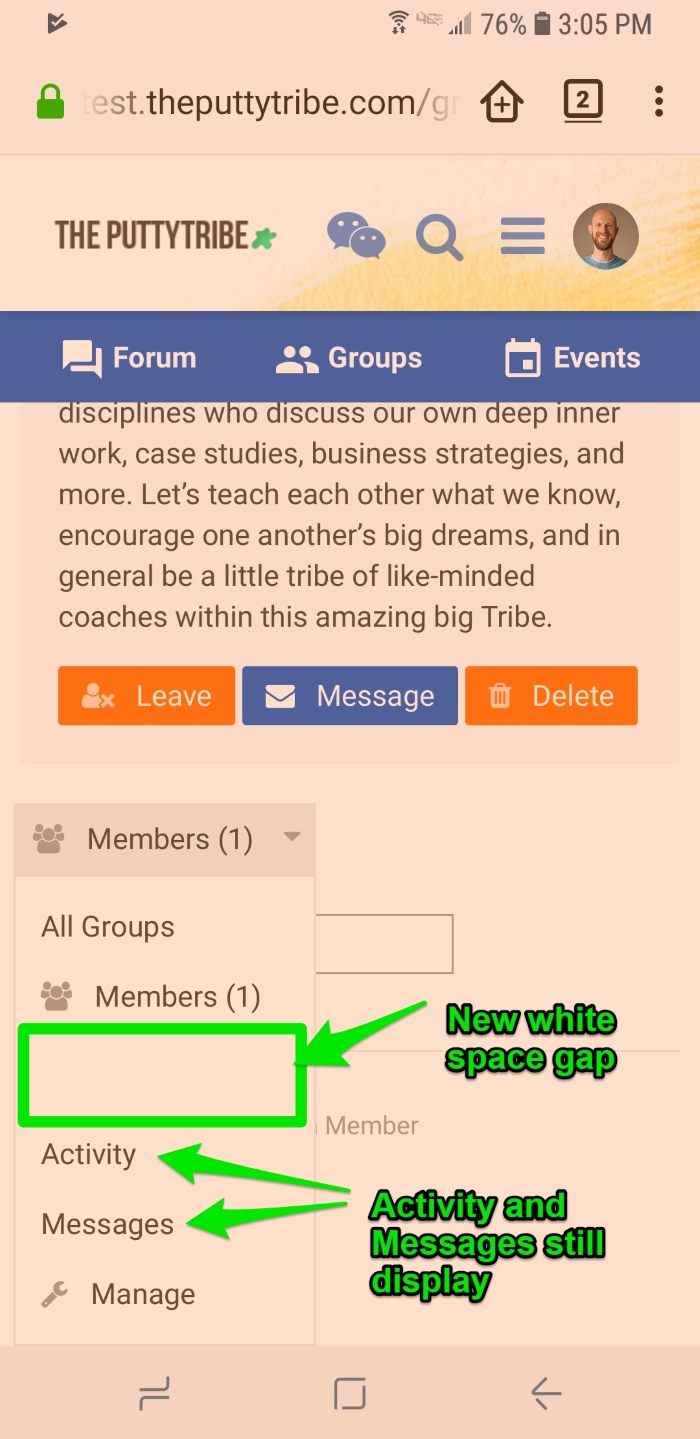
The screen shots below show how it worked at least functionally in desktop view and didn’t work so well in mobile view. Is there another way to approach hiding the Activity and Messages elements – preferably for all groups at once instead of new templated lines of CSS for each group?
However, mobile view still shows the Activity and Messages options in the drop-down list, and frustratingly, the empty white space that was there before (which must be default theme or environmental related).
Do you know why the CSS would work on desktop view and not mobile view? And do you know if there’s a way to use a wildcard in the CSS to apply the display: none; code to all groups instead of going one-by-one?
Yes, they use separate CSS and different selectors. Lots of styling differs between mobile and desktop view, that’s part of how responsive design works.
If you swap to a mobile view on Chrome and inspect elements you can identify how it changes and produce the mobile-friendly alternative.
for example, I hid messages and activity from everyone using your code, but replicated it with .viewing-self and display: inline-block
so the user them self can see their message box, but unless admins turn off CSS customization, they’re not able to snoop easily.
What I’l looking to do is the opposite of this. I want to hide the profile picture box, or the pencil (change) button from users, but have it visible to admins, without having to go disable the CSS. Any ideas??