Embedding a list of Discourse Topics in another site

If you grab the latest builds of Discourse you’ll get a the ability to embed topic lists in other sites via some simple Javascript and HTML.

The typical use case for this is a blog or other content driven site, where you want a widget on the side of the screen that lists topics. You can filter by category, tag, or any of the other public filter options available.

How to Embed a list of Topics

First, you must enable the embed topics list site setting.

Then, in your HTML add a <script> tag that includes the javascript necessary to embed the Discourse topics. You can add this wherever you normally add scripts. For example:

<script src="http://URL/javascripts/embed-topics.js"></script>

Replace URL with the forum address, including the subfolder if it exists.

After that, in the <body> of your HTML document, add a d-topics-list tag to indicate the list of topics you’d like to embed. You’ll need to replace URL with your base URL here too:

<d-topics-list discourse-url="URL" category="1234" per-page="5"></d-topics-list>

Any attributes you provide (besides discourse-url which is required) will be converted into the query parameters for the topic search. So if you wanted to search topics by tag you could do this:

<d-topics-list discourse-url="URL" tags="cool"></d-topics-list>

If a query parameter has underscores, convert it to dashes. In the above example, you probably noticed thatper_page became per-page.

In SameSite contexts (i.e. the embedding site and your forum share a parent domain), Discourse will know if you’re logged into the forum, and will display the results accordingly. Don’t be surprised if you see secure categories and such when logged in - anonymous users will not be able to!

List of parameters

template: Either complete or basic (default). While basic is just a list of topic titles, the complete complete brings title, user name, user avatar, created at date, and topic thumbnail.

per-page: Number. Controls how many topics to return.

category: Number. Restrict topics to a single category. Pass the id of the target category

allow-create: Boolean. If enabled the embed will have a “New Topic” button.

tags: String. Restrict topics to ones associated with this tag.

top_period: One of all, yearly, quarterly, monthly, weekly, daily. If enabled will return the “Top” topics of the period.

Examples

I’ve created an example site here:

https://embed.eviltrout.com

You should be able to view source in your browser to see the code, but also the entire source is on github:

https://github.com/eviltrout/embed-topics

This is a brand new feature so any feedback / requests would be appreciated.

Styling the list

You can use our existing theme feature to add custom styles for the embed list.

For example, by default our embed list using the complete template looks like this:
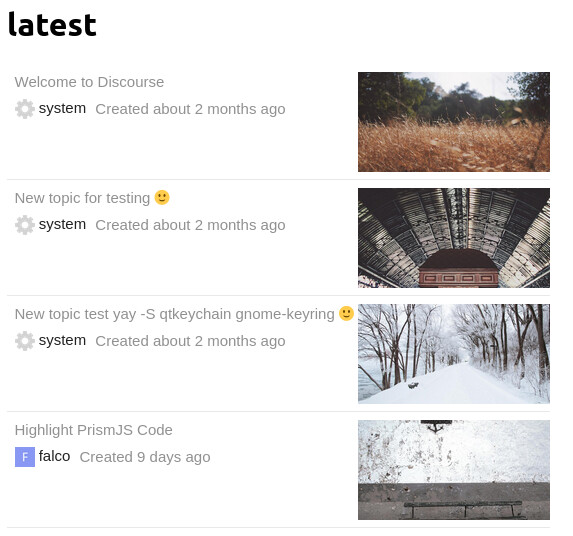
If you want it to look like, for example, a grid, you can add custom SCSS to Theme > Common > Embedded CSS:

.topics-list {
  display: grid;
  grid-template-columns: repeat(2, 1fr);
  
  .topic-list-item { 
    .main-link {
      border: 1px dotted gray;
      padding: 0;
    }
  
    .topic-column-wrapper {
      flex-direction: column-reverse;
      
      .topic-column.details-column {
        width: 100%;
      }
        
      .topic-column.featured-image-column .topic-featured-image img {
        max-width: initial;
        max-height: initial;
        width: 100%;
      }
    }
  }
}

Which will make it look like this:

95개의 좋아요

여러분 안녕하세요! 링크가 새 탭에서 열리도록 설정하고 싶습니다(즉, target=“_parent” 대신 target=“_blank” 사용). iframe을 고려할 때 이를 쉽게 처리하는 방법이 있을까요?

2개의 좋아요

이것이 여러분이 찾고 있는 것인지는 모르겠지만, 링크를 새 탭에서 열려면 아래 방식이 작동할 것입니다. 외부 도메인에 대해 CORS가 활성화되어 있어야 합니다. 고정된 토픽을 필터링하고 싶어서 이렇게 시도해 보았습니다.

// `fetch`는 폴리필이 필요할 수 있습니다
const targetEl = document.getElementById("forumTopics");

function renderTemplate(topicsArr) {
    const items = topicsArr.map(
        (topic) => `<li><a href="${topic[1]}" target="_blank">${topic[0]}</li>`
    );

    targetEl.innerHTML = `<ul>${items.join("\n")}</ul>`;
}

// 모든 토픽 목록에 `.json`을 붙입니다
fetch("https://forum.example.com/latest.json")
    .then((res) => res.json())
    .then((json) => {
        const topics = json.topic_list.topics
            .slice(1, 6)
            .map((t) => [
                t.title,
                `https://forum.example.com/t/${t.slug}/${t.id}`,
            ]);

        renderTemplate(topics);
    });
3개의 좋아요

감사합니다! 이 아이디어는 마음에 드는데, 이 게시물(What are the risks of enabling Cross-origin resource sharing (DISCOURSE_ENABLE_CORS))에 따르면 CORS를 활성화하는 것이 최선은 아닌 것 같아 고민 중입니다.

2개의 좋아요

CORS는 신뢰할 수 있는 사이트에만 활성화해야 합니다. 모든 소스에 CORS를 활성화하는 것은 CORS의 본래 목적을 무효화하는 것입니다.

6개의 좋아요

제가 CORS를 활성화한 사이트는 제가 직접 관리하는 사이트들뿐이었습니다. 목표는 프론트엔드 코드를 이용해 다른 사이트에서 포럼 주제 목록을 불러오는 것이었습니다. 그 방법은 임의의 사이트가 게시물을 임베드하도록 허용하는 데에는 아마도 작동하지 않았을 것입니다.

수정: 해당 코드를 복사/붙여넣기할 때는 .slice(1, 6)에 주의하세요. 이 코드는 주제 중 하나를 제거하기 때문입니다. (제 생각에는 제가 제거하고 싶었던 고정된 주제였던 것 같습니다.)

3개의 좋아요

좋아요, 그럼 시도해 볼 수 있겠네요. 지금은 테스트 중에 localhost를 제외하고 다른 사이트가 없어서 추가하는 것에 대해 망설였거든요. 하지만 장소를 제공할 수 있는 사람을 찾을 수 있다면 한번 해볼 수 있을 것 같아요. 도움 주셔서 감사합니다!

4개의 좋아요

안녕하세요 @j127

저희도 현재 동일한 문제를 겪고 있으며 링크를 새 탭에서 열려고 합니다.
간단한 질문 하나만 드리고 싶은데요.

제공해 주신 코드를 정확히 어디에 넣어야 하나요?

@eviltrout 제 경우 CSS 스타일이 표시되지 않는 이유가 무엇일지 혹시 아는 점이 있으신가요?

2개의 좋아요

그 코드는 일반적인 아이디어를 보여주는 간단한 예시일 뿐입니다. fetch가 모든 브라우저에서 작동하지는 않는 것 같습니다. 원하시면 ES5로 다시 작성해 드릴 수 있습니다.

사이트가 워드프레스인지, 아니면 헤드리스 워드프레스 같은 형태인가요?

4개의 좋아요

모든 현대 브라우저에서 작동하는 것으로 보입니다. Discourse는 더 이상 IE11을 지원하지 않습니다.

4개의 좋아요

제 사이트는 헤드리스가 아닌 일반 워드프레스입니다.

1개의 좋아요

이 기능을 사용하여 다른 Discourse 인스턴스에 Discourse 토픽 목록을 임베드할 수 있나요? 아니면 더 스마트한 방법이 있을까요?

제 사용 사례는 두 인스턴스를 미래에 통합할 수 있을 때까지 임시로 두 인스턴스 사이에 ‘다리’ 역할을 하는 것입니다. 이 과정이 자동화되고 동적으로 이루어지면 좋겠습니다.

2개의 좋아요

IE를 신경 쓰지 않는다면, 그 스니펫은 작동할 것입니다. (외부 도메인에 대해 CORS가 Discourse 설정에서 활성화되어 있어야 합니다.)

테스트하려면 이 포럼의 아무 페이지나 열고 브라우저 콘솔에 아래 스니펫을 붙여넣으세요. 대상 요소를 document.body로 변경했으므로, 포럼 주제 목록으로 페이지 전체를 대체하게 됩니다. 실제 사이트의 경우 대상 요소를 document.getElementById("#someId")로 변경하고, 해당 ID가 있는 div를 페이지 어딘가에 배치하면 됩니다. 스크립트가 주제 목록으로 채워 넣을 것입니다.

// IE를 신경 쓰지 않는다면 `fetch`에 폴리필이 필요할 수 있습니다
// const targetEl = document.getElementById("forumTopics");

// 예시처럼 페이지의 body를 대체합니다
const targetEl = document.body;

// 자신의 포럼에서 테스트하려면 포럼 URL을 여기에 입력하세요
const baseForumURL = `https://meta.discourse.org`;

// 표시할 주제 수
const numTopics = 6;

function renderTemplate(topicsArr) {
    const items = topicsArr.map(
        (topic) => `<li><a href="${topic[1]}" target="_blank">${topic[0]}</li>`
    );

    targetEl.innerHTML = `<ul>${items.join("\n")}</ul>`;
}

// 주제 목록에 `.json`을 붙입니다
fetch(`${baseForumURL}/latest.json`)
    .then((res) => res.json())
    .then((json) => {
        const topics = json.topic_list.topics
            .slice(0, numTopics)
            .map((t) => [
                t.title,
                `${baseForumURL}/t/${t.slug}/${t.id}`,
            ]);

        renderTemplate(topics);
    });

예시: WP 사이트 어딘가에 있는 대상 div가 다음과 같다면

<div id="forumTopics">
    <!-- 포럼 게시물이 여기에 표시됩니다 -->
</div>

그러면 JavaScript가 다음과 같이 해당 ID를 대상으로 할 수 있습니다:

// 제가 올린 원래 예시에서 이 줄을 찾으세요
const targetEl = document.getElementById("forumTopics");
4개의 좋아요

첫 번째 게시물의 코드인지, 50번째 게시물의 스니펫인지를 말씀하시는 건가요? 그리고 아니요, 저는 IE를 신경 쓰지 않습니다. 그 공룡을 위해 신경 쓸 필요가 없어요 :).
제 경우에는 어떤 브라우저에서도 제 스니펫에 대한 CSS가 로드되지 않습니다.

즉, 이것은 JS이고 워드프레스에 구현할 때 <script> 태그로 감싸야 한다는 뜻이 맞나요?

2개의 좋아요

WordPress를 사용한 지 좀 됐다. 테마의 HTML에 추가하는 것 같은가? 그렇다면 내 코드를 script 태그로 감싸고, <div>를 게시물이 표시되기를 원하는 위치에 배치하면 된다.

아래 코드를 WordPress 템플릿의 HTML에서 게시물이 표시되기를 원하는 위치에 바로 넣을 수 있을 것 같다. 포럼 URL이 포함된 줄을 꼭 업데이트해야 한다. 작동하지 않으면 알려줘. (테스트되지 않은 코드다.)

코드를 보려면 여기를 클릭하세요
<div id="forumTopics"></div>
<script>
// 테스트를 위해 포럼 URL을 여기에 입력하세요
const baseForumURL = `https://forum.example.com`;

// 표시할 주제 개수
const numTopics = 6;

const targetEl = document.getElementById("forumTopics");
// 게시물이 어떤 이유로든 로드되지 않는 경우, 포럼으로의 링크를 표시할 수 있습니다
targetEl.innerHTML = `<a class="link-to-discourse" href="${baseForumURL}/">최신 포럼 게시물 보기</a>`;

function renderTemplate(topicsArr) {
    const items = topicsArr.map(
        (topic) => `<li><a href="${topic[1]}" target="_blank">${topic[0]}</li>`
    );

    targetEl.innerHTML = `<ul>${items.join("\n")}</ul>`;
}

// 주제 목록에 `.json`을 붙입니다
fetch(`${baseForumURL}/latest.json`)
    .then((res) => res.json())
    .then((json) => {
        const topics = json.topic_list.topics
            .slice(0, numTopics)
            .map((t) => [
                t.title,
                `${baseForumURL}/t/${t.slug}/${t.id}`,
            ]);

        renderTemplate(topics);
    });
</script>
3개의 좋아요

감사합니다. 전체 스니펫을 제공해 주셔서 감사합니다.

초기 테스트 결과, 링크만 표시됩니다. CORS가 비활성화되어 있다고 생각되므로, 호스팅 업체에 해당 설정을 활성화해 달라고 요청할 예정입니다.
그동안, 특정 태그와 특정 카테고리에 속한 게시글만 표시하도록 스크립트를 수정하는 방법은 무엇인가요?

2개의 좋아요

확신은 없지만, 형식은
https://forum.example.com/tags/c/<catgory_name>/<tag_name>
인 것 같습니다.

예시: 카테고리가 "support"이고 태그가 "css"인 경우:
https://meta.discourse.org/tags/c/support/css

JSON으로 변환하려면 끝에 .json을 추가하세요:
https://meta.discourse.org/tags/c/support/css.json

따라서 fetch 함수에서 /latest.json 대신 /tags/c/support/css.json과 같은 것을 사용하세요.

(테스트되지 않음.)

3개의 좋아요

그런데 Discourse 인스턴스 자체에 5개의 주제를 임베드하고 싶다면 어떻게 해야 하나요?

주제를 만들고, 위키로 설정한 뒤 페이지로 게시합니다. 특정 카테고리/태그의 최신 5개 주제를 임베드하거나, 이 기능이 지원하는 템플릿을 사용하는 방법은 무엇인가요?

감사합니다.

1개의 좋아요

상위 주제(top topics)를 위한 쿼리 파라미터는 무엇인가요? order="top"을 시도해 보았지만, 특정 기간을 기준으로 포럼에서 상위 주제를 표시하는 방식과 동일하게 결과가 반환되지 않습니다. 포럼 필터의 결과를 재현하는 방법은 무엇이며, Discourse 필터 옵션이 사용하는 속성 값들을 어디서 확인할 수 있나요? 감사합니다!

2개의 좋아요

임베드된 콘텐츠의 글꼴 스타일을 변경할 수 있을까요? d-topics-list iframe html .topics-list .topic-list-item 같은 CSS 선택자를 시도해 봤지만 성공하지 못했습니다. 미리 도움을 주시면 감사하겠습니다!

2개의 좋아요