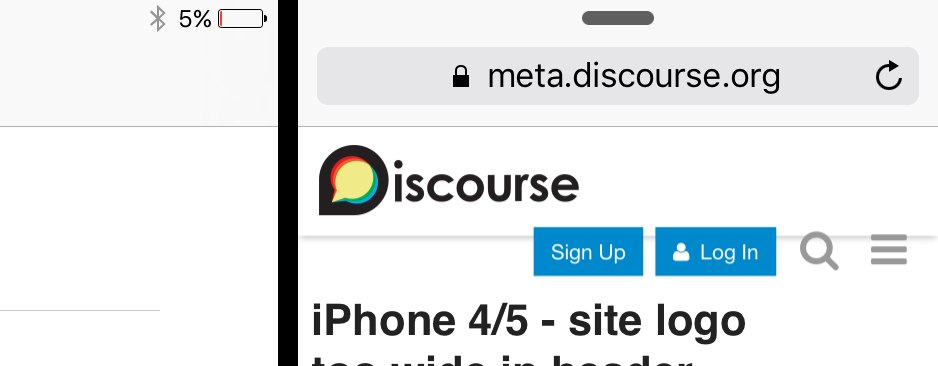
The discussion revolves around the issue of the header logo being too wide on narrower screens, specifically on iPhone 4/5 and split view modes. mr8 first reported the issue and provided screenshots from Safari’s responsive design mode and an iPad Air 2 in split-screen mode. codinghorror pointed out that the problem is a regression, and both buttons (“Sign Up” and “Log In”) should not appear on mobile devices due to lack of space.
mr8 also mentioned that the issue affects iOS 9’s multitasking modes, including split view and slide over. simon suggested a possible solution of giving the button its own row, but codinghorror rejected the idea, citing it would make the fixed header too large.
codinghorror attempted to fix the issue by changing the max-width but encountered another problem with the logo being pushed down. mr8 provided a possible solution using flexbox and proposed a CSS code to fix the issue, which codinghorror acknowledged as a bug that needs to be fixed, ideally with flexbox.
Was playing around in safari’s new responsive design mode and noticed that the logo is a little too wide when logged out pushing the buttons on the right downwards:
I don’t actually have a iPhone 4 or a 5 anymore so I can’t personally test this out on the actual device, but I seem to be able to reproduce it on both meta and try:
The first images are from OS X El Cap’s new responsive design mode in safari emulating an iPhone 4 or 5’s narrow display.
The second one is a screen grab from my iPad air 2 using the split screen mode. I believe discourse automatically sends the desktop version to the iPad even when in split-view/slide-over mode causing the two buttons to show up.
My iPad just died but i’ll try to post some more images tomorrow.