how to add Dreamhost SMTP in discourse. I have a problem with mandrill and Dreamhost SMTP both not sending mail.
AI-generated summary
The discussion revolves around setting up Dreamhost SMTP in Discourse. Aravinthraj_N initially struggles to configure it, and zogstrip suggests sharing the changes made to the app.yml file. After removing password/api keys, Aravinthraj_N shares the configuration.
Aravinthraj_N mentions that the main domain is WordPress, and Discourse is installed as a subdomain. zogstrip points out that the # character in front of the changed lines needs to be removed, as it comments out the lines.
Even after removing the # character, Aravinthraj_N still faces issues with sending mail. zogstrip suggests rebuilding the container, which Aravinthraj_N confirms doing.
codinghorror notes that the comment character was not removed from the config lines. Aravinthraj_N realizes the mistake and corrects it.
Despite correcting the configuration, Aravinthraj_N still faces issues with sending mail. mpalmer confirms that the port number is correct and suggests rebuilding the Docker image, which Aravinthraj_N confirms doing.
Aravinthraj_N ultimately decides to use Zoho SMTP, which works fine. seanmavley requests the configuration used by Aravinthraj_N.
Can you show us what you changed in the app.yml file?
(don’t forget to remove passwords/api keys before posting it publicly)


main domain is wordpress . i have install discourse as sub domain in it
how to do
Handle your first authentication. (This message will go away once you'd validated your first SSO request)
You forgot to remove the “#” character in front of the lines you changed. If you don’t, then they will be considered as comments and will not be taken into account.
omg  thanks bro @zogstrip
I removed “#” but it not sending mail
Did you rebuild the container?
yes i did…

Yet again the comment character was not removed from the config lines.
ok i thoughti should remove “#” that appear option (optional) text. let me do it. now i get it
still its not sending mail.
http://wiki.dreamhost.com/Email_Client_Configuration
can anyone tell port number is correct
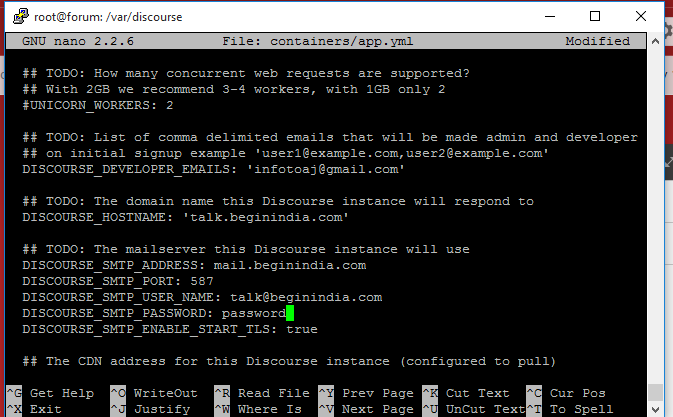

That port should be correct. Have you rebuilt your Docker image?
yes i rebuilt it… ./launcher rebuild app
a bit OT…
Pros and cons of using Dreamhost v Mandrill (if someone already has a mail server at Dreamhost)?
DreamHost mail didn’t work. I use Zoho SMTP it works fine.
What config did you use? Mine isn’t working.