maxtim
2024 年6 月 29 日 06:49
1
我一直在为 Obsidian 开发一个插件 ,并且一直在努力让图片上传。这是我目前为止所做的:
	async uploadImages(imageReferences: string[]): Promise<string[]> {
		const imageUrls = [];
		for (const ref of imageReferences) {
			const filePath = this.app.metadataCache.getFirstLinkpathDest(ref, this.activeFile.name)?.path;
			if (filePath) {
				const file = this.app.vault.getAbstractFileByPath(filePath) as TFile;
				if (file) {
					try {
						const arrayBuffer = await this.app.vault.readBinary(file);
						const blob = new Blob([arrayBuffer]);
						const boundary = '----WebKitFormBoundary7MA4YWxkTrZu0gW';
						let body = '';

						body += `--${boundary}\r\n`;
						body += `Content-Disposition: form-data; name=\"type\"\r\n\r\n`;
						body += "composer\r\n";
						body += `--${boundary}\r\n`;
						body += `Content-Disposition: form-data; name=\"synchronous\"\r\n\r\n`;
						body += "true\r\n";

						body += `--${boundary}\r\n`;
						body += `Content-Disposition: form-data; name=\"files[]\"; filename=\"${file.name}\"\r\n`;
						body += `Content-Type: image/jpg\r\n\r\n`
						body += blob + '\r\n';
						body += `--${boundary}--\r\n`;
						console.log(body)
						const formData = new TextEncoder().encode(body)

						const url = `${this.settings.baseUrl}/uploads.json`;
						const headers = {
							"Api-Key": this.settings.apiKey,
							"Api-Username": this.settings.disUser,
							"Content-Type": `multipart/form-data; boundary=${boundary}`
						};

						const response = await requestUrl({
							url: url,
							method: "POST",
							body: formData,
							throw: false,
							headers: headers,
						});

						//const response = await fetch(url, {
						//	method: "POST",
						//	body: formData,
						//	headers: new Headers(headers),
						//});

						console.log(`Upload Image response: ${response.status}`);
						//if (response.ok) {
						if (response.status == 200) {
							const jsonResponse = response.json();
							console.log(`Upload Image jsonResponse: ${JSON.stringify(jsonResponse)}`);
							imageUrls.push(jsonResponse.url);
						} else {
							new NotifyUser(this.app, `Error uploading image: ${response.status}`).open();
							console.error(`Error uploading image: ${JSON.stringify(response.json)}`);
							//console.error("Error uploading image:", response.status, await response.text());
						}
					} catch (error) {
						new NotifyUser(this.app, `Exception while uploading image: ${error}`).open();
						console.error("Exception while uploading image:", error);
					}
				} else {
					new NotifyUser(this.app, `File not found in vault: ${ref}`).open();
					console.error(`File not found in vault: ${ref}`);
				}
			} else {
				new NotifyUser(this.app, `Unable to resolve file path for: ${ref}`).open();
				console.error(`Unable to resolve file path for: ${ref}`);
			}
		}
		return imageUrls;
	}
我正在构建一个 multipart/form-data,因为 requestURL()formData() 作为参数。只能接受 string 或 arrayBufferfetch(),因为会出现 CORS 错误。使用此代码(以及对 body 的许多小调整)我收到了以下错误:
Error uploading image: {“errors”:[“You supplied invalid parameters to the request: Discourse::InvalidParameters”],“error_type”:“invalid_parameters”}
maxtim
2024 年6 月 30 日 00:07
2
我决定继续更新,因为我现在收到一个不同的错误消息:
	async uploadImages(imageReferences: string[]): Promise<string[]> {
		const imageUrls = [];
		for (const ref of imageReferences) {
			const filePath = this.app.metadataCache.getFirstLinkpathDest(ref, this.activeFile.name)?.path;
			if (filePath) {
				const file = this.app.vault.getAbstractFileByPath(filePath) as TFile;
				if (file) {
					try {
						const imgfile = await this.app.vault.readBinary(file);
						const boundary = genBoundary();
						const sBoundary = '--' + boundary + '\r\n';
						let body = '';
						body += `${sBoundary}Content-Disposition: form-data; name="type"\r\n\r\ncomposer\r\n`;
						body += `${sBoundary}Content-Disposition: form-data; name="synchronous"\r\n\r\ntrue\r\n`;
						body += `${sBoundary}Content-Disposition: form-data; name="files[]"; filename="${file.name}"\r\nContent-Type: image/jpg`;
						console.log(body);

						const eBoundary = '\r\n--' + boundary + '--\\r\\n';
						const bodyArray = new TextEncoder().encode(body);
						const endBoundaryArray = new TextEncoder().encode(eBoundary);

						const formDataArray = new Uint8Array(bodyArray.length + imgfile.byteLength + endBoundaryArray.length);
						formDataArray.set(bodyArray, 0);
						formDataArray.set(new Uint8Array(imgfile), bodyArray.length);
						formDataArray.set(endBoundaryArray, bodyArray.length + imgfile.byteLength);

						const url = `${this.settings.baseUrl}/uploads.json`;
						const headers = {
							"Api-Key": this.settings.apiKey,
							"Api-Username": this.settings.disUser,
							"Content-Type": `multipart/form-data; boundary=${boundary}`
						};

						const response = await requestUrl({
							url: url,
							method: "POST",
							body: formDataArray.buffer,
							throw: false,
							headers: headers,
						});

						console.log(`Upload Image response: ${response.status}`);
						if (response.status == 200) {
							const jsonResponse = response.json();
							console.log(`Upload Image jsonResponse: ${JSON.stringify(jsonResponse)}`);
							imageUrls.push(jsonResponse.url);
						} else {
							new NotifyUser(this.app, `Error uploading image: ${response.status}`).open();
							console.error(`Error uploading image: ${JSON.stringify(response.json)}`);
						}
					} catch (error) {
						new NotifyUser(this.app, `Exception while uploading image: ${error}`).open();
						console.error("Exception while uploading image:", error);
					}
				} else {
					new NotifyUser(this.app, `File not found in vault: ${ref}`).open();
					console.error(`File not found in vault: ${ref}`);
				}
			} else {
				new NotifyUser(this.app, `Unable to resolve file path for: ${ref}`).open();
				console.error(`Unable to resolve file path for: ${ref}`);
			}
		}
		return imageUrls;
	}
我现在收到的错误消息是:
上传图片时出错:SyntaxError:意外的令牌 ‘I’,“Invalid request” 不是有效的 JSON
这让我感到困惑,因为 API 说明我们需要发送 multipart/form-data,但它却说 JSON 无效?也许这与 requestAPI() 有关。
maxtim
2024 年7 月 2 日 22:03
4
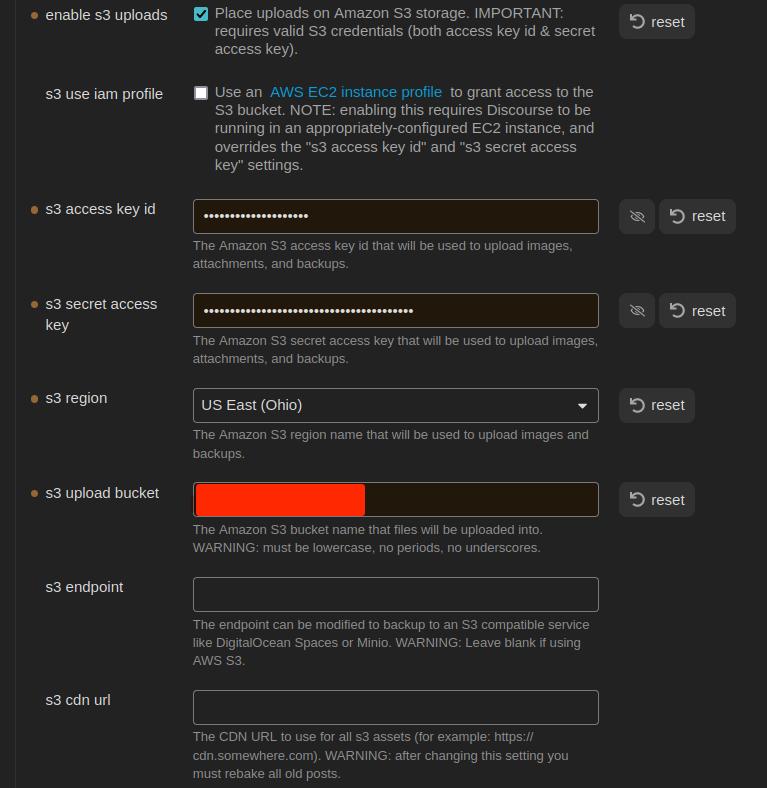
因此,我想尝试一种不同的方法,使用 S3 存储。我遵循了此处 的说明来设置 AWS S3 存储桶。这是我的设置:
这是我的代码:
	async uploadExternalImage(imageReferences: string[]): Promise<string[]> {
		const imageUrls: string[] = [];
		for (const ref of imageReferences) {
			const filePath = this.app.metadataCache.getFirstLinkpathDest(ref, this.activeFile.name)?.path;
			if (filePath) {
				const file = this.app.vault.getAbstractFileByPath(filePath) as TFile;
				if (file) {
					try {
						const url = `${this.settings.baseUrl}/uploads/generate-presigned-put.json`;
						//const imgfile = await this.app.vault.readBinary(file);
						const img = {
							type: "composer",
							file_name: file.name,
							file_size: file.stat.size,
						}
						console.log(JSON.stringify(img));
						const headers = {
							"Content-Type": "application/json",
							"Api-Key": this.settings.apiKey,
							"Api-Username": this.settings.disUser,
						};
						const response = await requestUrl({
							url: url,
							method: "POST",
							body: JSON.stringify(img),
							throw: false,
							headers: headers
						})
						console.log(response.json)
					} catch (error) {
						console.error(`Error uploading: ${error}`);
						//console.log(response.json)
					}
				} else {
					console.error('error')
				}
			} else {
				console.error('error')
			}
		}
		return imageUrls;
	}
现在,我意识到这目前是行不通的,因为我还没有实际上传文件。根据我在文档 中的阅读,我将发送一个包含类型、文件名和文件大小的 JSON 对象。API 应该会回复一个密钥和一个 URL,供我用于实际的文件传输。但此时,我收到了以下错误:
{
    "errors": [
        "The requested URL or resource could not be found."
    ],
    "error_type": "not_found"
}
[
我检查了我的 API 密钥,以确保它具有权限,它确实有。但我还是创建了一个新的。还有一个全局的。都没有用。相同的错误代码。我哪里做错了?
编辑,这是 img 对象:
{"type":"composer","file_name":"face2.jpg","file_size":17342}
simon
2024 年7 月 3 日 06:35
8
我在这里猜测一下,但我不认为配置 CORS 会在这种情况下奏效。来源(至少从 Obsidian 桌面应用程序来看)是 'app://obsidian.md'。我认为 CORS 只能在 Discourse 上配置以处理 HTTP 请求。
@maxtim ,你需要它在移动设备上也能工作,还是只需要能够从桌面应用程序发布到 Discourse 就足够了?我再次猜测一下,但……据我所知,桌面应用程序是一个 Electron 应用程序。它运行在 Chromium 和 Node.js 的组合上。你也许可以使用 node-fetch
maxtim
2024 年7 月 3 日 17:20
9
Thomas Kalka:
Did you follow
I went ahead and tried (proverbial throwing wet noodles to see what sticks). But I was already apprehensive and @simon is correct.
Ideally, the plugin would be available on mobile as well. But for now, if Desktop only is what we get, it’s what we get.
Of course, another solution might be: Obsidian Vault on mobile → sync to Desktop → cli to upload to Discourse. But that does seem a little convoluted.
Basically, the ideal situation is that the Discourse forum replaces the Obsidian Vault. That way users who prefer the forum, can use the forum. Users who prefer (or indeed need an off-line solution) can use Obsidian. I already have some ideas on how a bi-directional sync might work. But I think images/files need to handles in some way first.
Edit:
I’m fairly convinced this will work, but I can’t seem to be able to get the parameters correct:
					try {
						const imgfile = await this.app.vault.readBinary(file);
						const boundary = genBoundary();
						const sBoundary = '--' + boundary + '\r\n';
						let body = '';
						body += `${sBoundary}Content-Disposition: form-data; name=\"type\"\r\n\r\ncomposer\r\n`;
						body += `${sBoundary}Content-Disposition: form-data; name=\"synchronous\"\r\n\r\ntrue\r\n`;
						body += `${sBoundary}Content-Disposition: form-data; name=\"files[]\"; filename=\"${file.name}\"\r\nContent-Type: image/jpg\r\n`;

						const eBoundary = '\r\n--' + boundary + '--\\r\n';
						const bodyArray = new TextEncoder().encode(body);
						const endBoundaryArray = new TextEncoder().encode(eBoundary);

						const formDataArray = new Uint8Array(bodyArray.length + imgfile.byteLength + endBoundaryArray.length);
						formDataArray.set(bodyArray, 0);
						formDataArray.set(new Uint8Array(imgfile), bodyArray.length);
						formDataArray.set(endBoundaryArray, bodyArray.length + imgfile.byteLength);

						const url = `${this.settings.baseUrl}/uploads.json`;
						const headers = {
							"Api-Key": this.settings.apiKey,
							"Api-Username": this.settings.disUser,
							"Content-Type": `multipart/form-data; boundary=${boundary}`
						};

						const response = await requestUrl({
							url: url,
							method: "POST",
							body: formDataArray,
							throw: false,
							headers: headers,
						});

						if (response.status == 200) {
							const jsonResponse = response.json();
							console.log(`Upload Image jsonResponse: ${JSON.stringify(jsonResponse)}`);
							imageUrls.push(jsonResponse.url);
						} else {
							new NotifyUser(this.app, `Error uploading image: ${response.status}`).open();
							console.error(`Error uploading image: ${JSON.stringify(response.json)}`);
						}
maxtim
2024 年7 月 4 日 18:01
10
太棒了!!我做到了!
	async uploadImages(imageReferences: string[]): Promise<string[]> {
		const imageUrls = [];
		for (const ref of imageReferences) {
			const filePath = this.app.metadataCache.getFirstLinkpathDest(ref, this.activeFile.name)?.path;
			if (filePath) {
				const file = this.app.vault.getAbstractFileByPath(filePath) as TFile;
				if (file) {
					try {
						const imgfile = await this.app.vault.readBinary(file);
						const boundary = genBoundary();
						const sBoundary = '--' + boundary + '\r\n';
						const imgForm = `${sBoundary}Content-Disposition: form-data; name=\"file\"; filename=\"${file.name}\"\r\nContent-Type: image/${file.extension}\r\n\r\n`;


						let body = '';
						body += `\r\n${sBoundary}Content-Disposition: form-data; name=\"type\"\r\n\r\ncomposer\r\n`;
						body += `${sBoundary}Content-Disposition: form-data; name=\"synchronous\"\r\n\r\ntrue\r\n`;

						const eBoundary = '\r\n--' + boundary + '--\\r\n';
						const imgFormArray = new TextEncoder().encode(imgForm);
						const bodyArray = new TextEncoder().encode(body);
						const endBoundaryArray = new TextEncoder().encode(eBoundary);

						const formDataArray = new Uint8Array(imgFormArray.length + imgfile.byteLength + bodyArray.length + endBoundaryArray.length);
						formDataArray.set(imgFormArray, 0);
						formDataArray.set(new Uint8Array(imgfile), imgFormArray.length);
						formDataArray.set(bodyArray, imgFormArray.length + imgfile.byteLength);
						formDataArray.set(endBoundaryArray, imgFormArray.length + bodyArray.length + imgfile.byteLength);

						const url = `${this.settings.baseUrl}/uploads.json`;
						const headers = {
							"Api-Key": this.settings.apiKey,
							"Api-Username": this.settings.disUser,
							"Content-Type": `multipart/form-data; boundary=${boundary}`,
						};

						const response = await requestUrl({
							url: url,
							method: "POST",
							body: formDataArray.buffer,
							throw: false,
							headers: headers,
						});

						if (response.status == 200) {
							const jsonResponse = response.json;
							console.log(`Upload Image jsonResponse: ${JSON.stringify(jsonResponse)}`);
							imageUrls.push(jsonResponse.url);
						} else {
							new NotifyUser(this.app, `Error uploading image: ${response.status}`).open();
							console.error(`Error uploading image: ${JSON.stringify(response.json)}`);
						}
					} catch (error) {
						new NotifyUser(this.app, `Exception while uploading image: ${error}`).open();
						console.error("Exception while uploading image:", error);
					}
				} else {
					new NotifyUser(this.app, `File not found in vault: ${ref}`).open();
					console.error(`File not found in vault: ${ref}`);
				}
			} else {
				new NotifyUser(this.app, `Unable to resolve file path for: ${ref}`).open();
				console.error(`Unable to resolve file path for: ${ref}`);
			}
		}
		return imageUrls;
	}
问题在于我构建表单数据的方式。我需要它按以下顺序进行:
我之前将参数放在了图片前面。
我通过分析一个成功的 Python 上传来解决这个问题:
import requests
from requests_toolbelt.multipart.encoder import MultipartEncoder
from requests.models import PreparedRequest


class Discourse:
    def __init__(self):
        self.base_url = "CENSORED"
        self.api_key = "CENSORED"
        self.api_username = "CENSORED"
        self.category = 2

    def post_uploads(self, file_path):
        headers = {
            "Content-Type": "multipart/form-data",
            "Api-Key": self.api_key,
            "Api-Username": self.api_username
        }

        multi = MultipartEncoder(
            fields = {
                'file': ('filename', open(file_path, 'rb'), 'image/jpg'),
                'type': 'composer',
                'synchronous': 'true'
            }
        )

        headers['Content-Type'] = multi.content_type

        request = requests.Request(
            method = "POST",
            url = f"{self.base_url}/uploads.json",
            headers = headers,
            data = multi
        )
        prepared_request = request.prepare()

        print("Headers:")
        for k, v in prepared_request.headers.items():
            print(f"{k}: {v}")

        print(multi.to_string())

        response = requests.post(
            f"{self.base_url}/uploads.json",
            headers=headers,
            params=params,
            data=m
        )

        return response.json()


if __name__ == "__main__":
    ds = Discourse()
    response = ds.post_uploads("/home/tfinley/Pictures/face2.jpg")
    print(response)
现在如何删除孤立的上传项?^_o
Lhc_fl
2024 年7 月 5 日 02:16
13
我来晚了,但我之前为 nodejs 编写了一个第三方 discourse-api:
使用这个库,你可以轻松创建上传。只需这样做:
const { DiscourseApi } = require("node-discourse-api");
const api = new DiscourseApi("https://discourse.example.com");
api.options.api_username = "API_USERNAME";
api.options.api_key = "API_KEY";

api.createUpload(file_path_or_buffer, { filename: "filename" })
(注意:这个库不完整)