Não tenho certeza se isso apareceu em outro lugar (os termos de busca, perfil de cor incorporado, retornam resultados não relacionados.. ).
Eu administro um fórum de fotografia de Software Livre em discuss.pixls.us. Como você pode imaginar, temos usuários muito exigentes quanto à forma como suas imagens são exibidas.
Recentemente, nos deparamos com um problema em um tópico sobre gerenciamento de cores:
Um dos fotógrafos notou que a funcionalidade de buscar imagens vinculadas e armazená-las localmente parece remover as informações de cor das imagens. Embora isso possa ser aceitável para economizar espaço na maioria dos fóruns, para um fórum de fotografia isso é um pouco doloroso.
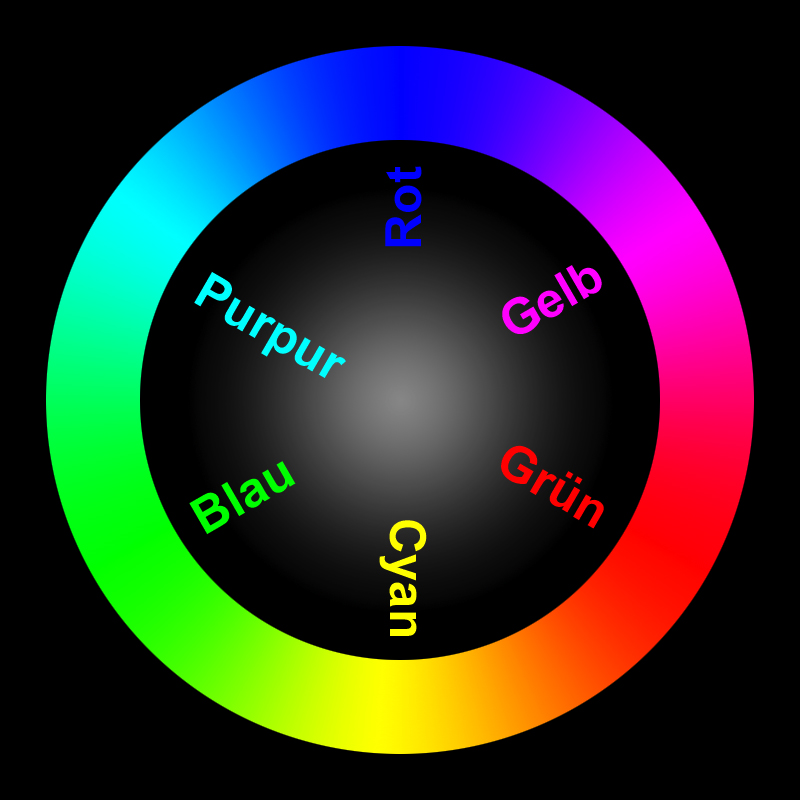
Para ilustrar, esta imagem possui um perfil de cor incorporado rotacionado. Ela deveria mostrar (Rot = Vermelho, Grün = Verde, Blau = Azul):
O processamento de imagem está sendo feito com o ImageMagick? Se sim, há alguma consideração em adicionar uma opção para converter imagens enviadas para sRGB e marcá-las como tal antes de salvar?
(Eu ficaria feliz em investigar mais se alguém puder me apontar as partes relevantes do código que lidam com a conversão de imagem ao fazer o upload?)
@zogstrip - is the conversion being done using imagemagick? If so, would you mind pointing me to the relevant section?
It appears that we may only need an option to convert any images to sRGB if they have a different profile embedded, and then either strip the profile or specify that the image is now sRGB.
I was thinking about this and this seems very specific to a photography forum. If they want to keep all the metadata/color profile, they can just set SiteSetting.strip_image_metadata to false. For majority of the images, keeping the exif or iptc metadata isn’t going to be very useful.
Interesting @Patrick_David, so this is not really a bug… it is a feature request to allow for fidelity when stripping exif tags (or simply misunderstanding an existing feature)
I am going to close this for now, but feel free to open a new topic if you find setting strip_image_metadata to false unacceptable.
 ).
).