pmusaraj
2018 年11 月 9 日 00:55
1
另请参阅:We're upgrading our icons to Font Awesome 6!
我们将很快把一个 分支 合并到 master 中,该分支将 Discourse 升级到 Font Awesome 5.5.0(免费版),并改用 SVG 图标而非图标字体。这是一项重大变更,带来诸多优势,同时对开发者而言也有一处重要变化。
以下是变更的简要概述:
使用 SVG 图标将提供更清晰的图标,更利于无障碍访问,且更易于自定义。更多详情请参阅 这篇 GitHub 文章 。
由于 Font Awesome 图标集在版本 5 中已增长到 1300 多个图标,我们构建了一个内部 API,向客户端交付所有 FA 图标的子集,即仅交付该 Discourse 实例实际使用的图标。
该子集的体积更小:目前已在 Meta 站点运行,大小仅为 27.5 KB,而 FA 4.7 的图标字体为 75.7 KB。
插件和主题(包括主题组件)可以向该集合添加额外的 FA 图标。
群组徽章(flair)和徽章图标将自动包含在集合中,站点管理员还可以使用一个名为 svg icon subset 的新站点设置来注册他们选择的图标,并将其添加到站点的子集中。
破坏性变更 :插件和主题开发者不再可以使用 <i class="fa fa-icon"></i> 或覆盖 :before 伪选择器来引用或替换图标;现在应改用 Discourse 函数在页面中注入 SVG。
下文提供了如何更新插件和主题以使用新图标集的说明。
Font Awesome 5 引入了许多新图标,同时也进行了一些命名变更。有关变更的完整讨论,请参阅 Font Awesome 升级文档 。主要变化是 FA 中的图标现在分为不同的样式。共有三种样式:
solid(默认)-- fas
regular – far
brands – fab
对于 regular 或 brands 样式,FA 5 分别引入了新的类前缀 far 和 fab。因此,要使用 regular 或 brands 样式中的图标,我们需要采用新的命名约定:"far fa-address-book" 或 "fab fa-facebook"。(solid 图标仍可像以前一样引用为 "fa-icon-name")。
为了将三种样式打包到一个 SVG Sprite 中,Discourse 内部将 regular 和 brand 样式的图标转换为 far-icon-name 和 fab-icon-name。插件、主题、群组徽章和徽章可以使用标准的 Font Awesome 5 命名约定。站点管理员通过 svg icon subset 站点设置向集合添加图标时,必须 使用内部命名约定。
添加新图标
插件 :
在插件的 plugin.rb 文件中注册图标:
register_svg_icon "user-times" if respond_to?(:register_svg_icon)
(注意:您需要重启 Rails 开发环境中的服务器才能使此更改生效。)
主题或组件 :
添加一个名称包含 _icon 的字符串或列表设置,例如:
svg_icons:
  default: 'question-circle|wallet'
  type: 'list'
  list_type: 'compact'
Discourse 将会把该主题设置中定义的图标包含到子集中。
在 JavaScript 中使用图标
插件 :
import { iconNode } from "discourse-common/lib/icon-library";
...
let icon = iconNode('user-times');
或使用 iconHTML 辅助函数:
import { iconHTML } from "discourse-common/lib/icon-library";
...
let icon = iconHTML('user-times');
主题或组件 :
const { iconNode } = require("discourse-common/lib/icon-library");
...
let icon = iconNode('user-times');
或使用 iconHTML 辅助函数:
const { iconHTML } = require("discourse-common/lib/icon-library");
...
let icon = iconHTML('user-times');
这些辅助函数还可以接受第二个参数,包含如 title 或 class 等属性。这在 插件和主题/组件 中的工作方式相同,例如:
iconHTML('user-times', { class: "reply-to-glyph" })
在 Handlebars 模板中使用图标
在 Handlebars 模板中,您可以像这样使用 d-icon:
{{d-icon 'user-times'}}
这在 插件和主题/组件 中的工作方式也相同。
如果您需要比 Font Awesome 提供的更多图标,可以在插件或主题中添加自己的 SVG 图标。请参阅 此 SVG Sprite 以了解如何构建您的 Sprite。(它本质上是一组 <symbol> 元素,每个元素都有唯一的 ID。)
在主题和组件中 :将 SVG Sprite 添加到 /assets 文件夹,并在 about.json 中使用变量名 icons-sprite 进行引用。对于名为 my-icons.svg 的 Sprite,您的 assets.json 应包含以下内容:
"assets": {
   "icons-sprite": "/assets/my-icons.svg"
}
您也可以通过 UI 将 SVG Sprite 添加到主题或组件中。执行此操作时,请确保 SCSS 变量名设置为 icons-sprite。截图如下:
在插件中 :只需将 SVG Sprite 文件包含在 plugins/your-plugin-name/svg-icons 文件夹中。重启服务器(如果在开发环境中)或在 Docker 容器中重建站点,您的自定义图标将自动可用。
为避免与 Font Awesome 图标 ID 发生任何潜在冲突,您应在插件或主题中为自定义图标的 ID 添加前缀。
80 个赞
Could someone elaborate on how to update a theme component? I’m very green at this and haven’t been able to make sense of all this. I’m currently using as such:
<a href="javascript:history.back()" class="app-go-back"><i class="fas fa-arrow-left" aria-hidden="true"></i></a>
This may be unrelated, but the following css has broken since the latest build:
.b-header .nav-pills > li:nth-child(3) a::before{
	content: "\f1ea";
}
As you can see here , only this one icon has broken, I double checked and f1ea is still valid in FA5. Is there a better way to achieve this with the new changes?
2 个赞
Stephen
2018 年11 月 27 日 22:17
3
From what I can see all of the icons are broken:
2 个赞
Hmm interesting, they must be cached on my side. Is the option of using this gone now @pmusaraj ?
2 个赞
pmusaraj
2018 年11 月 27 日 22:28
5
For HTML code directly, you can replace:
<i class="fas fa-arrow-left" aria-hidden="true"></i>
with:
<svg class="fa d-icon d-icon-arrow-left svg-icon svg-node" aria-hidden="true"><use xlink:href="#arrow-left"></use></svg>
Note that “arrow left” is in two places, in the class and in the <use> tag. Also, this icon is in the solid style in FA5, but for icons in regular or brands, you need to use the prefixes far- and fab-, respectively.
In your header links, you can’t use :before anymore, because SVG sprites can’t be added to pseudo selectors. But you can use this component: Header Submenus (it’s been updated recently, and is FA5-compatible).
15 个赞
Good job.
How can I change this code to work with Font Awesome 5?
 a[href="/new"]:before {
      display: inline-block;
      font-family: FontAwesome;
      font-style: normal;
      font-weight: normal;
      line-height: 1;
      -moz-osx-font-smoothing: grayscale;
      content: "\f0ca";
      margin-right: 3px
    }
2 个赞
pmusaraj
2018 年11 月 28 日 14:24
7
What is creating this a[href="/new"] element? If you are adding it in your theme, via JS, then it’s easier to add the icon there, instead of using the CSS pseudo selector. One of iconHTML or iconNode above should do the trick.
5 个赞
I’m very confused. I tried this and it worked:
But when I switched “left” to “right” in both places, it didn’t work. Am I missing something? Here’s the code I tried:
<svg class="fa d-icon d-icon-arrow-right svg-icon svg-node" aria-hidden="true"><use xlink:href="#arrow-right"></use></svg>
(I was actually trying to get the church icon to work, so if that’s going to require something else, let me know.)
1 个赞
pmusaraj
2018 年11 月 28 日 14:35
9
The arrow-right icon is not included by default (because it isn’t used elsewhere in Discourse), so you will need to add it to the svg icons subset site setting. Same for the church icon. (FA5 comes with thousands of icons, so we use a subset to avoid loading all the icons all the time. It saves precious bytes
17 个赞
Makes complete sense. Thanks much.
2 个赞
pmusaraj:
The arrow-right icon is not included by default (because it isn’t used elsewhere in Discourse), so you will need to add it to the svg icons subset site setting. Same for the church icon. (FA5 comes with thousands of icons, so we use a subset to avoid loading all the icons all the time. It saves precious bytes
I was banging my head against the wall trying to figure out why the right arrow wasn’t displaying last night! FYI I don’t if this is because it is a work in progress, but the instructions say to use far but this did not display the icon, I had to add it as fa-right-arrow for it to display.
3 个赞
pmusaraj
2018 年11 月 28 日 14:55
12
Sorry about that, I have updated the description text for that setting to include: “Use prefix ‘fa-’ for solid icons, ‘far-’ for regular icons and ‘fab-’ for brand icons.”
8 个赞
I want to add icons to the navigation bar – and I used a[href="/new"] for meta.discourse.org/new or a[href="/categories"] for Categories - Discourse Meta
// Add Font Awesome 5 Icons to the navigation bar

a[href="/new"]:before {
  font-family: "Font Awesome 5 Free";
  font-weight: 900;
  content: "\f007";
  display: inline-block;
  font-style: normal;
  font-variant: normal;
  text-rendering: auto;
  line-height: 1;
  margin-right: 3px;
  -webkit-font-smoothing: antialiased;
}
But I’m doing something wrong and it’s not working.
2 个赞
We are no longer using Font Awesome as a font, so using the old method of pseudo selectors in CSS will not work.
If you don’t want to touch javascript and want a CSS-only solution, you can use an SVG as an image:
a[href="/new"]:before {
   content: url(/link-to-file.svg);
  // display inline-block, etc still needed
}
or you can inline the SVG’s code (which I believe has some compatibility issues with older browsers)
a[href="/new"]:before {
   content: url('data:image/svg+xml; utf8, <svg xmlns="http://www.w3.org/2000/svg" aria-hidden="true" data-prefix="fas" data-icon="grin-tongue-wink" class="svg-inline--fa fa-grin-tongue-wink fa-w-16" role="img"  height="25" width="25" viewBox="0 0 496 512"><path fill="white" d="M344 184c-13.3 0-24 10.7-24 24s10.7 24 24 24 24-10.7 24-24-10.7-24-24-24zM248 8C111 8 0 119 0 256c0 106.3 67 196.7 161 232-5.6-12.2-9-25.7-9-40v-45.5c-24.7-16.2-43.5-38.1-47.8-63.8-2-11.8 9.3-21.5 20.7-17.9C155.1 330.5 200 336 248 336s92.9-5.5 123.1-15.2c11.5-3.7 22.6 6.1 20.7 17.9-4.3 25.7-23.1 47.6-47.8 63.8V448c0 14.3-3.4 27.8-9 40 94-35.3 161-125.7 161-232C496 119 385 8 248 8zm-56 225l-9.5-8.5c-14.8-13.2-46.2-13.2-61 0L112 233c-8.5 7.4-21.6.3-19.8-10.8 4-25.2 34.2-42.1 59.9-42.1S208 197 212 222.2c1.6 11.1-11.6 18.2-20 10.8zm152 39c-35.3 0-64-28.7-64-64s28.7-64 64-64 64 28.7 64 64-28.7 64-64 64zm-50.9 102.6c-14.4-6.5-31.1 2.2-34.6 17.6l-1.8 7.8c-2.1 9.2-15.2 9.2-17.3 0l-1.8-7.8c-3.5-15.4-20.2-24.1-34.6-17.6-.9.4.3-.2-18.9 9.4v63c0 35.2 28 64.5 63.1 64.9 35.7.5 64.9-28.4 64.9-64v-64c-19.5-9.6-18.2-8.9-19-9.3z"></path></svg>');
}
8 个赞
I’ve hacked my way through this and I’ve got everything working again except the right arrow on my mobile navigation component for the app, I can’t get it to right align to save my life. I tried using flex with flex-end to no avail. Please forgive my horrible attempt at this…
Here is my components code:
/body
<div id="mobilenav">
<a href="javascript:history.back()" class="app-go-back">Back</a>
<a href="javascript:history.forward()" class="app-go-forward">Forward</a>
		<div id="mobilenavleft">
			<svg class="fa d-icon d-icon-arrow-left svg-icon svg-node" aria-hidden="true">
			<use xlink:href="#arrow-left"></use>
		</svg>
	</div>
		<div id="mobilenavright">
			<svg class="fa d-icon d-icon-arrow-right svg-icon svg-node" aria-hidden="true">
			<use xlink:href="#arrow-right"></use>
	</svg>
</div>
CSS
@media only screen and (min-width:1024px) {
div#mobilenav {
            display: none !important;
        }
}

/* move up compose window on mobile */
@media only screen and (max-width:1024px) {
#reply-control.open.edit-title {
            margin-bottom: 29px;
            height: 85%;
            margin-top: -29px;
        }

.timeline-container.timeline-fullscreen.show {
            margin-bottom: 29px;
        }
#reply-control.open {
            margin-bottom: 29px;
        }
.docked-composer .docked-editor {
    margin-bottom: 29px;
}
#topic-progress {
    margin-bottom: 33px;
}
.sticky-footer {
    margin-bottom: 33px;
}
}

/* display on ipad in landscape orientation */
@media only screen
and (min-device-width : 768px)
and (max-device-width : 1024px)
and (orientation : landscape) {
div#mobilenav {
            display: block;
        }
}

div#mobilenav {
box-shadow: 0px -1px 5px 0px rgba(0,0,0,0.15);
position: fixed;
bottom: 0px;
width: 100%;
height: auto;
border: none;
z-index: 99999999999;
background-color: #2A2B2F;
}

.app-go-forward {
text-align: right;
padding: 5px 3%;
width: 44%;
float: right;
display: inline-block;
}

.app-go-back {
text-align: left;
padding: 5px 7%;
width: 44%;
float: left;
display: inline-block;
}

div#mobilenav {
display: flex;
flex-direction: row;
flex-wrap: nowrap;
}

div#mobilenavleft {
box-shadow: 0px -1px 5px 0px rgba(0,0,0,0.15);
position: fixed;
bottom: 0px;
width: 1%;
height: auto;
border: none;
z-index: 99999999999;
padding-bottom: 4px;
padding-left: 5px;
}

div#mobilenavright {
box-shadow: 0px -1px 5px 0px rgba(0,0,0,0.15);
position: fixed;
bottom: 0px;
width: 1%;
height: auto;
border: none;
z-index: 99999999999;
padding-bottom: 4px;
padding-right: 5px;
justify-content: flex-end;
}
If anyone wants to help, my site is here and this component only displays below 1024px obviously. The left arrow looks perfect and the right arrow should mirror this.
1 个赞
It’s because you’re using position: fixed on the arrow, if you add
div#mobilenavright {
  right: 5px;
}
Then it should be where you want it.
Sidenote: You don’t really need to use position: fixed for those arrows at all because they’re already within a fixed container, if you put the arrows inside of your a tags containing the “forward” and “back” text the layout might be a bit easier to manage in general.
10 个赞
awesomerobot:
If you don’t want to touch javascript and want a CSS-only solution, you can use an SVG as an image:
a[href="/new"]:before {
   content: url(/link-to-file.svg);
  // display inline-block, etc still needed
}
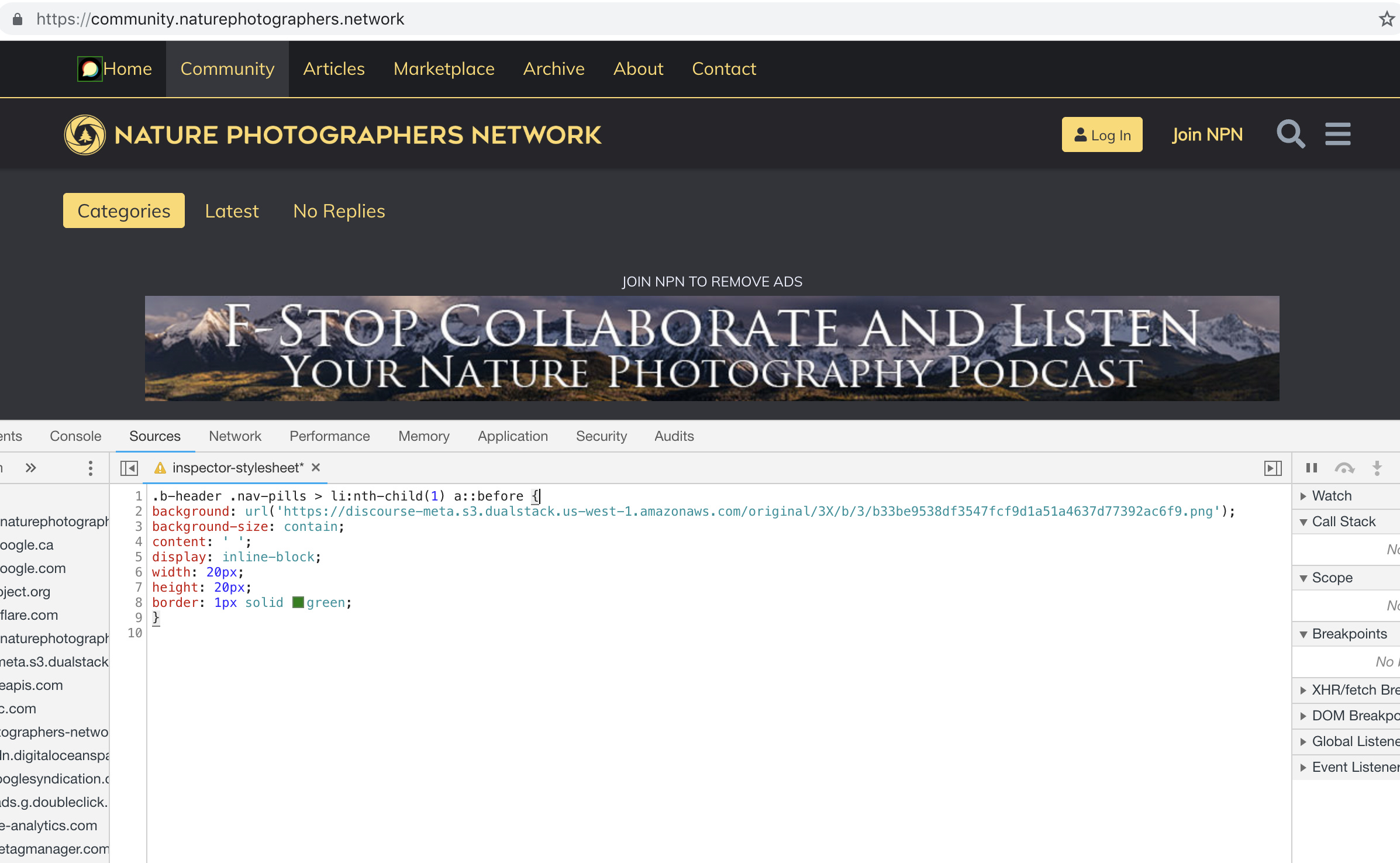
I’m trying to use this with the Brand Header Theme Component but not having any success with this:
.b-header .nav-pills > li:nth-child(1) a::before{
content: url(https://npn.sfo2.cdn.digitaloceanspaces.com/misc/home-solid.svg);
display: inline-block;
width: 20px;
height: 20px;}
I’ve also tried:
.b-header .nav-pills > li:nth-child(1) a::before {
display: block;
  content: ' ';
  background-image: url('https://npn.sfo2.cdn.digitaloceanspaces.com/misc/home-solid.svg');
  background-size: 20px 20px;
  height: 20px;
  width: 20px;
}
Anyone have ideas?
2 个赞
pmusaraj
2018 年11 月 29 日 23:12
18
Something is wrong with your SVG image. The screenshot below works with the Discourse logo, but not with that SVG file:
2 个赞
It might be because the SVG doesn’t have any height/width defined (in the SVG markup itself, not the CSS)
Can you right click this one below, save it, and try again… I’ve added some dimensions to it.
8 个赞
This does seem to work, dare I ask how? Also, fill: does not seem to work on this to change the color, it just displays as black.
For reference, my code:
.b-header .nav-pills > li:nth-child(1) a::before {
display: inline-block;
content: ' ';
background: url('https://global.discourse-cdn.com/meta/original/3X/a/6/a61b08e7f318170faee755cb6dcd48d6f6d7413d.svg');
background-size: contain;
height: 20px;
width: 20px;
border: 1px solid blue;
fill: blue;
}
2 个赞


 )
)