I’m currently using this: GitHub - davidmh/discourse-giphy: Giphy integration for discourse · GitHub
إعجاب واحد (1)
The plugin has been updated to support SVG icons with Font Awesome 5
إعجابَين (2)
I’ve added this plugin following the guidelines on the github page, but it doesn’t work! I’ve also added it under hooks, but the problem persists. How can I properly install it, or uninstall if it doesn’t work eventually? Thanks in advance!
To uninstall, you simply remove it from your app.yml.
Are you running on HTTPS? Did you add the template to support a reverse proxy?
3 إعجابات
Fixed! Thank you very much!
3 إعجابات
Thanks for this great plugin.
I just have a little issue, the icon to insert a Gif doesn’t appear in the window, do you have any idea where it could come from ?

Core’s icons changed to be based on fontawesome 5 sets, which is probably why the icon’s missing. The plugin would need to be updated here to support it.
3 إعجابات
I don’t think that is it… it already supports FA 5.
3 إعجابات
On latest, on my sandbox, the icon works fine…

I need to know the Discourse version and if there are any console related errors on your site.
4 إعجابات
إذن… هل لا يزال هذا يعمل لأي شخص؟
لم ألقِ نظرة على هذه الإضافة منذ بضع سنوات، لكنني فعلت ذلك اليوم… والعالم أصبح الآن يستخدم https - وبعد استخدام حل الوكيل العكسي، لا تزال الـ JSON المُرجعة تحتوي على عناوين URL بـ http://، لذا فهي لا تظهر بسبب المحتوى المختلط؟
4 إعجابات
تحديث: قمنا بإصلاح المشكلة المذكورة أعلاه من خلال إجراء ما يلي في تكوين nginx الخاص بنا.
(إخلاء مسؤولية: لا أعرف ما إذا كانت صورة Docker تتضمن ngx_http_sub_module)
  location /replygif/ {
        proxy_pass http://replygif.net/;
        proxy_set_header Accept-Encoding "";
        sub_filter http://replygif.net/ /replygif/;
        sub_filter_once off;
        sub_filter_types application/json;
  }
يجب أن يكون عنوان URL الخاص بـ API في إعداداتك هو https://yourforumname/replygif/api/ إذا كنت تستخدم هذا.
@PaulinaMX هذا يعمل الآن على منتداك
7 إعجابات
@RGJ شكرًا جزيلاً لك  تعمل التصنيفات بشكل مثالي، ولكن يبدو أن الوسوم لا تعمل.
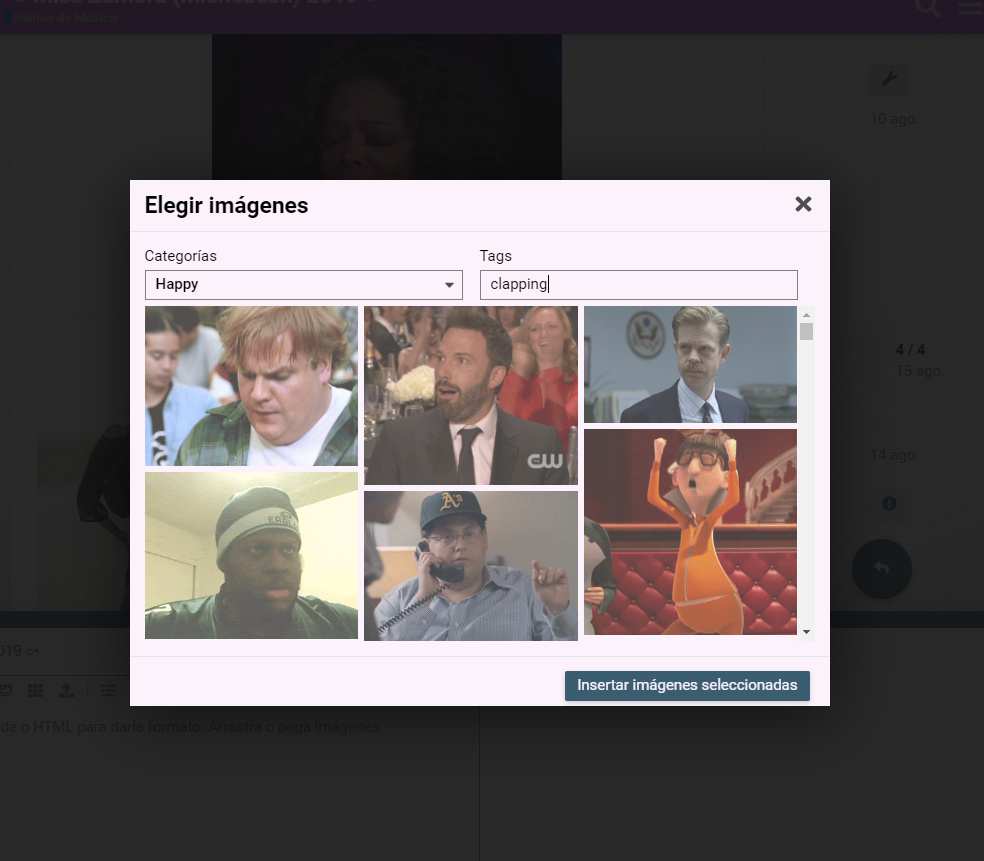
يبدو أن هذه مشكلة في الإضافة نفسها. @cpradio هل لديك أي فكرة؟
إعجاب واحد (1)
@cpradio نحن بحاجة إليك
هل سيؤدي هذا إلى إصلاح مشكلة blocked:mixed-content، حيث تقوم المتصفحات الحالية بحظر محتوى HTTP من المواقع التي تستخدم HTTPS؟
يجب عليك اتباع تعليمات الوكيل.
يوجد قسم في ملف README يتعلق بـ HTTPS.
TL;DR: تم تكوين الوكيل هناك، لكنه لا يحل المشكلة، لأن الروابط غير المخولة عبر الوكيل لا تزال تُجلب.
التفاصيل:
فحصت الخادم، وقد تم تكوينه وفقًا لتعليماتك. دخلت إلى الحاوية نفسها لفحص ملف discourse.conf ووجدت أن إعداد تمرير الوكيل (proxy pass) تم بشكل صحيح.
باستخدام أدوات مطوري Chromium (شبكة)، أرى استعلامات تمر عبر الوكيل، مثل: https://mycompany.com/replygif/gifs?api-key=39YAprx5Yi&reply=Angry. تُرجع استجابة JSON تحتوي على عناوين URL مثل http://replygif.net/i/1032.gif.
بعد ذلك، يقوم اتصال الشبكة من متصفح العميل بطلب صور مصغرة، مثل: http://replygif.net/thumbnail/176.gif. وهذا يفشل بالطبع لأن سياسة محتوى الأمان (CSP) تمنع المحتوى المختلط (HTTP + HTTPS).
لا أعرف كيفية عمل تطبيق Ember.js، لكن استنادًا إلى حركة مرور الشبكة، يبدو أن هناك استعلامات لجلب JSON يحتوي على عناوين URL للصور، والتي تُستخدم لاحقًا لجلب الصور المصغرة، لكن هذه الروابط نفسها لن تعمل، ولن يحل تمرير الوكيل (proxypass) هذه المشكلة.
لحل هذه المشكلة، يبدو أنه يجب تكوين تطبيق Ember نفسه لإعادة كتابة مراجع عناوين URL هذه لتطابق نفس العنوان المرجعي عبر الوكيل، مثل: https://mycompany.com/replygif/thumbnail/176.gif.
آراؤك؟ اقتراحاتك؟
إعجاب واحد (1)
لا يبدو أن هناك الكثير الذي يمكنني فعله حيال ذلك، حيث يبدو أن replygif لا يزال لا يدعم HTTPS.
إعجابَين (2)
أنا مبتدئ في هذا المجال، هل هناك دليل خطوة بخطوة لإعداد وكيل عكسي لهذا الملحق؟
موقع آمن، مستضاف على DigitalOcean، إذا كان ذلك يساعد.
نعم، يشرح ملف readme الخطوات بالتفصيل. بل إنه يحتوي على أمر wget لوضع القالب في المكان الصحيح، ثم لا يتبقى سوى تحديث ملف app.yml لاستخدام القالب.
إعجابَين (2)