Set up Microsoft Teams notifications using the discourse-chat-integration plugin

This guide describes how to set up the Microsoft Teams provider included in discourse-chat-integration .

Setup Microsoft Teams

In Microsoft Teams:

  1. From the vertical navigation bar on the left, click the ellipsis button () and select Workflows from the menu.

  2. Click the + Build from scratch button on the right top corner of the Workflows page.

  3. In the custom workflow modal, search for webhook and select the When a Teams webhook request is received trigger.

  4. In the Who can trigger the flow field, select Anyone. [1]

  5. Click + New step.

  6. Next, search for card and select the Post card in a chat or channel action.

  7. Fill out the fields as follows:

  • Post as: Choose who the messages should come from; you can leave this set to the default value or choose User to make the message appear from you.

  • Post in: Select Channel, which will make more fields appear:

    • Team: Select the desired team.
    • Channel: Select the desired channel.
    • Adaptive Card: Click into the input, which will open a pop-up (described in next step).

  1. Click inside the Adaptive Card field to open a pop-up [2] for inserting dynamic content or an expression. Switch to the Expression tab and type triggerBody() in the expression field.

  2. Click Save.

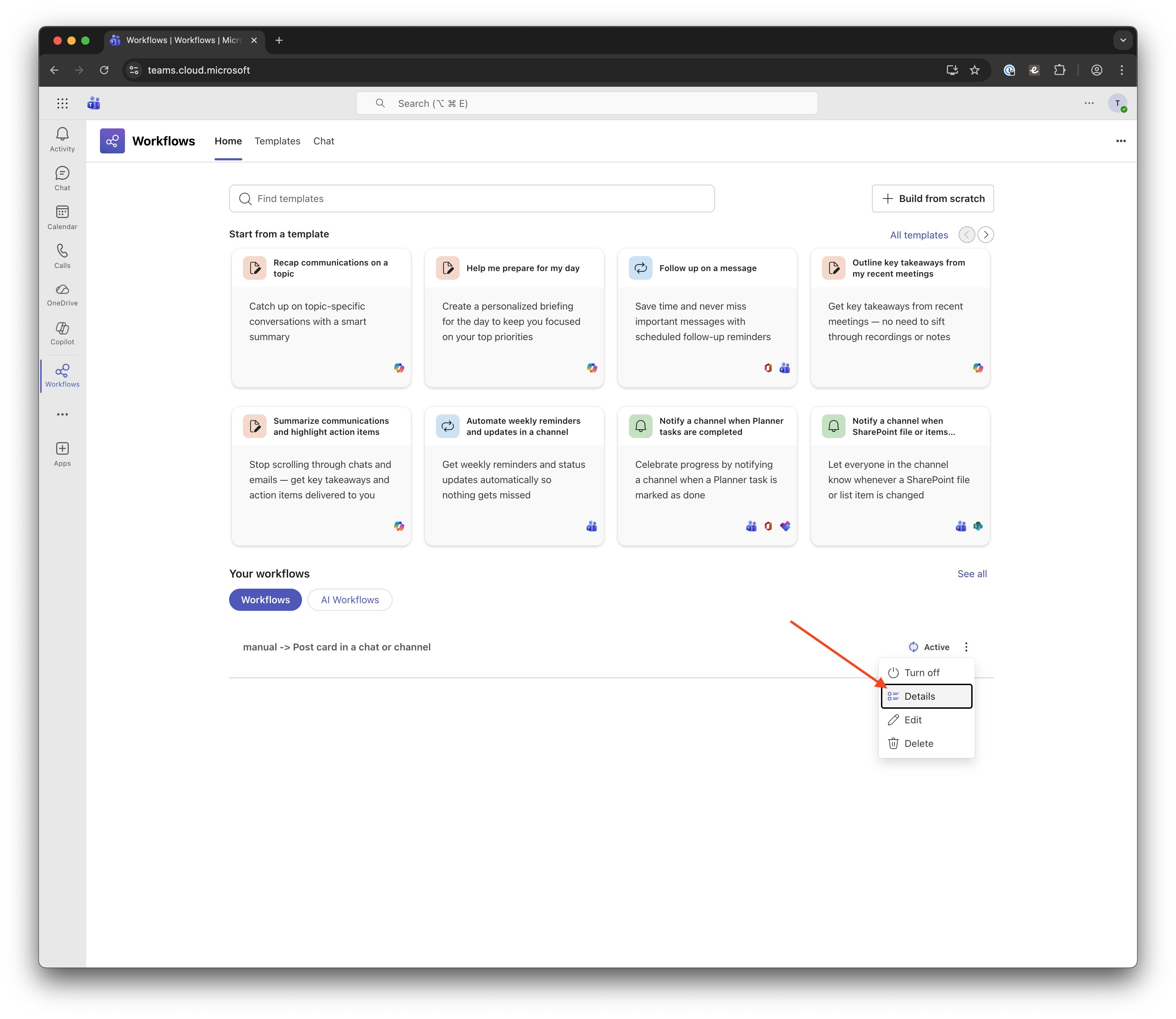
  3. You should now see a workflow named manual → Post card in a chat or channel in your list. Click the vertical ellipsis button on this workflow and select Details from the drop-down menu.

  4. On this page, click Copy webhook link to grab the link for the next steps. While you’re here, you can optionally edit the workflow name to reflect its purpose for others on your team.

Setup Discourse

Now, back to Discourse:

  1. In your Discourse admin area, enable the Chat integration enabled setting to turn on the Chat Integration plugin and the Chat integration Teams enabled setting to support Microsoft Teams.

  2. In the sidebar, find the Plugins section and click Chat Integrations, then click + Create Channel.

  3. In the Edit Channel modal, fill out the fields as follows:

  • Name: Enter a name that makes it clear which Microsoft Teams channel you’re connecting to; it doesn’t need to be a perfect match.
  • Webhook URL: Paste the webhook URL you copied in step 11 of the Teams setup section above.
  1. Click Save Channel.

Test the integration

Now it’s time to make sure everything is working as expected.

  1. In Discourse, click Test on the newly created channel.

  2. Search for a topic by ID, title, or URL; select the desired topic; and click Send Test Message.

  3. In Microsoft Teams, a new message with information from the topic should be posted in the channel:

Optional: Set up Rules for your channel

Now that you’ve confirmed everything is working, you can go back to Discourse and setup additional rules for your channel to customize the message.

Debugging

If you do not see the message in Microsoft Teams as expected, go to the Workflow Details page (see step 10 in the Teams setup section above) and check the Run history section. This should show logs of each message run.

Click the failed run, which will take you to the Power Automate area where you can see an error message at the top of the page. (In the below screenshot, the run was successful, but the arrow indicates where the error will appear on a failed run.)

This should detail the problem, which you can then fix or share with us here so we can help.


    1. Discourse doesn’t currently support authenticated webhooks to Teams, so only the “Anyone” option works.
    ↩︎
  1. if the popup doesn’t appear, type anything in the Adaptive Card field temporarily, save the workflow, open it again for editing and the popup should appear. ↩︎

Last edited by @lindsey 2026-03-03T13:34:37Z

Check documentPerform check on document:
12 Likes

Just tried it out and it seemed to work at first, but only the first time I clicked on the test button.
Rules are set up as follows:

  • Type: normal
  • Filter: All topics(?) and replies (translating from German here)
  • Category: Sandbox

When I wrote a reply to the test topic in my Sandbox category I got a warning sign when I went to my chat integrations, but when clicking on the warning triangle it says unknown error... with the error message bein null.

When I try to send another test notification it gives me another error 500 internal server error

Any hints on where to start trouble shooting this are welcome. If this should be posted elsewhere (e.g. under the chat integration plugin page), or made a separate topic, feel free to move it accordingly or let me know.

3 Likes

Hi @SHilser - please can you check /logs on your site, and see if there is anything relevant there?

2 Likes

There’s two things that seem relevant.

  • Socket Error
  • Internal Server Error

I copied the logs below (I replaced my domain name with mydomain.tld)

Socket Errror

Message (4 copies reported)

SocketError (Failed to open TCP connection to outlook.office.com:443 (getaddrinfo: Temporary failure in name resolution))
app/controllers/application_controller.rb:340:in `block in with_resolved_locale'
app/controllers/application_controller.rb:340:in `with_resolved_locale'
lib/middleware/omniauth_bypass_middleware.rb:68:in `call'
lib/content_security_policy/middleware.rb:12:in `call'
lib/middleware/anonymous_cache.rb:336:in `call'
config/initializers/100-quiet_logger.rb:19:in `call'
config/initializers/100-silence_logger.rb:31:in `call'
lib/middleware/enforce_hostname.rb:22:in `call'
lib/middleware/request_tracker.rb:176:in `call'

Backtrace

/usr/local/lib/ruby/2.6.0/net/http.rb:949:in `rescue in block in connect'
/usr/local/lib/ruby/2.6.0/net/http.rb:946:in `block in connect'
/usr/local/lib/ruby/2.6.0/timeout.rb:93:in `block in timeout'
/usr/local/lib/ruby/2.6.0/timeout.rb:103:in `timeout'
/usr/local/lib/ruby/2.6.0/net/http.rb:945:in `connect'
/usr/local/lib/ruby/2.6.0/net/http.rb:930:in `do_start'
/usr/local/lib/ruby/2.6.0/net/http.rb:919:in `start'
/usr/local/lib/ruby/2.6.0/net/http.rb:1470:in `request'
rack-mini-profiler (2.0.4) lib/patches/net_patches.rb:19:in `block in request_with_mini_profiler'
rack-mini-profiler (2.0.4) lib/mini_profiler/profiling_methods.rb:33:in `step'

Env

HTTP HOSTS: mysite.tld

Internal Server Error

Message (4 copies reported)

Error: Internal Server Error
Url: https://mysite.tld/assets/ember_jquery-1ed3f3559e6f967733b4088aa729ff7039dff2c09c5a5f787a214b016f58aabc.js
Line: 1
Column: 267890
Window Location: https://mysite.tld/admin/plugins/chat/teams

Backtrace

o/t</<@https://mysite.tld/assets/ember_jquery-1ed3f3559e6f967733b4088aa729ff7039dff2c09c5a5f787a214b016f58aabc.js:1:267890
o/t<@https://mysite.tld/assets/ember_jquery-1ed3f3559e6f967733b4088aa729ff7039dff2c09c5a5f787a214b016f58aabc.js:1:267993
o@https://mysite.tld/assets/ember_jquery-1ed3f3559e6f967733b4088aa729ff7039dff2c09c5a5f787a214b016f58aabc.js:1:268074
trigger@https://mysite.tld/assets/ember_jquery-1ed3f3559e6f967733b4088aa729ff7039dff2c09c5a5f787a214b016f58aabc.js:1:545343
A</e._onError/<@https://mysite.tld/assets/ember_jquery-1ed3f3559e6f967733b4088aa729ff7039dff2c09c5a5f787a214b016f58aabc.js:1:550189
f</t.invoke@https://mysite.tld/assets/ember_jquery-1ed3f3559e6f967733b4088aa729ff7039dff2c09c5a5f787a214b016f58aabc.js:1:490190
f</t.flush@https://mysite.tld/assets/ember_jquery-1ed3f3559e6f967733b4088aa729ff7039dff2c09c5a5f787a214b016f58aabc.js:1:489198
p</t.flush@https://mysite.tld/assets/ember_jquery-1ed3f3559e6f967733b4088aa729ff7039dff2c09c5a5f787a214b016f58aabc.js:1:491205
t</t._end@https://mysite.tld/assets/ember_jquery-1ed3f3559e6f967733b4088aa729ff7039dff2c09c5a5f787a214b016f58aabc.js:1:496596Here
t</t.end@https://mysite.tld/assets/ember_jquery-1ed3f3559e6f967733b4088aa729ff7039dff2c09c5a5f787a214b016f58aabc.js:1:493157

Env

HTTP HOSTS: mysite.tld

Thanks for the help :slight_smile:

2 Likes

That suggests that your server is having trouble with DNS resolution. Are you using a standard docker-based installation? Or is this in development?

3 Likes

Just set it up about a week ago on a separate DigitalOcean droplet (one-click installation, now I’m on Version: 2.6.0.beta1 (310952fd6a). I use a subdomain and have the DNS records also on DigitalOcean. I have an A-Record, pointing to the IP, MX-Record pointing to the sub-domain name for reply by email as per these instruction). Only thing there is that I don’t have a DMARC Record published.

That’s all I can think of that I did in relation to DNS stuff. However, so far everything worked as expected. The site is set up, I can reach it via the sub-domain name, log-in, create topics (even via email), etc.

I’m just startled the first message made it through, but subsequent ones didn’t :man_shrugging:

2 Likes

When I say DNS resolution, I mean your server is having trouble contacting outlook.office.com. The setup of your forum’s DNS records shouldn’t affect that.

Can you try connecting to your server via SSH and running

host outlook.office.com

You should get something like

outlook.office.com is an alias for substrate.office.com.
substrate.office.com is an alias for substrate.ms-acdc.office.com.
substrate.ms-acdc.office.com is an alias for afd-k.office.com.
afd-k.office.com is an alias for outlook-office-com.k-0002.k-msedge.net.
outlook-office-com.k-0002.k-msedge.net is an alias for k-0002.k-msedge.net.
k-0002.k-msedge.net has address 13.107.18.11
k-0002.k-msedge.net has IPv6 address 2620:1ec:c::11
3 Likes

When I enter

host -d outlook.office.com

I get the following:

Trying "outlook.office.com"
Host outlook.office.com not found: 2(SERVFAIL)
Received 36 bytes from 127.0.0.53#53 in 43 ms

When adding port :443 I get another error

Trying "outlook.office.com:443"
Host outlook.office.com:443 not found: 3(NXDOMAIN)
Received 40 bytes from 127.0.0.53#53 in 3 ms

For other domains like google.com or the domain of my discourse instance in question (h-da.transformative-praxis.cc), or other sites I get the expected output similar to what you describe.

I did some search for the first error, but I’m still not sure about its source. I’ve read the following, but wasn’t able to judge, if this is actually relevant to my problem:

1 Like

I kept retrying it and this time I got the results you described when typing

host outlook.office.com

So everything seemed fine at this point. I’ve repeated that many times in a row to make sure (like around 15 times with an interval of around 10 seconds) and at some point I got the same servfail error as before. But mostly it worked.

The opposite is the case when I try to send a test message. It maybe works one out of ten times. The other times I get the same errors as before. And when I post a regular message that fits to the rule I’ve set for the channel, I don’t get a notification, nor an error message in the logs.
It just seems so random to me that I can’t find out what causes it.

I kept suspecting my setup with two droplets for each subdomain and two respective A-Records, plus one set of NS-records for my main domain pointing to ns1.digitalocean.com. So I tried out dnsstuff for my site getting a Fail for the SOA record check and whatsmydns.net for my NS records, but I still couldn’t figure out any possible connections to my problem.

At this point I’m totally confused who’s causing the error, me having made some wrong DNS settings (which shouldn’t affect it according to @david), server settings/issues, or is it just MS-Teams (outlook.office.com) acting up, or blocking me in some way?

Any hints for what I could check/do to find the error are appreciated, including where else to go and ask, if you think this is beyond what you can do to help me here.

Thanks a lot for all the help so far.

1 Like

Hi, thanks for this. I keep failing at step Discourse 5: The dialogue box says my incoming Webhooks URL is invalid?

Any help appreciated!

Dan

1 Like

Would you mind sharing what your webhook URL looks like? Either via PM to me or, if you can invalidate it first, here in the topic?

1 Like

Thanks @Dan_Turner, I just relaxed our validation a little which should help the situation. Please give it a try and let me know if it works better for you

https://github.com/discourse/discourse-chat-integration/commit/00ec1f486a3fd1dc523cdf242cfb1c78baaa407e

2 Likes

Thanks! Will give it a try.

Dan

1 Like

Sorry to be thick but do I need to update Discourse or edit the file directly as detailed in the fix?
Thanks, Dan

1 Like

You need to update the plugin. Visit /admin/upgrade, and press the update button next to “Discourse-chat-integration”

2 Likes

Hey - so sorry for being incompetent but - how do I actually try this as I’m on a hosted discourse instance? Thanks. Dan

1 Like

You will need to ask your hosting provider to update the plugin for you. At discourse.org this change has already gone out to all our customers, so I guess you must be hosted elsewhere?

1 Like

yeah, discourse hosting for me. which version is it in please and I will ask them to update?

1 Like

We don’t have version numbers for plugins, but you can share this commit link with them: https://github.com/discourse/discourse-chat-integration/commit/00ec1f486a3fd1dc523cdf242cfb1c78baaa407e

2 Likes

Thanks for this -so useful- plugin.
A great improvement would be : add group mention in the message to generate notifications on Teams side.
It appears that webhook API is (was?) not implementing this feature but some say it has been implemented recently.
Do you think it could be easily implemented?