本指南介绍如何设置 discourse-chat-integration 中包含的 Microsoft Teams 提供程序。
在 Microsoft Teams 中:
从左侧的垂直导航栏中,单击省略号按钮(… )并从菜单中选择 工作流 Workflows )。
在“工作流 ”(Workflows )页面的右上角,单击 + 从头开始构建 + Build from scratch )按钮。
在自定义工作流模态框中,搜索 webhook 并选择 当收到 Teams webhook 请求时 (When a Teams webhook request is received )触发器。
在 谁可以触发流 (Who can trigger the flow )字段中,选择 任何人(Anyone)。
单击 + 新建步骤 + New step )。
接下来,搜索 card 并选择 在聊天或频道中发布卡片 (Post card in a chat or channel )操作。
按照以下方式填写字段:
单击 自适应卡片 (Adaptive Card )字段以打开一个弹出窗口 以插入动态内容或表达式。切换到 表达式 (Expression )选项卡,并在表达式字段中输入 triggerBody()。
单击 保存 Save )。
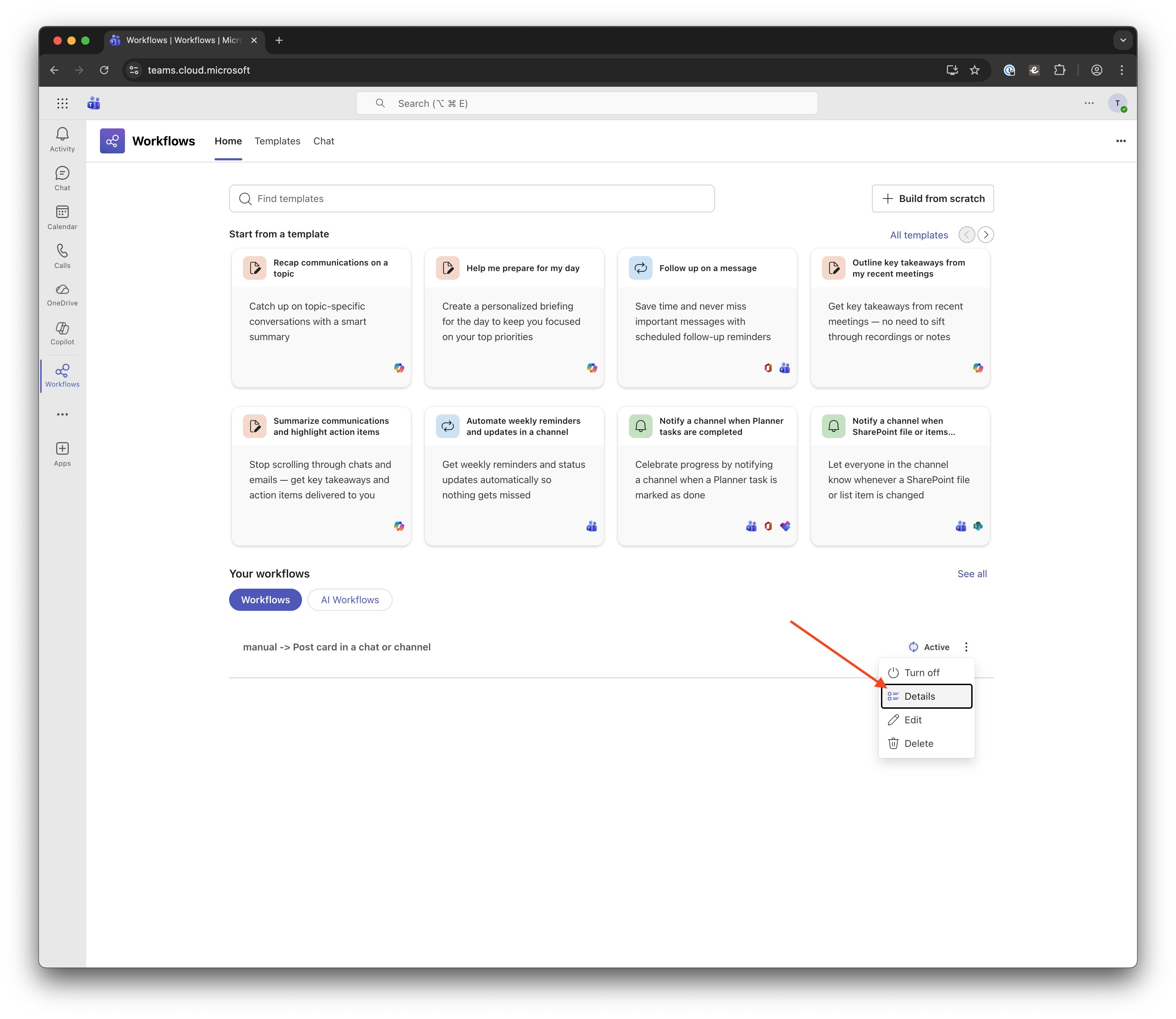
您现在应该在列表中看到一个名为 manual → Post card in a chat or channel 的工作流。单击此工作流上的垂直省略号按钮,然后从下拉菜单中选择 详细信息 Details )。
在此页面上,单击 复制 webhook 链接 Copy webhook link )以获取下一步所需的链接。在此期间,您可以选择编辑工作流名称,以反映其对团队中其他人的目的。
现在,回到 Discourse:
在您的 Discourse 管理区域中,启用 Chat integration enabled 设置以开启“聊天集成”插件,并启用 Chat integration Teams enabled 设置以支持 Microsoft Teams。
在侧边栏中,找到 插件 (Plugins )部分并单击 聊天集成 (Chat Integrations ),然后单击 + 创建频道 + Create Channel )。
在 编辑频道 (Edit Channel )模态框中,按如下方式填写字段:
名称 (Name: ):输入一个名称,使其清楚地表明您正在连接到哪个 Microsoft Teams 频道;它不需要完全匹配。Webhook URL :粘贴您在上面 Teams 设置部分的第 11 步中复制的 webhook URL。
单击 保存频道 Save Channel )。
现在是时候确保一切都按预期工作了。
在 Discourse 中,单击新创建的频道上的 测试 Test )。
按 ID、标题或 URL 搜索主题;选择所需的主题;然后单击 发送测试消息 Send Test Message )。
在 Microsoft Teams 中,一条包含主题信息的新消息将发布到频道中:
确认一切正常后,您可以返回 Discourse 并为您的频道设置其他规则 来定制消息。
如果您没有在 Microsoft Teams 中看到预期的消息,请转到 工作流详细信息 (Workflow Details )页面(参见上面 Teams 设置部分的第 10 步),并检查 运行历史记录 (Run history )部分。这应该会显示每次消息运行的日志。
单击失败的运行,这将带您进入 Power Automate 区域,您可以在页面顶部看到错误消息。(在下面的截图中,运行成功了,但箭头指示了失败的运行中错误出现的位置。)
这应该会详细说明问题,然后您可以修复它或在此处与我们分享,以便我们提供帮助。
12 个赞
SHilser
2020 年8 月 13 日 08:44
2
刚刚试了一下,起初似乎有效,但只有第一次 点击测试按钮时有效。
类型:普通
筛选器:所有主题(?)和回复(此处从德语翻译而来)
分类:沙盒
当我在沙盒分类中回复测试主题时,进入聊天集成页面后会出现警告标志,但点击警告三角形时显示“未知错误…
3 个赞
david
2020 年8 月 13 日 09:45
3
你好 @SHilser ,请检查你网站上的 /logs,看看那里是否有任何相关内容?
2 个赞
SHilser
2020 年8 月 13 日 10:03
4
有两点看起来相关。
我复制了下面的日志(我已将域名替换为 mydomain.tld)
消息(报告了 4 份副本)

SocketError(无法打开到 outlook.office.com:443 的 TCP 连接(getaddrinfo:名称解析临时失败))
app/controllers/application_controller.rb:340:in `block in with_resolved_locale'
app/controllers/application_controller.rb:340:in `with_resolved_locale'
lib/middleware/omniauth_bypass_middleware.rb:68:in `call'
lib/content_security_policy/middleware.rb:12:in `call'
lib/middleware/anonymous_cache.rb:336:in `call'
config/initializers/100-quiet_logger.rb:19:in `call'
config/initializers/100-silence_logger.rb:31:in `call'
lib/middleware/enforce_hostname.rb:22:in `call'
lib/middleware/request_tracker.rb:176:in `call'

回溯

/usr/local/lib/ruby/2.6.0/net/http.rb:949:in `rescue in block in connect'
/usr/local/lib/ruby/2.6.0/net/http.rb:946:in `block in connect'
/usr/local/lib/ruby/2.6.0/timeout.rb:93:in `block in timeout'
/usr/local/lib/ruby/2.6.0/timeout.rb:103:in `timeout'
/usr/local/lib/ruby/2.6.0/net/http.rb:945:in `connect'
/usr/local/lib/ruby/2.6.0/net/http.rb:930:in `do_start'
/usr/local/lib/ruby/2.6.0/net/http.rb:919:in `start'
/usr/local/lib/ruby/2.6.0/net/http.rb:1470:in `request'
rack-mini-profiler (2.0.4) lib/patches/net_patches.rb:19:in `block in request_with_mini_profiler'
rack-mini-profiler (2.0.4) lib/mini_profiler/profiling_methods.rb:33:in `step'

环境

HTTP HOSTS: mysite.tld
消息(报告了 4 份副本)

错误:内部服务器错误
URL: https://mysite.tld/assets/ember_jquery-1ed3f3559e6f967733b4088aa729ff7039dff2c09c5a5f787a214b016f58aabc.js
行:1
列:267890
窗口位置:https://mysite.tld/admin/plugins/chat/teams

回溯

o/t</</@https://mysite.tld/assets/ember_jquery-1ed3f3559e6f967733b4088aa729ff7039dff2c09c5a5f787a214b016f58aabc.js:1:267890
o/t<@https://mysite.tld/assets/ember_jquery-1ed3f3559e6f967733b4088aa729ff7039dff2c09c5a5f787a214b016f58aabc.js:1:267993
o@https://mysite.tld/assets/ember_jquery-1ed3f3559e6f967733b4088aa729ff7039dff2c09c5a5f787a214b016f58aabc.js:1:268074
trigger@https://mysite.tld/assets/ember_jquery-1ed3f3559e6f967733b4088aa729ff7039dff2c09c5a5f787a214b016f58aabc.js:1:545343
A</e._onError/</@https://mysite.tld/assets/ember_jquery-1ed3f3559e6f967733b4088aa729ff7039dff2c09c5a5f787a214b016f58aabc.js:1:550189
f</t.invoke@https://mysite.tld/assets/ember_jquery-1ed3f3559e6f967733b4088aa729ff7039dff2c09c5a5f787a214b016f58aabc.js:1:490190
f</t.flush@https://mysite.tld/assets/ember_jquery-1ed3f3559e6f967733b4088aa729ff7039dff2c09c5a5f787a214b016f58aabc.js:1:489198
p</t.flush@https://mysite.tld/assets/ember_jquery-1ed3f3559e6f967733b4088aa729ff7039dff2c09c5a5f787a214b016f58aabc.js:1:491205
t</t._end@https://mysite.tld/assets/ember_jquery-1ed3f3559e6f967733b4088aa729ff7039dff2c09c5a5f787a214b016f58aabc.js:1:496596Here
t</t.end@https://mysite.tld/assets/ember_jquery-1ed3f3559e6f967733b4088aa729ff7039dff2c09c5a5f787a214b016f58aabc.js:1:493157

环境

HTTP HOSTS: mysite.tld
感谢您的帮助
2 个赞
david
2020 年8 月 13 日 10:16
5
SHilser:
名称解析临时失败
这表明您的服务器在 DNS 解析方面遇到了问题。您使用的是标准的基于 Docker 的安装吗?还是处于开发环境中?
3 个赞
SHilser
2020 年8 月 13 日 10:55
6
大约一周前,我在一个独立的 DigitalOcean Droplet 上完成了设置(一键安装,当前版本为:2.6.0.beta1 (310952fd6a )。我使用子域名,DNS 记录也托管在 DigitalOcean 上。我配置了一条 A 记录指向 IP 地址,以及一条 MX 记录指向子域名,以便通过电子邮件回复,具体操作参见这些说明 。唯一缺失的是,我尚未发布 DMARC 记录。
这就是我在 DNS 相关方面所做的全部设置。不过到目前为止,一切运行正常。网站已配置完成,我可以通过子域名访问、登录、创建主题(甚至通过电子邮件创建)等。
只是让我感到意外的是,第一条消息成功送达,但后续的消息却未能送达
2 个赞
david
2020 年8 月 13 日 12:06
7
当我提到 DNS 解析时,我是指您的服务器在尝试连接 outlook.office.com 时遇到了问题。您的论坛 DNS 记录的配置不应影响这一点。
您可以尝试通过 SSH 连接到您的服务器并运行以下命令:
host outlook.office.com
您应该会看到类似以下的输出:
outlook.office.com 是 substrate.office.com 的别名。
substrate.office.com 是 substrate.ms-acdc.office.com 的别名。
substrate.ms-acdc.office.com 是 afd-k.office.com 的别名。
afd-k.office.com 是 outlook-office-com.k-0002.k-msedge.net 的别名。
outlook-office-com.k-0002.k-msedge.net 是 k-0002.k-msedge.net 的别名。
k-0002.k-msedge.net 的 IP 地址为 13.107.18.11
k-0002.k-msedge.net 的 IPv6 地址为 2620:1ec:c::11
3 个赞
SHilser
2020 年8 月 13 日 12:59
8
当我输入
host -d outlook.office.com
时,得到以下结果:
Trying "outlook.office.com"
Host outlook.office.com not found: 2(SERVFAIL)
Received 36 bytes from 127.0.0.53#53 in 43 ms
当添加端口 :443 时,我得到另一个错误:
Trying "outlook.office.com:443"
Host outlook.office.com:443 not found: 3(NXDOMAIN)
Received 40 bytes from 127.0.0.53#53 in 3 ms
Received 40 bytes from 127.0.0.53#53 in 3 ms
对于其他域名,如 google.com 、我讨论的 Discourse 实例域名(h-da.transformative-praxis.cc)或其他网站,我得到了与您描述的类似的预期输出。
我对第一个错误进行了一些搜索,但仍不确定其来源。我阅读了以下内容,但无法判断它们是否与我的问题相关:
1 个赞
SHilser
2020 年8 月 26 日 17:26
9
我不断重试,这次当我输入
host outlook.office.com
时,得到了您描述的结果。因此,到目前为止一切似乎正常。我连续重复了多次(大约15次,每次间隔约10秒)以确保无误,但在某次又遇到了和之前一样的servfail错误。不过大多数情况下是成功的。
而当我尝试发送测试消息时,情况恰恰相反:可能每十次中只有一次成功,其余时候都会出现和之前一样的错误。此外,当我发布一条符合我为该频道设定规则的常规消息时,既没有收到通知,日志中也没有错误信息。
这一切看起来太随机了,我无法确定到底是什么原因导致的。
我一直怀疑我的设置问题:每个子域名对应两个droplet,并配置了两个相应的A记录,同时我的主 域名还有一组指向ns1.digitalocean.com的NS记录。因此,我尝试使用dnsstuff检查我的网站 ,结果显示SOA记录检查失败;又通过whatsmydns.net检查我的NS记录 ,但依然无法找到与我的问题之间的任何可能关联。
目前我完全困惑了:到底是谁导致了这个错误?是我设置了一些错误的DNS配置(根据@david的说法,这不应该产生影响),是服务器设置或问题,还是仅仅是MS Teams(outlook.office.com )自身出了问题,或者是以某种方式阻止了我?
如果您能提供一些建议,告诉我可以检查或做些什么来定位错误,或者如果认为这超出了您在此处能提供的帮助范围,建议我去哪里进一步咨询,我将不胜感激。
非常感谢到目前为止您提供的全部帮助。
1 个赞
你好,感谢反馈。我在“Discourse 5”步骤一直失败,对话框提示我的传入 Webhooks URL 无效?
如有任何帮助,不胜感激!
Dan
1 个赞
david
2021 年1 月 26 日 16:03
11
您介意分享一下您的 Webhook URL 长什么样吗?可以通过私信发给我,或者,如果您能先使其失效 ,也可以直接在这个主题中发布?
1 个赞
david
2021 年1 月 26 日 17:46
13
谢谢 @Dan_Turner ,我刚稍微放宽了验证,这应该能改善现状。请试试看,并告诉我是否对你更有帮助。
committed 05:45PM - 26 Jan 21 UTC
2 个赞
抱歉有点笨,请问我需要更新 Discourse,还是按照修复说明直接编辑文件?
1 个赞
david
2021 年1 月 26 日 20:35
16
您需要更新插件。请访问 /admin/upgrade,然后点击“Discourse-chat-integration”旁边的更新按钮。
2 个赞
嘿,非常抱歉我有点笨拙——不过,既然我是在托管的 Discourse 实例上,我该如何实际尝试这个呢?谢谢。Dan
1 个赞
david
2021 年2 月 5 日 14:46
18
您需要联系您的托管服务提供商为您更新该插件。在 discourse.org 上,此变更已推送给我们的所有客户,因此我猜您可能是托管在其他地方?
1 个赞
是的,对我来说是 Discourse 托管服务。请问目前是什么版本?我会请他们进行更新。
1 个赞
david
2021 年2 月 5 日 14:58
20
2 个赞
RomainP
2024 年5 月 14 日 18:54
23
感谢这个非常有用的插件。