设置通过 POP3 轮询的电子邮件回复

所以您想为您的 Discourse 论坛设置通过电子邮件回复支持。

:mega: 电子邮件回复在所有 discourse.org 托管的站点上默认预先配置并启用。下面的指南仅适用于自行托管的用户。

好消息!与传出电子邮件(这对于 GMail、Outlook、Yahoo Mail 等典型消费邮件服务来说完全不适用)不同,传入的电子邮件回复通常数量极少。除非您的论坛规模极其庞大,有成千上万的人回复通知邮件,否则您可能使用 Gmail 就很安全了。

:bell: 或者,如果您不习惯为此使用 GMail,可以使用 Configure direct-delivery incoming email for self-hosted sites with Mail-Receiver 设置您自己的传入邮件服务。

所以,以下是使用 GMail 作为示例的设置方法。

  1. 创建一个新的 GMail 帐户。如果您不设置一个全新的电子邮件帐户,旧邮件将通过 POP3 同步,导致不可预见的问题并发送退信通知邮件!

  2. 为新帐户分配一个用户名,例如 discourse-replies@example.com,或者在我的情况下是 replies@example.com(如果您使用的是普通 GMail 帐户,请在此处将 @example.com 替换为 @gmail.com)。为其设置一个强密码。

  3. 通过 http://mail.google.com 登录此帐户。接受服务条款,输入验证码,加载默认的网页界面。也许发送一封测试邮件,接收一封测试邮件。试用一下。

  4. POP3s 访问在 Gmail 中默认是关闭的,所以请通过“设置”、“邮件转发和 POP/IMAP”将其打开:
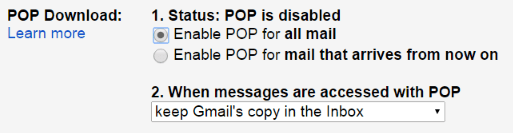
    默认情况下会保留所有传入邮件——但您可以根据需要进行调整。

  5. 访问 Discourse 设置并检查“电子邮件”选项卡。

  6. 更改以下设置:

    • reply_by_email_address 输入 replies+%{reply_key}@example.com
    • pop3_polling_username 输入 replies@example.com
    • pop3_polling_password 输入该电子邮件帐户的密码
    • pop3_polling_host 设置为 pop.gmail.com
    • pop3_polling_enabled 设置为 true
    • reply_by_email_enabled 设置为 true

这个帐户会进行一定程度的轮询,但我们已将其设置为低、安全的频率——您可以通过 pop3_polling_period_mins 设置来配置轮询间隔。

我们假设您的电子邮件服务支持加号寻址(即地址标签),因此在开始之前请检查这一点。Gmail 当然是支持的。

如果一切正常,您现在应该会在所有通知邮件的页脚看到提示,告诉您可以回复,方法是访问网站或通过电子邮件回复:

要回应,回复此电子邮件或在浏览器中访问 {topic URL}。

如果正常工作:

  • 在您的网络浏览器中查看 Discourse 的 /logs 路径,查找与电子邮件相关的错误消息。

  • 使用您的网络浏览器登录您的邮件帐户,检查是否有任何错误或通知。

转发发送到其他地址的邮件

假设您正在轮询来自“replies@your.domain”帐户的电子邮件,并且您想为“help@your.domain”和“dev@your.domain”设置传入电子邮件。

您需要将发送到“help@your.domain”和“dev@your.domain”的所有电子邮件转发到“replies@your.domain”。如果您使用的是 GMail,他们有一篇关于如何自动将传入电子邮件转发到另一个帐户的精彩教程。

然后,Discourse 将定期轮询来自“reply@discourse.org”帐户的电子邮件,并将邮件投递到相应的 category(类别)、group(群组)、topic(主题)或 message(消息)。

潜在问题

  1. 我们发现在不同国家/地区注册 GMail 帐户与您的服务器所在国家/地区不同时会出现困难。例如,如果您在英国注册 Gmail 帐户,但服务器在美国。

  2. 如果您使用的是 GMail 帐户(例如 @gmail.com)或 Google Workspace 邮箱(例如您域名的 Google 邮箱 @yourdomain.com),则需要为您的帐户创建应用密码,在第 6 步中用它代替您的帐户密码。

另请参阅:Troubleshoot reply by email

ℹ 自 2022 年 5 月 30 日起,Google 的**“不太安全的应用程序访问”**选项不再受支持,因此您需要使用应用密码,并启用双重身份验证才能使用它。
91 个赞
Troubleshoot reply by email
Issues Configuring Respond by Email
How can I enable "reply to this email to respond"
Confused about setting up reply by email
Disable Reply Via Email
Reply via Email — emails not getting to the staged user
Reply by email Issues
Reply-by email POP3 polling hosted with roundcube
What is "Mailing List mode"?
Prevent creation of staged user for emails with auto-xyz header
Email polling error with Google Apps
No received mails in new Discourse installation
I cant setup smtp. I tried everything
Email in to a private category
Use Discourse as a Private Support/Ticket System
Disable reply via email?
Free Discourse forum hosting for community-friendly GitHub projects
Mail-receiver relay access denied
Installation by the book
Email support with discourse
Using subject line for reply-by-email identifier
Email notifications reply directly to me (the admin)
How to configure c panel email server to work with incoming emails
Multiple Mail Receivers for Multiple Discourse Instances
How to reply to email
Email Reply Issues After Provider Change
Notification email cannot be the same as reply by email
Notification Email From Set to noreply?
How should Discourse System Market itself?
Instant notification for every new topic/reply
Want to set internal forum on our reactjs member's platform
Reply by email with pop/imap feature use oauth instead of username:password
Discourse setting Reply-To value in `From` header field when using reply by eMail feature
Configure authentication checks on incoming email
Webhook to forward posts to a mailinglist: best practice?
Replacing Mailing lists: Email-In
Message 'receiver' not in view until they reply
POP3 polling settings
Customize the "reply to" address in new private message notification emails
Personal Message Replies Not Displaying in Inbox When Initiated via Auto-Quoted Post
Forwarding email with reply-by-email enabled?
Configuring Incoming Email to Create Category Topics or Group Messages
Some questions regarding to pop polling, wildcards and MX
'hostname "mail.domain.tld" does not match the server certificate' :: SNI support? & how to query cert from Discourse container?
Enabling reply_by_email
How might we better structure #howto?

我明白本指南专门介绍 POP3 轮询,但我认为它应该首先推广 mail-receiver,而不是使用 Gmail 帐户,后者应该是备选方案,而不是像目前那样呈现。

我设置了各种 Discourse 安装,从未接触过 mail-receiver,因为我首先看到的是“Gmail”,然后想“我知道 Gmail,让我们来配置它”,而没有真正去了解更多,或者认为其他方式会更复杂。

我最终尝试了 mail-receiver,我认为它在各方面都是一个更好的解决方案。

Gmail 解决方案需要配置 Gmail 帐户中的应用密码,这也需要双因素身份验证。
完成所有这些工作有点麻烦,最后我们得到一个轮询率很低的回复邮件功能(而 mail-receiver 几乎是即时的)。它还依赖第三方软件。

我认为推广 mail-receiver 的另一个原因是,它不需要比安装 Discourse 本身更多的知识或技术技能。这主要是关于 DNS 和 yml 配置的问题。

当然,它比 Gmail 解决方案更具技术性(尽管我有时在尝试配置它时会感到困惑,尤其是在应用密码方面),但如果有人已经安装并配置了自托管的 Discourse,那么他们也可以安装和配置 #mail-receiver。


而且,也许更重要的是(这也是我关注它的原因),启用回复邮件设置的描述链接到本指南,而不是 mail-receiver 指南:

激活允许用户直接通过电子邮件回复主题的功能,而无需他们登录网站。有关更多信息,请参阅 Meta 上的指南

3 个赞