网站宕机。不确定原因。
之前 Sidekick 出现故障(Malign 几周前断开了连接。已修复。但仍有随机作业失败。尝试升级到最新的 Beta 版本,但无法更新。Admin Panel 开始缺少所有指标。
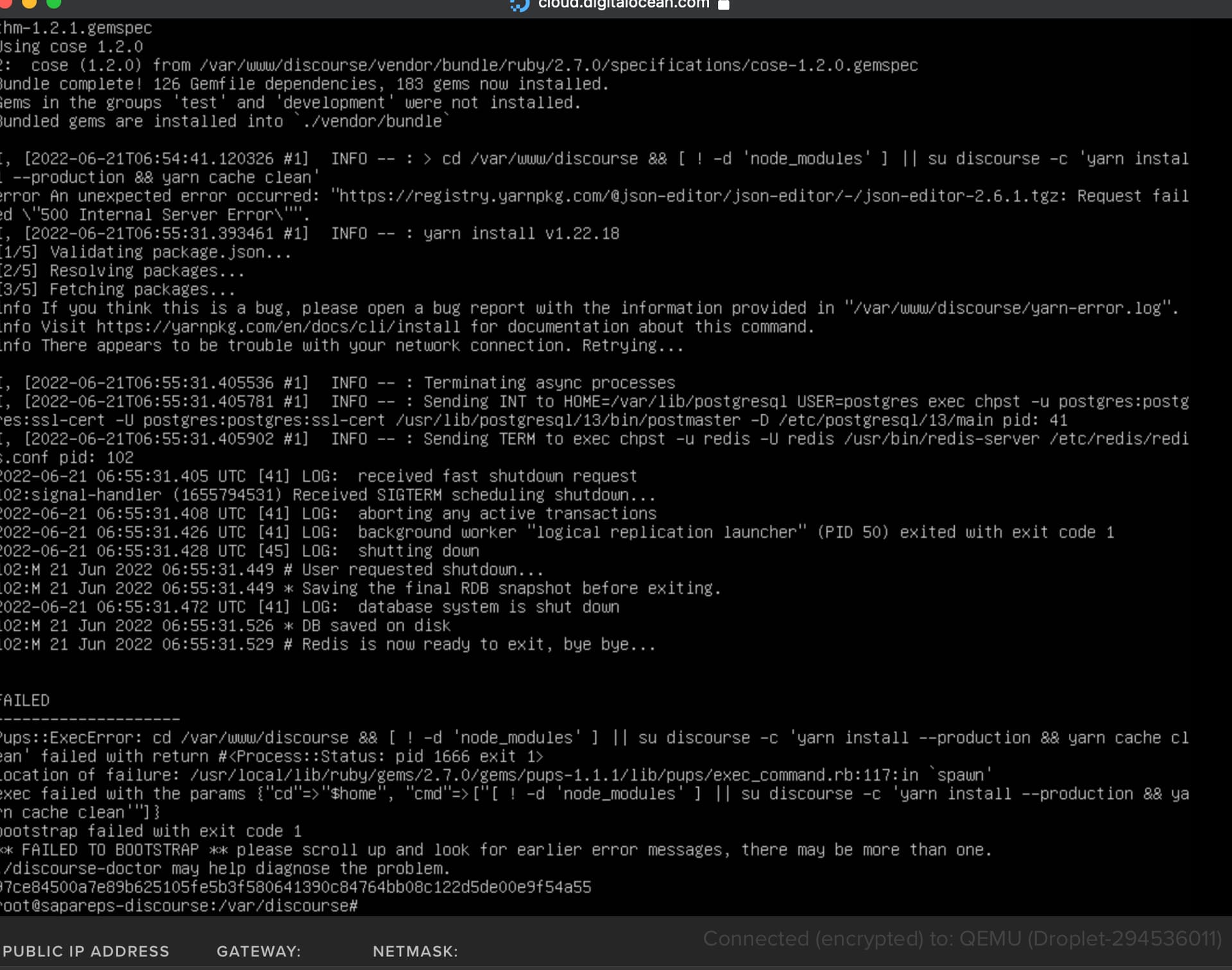
决定重建应用程序。但出现以下错误(见截图)并失败。尝试禁用所有插件并重建,但仍然失败。
网站运行在 Digital Ocean 虚拟机上,使用 Malign 邮件服务器。
看起来一个外部服务因 500 错误而宕机
https://registry.yarnpkg.com/
但现在对我来说已经恢复了,所以也许可以再试一次。
此时 Cloudflare 出现大面积中断,影响了互联网的很大一部分。
由于 yarnpkg.com 位于 Cloudflare 之后,因此受到影响,所有重建都会失败。
我建议在 https://www.cloudflarestatus.com/ 恢复正常之前,不要进行任何操作。
我这里也有同样的问题!
我尝试了恢复 VPS 备份,但没有成功。
此时,自定义向导插件似乎在 tests-passed 上损坏。
从您的配置中删除该插件可能会解决此问题。
@RGJ 谢谢!
我一会儿就试试,然后回来汇报。有趣的是,那个插件已经坏了好几天了,导致向导们只显示一个空白页面。
我们需要完整的日志来帮助分类问题。
如何复制完整的日志?在哪里可以提取/复制它?
当使用 ssh 通过 Windows、Mac 或 Linux 的原生终端应用程序连接时,您可以向上滚动以查看完整日志。不确定您正在使用的网络终端是否具有此功能。
要删除此每日提示消息:rm -rf /etc/update-motd.d/99-one-click
上次登录:2022年4月27日 星期三 20:06:51
正在更改 root 的密码。
当前密码:
新密码:
重新输入新密码:
root@sapareps-discourse:~# cd /var/discourse
root@sapareps-discourse:/var/discourse# ./launcher rebuild app
检测到 x86_64 架构。
警告:containers/app.yml 文件对所有人可读。您可以通过运行以下命令来保护此文件:chmod o-rwx containers/app.yml
确保 launcher 是最新的
获取 origin
Launcher 已是最新
停止旧容器
+ /usr/bin/docker stop -t 60 app
app
2.0.20220413-0411: Pulling from discourse/base
摘要:sha256:bd13d6869319791c8379143cc8a1c4cfc71d5406dd7e606dffdd40da04d4ed1b
状态:discourse/base:2.0.20220413-0411 镜像已是最新
docker.io/discourse/base:2.0.20220413-0411
/usr/local/lib/ruby/gems/2.7.0/gems/pups-1.1.1/lib/pups.rb
/usr/local/bin/pups --stdin
I, [2022-06-21T18:12:51.330262 #1]  INFO -- : 从标准输入读取
I, [2022-06-21T18:12:51.336966 #1]  INFO -- : > locale-gen $LANG && update-locale
I, [2022-06-21T18:12:51.363629 #1]  INFO -- : 正在生成区域设置(这可能需要一些时间)...
生成完成。

I, [2022-06-21T18:12:51.364218 #1]  INFO -- : > mkdir -p /shared/postgres_run
I, [2022-06-21T18:12:51.366887 #1]  INFO -- :
I, [2022-06-21T18:12:51.367390 #1]  INFO -- : > chown postgres:postgres /shared/postgres_run
I, [2022-06-21T18:12:51.369713 #1]  INFO -- :
I, [2022-06-21T18:12:51.370124 #1]  INFO -- : > chmod 775 /shared/postgres_run
I, [2022-06-21T18:12:51.371878 #1]  INFO -- :
I, [2022-06-21T18:12:51.372266 #1]  INFO -- : > rm -fr /var/run/postgresql
I, [2022-06-21T18:12:51.374522 #1]  INFO -- :
I, [2022-06-21T18:12:51.374906 #1]  INFO -- : > ln -s /shared/postgres_run /var/run/postgresql
I, [2022-06-21T18:12:51.377212 #1]  INFO -- :
I, [2022-06-21T18:12:51.377591 #1]  INFO -- : > socat /dev/null UNIX-CONNECT:/shared/postgres_run/.s.PGSQL.5432 || exit 0 && echo postgres already running stop container ; exit 1
2022/06/21 18:12:51 socat[18] E connect(6, AF=1 "/shared/postgres_run/.s.PGSQL.5432", 36): No such file or directory
I, [2022-06-21T18:12:51.384183 #1]  INFO -- :
I, [2022-06-21T18:12:51.384544 #1]  INFO -- : > rm -fr /shared/postgres_run/.s*
I, [2022-06-21T18:12:51.387339 #1]  INFO -- :
I, [2022-06-21T18:12:51.387733 #1]  INFO -- : > rm -fr /shared/postgres_run/*.pid
I, [2022-06-21T18:12:51.390146 #1]  INFO -- :
I, [2022-06-21T18:12:51.390427 #1]  INFO -- : > mkdir -p /shared/postgres_run/13-main.pg_stat_tmp
I, [2022-06-21T18:12:51.392381 #1]  INFO -- :
I, [2022-06-21T18:12:51.392821 #1]  INFO -- : > chown postgres:postgres /shared/postgres_run/13-main.pg_stat_tmp
I, [2022-06-21T18:12:51.394872 #1]  INFO -- :
I, [2022-06-21T18:12:51.399218 #1]  INFO -- : File > /etc/service/postgres/run  chmod: +x  chown:
I, [2022-06-21T18:12:51.403401 #1]  INFO -- : File > /etc/service/postgres/log/run  chmod: +x  chown:
I, [2022-06-21T18:12:51.407474 #1]  INFO -- : File > /etc/runit/3.d/99-postgres  chmod: +x  chown:
I, [2022-06-21T18:12:51.411329 #1]  INFO -- : File > /root/upgrade_postgres  chmod: +x  chown:
I, [2022-06-21T18:12:51.411782 #1]  INFO -- : > chown -R root /var/lib/postgresql/13/main
I, [2022-06-21T18:12:52.377410 #1]  INFO -- :
I, [2022-06-21T18:12:52.378090 #1]  INFO -- : > [ ! -e /shared/postgres_data ] && install -d -m 0755 -o postgres -g postgres /shared/postgres_data && sudo -E -u postgres /usr/lib/postgresql/13/bin/initdb -D /shared/postgres_data || exit 0
I, [2022-06-21T18:12:52.380595 #1]  INFO -- :
I, [2022-06-21T18:12:52.381070 #1]  INFO -- : > chown -R postgres:postgres /shared/postgres_data
I, [2022-06-21T18:12:52.405390 #1]  INFO -- :
I, [2022-06-21T18:12:52.406271 #1]  INFO -- : > chown -R postgres:postgres /var/run/postgresql
I, [2022-06-21T18:12:52.409803 #1]  INFO -- :
I, [2022-06-21T18:12:52.410546 #1]  INFO -- : > /root/upgrade_postgres
I, [2022-06-21T18:12:52.417128 #1]  INFO -- :
I, [2022-06-21T18:12:52.417655 #1]  INFO -- : > rm /root/upgrade_postgres
I, [2022-06-21T18:12:52.420959 #1]  INFO -- :
I, [2022-06-21T18:12:52.422067 #1]  INFO -- : 将 /etc/postgresql/13/main/postgresql.conf 中的 data_directory = '/var/lib/postgresql/13/main' 替换为 data_directory = '/shared/postgres_data'
I, [2022-06-21T18:12:52.422979 #1]  INFO -- : 将 /etc/postgresql/13/main/postgresql.conf 中的 (?-mix:#?listen_addresses *=.*) 替换为 listen_addresses = '*'
I, [2022-06-21T18:12:52.423648 #1]  INFO -- : 将 /etc/postgresql/13/main/postgresql.conf 中的 (?-mix:#?synchronous_commit *=.*) 替换为 synchronous_commit = $db_synchronous_commit
I, [2022-06-21T18:12:52.424211 #1]  INFO -- : 将 /etc/postgresql/13/main/postgresql.conf 中的 (?-mix:#?shared_buffers *=.*) 替换为 shared_buffers = $db_shared_buffers
I, [2022-06-21T18:12:52.424825 #1]  INFO -- : 将 /etc/postgresql/13/main/postgresql.conf 中的 (?-mix:#?work_mem *=.*) 替换为 work_mem = $db_work_mem
I, [2022-06-21T18:12:52.425375 #1]  INFO -- : 将 /etc/postgresql/13/main/postgresql.conf 中的 (?-mix:#?default_text_search_config *=.*) 替换为 default_text_search_config = '$db_default_text_search_config'
I, [2022-06-21T18:12:52.425929 #1]  INFO -- : > install -d -m 0755 -o postgres -g postgres /shared/postgres_backup
I, [2022-06-21T18:12:52.430787 #1]  INFO -- :
I, [2022-06-21T18:12:52.431591 #1]  INFO -- : 将 /etc/postgresql/13/main/postgresql.conf 中的 (?-mix:#?checkpoint_segments *=.*) 替换为 checkpoint_segments = $db_checkpoint_segments
I, [2022-06-21T18:12:52.432188 #1]  INFO -- : 将 /etc/postgresql/13/main/postgresql.conf 中的 (?-mix:#?logging_collector *=.*) 替换为 logging_collector = $db_logging_collector
I, [2022-06-21T18:12:52.433316 #1]  INFO -- : 将 /etc/postgresql/13/main/postgresql.conf 中的 (?-mix:#?log_min_duration_statement *=.*) 替换为 log_min_duration_statement = $db_log_min_duration_statement
I, [2022-06-21T18:12:52.434284 #1]  INFO -- : 将 /etc/postgresql/13/main/pg_hba.conf 中的 (?-mix:^#local +replication +postgres +peer$) 替换为 local replication postgres  peer
I, [2022-06-21T18:12:52.434719 #1]  INFO -- : 将 /etc/postgresql/13/main/pg_hba.conf 中的 (?-mix:^host.*all.*all.*127.*$) 替换为 host all all 0.0.0.0/0 md5
I, [2022-06-21T18:12:52.435111 #1]  INFO -- : 将 /etc/postgresql/13/main/pg_hba.conf 中的 (?-mix:^host.*all.*all.*::1\/128.*$) 替换为 host all all ::/0 md5
I, [2022-06-21T18:12:52.435476 #1]  INFO -- : > HOME=/var/lib/postgresql USER=postgres exec chpst -u postgres:postgres:ssl-cert -U postgres:postgres:ssl-cert /usr/lib/postgresql/13/bin/postmaster -D /etc/postgresql/13/main
I, [2022-06-21T18:12:52.437588 #1]  INFO -- : > sleep 5
2022-06-21 18:12:52.470 UTC [41] LOG:  正在启动 PostgreSQL 13.6 (Debian 13.6-1.pgdg110+1) on x86_64-pc-linux-gnu, 由 gcc (Debian 10.2.1-6) 10.2.1 20210110 编译, 64位
2022-06-21 18:12:52.472 UTC [41] LOG:  正在监听 IPv4 地址 "0.0.0.0", 端口 5432
2022-06-21 18:12:52.472 UTC [41] LOG:  正在监听 IPv6 地址 "::", 端口 5432
2022-06-21 18:12:52.474 UTC [41] LOG:  正在监听 Unix 套接字 "/var/run/postgresql/.s.PGSQL.5432"
2022-06-21 18:12:52.477 UTC [44] LOG:  数据库系统于 2022-06-21 18:12:44 UTC 关闭
2022-06-21 18:12:52.481 UTC [41] LOG:  数据库系统已准备好接受连接
I, [2022-06-21T18:12:57.446526 #1]  INFO -- :
I, [2022-06-21T18:12:57.446758 #1]  INFO -- : > su postgres -c 'createdb discourse' || true
2022-06-21 18:12:57.503 UTC [54] postgres@postgres ERROR:  数据库 "discourse" 已存在
2022-06-21 18:12:57.503 UTC [54] postgres@postgres STATEMENT:  CREATE DATABASE discourse;
createdb: 错误:数据库创建失败:ERROR:  数据库 "discourse" 已存在
I, [2022-06-21T18:12:57.505718 #1]  INFO -- :
I, [2022-06-21T18:12:57.506121 #1]  INFO -- : > su postgres -c 'psql discourse -c "create user discourse;"' || true
2022-06-21 18:12:57.557 UTC [58] postgres@discourse ERROR:  角色 "discourse" 已存在
2022-06-21 18:12:57.557 UTC [58] postgres@discourse STATEMENT:  create user discourse;
ERROR:  角色 "discourse" 已存在
I, [2022-06-21T18:12:57.560289 #1]  INFO -- :
I, [2022-06-21T18:12:57.560830 #1]  INFO -- : > su postgres -c 'psql discourse -c "grant all privileges on database discourse to discourse;"' || true
I, [2022-06-21T18:12:57.609191 #1]  INFO -- : GRANT

I, [2022-06-21T18:12:57.609734 #1]  INFO -- : > su postgres -c 'psql discourse -c "alter schema public owner to discourse;"'
I, [2022-06-21T18:12:57.659896 #1]  INFO -- : ALTER SCHEMA

I, [2022-06-21T18:12:57.660534 #1]  INFO -- : > su postgres -c 'psql template1 -c "create extension if not exists hstore;"'
NOTICE:  扩展 "hstore" 已存在,跳过
I, [2022-06-21T18:12:57.715498 #1]  INFO -- : CREATE EXTENSION

I, [2022-06-21T18:12:57.715937 #1]  INFO -- : > su postgres -c 'psql template1 -c "create extension if not exists pg_trgm;"'
NOTICE:  扩展 "pg_trgm" 已存在,跳过
I, [2022-06-21T18:12:57.763396 #1]  INFO -- : CREATE EXTENSION

I, [2022-06-21T18:12:57.763868 #1]  INFO -- : > su postgres -c 'psql discourse -c "create extension if not exists hstore;"'
NOTICE:  扩展 "hstore" 已存在,跳过
I, [2022-06-21T18:12:57.814019 #1]  INFO -- : CREATE EXTENSION

I, [2022-06-21T18:12:57.814536 #1]  INFO -- : > su postgres -c 'psql discourse -c "create extension if not exists pg_trgm;"'
NOTICE:  扩展 "pg_trgm" 已存在,跳过
I, [2022-06-21T18:12:57.862906 #1]  INFO -- : CREATE EXTENSION

I, [2022-06-21T18:12:57.863438 #1]  INFO -- : > sudo -u postgres psql discourse
I, [2022-06-21T18:12:57.868258 #1]  INFO -- : update pg_database set encoding = pg_char_to_encoding('UTF8') where datname = 'discourse' AND encoding = pg_char_to_encoding('SQL_ASCII');

I, [2022-06-21T18:12:57.930330 #1]  INFO -- : File > /var/lib/postgresql/take-database-backup  chmod: +x  chown: postgres:postgres
I, [2022-06-21T18:12:57.933140 #1]  INFO -- : File > /var/spool/cron/crontabs/postgres  chmod:   chown:
I, [2022-06-21T18:12:57.933592 #1]  INFO -- : > echo postgres installed!
I, [2022-06-21T18:12:57.935457 #1]  INFO -- : postgres installed!

I, [2022-06-21T18:12:57.939892 #1]  INFO -- : File > /etc/service/redis/run  chmod: +x  chown:
I, [2022-06-21T18:12:57.944228 #1]  INFO -- : File > /etc/service/redis/log/run  chmod: +x  chown:
I, [2022-06-21T18:12:57.948494 #1]  INFO -- : File > /etc/runit/3.d/10-redis  chmod: +x  chown:
I, [2022-06-21T18:12:57.949629 #1]  INFO -- : 将 /etc/redis/redis.conf 中的 daemonize yes 替换为
I, [2022-06-21T18:12:57.950403 #1]  INFO -- : 将 /etc/redis/redis.conf 中的 (?-mix:^pidfile.*$) 替换为
I, [2022-06-21T18:12:57.951198 #1]  INFO -- : > install -d -m 0755 -o redis -g redis /shared/redis_data
I, [2022-06-21T18:12:57.954090 #1]  INFO -- :
I, [2022-06-21T18:12:57.954694 #1]  INFO -- : 将 /etc/redis/redis.conf 中的 (?-mix:^logfile.*$) 替换为 logfile ""
I, [2022-06-21T18:12:57.955276 #1]  INFO -- : 将 /etc/redis/redis.conf 中的 (?-mix:^bind .*$) 替换为
I, [2022-06-21T18:12:57.956141 #1]  INFO -- : 将 /etc/redis/redis.conf 中的 (?-mix:^dir .*$) 替换为 dir /shared/redis_data
I, [2022-06-21T18:12:57.956812 #1]  INFO -- : 将 /etc/redis/redis.conf 中的 (?-mix:^protected-mode yes) 替换为 protected-mode no
I, [2022-06-21T18:12:57.957413 #1]  INFO -- : 将 /etc/redis/redis.conf 中的 # io-threads 4 替换为 io-threads $redis_io_threads
I, [2022-06-21T18:12:57.957962 #1]  INFO -- : > echo redis installed
I, [2022-06-21T18:12:57.960509 #1]  INFO -- : redis installed

I, [2022-06-21T18:12:57.960967 #1]  INFO -- : > cat /etc/redis/redis.conf | grep logfile
I, [2022-06-21T18:12:57.964878 #1]  INFO -- : logfile ""

I, [2022-06-21T18:12:57.965269 #1]  INFO -- : > exec chpst -u redis -U redis /usr/bin/redis-server /etc/redis/redis.conf
I, [2022-06-21T18:12:57.966848 #1]  INFO -- : > sleep 10
102:C 21 Jun 2022 18:12:57.974 # oO0OoO0OoO0Oo Redis is starting oO0OoO0OoO0Oo
102:C 21 Jun 2022 18:12:57.974 # Redis version=6.2.6, bits=64, commit=00000000, modified=0, pid=102, just started
102:C 21 Jun 2022 18:12:57.975 # Configuration loaded
102:M 21 Jun 2022 18:12:57.975 * monotonic clock: POSIX clock_gettime
102:M 21 Jun 2022 18:12:57.976 * Running mode=standalone, port=6379.
102:M 21 Jun 2022 18:12:57.976 # Server initialized
102:M 21 Jun 2022 18:12:57.976 # WARNING overcommit_memory is set to 0! Background save may fail under low memory condition. To fix this issue add 'vm.overcommit_memory = 1' to /etc/sysctl.conf and then reboot or run the command 'sysctl vm.overcommit_memory=1' for this to take effect.
102:M 21 Jun 2022 18:12:57.977 * Loading RDB produced by version 6.2.6
102:M 21 Jun 2022 18:12:57.977 * RDB age 14 seconds
102:M 21 Jun 2022 18:12:57.977 * RDB memory usage when created 9.18 Mb
102:M 21 Jun 2022 18:12:58.002 # Done loading RDB, keys loaded: 632, keys expired: 0.
102:M 21 Jun 2022 18:12:58.002 * DB loaded from disk: 0.026 seconds
102:M 21 Jun 2022 18:12:58.002 * Ready to accept connections
I, [2022-06-21T18:13:07.974201 #1]  INFO -- :
I, [2022-06-21T18:13:07.974801 #1]  INFO -- : > thpoff echo "thpoff is installed!"
I, [2022-06-21T18:13:07.978425 #1]  INFO -- : thpoff is installed!

I, [2022-06-21T18:13:07.978878 #1]  INFO -- : > /usr/local/bin/ruby -e 'if ENV["DISCOURSE_SMTP_ADDRESS"] == "smtp.example.com"; puts "Aborting! Mail is not configured!"; exit 1; end'
I, [2022-06-21T18:13:08.058933 #1]  INFO -- :
I, [2022-06-21T18:13:08.059510 #1]  INFO -- : > /usr/local/bin/ruby -e 'if ENV["DISCOURSE_HOSTNAME"] == "discourse.example.com"; puts "Aborting! Domain is not configured!"; exit 1; end'
I, [2022-06-21T18:13:08.121564 #1]  INFO -- :
I, [2022-06-21T18:13:08.122131 #1]  INFO -- : > /usr/local/bin/ruby -e 'if (ENV["DISCOURSE_CDN_URL"] || "")[0..1] == "//"; puts "Aborting! CDN must have a protocol specified. Once fixed you should rebake your posts now to correct all posts."; exit 1; end'
I, [2022-06-21T18:13:08.184902 #1]  INFO -- :
I, [2022-06-21T18:13:08.185445 #1]  INFO -- : > rm -f /etc/cron.d/anacron
I, [2022-06-21T18:13:08.188195 #1]  INFO -- :
I, [2022-06-21T18:13:08.191134 #1]  INFO -- : File > /etc/cron.d/anacron  chmod:   chown:
I, [2022-06-21T18:13:08.195670 #1]  INFO -- : File > /etc/runit/1.d/copy-env  chmod: +x  chown:
I, [2022-06-21T18:13:08.200043 #1]  INFO -- : File > /etc/service/unicorn/run  chmod: +x  chown:
I, [2022-06-21T18:13:08.204368 #1]  INFO -- : File > /etc/service/nginx/run  chmod: +x  chown:
I, [2022-06-21T18:13:08.208837 #1]  INFO -- : File > /etc/runit/3.d/01-nginx  chmod: +x  chown:
I, [2022-06-21T18:13:08.213053 #1]  INFO -- : File > /etc/runit/3.d/02-unicorn  chmod: +x  chown:
I, [2022-06-21T18:13:08.213472 #1]  INFO -- : 将 /etc/service/unicorn/run 中的 # postgres 替换为 sv start postgres || exit 1
I, [2022-06-21T18:13:08.213888 #1]  INFO -- : > exec chpst -u redis -U redis /usr/bin/redis-server /etc/redis/redis.conf
I, [2022-06-21T18:13:08.215936 #1]  INFO -- : > cd /var/www/discourse && git reset --hard
129:C 21 Jun 2022 18:13:08.223 # oO0OoO0OoO0Oo Redis is starting oO0OoO0OoO0Oo
129:C 21 Jun 2022 18:13:08.224 # Redis version=6.2.6, bits=64, commit=00000000, modified=0, pid=129, just started
129:C 21 Jun 2022 18:13:08.224 # Configuration loaded
129:M 21 Jun 2022 18:13:08.225 * monotonic clock: POSIX clock_gettime
129:M 21 Jun 2022 18:13:08.226 # Warning: Could not create server TCP listening socket *:6379: bind: Address already in use
129:M 21 Jun 2022 18:13:08.226 # Failed listening on port 6379 (TCP), aborting.
Updating files: 100% (31051/31051), done.
I, [2022-06-21T18:13:11.903734 #1]  INFO -- : HEAD is now at 6fc52d95 DEV: Remove scoped order warning in PostDestroyer.

I, [2022-06-21T18:13:11.904377 #1]  INFO -- : > cd /var/www/discourse && git clean -f
I, [2022-06-21T18:13:12.092091 #1]  INFO -- :
I, [2022-06-21T18:13:12.092644 #1]  INFO -- : > cd /var/www/discourse && git remote set-branches --add origin main
I, [2022-06-21T18:13:12.096587 #1]  INFO -- :
I, [2022-06-21T18:13:12.097002 #1]  INFO -- : > cd /var/www/discourse && git remote set-branches origin tests-passed
I, [2022-06-21T18:13:12.100716 #1]  INFO -- :
I, [2022-06-21T18:13:12.101089 #1]  INFO -- : > cd /var/www/discourse && git fetch --depth 1 origin tests-passed
From https://github.com/discourse/discourse
 * branch              tests-passed -> FETCH_HEAD
 * [new branch]        tests-passed -> origin/tests-passed
I, [2022-06-21T18:13:14.534671 #1]  INFO -- :
I, [2022-06-21T18:13:14.535098 #1]  INFO -- : > cd /var/www/discourse && git checkout tests-passed
Switched to a new branch 'tests-passed'
I, [2022-06-21T18:13:15.444145 #1]  INFO -- : Branch 'tests-passed' set up to track remote branch 'tests-passed' from 'origin'.

I, [2022-06-21T18:13:15.444690 #1]  INFO -- : > cd /var/www/discourse && mkdir -p tmp
I, [2022-06-21T18:13:15.449120 #1]  INFO -- :
I, [2022-06-21T18:13:15.449554 #1]  INFO -- : > cd /var/www/discourse && chown discourse:www-data tmp
I, [2022-06-21T18:13:15.453094 #1]  INFO -- :
I, [2022-06-21T18:13:15.453420 #1]  INFO -- : > cd /var/www/discourse && mkdir -p tmp/pids
I, [2022-06-21T18:13:15.456541 #1]  INFO -- :
I, [2022-06-21T18:13:15.456860 #1]  INFO -- : > cd /var/www/discourse && mkdir -p tmp/sockets
I, [2022-06-21T18:13:15.459591 #1]  INFO -- :
I, [2022-06-21T18:13:15.459894 #1]  INFO -- : > cd /var/www/discourse && touch tmp/.gitkeep
I, [2022-06-21T18:13:15.462612 #1]  INFO -- :
I, [2022-06-21T18:13:15.462880 #1]  INFO -- : > cd /var/www/discourse && mkdir -p                    /shared/log/rails
I, [2022-06-21T18:13:15.465523 #1]  INFO -- :
I, [2022-06-21T18:13:15.465799 #1]  INFO -- : > cd /var/www/discourse && bash -c "touch -a           /shared/log/rails/{production,production_errors,unicorn.stdout,unicorn.stderr,sidekiq}.log"
I, [2022-06-21T18:13:15.470111 #1]  INFO -- :
I, [2022-06-21T18:13:15.470432 #1]  INFO -- : > cd /var/www/discourse && bash -c "ln    -s           /shared/log/rails/{production,production_errors,unicorn.stdout,unicorn.stderr,sidekiq}.log /var/www/discourse/log"
I, [2022-06-21T18:13:15.474822 #1]  INFO -- :
I, [2022-06-21T18:13:15.475162 #1]  INFO -- : > cd /var/www/discourse && bash -c "mkdir -p           /shared/{uploads,backups}"
I, [2022-06-21T18:13:15.479361 #1]  INFO -- :
I, [2022-06-21T18:13:15.479708 #1]  INFO -- : > cd /var/www/discourse && bash -c "ln    -s           /shared/{uploads,backups} /var/www/discourse/public"
I, [2022-06-21T18:13:15.483657 #1]  INFO -- :
I, [2022-06-21T18:13:15.483990 #1]  INFO -- : > cd /var/www/discourse && bash -c "mkdir -p           /shared/tmp/{backups,restores}"
I, [2022-06-21T18:13:15.488082 #1]  INFO -- :
I, [2022-06-21T18:13:15.488489 #1]  INFO -- : > cd /var/www/discourse && bash -c "ln    -s           /shared/tmp/{backups,restores} /var/www/discourse/tmp"
I, [2022-06-21T18:13:15.492292 #1]  INFO -- :
I, [2022-06-21T18:13:15.492654 #1]  INFO -- : > cd /var/www/discourse && chown -R discourse:www-data /shared/log/rails /shared/uploads /shared/backups /shared/tmp
I, [2022-06-21T18:13:15.507160 #1]  INFO -- :
I, [2022-06-21T18:13:15.507617 #1]  INFO -- : > cd /var/www/discourse && find public/plugins/ -maxdepth 1 -xtype l -delete
I, [2022-06-21T18:13:15.512678 #1]  INFO -- :
I, [2022-06-21T18:13:15.513394 #1]  INFO -- : 将 /etc/service/unicorn/run 中的 # redis 替换为 sv start redis || exit 1
I, [2022-06-21T18:13:15.514446 #1]  INFO -- : > cd /var/www/discourse/plugins && git clone https://github.com/discourse/docker_manager.git
Cloning into 'docker_manager'...
I, [2022-06-21T18:13:16.270114 #1]  INFO -- :
I, [2022-06-21T18:13:16.270601 #1]  INFO -- : > cd /var/www/discourse/plugins && git clone https://github.com/discourse/discourse-bbcode.git
Cloning into 'discourse-bbcode'...
I, [2022-06-21T18:13:16.761107 #1]  INFO -- :
I, [2022-06-21T18:13:16.761593 #1]  INFO -- : > cd /var/www/discourse/plugins && git clone https://github.com/discourse/discourse-reactions.git
Cloning into 'discourse-reactions'...
I, [2022-06-21T18:13:17.143173 #1]  INFO -- :
I, [2022-06-21T18:13:17.143669 #1]  INFO -- : > cd /var/www/discourse/plugins && git clone https://github.com/discourse/discourse-microsoft-auth.git
Cloning into 'discourse-microsoft-auth'...
I, [2022-06-21T18:13:17.414298 #1]  INFO -- :
I, [2022-06-21T18:13:17.414818 #1]  INFO -- : > cd /var/www/discourse/plugins && git clone https://github.com/discourse/discourse-checklist.git
Cloning into 'discourse-checklist'...
I, [2022-06-21T18:13:17.736702 #1]  INFO -- :
I, [2022-06-21T18:13:17.737167 #1]  INFO -- : > cd /var/www/discourse/plugins && git clone https://github.com/discourse/discourse-whos-online.git
Cloning into 'discourse-whos-online'...
I, [2022-06-21T18:13:18.031000 #1]  INFO -- :
I, [2022-06-21T18:13:18.031530 #1]  INFO -- : > cd /var/www/discourse/plugins && git clone https://github.com/discourse/discourse-canned-replies.git
Cloning into 'discourse-canned-replies'...
I, [2022-06-21T18:13:18.379914 #1]  INFO -- :
I, [2022-06-21T18:13:18.380428 #1]  INFO -- : > cd /var/www/discourse/plugins && git clone https://github.com/discourse/discourse-automation.git
Cloning into 'discourse-automation'...
I, [2022-06-21T18:13:18.735347 #1]  INFO -- :
I, [2022-06-21T18:13:18.735990 #1]  INFO -- : > cd /var/www/discourse/plugins && git clone https://github.com/discourse/discourse-footnote.git
Cloning into 'discourse-footnote'...
I, [2022-06-21T18:13:19.123474 #1]  INFO -- :
I, [2022-06-21T18:13:19.123928 #1]  INFO -- : > cd /var/www/discourse/plugins && git clone https://github.com/discourse/discourse-user-notes.git
Cloning into 'discourse-user-notes'...
I, [2022-06-21T18:13:19.447971 #1]  INFO -- :
I, [2022-06-21T18:13:19.448644 #1]  INFO -- : > cd /var/www/discourse/plugins && git clone https://github.com/paviliondev/discourse-landing-pages.git
Cloning into 'discourse-landing-pages'...
I, [2022-06-21T18:13:19.812517 #1]  INFO -- :
I, [2022-06-21T18:13:19.813025 #1]  INFO -- : > cd /var/www/discourse/plugins && git clone https://github.com/fzngagan/discourse-dictionary.git
Cloning into 'discourse-dictionary'...
I, [2022-06-21T18:13:20.067885 #1]  INFO -- :
I, [2022-06-21T18:13:20.068362 #1]  INFO -- : > cd /var/www/discourse/plugins && git clone https://github.com/gdpelican/retort.git
Cloning into 'retort'...
I, [2022-06-21T18:13:20.334657 #1]  INFO -- :
I, [2022-06-21T18:13:20.335137 #1]  INFO -- : > cd /var/www/discourse/plugins && git clone https://github.com/wolftallemo/discourse-mailgun-routes.git
Cloning into 'discourse-mailgun-routes'...
I, [2022-06-21T18:13:20.578172 #1]  INFO -- :
I, [2022-06-21T18:13:20.579001 #1]  INFO -- : > cp /var/www/discourse/config/nginx.sample.conf /etc/nginx/conf.d/discourse.conf
I, [2022-06-21T18:13:20.583226 #1]  INFO -- :
I, [2022-06-21T18:13:20.583775 #1]  INFO -- : > rm /etc/nginx/sites-enabled/default
I, [2022-06-21T18:13:20.586433 #1]  INFO -- :
I, [2022-06-21T18:13:20.586908 #1]  INFO -- : > mkdir -p /var/nginx/cache
I, [2022-06-21T18:13:20.590054 #1]  INFO -- :
I, [2022-06-21T18:13:20.590937 #1]  INFO -- : 将 /etc/nginx/nginx.conf 中的 pid /run/nginx.pid; 替换为 daemon off;
I, [2022-06-21T18:13:20.591596 #1]  INFO -- : 将 /etc/nginx/conf.d/discourse.conf 中的 (?m-ix:upstream[^\}]+\}) 替换为 upstream discourse { server 127.0.0.1:3000; }
I, [2022-06-21T18:13:20.592152 #1]  INFO -- : 将 /etc/nginx/conf.d/discourse.conf 中的 (?-mix:server_name.+$) 替换为 server_name _ ;
I, [2022-06-21T18:13:20.592748 #1]  INFO -- : 将 /etc/nginx/conf.d/discourse.conf 中的 (?-mix:client_max_body_size.+$) 替换为 client_max_body_size $upload_size ;
I, [2022-06-21T18:13:20.593218 #1]  INFO -- : 将 /etc/nginx/nginx.conf 中的 (?-mix:worker_connections.+$) 替换为 worker_connections $nginx_worker_connections ;
I, [2022-06-21T18:13:20.593567 #1]  INFO -- : > echo "done configuring web"
I, [2022-06-21T18:13:20.595813 #1]  INFO -- : done configuring web

I, [2022-06-21T18:13:20.596245 #1]  INFO -- : > cd /var/www/discourse && gem install bundler --conservative -v $(awk '/BUNDLED WITH/ { getline; gsub(/ /,""); print $0 }' Gemfile.lock)
I, [2022-06-21T18:13:21.286788 #1]  INFO -- : Successfully installed bundler-2.3.16
1 gem installed

我的更新中出现了错误

```ruby
api_key = "a quick brown fox"
fetch("https://api.example.com/data", headers: { 'Authorization' => api_key })
请帮我修复它。.
3: json (2.6.2) from /var/www/discourse/vendor/bundle/ruby/2.7.0/specifications/json-2.6.2.gemspec
使用 r2 0.2.7
3: r2 (0.2.7) from /var/www/discourse/vendor/bundle/ruby/2.7.0/specifications/r2-0.2.7.gemspec
使用 raindrops 0.20.0
3: raindrops (0.20.0) from /var/www/discourse/vendor/bundle/ruby/2.7.0/specifications/raindrops-0.20.0.gemspec
使用 rchardet 1.8.0
3: rchardet (1.8.0) from /var/www/discourse/vendor/bundle/ruby/2.7.0/specifications/rchardet-1.8.0.gemspec
使用 rexml 3.2.5
3: rexml (3.2.5) from /var/www/discourse/vendor/bundle/ruby/2.7.0/specifications/rexml-3.2.5.gemspec
使用 rinku 2.0.6
3: rinku (2.0.6) from /var/www/discourse/vendor/bundle/ruby/2.7.0/specifications/rinku-2.0.6.gemspec
使用 rotp 6.2.0
3: rotp (6.2.0) from /var/www/discourse/vendor/bundle/ruby/2.7.0/specifications/rotp-6.2.0.gemspec
使用 rqrcode_core 1.2.0
3: rqrcode_core (1.2.0) from /var/www/discourse/vendor/bundle/ruby/2.7.0/specifications/rqrcode_core-1.2.0.gemspec
使用 rubyzip 2.3.2
3: rubyzip (2.3.2) from /var/www/discourse/vendor/bundle/ruby/2.7.0/specifications/rubyzip-2.3.2.gemspec
使用 tilt 2.0.10
3: tilt (2.0.10) from /var/www/discourse/vendor/bundle/ruby/2.7.0/specifications/tilt-2.0.10.gemspec
使用 sshkey 2.0.0
3: sshkey (2.0.0) from /var/www/discourse/vendor/bundle/ruby/2.7.0/specifications/sshkey-2.0.0.gemspec
使用 stackprof 0.2.19
3: stackprof (0.2.19) from /var/www/discourse/vendor/bundle/ruby/2.7.0/specifications/stackprof-0.2.19.gemspec
获取 unf_ext 0.0.8.2
安装带有原生扩展的 unf_ext 0.0.8.2
正在构建原生扩展。这可能需要一些时间…
3: unf_ext (0.0.8.2) from /var/www/discourse/vendor/bundle/ruby/2.7.0/specifications/unf_ext-0.0.8.2.gemspec
使用 xorcist 1.1.2
3: xorcist (1.1.2) from /var/www/discourse/vendor/bundle/ruby/2.7.0/specifications/xorcist-1.1.2.gemspec
使用 i18n 1.10.0
3: i18n (1.10.0) from /var/www/discourse/vendor/bundle/ruby/2.7.0/specifications/i18n-1.10.0.gemspec
使用 tzinfo 2.0.4
3: tzinfo (2.0.4) from /var/www/discourse/vendor/bundle/ruby/2.7.0/specifications/tzinfo-2.0.4.gemspec
获取 nokogiri 1.13.6 (x86_64-linux)
安装 nokogiri 1.13.6 (x86_64-linux)
3: nokogiri (1.13.6) from /var/www/discourse/vendor/bundle/ruby/2.7.0/specifications/nokogiri-1.13.6-x86_64-linux.gemspec
使用来自 GitHub - discourse/mail: A Really Ruby Mail Library · GitHub (位于 main@5b700fc) 的 mail 2.8.0.edge
3: mail (2.8.0.edge) from /var/www/discourse/vendor/bundle/ruby/2.7.0/bundler/gems/mail-5b700fc95ee6/mail.gemspec
使用 rack-test 1.1.0
3: rack-test (1.1.0) from /var/www/discourse/vendor/bundle/ruby/2.7.0/specifications/rack-test-1.1.0.gemspec
使用 sprockets 3.7.2
3: sprockets (3.7.2) from /var/www/discourse/vendor/bundle/ruby/2.7.0/specifications/sprockets-3.7.2.gemspec
使用 request_store 1.5.1
3: request_store (1.5.1) from /var/www/discourse/vendor/bundle/ruby/2.7.0/specifications/request_store-1.5.1.gemspec
使用 message_bus 4.2.0
3: message_bus (4.2.0) from /var/www/discourse/vendor/bundle/ruby/2.7.0/specifications/message_bus-4.2.0.gemspec
使用 rack-mini-profiler 3.0.0
3: rack-mini-profiler (3.0.0) from /var/www/discourse/vendor/bundle/ruby/2.7.0/specifications/rack-mini-profiler-3.0.0.gemspec
使用 rack-protection 2.2.0
3: rack-protection (2.2.0) from /var/www/discourse/vendor/bundle/ruby/2.7.0/specifications/rack-protection-2.2.0.gemspec
获取 net-protocol 0.1.3
安装 net-protocol 0.1.3
3: net-protocol (0.1.3) from /var/www/discourse/vendor/bundle/ruby/2.7.0/specifications/net-protocol-0.1.3.gemspec
使用 addressable 2.8.0
3: addressable (2.8.0) from /var/www/discourse/vendor/bundle/ruby/2.7.0/specifications/addressable-2.8.0.gemspec
获取 aws-sigv4 1.5.0
安装 aws-sigv4 1.5.0
3: aws-sigv4 (1.5.0) from /var/www/discourse/vendor/bundle/ruby/2.7.0/specifications/aws-sigv4-1.5.0.gemspec
使用 barber 0.12.2
3: barber (0.12.2) from /var/www/discourse/vendor/bundle/ruby/2.7.0/specifications/barber-0.12.2.gemspec
使用 ember-data-source 3.0.2
3: ember-data-source (3.0.2) from /var/www/discourse/vendor/bundle/ruby/2.7.0/specifications/ember-data-source-3.0.2.gemspec
使用 uglifier 4.2.0
3: uglifier (4.2.0) from /var/www/discourse/vendor/bundle/ruby/2.7.0/specifications/uglifier-4.2.0.gemspec
使用 pry 0.13.1
3: pry (0.13.1) from /var/www/discourse/vendor/bundle/ruby/2.7.0/specifications/pry-0.13.1.gemspec
使用 ecma-re-validator 0.4.0
3: ecma-re-validator (0.4.0) from /var/www/discourse/vendor/bundle/ruby/2.7.0/specifications/ecma-re-validator-0.4.0.gemspec
获取 faraday-multipart 1.0.4
安装 faraday-multipart 1.0.4
3: faraday-multipart (1.0.4) from /var/www/discourse/vendor/bundle/ruby/2.7.0/specifications/faraday-multipart-1.0.4.gemspec
使用 mini_suffix 0.3.3
3: mini_suffix (0.3.3) from /var/www/discourse/vendor/bundle/ruby/2.7.0/specifications/mini_suffix-0.3.3.gemspec
使用 omniauth 1.9.1
3: omniauth (1.9.1) from /var/www/discourse/vendor/bundle/ruby/2.7.0/specifications/omniauth-1.9.1.gemspec
使用 sassc 2.0.1
3: sassc (2.0.1) from /var/www/discourse/vendor/bundle/ruby/2.7.0/specifications/sassc-2.0.1.gemspec
使用 image_optim 0.31.1
3: image_optim (0.31.1) from /var/www/discourse/vendor/bundle/ruby/2.7.0/specifications/image_optim-0.31.1.gemspec
使用 webpush 1.1.0
3: webpush (1.1.0) from /var/www/discourse/vendor/bundle/ruby/2.7.0/specifications/webpush-1.1.0.gemspec
使用 logstash-logger 0.26.1
3: logstash-logger (0.26.1) from /var/www/discourse/vendor/bundle/ruby/2.7.0/specifications/logstash-logger-0.26.1.gemspec
使用 mini_racer 0.6.2
3: mini_racer (0.6.2) from /var/www/discourse/vendor/bundle/ruby/2.7.0/specifications/mini_racer-0.6.2.gemspec
获取 sidekiq 6.5.1
安装 sidekiq 6.5.1
3: sidekiq (6.5.1) from /var/www/discourse/vendor/bundle/ruby/2.7.0/specifications/sidekiq-6.5.1.gemspec
使用 redis-namespace 1.8.2
3: redis-namespace (1.8.2) from /var/www/discourse/vendor/bundle/ruby/2.7.0/specifications/redis-namespace-1.8.2.gemspec
获取 net-http 0.2.2
安装 net-http 0.2.2
3: net-http (0.2.2) from /var/www/discourse/vendor/bundle/ruby/2.7.0/specifications/net-http-0.2.2.gemspec
使用 puma 5.6.4
3: puma (5.6.4) from /var/www/discourse/vendor/bundle/ruby/2.7.0/specifications/puma-5.6.4.gemspec
获取 bootsnap 1.12.0
安装带有原生扩展的 bootsnap 1.12.0
正在构建原生扩展。这可能需要一些时间…
3: bootsnap (1.12.0) from /var/www/discourse/vendor/bundle/ruby/2.7.0/specifications/bootsnap-1.12.0.gemspec
使用 rbtrace 0.4.14
3: rbtrace (0.4.14) from /var/www/discourse/vendor/bundle/ruby/2.7.0/specifications/rbtrace-0.4.14.gemspec
使用 rss 0.2.9
3: rss (0.2.9) from /var/www/discourse/vendor/bundle/ruby/2.7.0/specifications/rss-0.2.9.gemspec
使用 unicorn 6.1.0
3: unicorn (6.1.0) from /var/www/discourse/vendor/bundle/ruby/2.7.0/specifications/unicorn-6.1.0.gemspec
使用 rqrcode 2.1.1
3: rqrcode (2.1.1) from /var/www/discourse/vendor/bundle/ruby/2.7.0/specifications/rqrcode-2.1.1.gemspec
使用 unf 0.1.4
3: unf (0.1.4) from /var/www/discourse/vendor/bundle/ruby/2.7.0/specifications/unf-0.1.4.gemspec
获取 activesupport 7.0.3
安装 activesupport 7.0.3
3: activesupport (7.0.3) from /var/www/discourse/vendor/bundle/ruby/2.7.0/specifications/activesupport-7.0.3.gemspec
获取 loofah 2.18.0
安装 loofah 2.18.0
3: loofah (2.18.0) from /var/www/discourse/vendor/bundle/ruby/2.7.0/specifications/loofah-2.18.0.gemspec
使用 ruby-readability 0.7.0
3: ruby-readability (0.7.0) from /var/www/discourse/vendor/bundle/ruby/2.7.0/specifications/ruby-readability-0.7.0.gemspec
使用 sanitize 6.0.0
3: sanitize (6.0.0) from /var/www/discourse/vendor/bundle/ruby/2.7.0/specifications/sanitize-6.0.0.gemspec
获取 net-imap 0.2.3
安装 net-imap 0.2.3
3: net-imap (0.2.3) from /var/www/discourse/vendor/bundle/ruby/2.7.0/specifications/net-imap-0.2.3.gemspec
获取 net-pop 0.1.1
安装 net-pop 0.1.1
3: net-pop (0.1.1) from /var/www/discourse/vendor/bundle/ruby/2.7.0/specifications/net-pop-0.1.1.gemspec
获取 net-smtp 0.3.1
安装 net-smtp 0.3.1
3: net-smtp (0.3.1) from /var/www/discourse/vendor/bundle/ruby/2.7.0/specifications/net-smtp-0.3.1.gemspec
使用 css_parser 1.11.0
3: css_parser (1.11.0) from /var/www/discourse/vendor/bundle/ruby/2.7.0/specifications/css_parser-1.11.0.gemspec
获取 aws-sdk-core 3.130.2
安装 aws-sdk-core 3.130.2
3: aws-sdk-core (3.130.2) from /var/www/discourse/vendor/bundle/ruby/2.7.0/specifications/aws-sdk-core-3.130.2.gemspec
使用 ember-handlebars-template 0.8.0
3: ember-handlebars-template (0.8.0) from /var/www/discourse/vendor/bundle/ruby/2.7.0/specifications/ember-handlebars-template-0.8.0.gemspec
获取 json_schemer 0.2.21
安装 json_schemer 0.2.21
3: json_schemer (0.2.21) from /var/www/discourse/vendor/bundle/ruby/2.7.0/specifications/json_schemer-0.2.21.gemspec
使用 pry-byebug 3.9.0
3: pry-byebug (3.9.0) from /var/www/discourse/vendor/bundle/ruby/2.7.0/specifications/pry-byebug-3.9.0.gemspec
使用 pry-rails 0.3.9
3: pry-rails (0.3.9) from /var/www/discourse/vendor/bundle/ruby/2.7.0/specifications/pry-rails-0.3.9.gemspec
使用 faraday 1.10.0
3: faraday (1.10.0) from /var/www/discourse/vendor/bundle/ruby/2.7.0/specifications/faraday-1.10.0.gemspec
使用 omniauth-oauth 1.2.0
3: omniauth-oauth (1.2.0) from /var/www/discourse/vendor/bundle/ruby/2.7.0/specifications/omniauth-oauth-1.2.0.gemspec
获取 mini_scheduler 0.14.0
安装 mini_scheduler 0.14.0
3: mini_scheduler (0.14.0) from /var/www/discourse/vendor/bundle/ruby/2.7.0/specifications/mini_scheduler-0.14.0.gemspec
使用 rails-dom-testing 2.0.3
3: rails-dom-testing (2.0.3) from /var/www/discourse/vendor/bundle/ruby/2.7.0/specifications/rails-dom-testing-2.0.3.gemspec
使用 globalid 1.0.0
3: globalid (1.0.0) from /var/www/discourse/vendor/bundle/ruby/2.7.0/specifications/globalid-1.0.0.gemspec
获取 activemodel 7.0.3
安装 activemodel 7.0.3
3: activemodel (7.0.3) from /var/www/discourse/vendor/bundle/ruby/2.7.0/specifications/activemodel-7.0.3.gemspec
获取 rails-html-sanitizer 1.4.3
安装 rails-html-sanitizer 1.4.3
3: rails-html-sanitizer (1.4.3) from /var/www/discourse/vendor/bundle/ruby/2.7.0/specifications/rails-html-sanitizer-1.4.3.gemspec
获取 aws-sdk-kms 1.56.0
安装 aws-sdk-kms 1.56.0
3: aws-sdk-kms (1.56.0) from /var/www/discourse/vendor/bundle/ruby/2.7.0/specifications/aws-sdk-kms-1.56.0.gemspec
获取 aws-sdk-sns 1.53.0
安装 aws-sdk-sns 1.53.0
3: aws-sdk-sns (1.53.0) from /var/www/discourse/vendor/bundle/ruby/2.7.0/specifications/aws-sdk-sns-1.53.0.gemspec
使用 oauth2 1.4.7
3: oauth2 (1.4.7) from /var/www/discourse/vendor/bundle/ruby/2.7.0/specifications/oauth2-1.4.7.gemspec
使用 omniauth-twitter 1.4.0
3: omniauth-twitter (1.4.0) from /var/www/discourse/vendor/bundle/ruby/2.7.0/specifications/omniauth-twitter-1.4.0.gemspec
获取 activejob 7.0.3
安装 activejob 7.0.3
3: activejob (7.0.3) from /var/www/discourse/vendor/bundle/ruby/2.7.0/specifications/activejob-7.0.3.gemspec
使用 active_model_serializers 0.8.4
3: active_model_serializers (0.8.4) from /var/www/discourse/vendor/bundle/ruby/2.7.0/specifications/active_model_serializers-0.8.4.gemspec
获取 activerecord 7.0.3
安装 activerecord 7.0.3
3: activerecord (7.0.3) from /var/www/discourse/vendor/bundle/ruby/2.7.0/specifications/activerecord-7.0.3.gemspec
获取 actionview 7.0.3
安装 actionview 7.0.3
3: actionview (7.0.3) from /var/www/discourse/vendor/bundle/ruby/2.7.0/specifications/actionview-7.0.3.gemspec
获取 aws-sdk-s3 1.114.0
安装 aws-sdk-s3 1.114.0
3: aws-sdk-s3 (1.114.0) from /var/www/discourse/vendor/bundle/ruby/2.7.0/specifications/aws-sdk-s3-1.114.0.gemspec
使用 omniauth-oauth2 1.7.2
3: omniauth-oauth2 (1.7.2) from /var/www/discourse/vendor/bundle/ruby/2.7.0/specifications/omniauth-oauth2-1.7.2.gemspec
使用 seed-fu 2.3.9
3: seed-fu (2.3.9) from /var/www/discourse/vendor/bundle/ruby/2.7.0/specifications/seed-fu-2.3.9.gemspec
获取 actionpack 7.0.3
安装 actionpack 7.0.3
3: actionpack (7.0.3) from /var/www/discourse/vendor/bundle/ruby/2.7.0/specifications/actionpack-7.0.3.gemspec
使用 actionview_precompiler 0.2.3
3: actionview_precompiler (0.2.3) from /var/www/discourse/vendor/bundle/ruby/2.7.0/specifications/actionview_precompiler-0.2.3.gemspec
使用 omniauth-facebook 9.0.0
3: omniauth-facebook (9.0.0) from /var/www/discourse/vendor/bundle/ruby/2.7.0/specifications/omniauth-facebook-9.0.0.gemspec
使用 omniauth-github 1.4.0
3: omniauth-github (1.4.0) from /var/www/discourse/vendor/bundle/ruby/2.7.0/specifications/omniauth-github-1.4.0.gemspec
使用 omniauth-google-oauth2 0.8.2
3: omniauth-google-oauth2 (0.8.2) from /var/www/discourse/vendor/bundle/ruby/2.7.0/specifications/omniauth-google-oauth2-0.8.2.gemspec
获取 actionmailer 7.0.3
安装 actionmailer 7.0.3
3: actionmailer (7.0.3) from /var/www/discourse/vendor/bundle/ruby/2.7.0/specifications/actionmailer-7.0.3.gemspec
获取 railties 7.0.3
安装 railties 7.0.3
3: railties (7.0.3) from /var/www/discourse/vendor/bundle/ruby/2.7.0/specifications/railties-7.0.3.gemspec
使用 sprockets-rails 3.4.2
3: sprockets-rails (3.4.2) from /var/www/discourse/vendor/bundle/ruby/2.7.0/specifications/sprockets-rails-3.4.2.gemspec
获取 jquery-rails 4.5.0
安装 jquery-rails 4.5.0
3: jquery-rails (4.5.0) from /var/www/discourse/vendor/bundle/ruby/2.7.0/specifications/jquery-rails-4.5.0.gemspec
使用 lograge 0.12.0
3: lograge (0.12.0) from /var/www/discourse/vendor/bundle/ruby/2.7.0/specifications/lograge-0.12.0.gemspec
使用 rails_failover 0.8.1
3: rails_failover (0.8.1) from /var/www/discourse/vendor/bundle/ruby/2.7.0/specifications/rails_failover-0.8.1.gemspec
使用 rails_multisite 4.0.1
3: rails_multisite (4.0.1) from /var/www/discourse/vendor/bundle/ruby/2.7.0/specifications/rails_multisite-4.0.1.gemspec
使用 sassc-rails 2.1.2
3: sassc-rails (2.1.2) from /var/www/discourse/vendor/bundle/ruby/2.7.0/specifications/sassc-rails-2.1.2.gemspec
使用 discourse-ember-rails 0.18.6
3: discourse-ember-rails (0.18.6) from /var/www/discourse/vendor/bundle/ruby/2.7.0/specifications/discourse-ember-rails-0.18.6.gemspec
0: pg (1.4.0) from /var/www/discourse/vendor/bundle/ruby/2.7.0/specifications/pg-1.4.0.gemspec
2: oj (3.13.14) from /var/www/discourse/vendor/bundle/ruby/2.7.0/specifications/oj-3.13.14.gemspec
1: openssl (3.0.0) from /var/www/discourse/vendor/bundle/ruby/2.7.0/specifications/openssl-3.0.0.gemspec
获取 openssl-signature_algorithm 1.2.1
安装 openssl-signature_algorithm 1.2.1
3: openssl-signature_algorithm (1.2.1) from /var/www/discourse/vendor/bundle/ruby/2.7.0/specifications/openssl-signature_algorithm-1.2.1.gemspec
使用 cose 1.2.0
0: cose (1.2.0) from /var/www/discourse/vendor/bundle/ruby/2.7.0/specifications/cose-1.2.0.gemspec
捆绑完成!126 个 Gemfile 依赖项,183 个 gems 现已安装。
未安装 ‘test’ 和 ‘development’ 组中的 gems。
捆绑的 gems 安装到了 ./vendor/bundle
I, [2022-06-21T18:14:34.127823 #1] INFO – : > cd /var/www/discourse && [ ! -d ‘node_modules’ ] || su discourse -c ‘yarn install --production && yarn cache clean’
警告“eslint-config-discourse > eslint-plugin-lodash@7.1.0”具有未满足的对等依赖项“lodash@>=4”。
警告“ > @mixer/parallel-prettier@2.0.1”具有未满足的对等依赖项“prettier@^2.0.0”。
I, [2022-06-21T18:16:42.319255 #1] INFO – : yarn install v1.22.18
[1/5] 验证 package.json…
[2/5] 解析包…
[3/5] 获取包…
info 您的网络连接似乎有问题。正在重试…
info 您的网络连接似乎有问题。正在重试…
[4/5] 链接依赖项…
[5/5] 构建新包…
$ yarn --cwd app/assets/javascripts/discourse
yarn install v1.22.18
[1/4] 解析包…
[2/4] 获取包…
[3/4] 链接依赖项…
[4/4] 构建新包…
成功保存锁文件。
耗时 48.25s。
耗时 122.40s。
yarn cache v1.22.18
成功清除缓存。
耗时 5.30s。
I, [2022-06-21T18:16:42.325028 #1] INFO – : > cd /var/www/discourse && su discourse -c ‘LOAD_PLUGINS=0 bundle exec rake plugin:pull_compatible_all’
I, [2022-06-21T18:16:46.399432 #1] INFO – : discourse-mailgun-routes 已是最新的兼容版本
discourse-footnote 已是最新的兼容版本
docker_manager 已是最新的兼容版本
retort 已是最新的兼容版本
discourse-whos-online 已是最新的兼容版本
discourse-landing-pages 已是最新的兼容版本
discourse-canned-replies 已是最新的兼容版本
discourse-bbcode 已是最新的兼容版本
discourse-automation 已是最新的兼容版本
discourse-dictionary 已是最新的兼容版本
discourse-reactions 已是最新的兼容版本
discourse-checklist 已是最新的兼容版本
discourse-user-notes 已是最新的兼容版本
discourse-microsoft-auth 已是最新的兼容版本
I, [2022-06-21T18:16:46.400276 #1] INFO – : > cd /var/www/discourse && su discourse -c ‘bundle exec rake db:migrate’
rake 中止!
Gem::LoadError: 无法激活 jquery-rails-4.4.0,已激活 jquery-rails-4.5.0
/var/www/discourse/lib/plugin_gem.rb:27:in load' /var/www/discourse/lib/plugin/instance.rb:773:in gem’
/var/www/discourse/plugins/discourse-landing-pages/plugin.rb:20:in activate!' /var/www/discourse/lib/plugin/instance.rb:679:in instance_eval’
/var/www/discourse/lib/plugin/instance.rb:679:in activate!' /var/www/discourse/lib/discourse.rb:274:in block in activate_plugins!’
/var/www/discourse/lib/discourse.rb:271:in each' /var/www/discourse/lib/discourse.rb:271:in activate_plugins!’
/var/www/discourse/config/application.rb:227:in block in <class:Application>' /var/www/discourse/lib/plugin.rb:6:in initialization_guard’
/var/www/discourse/config/application.rb:226:in <class:Application>' /var/www/discourse/config/application.rb:81:in module:Discourse’
/var/www/discourse/config/application.rb:80:in <top (required)>' /var/www/discourse/Rakefile:7:in require’
/var/www/discourse/Rakefile:7:in <top (required)>' /var/www/discourse/vendor/bundle/ruby/2.7.0/gems/rake-13.0.6/exe/rake:27:in <top (required)>’
/usr/local/bin/bundle:25:in load' /usr/local/bin/bundle:25:in ’
(通过运行带有 --trace 的任务查看完整跟踪)
I, [2022-06-21T18:16:50.804515 #1] INFO – : gem install iso8601 -v 0.13.0 -i /var/www/discourse/plugins/discourse-automation/gems/2.7.6 --no-document --ignore-dependencies --no-user-install
成功安装 iso8601-0.13.0
1 gem 已安装
gem install rrule -v 0.4.4 -i /var/www/discourse/plugins/discourse-automation/gems/2.7.6 --no-document --ignore-dependencies --no-user-install
成功安装 rrule-0.4.4
1 gem 已安装
gem install plissken -v 0.1.0 -i /var/www/discourse/plugins/discourse-dictionary/gems/2.7.6 --no-document --ignore-dependencies --no-user-install
成功安装 plissken-0.1.0
1 gem 已安装
gem install oxford_dictionary -v 2.0.1 -i /var/www/discourse/plugins/discourse-dictionary/gems/2.7.6 --no-document --ignore-dependencies --no-user-install
成功安装 oxford_dictionary-2.0.1
1 gem 已安装
gem install jquery-rails -v 4.4.0 -i /var/www/discourse/plugins/discourse-landing-pages/gems/2.7.6 --no-document --ignore-dependencies --no-user-install
成功安装 jquery-rails-4.4.0
1 gem 已安装
I, [2022-06-21T18:16:50.805351 #1] INFO – : 终止异步进程
I, [2022-06-21T18:16:50.805636 #1] INFO – : 向 HOME=/var/lib/postgresql USER=postgres exec chpst -u postgres:postgres:ssl-cert -U postgres:postgres:ssl-cert /usr/lib/postgresql/13/bin/postmaster -D /etc/postgresql/13/main pid: 41 发送 INT
I, [2022-06-21T18:16:50.805856 #1] INFO – : 向 exec chpst -u redis -U redis /usr/bin/redis-server /etc/redis/redis.conf pid: 102 发送 TERM
2022-06-21 18:16:50.806 UTC [41] LOG: 收到快速关闭请求
102:signal-handler (1655835410) 收到 SIGTERM 调度关闭…
2022-06-21 18:16:50.809 UTC [41] LOG: 中止任何活动事务
2022-06-21 18:16:50.823 UTC [41] LOG: 后台工作进程“逻辑复制启动器”(PID 50)以退出代码 1 退出
2022-06-21 18:16:50.824 UTC [45] LOG: 正在关闭
102:M 21 Jun 2022 18:16:50.839 # 用户请求关闭…
102:M 21 Jun 2022 18:16:50.840 * 退出前保存最终的 RDB 快照。
2022-06-21 18:16:50.852 UTC [41] LOG: 数据库系统已关闭
102:M 21 Jun 2022 18:16:50.912 * 数据库已保存到磁盘
102:M 21 Jun 2022 18:16:50.913 # Redis 现已准备退出,再见…
Pups::ExecError: cd /var/www/discourse && su discourse -c ‘bundle exec rake db:migrate’ 失败,返回 #<Process::Status: pid 1901 exit 1>
失败位置:/usr/local/lib/ruby/gems/2.7.0/gems/pups-1.1.1/lib/pups/exec_command.rb:117:in `spawn’
exec 失败,参数为 {“cd”=>“$home”, “hook”=>“db_migrate”, “cmd”=>[“su discourse -c ‘bundle exec rake db:migrate’”]}
bootstrap 失败,退出代码 1
** 引导失败 ** 请向上滚动并查看更早的错误消息,可能不止一个。
./discourse-doctor 可能有助于诊断问题。
8a1590a89354fb06251b4e09c2710b2889df9808f5295f179ceac349bb0e27e9
我认为最近有人报告了“Landing Pages”插件的类似错误:
如果也注释掉那个,然后尝试重新构建,也许就可以了。
我一小时后再试试,然后回来报告
Custom Wizard 插件已更新,以支持最新版本的 Discourse。Landing Pages 插件将在下周更新。
https://meta.discourse.org/t/custom-wizard-plugin/73345/769?u=angus