Hello,
I am currently having issues with the last step of discourse installation. I got this reply from my from ssh client while trying to enter " ./discourse-setup"
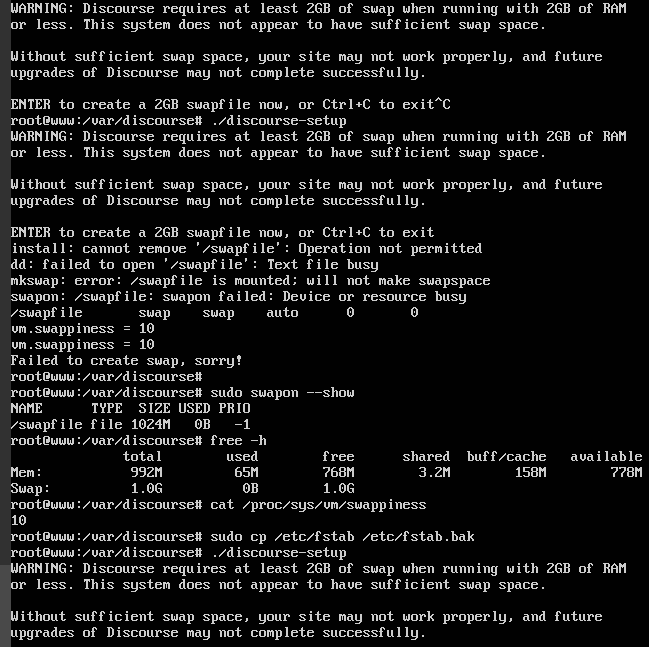
Please what should I do?
elmurph reported an “insufficient swap space” error during the final step of a Discourse installation on a Vultr VPS. The error occurred because the existing swap file was only 1 GB, whereas Discourse requires 2 GB. jomaxro identified the issue and suggested disabling the current swap file to allow the setup script to create the correct 2 GB size. elmurph confirmed the 1 GB file was created following outdated Vultr documentation from 2015, which jomaxro noted should be replaced with the current official instructions. Despite disabling the swap file, elmurph continued to receive the error. codinghorror recommended resetting the VPS with a clean Ubuntu Server 16.04 installation to resolve potential configuration conflicts. elmurph attempted this clean install but still faced the same swap space issue. Finally, pfaffman suggested that switching to Digital Ocean might be the easiest solution, or that elmurph manually create a 2 GB swap file and provide the output of free -h if the problem persists.
From the output you provided it would appear that you have a 1 GB swap file, not a 2 GB one as required by Discourse. I’d suggest disabling the existing swap file by running
swapoff /swapfile
then running
./discourse-setup
again so it can create the 2 GB file. Did you previously set up a 1 GB swap file?
Yes I did set up a 1GB swap file because it was part of the instructions in vultr instruction documentation
This? https://www.vultr.com/docs/how-to-install-discourse-on-ubuntu-14-04 Those docs are pretty outdated: Modified on: Thu, Feb 26, 2015 at 12:32 pm EST
The up-to-date instructions are here:
discourse/docs/INSTALL-cloud.md at main · discourse/discourse · GitHub
I have turned off swap file but am still getting an “insufficient swap space” message.
I suggest resetting your VPS with a clean Ubuntu Server 16.04 install and starting over from scratch.
Ok I will try that now. Thanks
[quote=“codinghorror, post:6, topic:57028, full:true”]
I suggest resetting your VPS with a clean Ubuntu Server 16.04 install and starting over from scratch.
[/quote]I have done what you said but am still having problem with the swap space stuff. Please what do I do?
The easiest thing would be to use digital ocean.
You could try to create a 2gb swap file yourself. If you do that and are still having trouble, include the output from
free -h