Can it be done with CSS? Grouping categories on category page

What I’d like to do (as I know there’s no baked in setting or feature set) is use CSS to group categories on the home page.

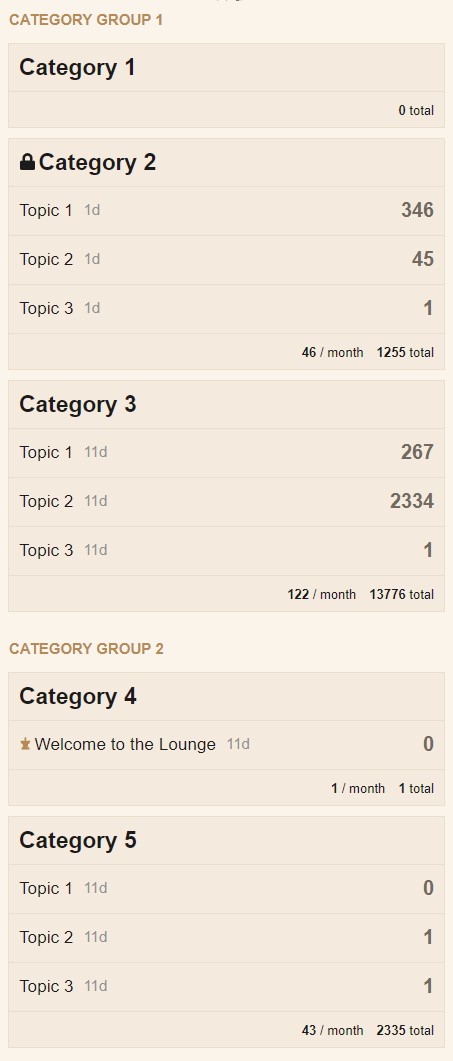
I’m not looking to nest categories, but just group some together and possibly put a header on them. I know the individual categories can be “separated” with padding, and I know each category can be targeted by category ID or category name. So what I’m hoping is to be able to replicate something that looks like this:

image

I realize for simplicity, the categories would have to be in their sorted order, and each category targeted by catediry_id, but I’m thinking that there’s possibly some CSS that can throw padding after one category or before another.

The big question is there the ability to insert some text in the padding to create a header?

The propose of this is to first break up the long category list view, but separate: example

  • category 1-2 under “staff” header

  • Category 3-4 under “community resources)

  • categories 5,8,11,12,13 “under general discussion categories”

I don’t want to make these sub categories, I like the structure and category system just as it is. All I want to do is display the categories a little differently on the categories view page. Ideally this is just a visual layout, NOTHING to change with the library structure of the platform.

Any idea how to make this happen?

This would be kind of a game changer for my work collaboration site’s layout.

Sam, codinghorror, do you think there would be a way to create a grouping step in the category reorganization menu that could do this natively, say as an option (grouping on/off).just put the categories in order within main page grouping and it could automatically separare them. In core, plugin or a theme component?

「いいね!」 3

anyone? buehler.

feedback appreciated

This kind of stuff is possible in a theme component but extremely complicated. I think you would need to override templates which makes this also pretty fragile.

「いいね!」 4

A bit late :smile: but maybe someone else needs it. I must mention that:

  • Not all the CSS code is required, especially the borders and the background colors for table rows, so feel free to adjust them as you like.
  • I had to change the layout from the regular table into flex cause you can’t have negative margins on table rows and other layout issues, and well…is more flexible :smile:
  • Replace Category Group 1 and Category Group 2 with your desired category group names
  • In my example I’ve used the category ID’s 2 and 4, so using chrome dev tools to inspect ( see pic below), find the right category id and replace [data-category-id="2"] and [data-category-id="4"] in my example with your id(s).

Paste this inside the Common tab:

.category-list{
    display: flex;
    flex-direction: column;
}
.category-list thead tr{
    display: flex;
}
.category-list .topics {
    width: 95px;
    margin-left: auto;
    min-width: 95px;
    white-space: nowrap;
}
.category-list tbody tr {
    background-color: var(--primary-very-low);
    box-sizing: border-box;
    display: flex;
}
body .category-list [data-category-id="2"],body .category-list [data-category-id="4"] {
    position: relative;
    margin-top: 50px;
}
body [data-category-id="2"]::before {
    content: "Category Group 1";
}
body [data-category-id="4"]::before {
    content: "Category Group 2";
}
body [data-category-id="2"]::before,body [data-category-id="4"]::before {
    position: absolute;
    top: -35px;
    left: 0;
    font-weight: bold;
    font-size: 15px;
    text-transform: uppercase;
    color: var(--primary-medium);
}

Paste this inside the Desktop tab:

.category-list tbody tr {
    margin-bottom: 15px;
    border: 1px solid var(--primary-low);
}

And this inside the Mobile tab:

body .category-list-item.category .posts {
    width: auto;
    margin-left: auto;
}
body .category-list-item>footer,body .subcategory-list-item>footer{
    background-color: var(--primary-very-low);
}
.categories-list .category-list th {
    padding: 0;
}
.category-list-item>footer .category-stat, .subcategory-list-item>footer .category-stat {
    float: right;
}
.category-list-item>footer .category-stat:first-child, .subcategory-list-item>footer .category-stat:first-child{
    margin-right: 0;
}
body .category-list-item.category tr:first-of-type{
    padding: 10px 0;
    border-bottom: 1px solid var(--primary-low);
}
body tr.category-topic-link:last-of-type{
    border-bottom: 1px solid var(--primary-low);
}
body .categories-list .category-list th {
    padding: 0;
}
body .category-list-item {
    border-top: none;
    margin-bottom: 10px;
}
body .category-list-item {
    padding: 0;
    border: 1px solid var(--primary-low)!important;
}
.category-list-item>footer, .subcategory-list-item>footer {
    border-top: none;
}

And this is how it looks on desktop and mobile resolutions:

「いいね!」 10

Hi Cos
]very interesting; thank you for sharing. in the same spirit (that of obtaining a better presentation, we are trying to put, in front of discourse, a wordpress page with a specific presentation and we would like to "send on this page, category names, for example those which have received a response , those chosen by the user, or then a determinate category; do you think this is possible and if so how?

「いいね!」 1

I’m afraid you can’t do that just by CSS. Maybe the WordPress Discourse plugin is what you need. In addition to this, the wp discourse shortcodes is also a must.
We are already using it on our WordPress website and it works great so far. This is how the plugin looks in the sidebar widget:

「いいね!」 2

@sam, @cosdesign’s response works. is there any way to bake this into core’s menus so users can leave it off by default, but then set the headers in the admin panel for group header titles, and in each category’s attributes page, select from a dropdown of the enabled section headers from the admin panel so the category just falls under the header.

This shouldn’t be terribly difficult to add to the platform and would really improve large multi user role and group, multi category installations

「いいね!」 1

Discourse コアでこのようなグループ化がサポートされるようになりました。

「デスクトップカテゴリページスタイル」として「注目のトピックを持つサブカテゴリ」を選択します。

すると、カテゴリページは次のようになります。

「いいね!」 5

RTLで可能ですか?
試しましたが、失敗しました💔

なるほど。コアとなる Discourse のスタイルシートは、ここで RTL バージョンを作成するために反転されます: discourse/lib/stylesheet/compiler.rb at main · discourse/discourse · GitHub CSS ファイルは、RTL バージョンを作成するためにコンパイルされるとは思いません。もしそれが正しければ、RTL レイアウトが使用されている場合にテーマで発生した問題が説明できるでしょう。

RTL ロケールでサイトを訪問し、方向が反転されているかどうかを確認して、サイトのテーマに方向を含む CSS ルールを追加することで、これを(確認)できます。反転されないと思います。

たとえば、テーマに次を追加した場合:

.category-list-item footer .category-stat, .subcategory-list-item footer .category-stat {
    float: right;
}

次のように変換されないと思います:

.category-list-item footer .category-stat, .subcategory-list-item footer .category-stat {
    float: left;
}

おっしゃる通りだと思います。上記のコードの使い方がまだよく分かりません :confused:

何か提案はありますか?

RTLに対応していないテーマの例をご存知ですか?もしご存知でしたら、そのテーマのリンクをここに投稿してください。そうすれば、私の理論をテストし、テスト後に何が問題なのかを説明します。

編集:問題の説明を以下に示します。

DiscourseのコアコードベースにあるCSSファイルの場合、RTLのCSSは、サイトのレイアウトの方向によって異なるほとんどのCSSルールを「反転」させることによって作成されます。たとえば、padding-leftpadding-rightに反転します。これは、RTLcss gem(https://github.com/discourse/rtlcss)によって行われます。

問題は、DiscourseのテーマではCSSルールが反転されないことです。つまり、テーマに方向を指定するCSSルールがある場合、RTL言語が使用されている場合とLTR言語が使用されている場合で方向は同じになります。これは軽微な例です。

テーマがRTLインターフェイスで使用されると、padding-left: 8px;padding-right: 8px;に反転されません。これにより、配置に軽微な問題が発生します。テーマがRTL言語で使用される場合に発生する、より大きな問題の例もきっとあるはずです。

テーマエディタでデフォルトのDiscourseテーマに追加するCSSについても同様です。これは、このトピックのコードを使用した例です。Can it be done with CSS? Grouping categories on category page - #4 by cosdesign

以下は、そのCSSからのルールで、方向を設定しています。

body [data-category-id="2"]::before,body [data-category-id="4"]::before {
    position: absolute;
    top: -35px;
    left: 0; // ここを変更する必要があります
    font-weight: bold;
    font-size: 15px;
    text-transform: uppercase;
    color: var(--primary-medium);
}

RTLロケールの場合、問題は次のとおりです。

そのルールがコアDiscourseのCSSファイルにあった場合、RTL言語が選択されるとleft: 0;は自動的にright: 0;に変換されます。CSSはテーマに追加されるため、手動で次のように編集する必要があります。

body [data-category-id="2"]::before,body [data-category-id="4"]::before {
    position: absolute;
    top: -35px;
    right: 0; // RTLレイアウトの適切な位置に変更されました
    font-weight: bold;
    font-size: 15px;
    text-transform: uppercase;
    color: var(--primary-medium);
}

Discourseは、RTLレイアウトが使用されている場合にhtmlタグにrtlクラスを追加します。テーマ開発者はこのクラスを使用して、テーマをLTRおよびRTLレイアウトの両方で機能させることができます。これは機能し、正しいと思いますが、おそらくleft: autoの宣言は不要かもしれません。

body [data-category-id="2"]::before,body [data-category-id="4"]::before {
    position: absolute;
    top: -35px;
    left: 0;
    font-weight: bold;
    font-size: 15px;
    text-transform: uppercase;
    color: var(--primary-medium);
}
/* RTLレイアウトの配置を修正 */
.rtl body [data-category-id="2"]::before,.rtl body [data-category-id="4"]::before {
    right: 0;
    left: auto;
}

開発者はテーマでこのアプローチを取るべきかどうかはわかりません。時間がかかり、エラーやメンテナンスの問題につながる可能性があります。おそらくDiscourseは、いくつかのテーマをコンパイルしてRTLバージョンを提供することを検討できるでしょう。これらのアプローチのいくつかを使用してテストする価値があるかもしれません。

require "rtlcss"

Rtlcss.flip_css("theme_css")

これは短い回答になるはずでした :slight_smile: 私が書いたことが正しく、他のトピックで対処されていない場合、新しいトピックに移動すべきかもしれません。

これらの Theme component がお探しのものかもしれません。または、コードを見てアイデアを得るための良いベースになるでしょう。

「Modern Category + Group boxes」は、Air Theme で使用されているものと同様にうまく機能します。