No estoy seguro de si esto apareció en otro lugar (los términos de búsqueda, perfil de color incrustado, devuelven resultados no asociados.. :).)
Dirijo un foro de fotografía de Software Libre en discuss.pixls.us. Como pueden imaginar, tenemos usuarios muy exigentes sobre cómo se muestran sus imágenes.
Recientemente nos encontramos con un problema en un hilo sobre gestión del color:
Uno de los fotógrafos notó que la funcionalidad de obtener imágenes enlazadas y almacenarlas localmente parece eliminar la información de color de las imágenes. Aunque esto puede ser aceptable para ahorrar espacio en la mayoría de los foros, para un foro de fotografía es bastante molesto.
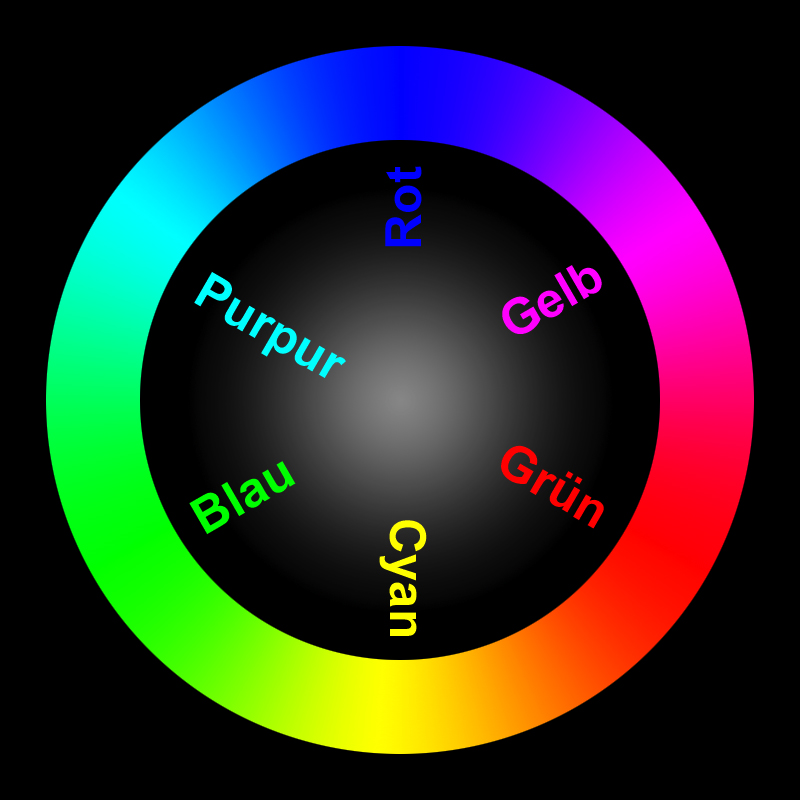
Para ilustrarlo, esta imagen tiene un perfil de color incrustado rotado. Debería mostrar (Rot = Rojo, Grün = Verde, Blau = Azul):
¿Se está realizando el procesamiento de imágenes con ImageMagick? De ser así, ¿se ha considerado la posibilidad de añadir una opción para convertir las imágenes subidas a sRGB y etiquetarlas como tal antes de guardarlas?
(Estaría encantado de investigar más a fondo si alguien pudiera indicarme las partes relevantes del código que gestionan la conversión de imágenes al subirlas).
@zogstrip - is the conversion being done using imagemagick? If so, would you mind pointing me to the relevant section?
It appears that we may only need an option to convert any images to sRGB if they have a different profile embedded, and then either strip the profile or specify that the image is now sRGB.
I was thinking about this and this seems very specific to a photography forum. If they want to keep all the metadata/color profile, they can just set SiteSetting.strip_image_metadata to false. For majority of the images, keeping the exif or iptc metadata isn’t going to be very useful.
Interesting @Patrick_David, so this is not really a bug… it is a feature request to allow for fidelity when stripping exif tags (or simply misunderstanding an existing feature)
I am going to close this for now, but feel free to open a new topic if you find setting strip_image_metadata to false unacceptable.