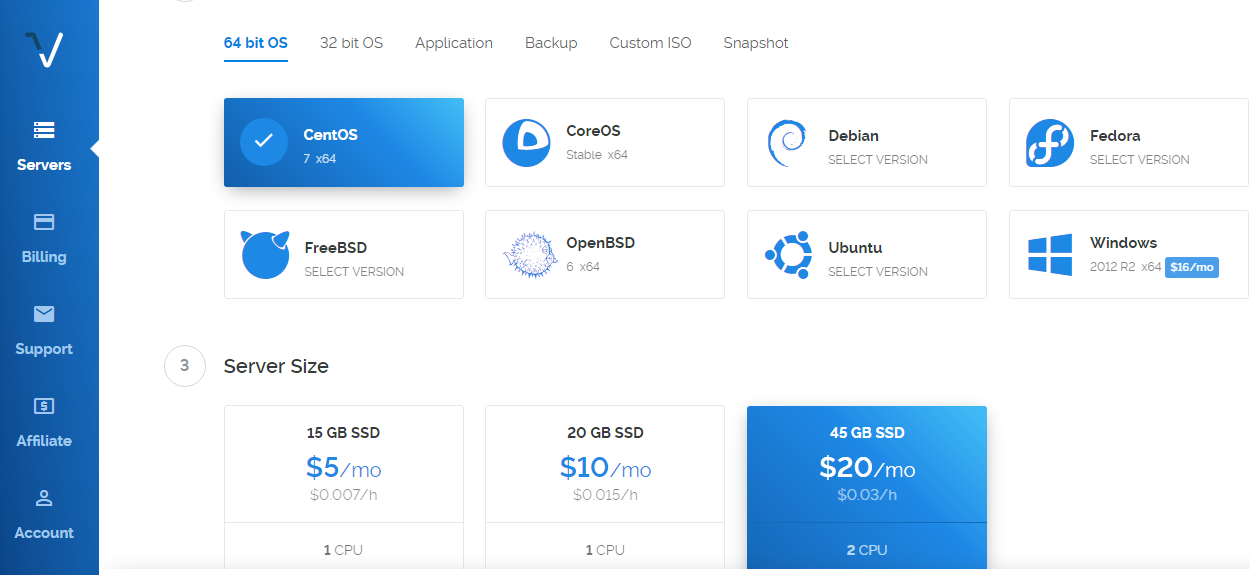
I want to start a forum and I have chosen vultr for cloud compute. But am still confused on some details I read on this forum and online too. I use windows 10 and I don’t know if it relates to installing dicourse on a cloud server.
This is where I got stuck. Should I pick Windows or any other OS? Is it according the OS I use on my PC?
I just need someone to explain the whole process to me. Thanks
Are you following these instructions?. They make it pretty clear that Ubuntu is what is recommended.
EDIT: Apologies if you are following those directions, but if you’re not, you’ll have another 100 questions that are supposed to be easy to find there.
You also need to decide what email provider you want to use, and get that setup before you run ./discourse-setup , as that will ask you for information about your mail provider.
My advice is even if you get all the way through the install and everything works, play with it a bit i.e. create some categories, and some posts, and a couple of users, and get used to how updates, deletions, backups and such work, including the CLI commands and shutting down and restarting your server. Take notes about what commands you ran, and what they do.
Once you’ve familiarized yourself with the basic admin tasks, then start again from scratch before you start inviting people and go live with your forum.
@Eduardo_Braga Penso che tu non abbia aggiunto il record DNS e abbia usato * per catturare tutto. Puoi aggiungere un record A per forum con l’indirizzo IP di Vultr.
Non sono sicuro se il record A venga aggiunto al dominio o meno. Puoi inserire il percorso completo “forum.meuxbox.com.br” nel campo Nome?
Di solito, se aggiungi un record A, almeno un server lo rileva entro 5-10 minuti in tutto il mondo. Dato che nessuno di essi lo ha rilevato, il DNS non è mappato correttamente.