さっきちょっと試してみたら、めちゃくちゃかっこいいですね! 初期のフィードバックをいくつか共有させてください。
- スクリーンシェアと音声の音量について:
試してみたのですが、他の参加者のスクリーンシェアの音量を、その人の話し声の音量と別に表示するオプションはありませんでした。 音声とスクリーンシェアのオーディオの両方を扱う、統合されたスライダーが1つしか表示されません。 スライダーを見落としませんでしたか? それとも私の理解が間違っていますか? (私のユースケースは、誰かのゲーム配信の音量をミュートまたは下げる一方で、その人の話し声は聞けるようにしたいということです。)
- 小さなバグ: 部屋を編集したとき(例: 部屋名の先頭文字を大文字にするなど)、再度編集に戻ると、ページ全体をリロードするまで編集オプションが表示されません。 編集を適用した後、クライアントUIが自分には権限があることを忘れているのかもしれません。
- IPプライバシーに関するポップアップには本当に感謝しています! この懸念を先回りして対応してくれてありがとうございます

- 私のシステムでは、マイクが非常に小さく、かなりのブーストが必要です。 これは私の環境側の問題ですが、Mumble(そしてDiscordもそうだと思いますが、しばらく使っていないので覚えていません)では、これを克服するために多くの手動ゲインを適用できます。 オートゲイン機能を無効にした場合、ブーストするための大きなヘッドルームを持つ手動ゲインノブを提供することを提案します(私の通常の生のバックグラウンドノイズは-48db、話し声は約-30dbです。 Audacityでは、通常の範囲に上げるために約20dbのブーストが必要です。)
- Discourseの問題ではありませんが、すべてのLinux Webrtcスクリーンシェアと同じ制限があります。 つまり、Firefoxではオーディオ付きスクリーンシェアが不可、Chromeではブラウザタブのオーディオスクリーンシェアのみサポート、ということです。 つまり、ゲームをストリーミングしたい場合、ブラウザの制限によりLinuxではゲームのオーディオをストリーミングできません。
- 他のソリューションで見た巧妙なワークアラウンドは、OBSを向けることができるエンドポイントアドレスを公開することでした。(おそらくLivekitはすでにこれをサポートしていますが、まだLivekitサーバー部分をセットアップしていないので確認できていません)
- 字幕機能に本当に感動しました! 文字起こし部分はまだユースケースがありませんが、ビジネス環境でのノート-taking(議事録作成)などで非常に有用だと確実に想像できます。
- 現在、チャットルームに人がいることを訪問者が気づくためのUI上の課題があります。 スクロールしないと見えないためです – 場合によってはかなり長い距離です。 私のインストール環境では、リンク/カテゴリ/タグが多いため、1ページ分以上スクロールする必要があります。 これはモバイルでは特に顕著で、メニューバーをクリックしない限り、チャットユーザーリストが全く表示されません。 チャットがアクティブなときのために、右上に何らかのボタンを設置することを提案します(Mumbleからの例)。 そこに**(1)**以上が表示されているのを見るのが、誰かがチャットに参加してほしいという私の主な合図です!
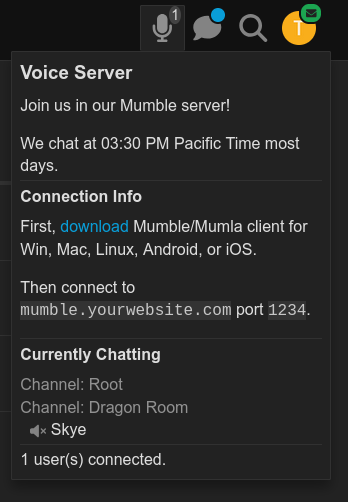
とにかく、素晴らしい仕事です – これはDiscourseにとって大きな前進であり、非常に期待しています! 