gormus
9월 6, 2024, 8:47오전
1
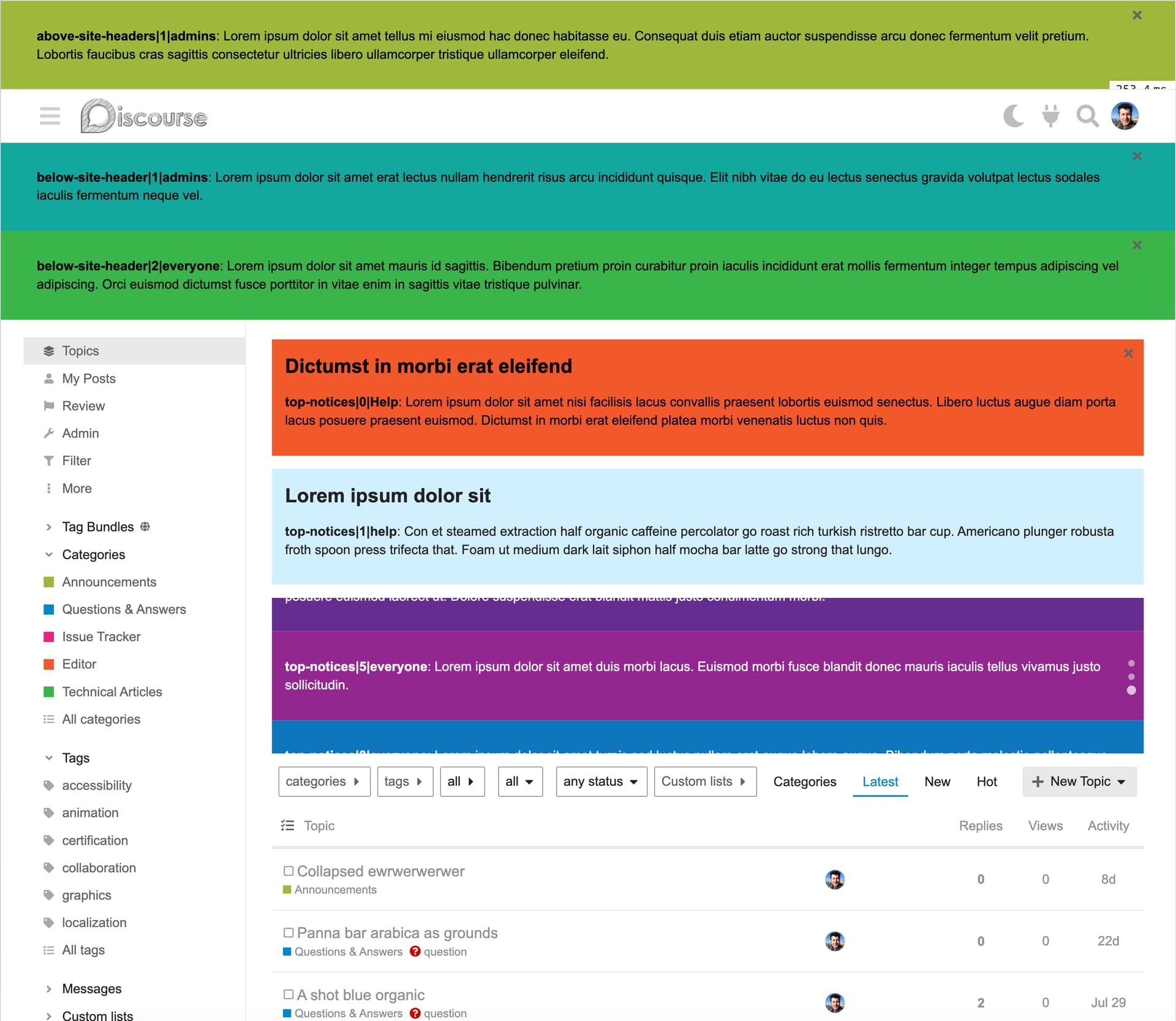
Notification Banners 테마 컴포넌트는 사이트에 메시지를 공유할 수 있는 사용자 정의 가능하고 유연한 방법을 제공합니다.
주요 기능은 다음과 같습니다:
완전한 사용자 정의 : 콘텐츠, 스타일, 동작 등을 포함하여 각 배너를 필요에 맞게 맞춤 설정할 수 있습니다.유연한 표시 옵션 : 배너를 스택 방식으로 표시하거나 쉬운 탐색을 위해 회전 캐러셀로 표시할 수 있습니다.대상 지정 메시징 : 배너를 특정 사용자 그룹에만 표시하여 개인화된 소통을 보장합니다.테마 지원 : 배너가 라이트 또는 다크 테마에 자동으로 조정되거나, 사용자 정의 색상을 설정할 수 있습니다.Markdown 지원 : Markdown을 사용하여 배너 메시지를 쉽게 서식 지정할 수 있습니다.Splide 기반 캐러셀 : 캐러셀 기능은 Splide JavaScript 라이브러리로 구동되며, 각 배너에 대한 개별 설정이 가능합니다.스케줄링 : 배너가 표시되어야 하는 시작일과 종료일을 지정할 수 있습니다.쉬운 표시 순서 : 간단한 설정으로 배너가 표시되는 순서를 제어할 수 있습니다.
이 컴포넌트는 시각적으로 매력적이고 개인화되며 잘 정리된 알림으로 청중의 참여를 유도하는 것을 쉽게 만들어 줍니다.
공식 지침을 따라 이 테마 컴포넌트를 테마에 추가하세요:https://meta.discourse.org/t/beginners-guide-to-using-discourse-themes/91966#add-theme-components-to-a-theme-9
theme authorized extensionscss 및 js 파일 확장자를 포함하도록 하세요.
각 알림 배너에는 다음 기능이 있을 수 있습니다:
제목 , 선택 사항, 메시지 위에 H2 헤딩으로 표시됩니다메시지 , 500자 길이의 간단한 알림 메시지입니다. Markdown이 지원됩니다.대상 , 알림의 대상으로 사용자 그룹을 선택합니다.카테고리 ; 배너를 표시할 카테고리를 선택합니다. 비워 두면 모든 카테고리에 표시됩니다.배경 색상 , 다른 배너와 구별하기 위해 설정할 수 있습니다.플러그인 아울렛 , 사이트 헤더 위 또는 아래에 알림을 설정하거나, top-notices 아울렛을 사용하여 네이티브 토픽 배너와 함께 표시할 수 있습니다.캐러셀로 표시 , 선택 시 각 아울렛의 모든 배너가 캐러셀로 표시됩니다. 아울렛당 최소 2개의 배너가 선택되어야 합니다.닫을 수 있음 , 선택 시 사용자가 배너를 닫을 수 있으며, 해당 사용자에게는 숨겨집니다.시작일 및 마지막 날짜 , 정의된 경우 배너의 가시성이 해당 날짜를 따릅니다. 따라서 배너를 미리 설정할 수 있지만, 설정된 날짜와 시간에만 선택된 대상에게 표시됩니다. 또는 마찬가지로 마지막 날짜에 배너가 자동으로 제거되도록 설정할 수 있습니다.표시 순서 , 어떤 배너가 위에, 어떤 배너가 아래에 표시되어야 하는지 정의합니다. v1.3.0부터 네이티브 재정렬 버튼을 사용합니다.
슬라이드쇼 또는 캐러셀 기능은 Splide 라이브러리가 제공하며, MIT 라이선스로 배포됩니다.
각 캐러셀은 Splide 옵션 을 사용하여 테마 컴포넌트 페이지에서 구성할 수 있습니다.
기본적으로 배너는 banner-topic과 동일한 색상을 사용합니다:
.notification-banner {
    background: var(--tertiary-low);
    color: var(--primary);
}
그러나 배너 설정에서 배경 색상이 정의된 경우, 그 명도에 따라 검은색 또는 흰색이 자동으로前景 색상으로 선택됩니다.
.notification-banners--above-site-header,
.notification-banners--below-site-header,
.notification-banners--top-notices {

  .notification-banner {

    &__wrapper {
    }

    &__close {
    }

    &__header {
    }

    &__content {
    }
  }

  &.splide {
    .notification-banner {
    }
  }
}

.notification-banners--top-notices {
  .notification-banner {

    &__content {
    }
  }
}
프로덕션 사이트를 업데이트하기 전에 변경 사항을 테스트하고 사용자 정의를 확인하는 것을 잊지 마세요.
I’ve been considering this idea to better target an audience using the Trust Levels:
I think I have something for you all to check out.
Though, I recommend testing this on a non-production environment first as it introduces a breaking change.
To install this version, use the staging branch of Notification Banners :
[Install the staging branch for testing the new feature]
30개의 좋아요
nathank
9월 6, 2024, 9:03오전
2
와! 정말 멋지네요 — 그리고 엄청 유연하네요.
카테고리로 제한할 수 있는 기능을 고려해 보셨나요?
9개의 좋아요
gormus
9월 6, 2024, 9:12오전
3
감사합니다!
사실 이전에 Filtered Topic Lists 테마 컴포넌트로 했던 내용을 포함할까 고민해 본 적이 있습니다. “Show on” 섹션을 참고해 주세요.
복잡해질까 봐 우려되어 해당 옵션을 포함하지 않았습니다. 대신 배너의 대상 사용자로 사용자 그룹을 사용하도록 선택했습니다.
하지만 필요성이 있다면 포함하는 것도 마다하지 않겠습니다.
5개의 좋아요
Lilly
9월 6, 2024, 2:23오후
4
정말 훌륭해요, @gormus ! 이 컴포넌트를 커뮤니티와 공유해 주셔서 감사합니다.
3개의 좋아요
toanvoc
9월 8, 2024, 6:28오전
6
이 배너 팝업을 닫기 위해 X 버튼을 클릭한 경우, 다시 표시되도록 하는 방법이 있나요? 배너 배경 반복 설정에서 ‘반복’, ‘반복-x’, '반복-y’를 선택했지만 작동하지 않습니다.
2개의 좋아요
nathank
9월 9, 2024, 7:52오전
7
Osman Görmüş:
필요하다면 기꺼이 포함하겠습니다.
좋습니다! 귀찮게 하기 전에 실제 환경에서 직접 사용해 보고 정말 필요한지 아닌지 확인해 보겠습니다.
4개의 좋아요
gormus
9월 9, 2024, 8:00오전
8
현재는 없습니다. 사용자가 닫은 알림을 다시 복원하고 싶어 할 것이라고는 생각하지 못했습니다.
정확히 어떤 의미인지 설명해 주실 수 있을까요?
2개의 좋아요
ked
9월 16, 2024, 2:32오전
10
Osman Görmüş:
필요하다면 기꺼이 포함하겠습니다.
저도 이 기능에 관심이 있습니다(특정 카테고리에서 사용 가능한 경우). 검토해 주셔서 감사합니다.
4개의 좋아요
gormus
9월 17, 2024, 11:59오전
11
이제 카테고리도 대상 독자(타깃)로 지원됩니다. 배너별로 단일 또는 여러 카테고리를 선택할 수 있습니다.
여러분의 생각을 알려주세요 : )
5개의 좋아요
현재 제 디스커스 페이지는 3.4.0.beta3-dev 버전으로 실행 중이며, 배너를 설치할 때 페이지가 표시되지 않는 오류가 발생하고 있습니다. 다시 확인해 주시고, 커뮤니티에 조기 업데이트를 제공할 수 있기를 바랍니다. 공유해 주셔서 감사합니다.
2개의 좋아요
gormus
10월 13, 2024, 7:08오후
13
안녕하세요 @hoangphuctran93 ,
문제를 보고해 주셔서 감사합니다. Discourse 3.4.0.beta3-dev (d3f09f8f61 )에서 Notification Banners를 새로 설치하여 문제를 확인했습니다.
방금 수정 사항을 적용했습니다. 사이트의 인스턴스를 업데이트하고, 필요하면 페이지를 강제 새로고침해 주세요.
2개의 좋아요
감사합니다. 잘 작동했고, 새로운 아이디어와 업데이트를 기대하고 있습니다. 몇 가지 제안 사항이 있습니다.
입력 상자 확장
HTML 디자인 외에도 이미지를 빠르게 선택할 수 있도록 허용
제목 대신 배너 이름을 지정할 수 있는 데이터 필드 추가. 이는 여러 배너가 적용될 때 분류 및 관리에 도움이 됩니다.
이것이 당사의 디스코urs 페이지 에 적용된 결과입니다.
1개의 좋아요
Beth
11월 19, 2024, 7:25오후
15
이 부분에서 문제가 발생하고 있습니다 - 여기서는 링크가 깨져 있습니다. 제 사이트에서 해당 확장자를 어떻게 승인할 수 있을까요?
감사합니다!
Moin
11월 19, 2024, 7:42오후
16
meta.discourse.org를 포럼 URL로 대체해야 합니다. 여기에서는 관리자 영역에 액세스할 수 없습니다.https://meta.discourse.org/admin/site_settings/category/files?filter=theme%20authorized%20extensions
또는 사이트 설정으로 이동하여 theme authorized extensions를 검색할 수도 있습니다.
5개의 좋아요
Beth
11월 19, 2024, 9:00오후
18
여기서 또 한 가지 질문이 있습니다. '스케줄링’이라고 하셨는데, 배너가 매주 동일한 시간에 표시되도록 설정할 수 있는 방법이 있나요? 저희는 매주 정기적으로 오피스 아워를 진행하는데, 이 배너가 해당 시간 동안 표시되기를 원합니다. 그렇게 하면 사이트 방문자가 현재 오피스 아워가 진행 중임을 확인하고 원할 경우 참여할 수 있을 것 같습니다.
1개의 좋아요
gormus
11월 20, 2024, 8:19오전
19
배너가 시작될 날짜와 시간을 지정하여 표시를 시작하고, 다른 날짜와 시간에 제거하도록 설정할 수 있습니다.
따라서 시작 및 종료 날짜와 시간에 대한 스케줄은 하나만 설정할 수 있습니다.
요청하신 내용은 더 복잡한 스케줄링 기능이 필요하며, Notification Banners는 이를 제공하지 않습니다.
다만, 시작 및 종료 날짜를 다르게 설정하여 동일한 배너의 사본을 여러 개 생성하면 필요한 결과를 달성할 수 있습니다.
그러나 라이브로 배포하기 전에 이 시나리오를 테스트해 보시는 것을 강력히 권장합니다.
그리고 어떤 시간대에 있든, datetime 값은 UTC로 입력해야 하며 필드 설명에 표시된 형식과 일치해야 합니다.
4개의 좋아요
Beth
11월 20, 2024, 2:13오후
20
피드백 감사합니다!
매주 3번의 오피스 아워 세션을 진행하기 때문에, 모든 세션에 대해 중복 배너를 수동으로 만드는 일은 꽤 많은 작업이 될 것 같습니다. 그래서 더 자동화된 해결책을 원했습니다.
다른 옵션으로 Automations 플러그인을 살펴보았는데, 배너 자동화도 "특정 시점"에만 적용되고 “반복” 동작은 지원하지 않는 것 같습니다.
2개의 좋아요