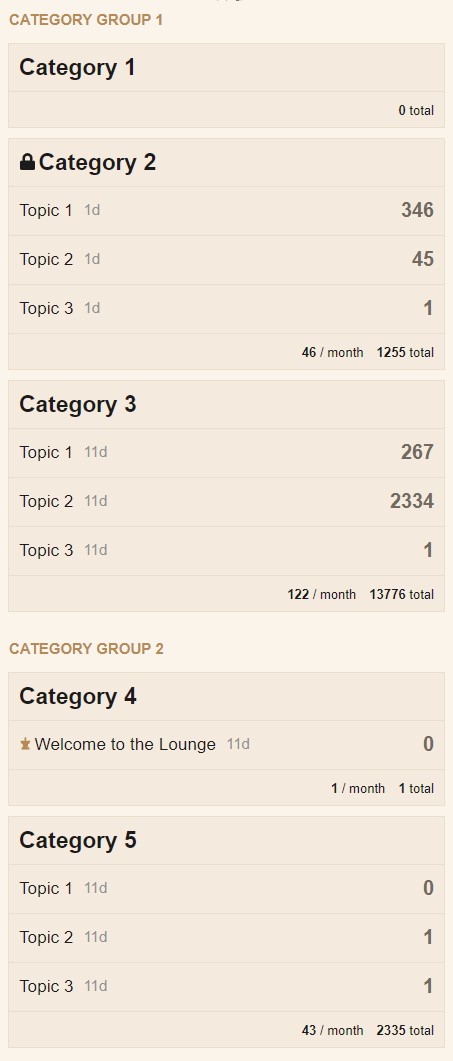
What I’d like to do (as I know there’s no baked in setting or feature set) is use CSS to group categories on the home page.
I’m not looking to nest categories, but just group some together and possibly put a header on them. I know the individual categories can be “separated” with padding, and I know each category can be targeted by category ID or category name. So what I’m hoping is to be able to replicate something that looks like this:
I realize for simplicity, the categories would have to be in their sorted order, and each category targeted by catediry_id, but I’m thinking that there’s possibly some CSS that can throw padding after one category or before another.
The big question is there the ability to insert some text in the padding to create a header?
The propose of this is to first break up the long category list view, but separate: example
category 1-2 under “staff” header
Category 3-4 under “community resources)
categories 5,8,11,12,13 “under general discussion categories”
I don’t want to make these sub categories, I like the structure and category system just as it is. All I want to do is display the categories a little differently on the categories view page. Ideally this is just a visual layout, NOTHING to change with the library structure of the platform.
Any idea how to make this happen?
This would be kind of a game changer for my work collaboration site’s layout.
Sam, codinghorror, do you think there would be a way to create a grouping step in the category reorganization menu that could do this natively, say as an option (grouping on/off).just put the categories in order within main page grouping and it could automatically separare them. In core, plugin or a theme component?
This kind of stuff is possible in a theme component but extremely complicated. I think you would need to override templates which makes this also pretty fragile.
A bit late but maybe someone else needs it. I must mention that:
Not all the CSS code is required, especially the borders and the background colors for table rows, so feel free to adjust them as you like.
I had to change the layout from the regular table into flex cause you can’t have negative margins on table rows and other layout issues, and well…is more flexible
Replace Category Group 1 and Category Group 2 with your desired category group names
In my example I’ve used the category ID’s 2 and 4, so using chrome dev tools to inspect ( see pic below), find the right category id and replace [data-category-id="2"] and [data-category-id="4"] in my example with your id(s).
Hi Cos
]very interesting; thank you for sharing. in the same spirit (that of obtaining a better presentation, we are trying to put, in front of discourse, a wordpress page with a specific presentation and we would like to "send on this page, category names, for example those which have received a response , those chosen by the user, or then a determinate category; do you think this is possible and if so how?
I’m afraid you can’t do that just by CSS. Maybe the WordPress Discourse plugin is what you need. In addition to this, the wp discourse shortcodes is also a must.
We are already using it on our WordPress website and it works great so far. This is how the plugin looks in the sidebar widget:
@sam, @cosdesign’s response works. is there any way to bake this into core’s menus so users can leave it off by default, but then set the headers in the admin panel for group header titles, and in each category’s attributes page, select from a dropdown of the enabled section headers from the admin panel so the category just falls under the header.
This shouldn’t be terribly difficult to add to the platform and would really improve large multi user role and group, multi category installations
Cela semble logique. Les feuilles de style de base de Discourse sont inversées pour créer une version RTL ici : discourse/lib/stylesheet/compiler.rb at main · discourse/discourse · GitHub. Je ne pense pas que les fichiers CSS ajoutés par les thèmes soient compilés pour créer une version RTL. Si c’est le cas, cela expliquerait les problèmes que vous avez rencontrés avec les thèmes lorsqu’une mise en page RTL est utilisée.
Vous pourriez confirmer cela en ajoutant quelques règles CSS contenant une direction au thème de votre site, puis en visitant le site avec une locale RTL et en voyant si la direction a été inversée. Je ne pense pas qu’elle sera inversée.
Connaissez-vous un exemple de thème qui ne fonctionne pas avec RTL ? Si oui, publiez un lien vers le thème ici et je testerai ma théorie et j’expliquerai ce qui ne va pas après l’avoir testé.
Edit : Voici une explication du problème :
Pour les fichiers CSS qui se trouvent dans la base de code principale de Discourse, le CSS RTL est créé en « inversant » la plupart des règles CSS qui dépendent de la direction de la mise en page du site. Par exemple, padding-left est inversé en padding-right. Ceci est fait avec la gemme RTLcss : GitHub - discourse/rtlcss: A wrapper around the rtlcss npm package to flip CSS direction in Ruby.
Le problème est que les thèmes Discourse ne voient pas leurs règles CSS inversées. Cela signifie que si un thème a des règles CSS qui spécifient une direction, la direction sera la même lorsqu’une langue RTL est utilisée que lorsqu’une langue LTR est utilisée. Voici un exemple mineur :
Lorsque le thème est utilisé avec une interface RTL, padding-left: 8px; n’est pas inversé en padding-right: 8px;. Cela cause un problème mineur d’alignement. Je suis sûr qu’il existe des exemples de problèmes plus importants lorsque les thèmes sont utilisés avec une langue RTL.
Si cette règle se trouvait dans un fichier CSS principal de Discourse, left: 0; serait automatiquement converti en right: 0; lorsqu’une langue RTL serait sélectionnée. Comme le CSS est ajouté à un thème, vous devez le modifier manuellement comme suit :
body [data-category-id="2"]::before,body [data-category-id="4"]::before {
position: absolute;
top: -35px;
right: 0; // changé à la bonne position pour les mises en page RTL
font-weight: bold;
font-size: 15px;
text-transform: uppercase;
color: var(--primary-medium);
}
Discourse ajoute une classe rtl à la balise html lorsqu’une mise en page RTL est utilisée. Les développeurs de thèmes pourraient utiliser cette classe pour faire fonctionner leurs thèmes à la fois pour les mises en page LTR et RTL. Cela fonctionne, et je pense que c’est correct, mais peut-être que la déclaration left: auto n’a pas besoin d’être là.
body [data-category-id="2"]::before,body [data-category-id="4"]::before {
position: absolute;
top: -35px;
left: 0;
font-weight: bold;
font-size: 15px;
text-transform: uppercase;
color: var(--primary-medium);
}
/* Corriger le positionnement pour les mises en page rtl */
.rtl body [data-category-id="2"]::before,.rtl body [data-category-id="4"]::before {
right: 0;
left: auto;
}
Je ne suis pas sûr si les développeurs devraient adopter cette approche avec leurs thèmes. C’est chronophage et pourrait entraîner des erreurs et des problèmes de maintenance. Peut-être que Discourse pourrait compiler certains thèmes et envisager de fournir une version RTL. Cela pourrait valoir la peine de tester cette approche avec quelques-uns d’entre eux :
require "rtlcss"
Rtlcss.flip_css("theme_css")
Ceci était censé être une réponse courte Si ce que j’ai écrit est correct et n’a pas été traité dans un autre sujet, peut-être qu’il devrait être déplacé vers un nouveau sujet.