Ho appena unito la Coda di Revisione che è stata in sviluppo negli ultimi mesi. L’abbiamo eseguita sui nostri server per un po’ di tempo ed è passata attraverso le mani di diversi sviluppatori, quindi è pronta per iniziare i test con gli utenti Discourse che seguono il ramo tests-passed.
Ecco le note dal commit:
Questo è un ampio refactoring che unisce tutti i tipi di elementi revocabili nel core di Discourse (Utenti, Post in coda e Segnalazioni) in un’unica coda di revisione consolidata.
Nuove Funzionalità
Un luogo comodo per revisionare tutti i contenuti
Gli elementi revocabili vengono valutati in background e gli elementi con priorità più alta vengono mostrati per primi. Gli membri dello staff e gli utenti con livelli di fiducia più alti generano elementi con priorità più alta.
Puoi filtrare la coda di revisione per stato, priorità, tipo di elemento revocabile, categoria e utente
L’API per gli elementi revocabili restituisce l’elenco delle azioni che possono essere eseguite su un elemento, il che significa che l’applicazione front-end può essere più semplice e non duplicare tutta la logica.
Le strutture dati sono progettate per abilitare la moderazione degli elementi a livello non staff nel prossimo futuro
Note di Progettazione del Software
Il modello Reviewable utilizza l’ereditarietà a tabella singola (STI) e ogni tipo di elemento revocabile deve dichiarare una sottoclasse, un serializzatore e un componente Ember. Attualmente esistono tre tipi: ReviewableQueuedPost, ReviewableUser e ReviewableFlaggedPost. Gli sviluppatori sono incoraggiati a osservare come sono implementati altri elementi revocabili e a crearne di propri.
Le Azioni sui Post (come le segnalazioni) devono ora essere create utilizzando l’oggetto servizio PostActionCreator. Ora ha un’API molto più amichevole e restituisce un oggetto risultato che restituirà l’elemento revocabile associato.
Compatibilità Retroattiva
L’API REST è mantenuta con i vecchi endpoint, tuttavia vengono registrati avvisi di deprecazione. Il codice di terze parti puntato alle vecchie API dovrebbe essere aggiornato alla nuova API della coda di revisione. Tutto il codice Ember.js/front-end per la vecchia interfaccia di approvazione utente / segnalazione / post in coda è stato rimosso.
In una futura release rimuoveremo le vecchie API e la compatibilità retroattiva.
Si prega di utilizzare questo argomento per feedback e segnalazioni di bug. Cercherò di risolvere le cose il più rapidamente possibile!
After upgrading from Discourse 2.3.0 beta 5 to beta 6 I now have 14 new notifications in the new /review page, all regarding users that need to be approved.
Those users are either user accounts we rejected weeks ago or banned users, though.
If I clikc on the “Reject” button I get an error message “Sorry, an error has occurred” (see picture below).
TLDR version, I have 14 notifications about already rejected/banned users and I cannot find a way to get rid of them
So the error popping up is almost certainly that the users have posts so they can’t be deleted. I think I realise the bug in my migration now, where I was creating reviewables for users who were not approved. I think perhaps banning someone is setting them as unapproved, so they showed up again.
This fixes the missing translations. Good catch @featheredtoast because it made me realise those components were admin only at the same time, which I also fixed:
I thought I’d seen this complaint elsewhere, but I can’t find it. I just did a g+ import and there are 1300 users in the approval queue with entries like this:
From this it’s impossible to tell why the user needs approval, and worse, the only way to find out seems to be to select the username and do a search. Is there a reason not to have the username link to their profile? Or, better, provide something about the user to know what to do about it?
And also, I presume that “Reject” rejects the user and does Something Bad. How does one clear this and say that the user is OK?
Help! How do I fix this?
My inclination is to just remove them all from the approval queue. But I don’t know how to do that because in the user record I see:
 approved: true,
 approved_by_id: -1,
 approved_at: Fri, 29 Mar 2019 18:26:49 UTC +00:00,
So I guess this approval must be in some other table?
@pfaffman can you help me track this down? You said you did an import, but was it before you ran database migrations? Was must_approve_users set to true?
I updated from the latest a few weeks ago to just now, site is not loading (the Oops message) and shows this in the logs a lot:
Failed to handle exception in exception app middleware : PG::UndefinedTable: ERROR:  relation "queued_posts" does not exist
LINE 8:                WHERE a.attrelid = '"queued_posts"'::regclass
                                          ^
:               SELECT a.attname, format_type(a.atttypid, a.atttypmod),
                     pg_get_expr(d.adbin, d.adrelid), a.attnotnull, a.atttypid, a.atttypmod,
                     c.collname, col_description(a.attrelid, a.attnum) AS comment
                FROM pg_attribute a
                LEFT JOIN pg_attrdef d ON a.attrelid = d.adrelid AND a.attnum = d.adnum
                LEFT JOIN pg_type t ON a.atttypid = t.oid
                LEFT JOIN pg_collation c ON a.attcollation = c.oid AND a.attcollation <> t.typcollation
               WHERE a.attrelid = '"queued_posts"'::regclass
                 AND a.attnum > 0 AND NOT a.attisdropped
               ORDER BY a.attnum
There are some gamebreaking problems with this as it stands now, ill run through them here.
When i click on a flagged comment, it does not jump directly to the comment in question in the thread. I have to use the search feature to locate the comment that got flagged. This is very stressful on mobile, and tedious overall.
When a post gets deleted by the system, i lose the ability to go to the thread in question. I prefer to read the thread as it is, and not through the flag menu.
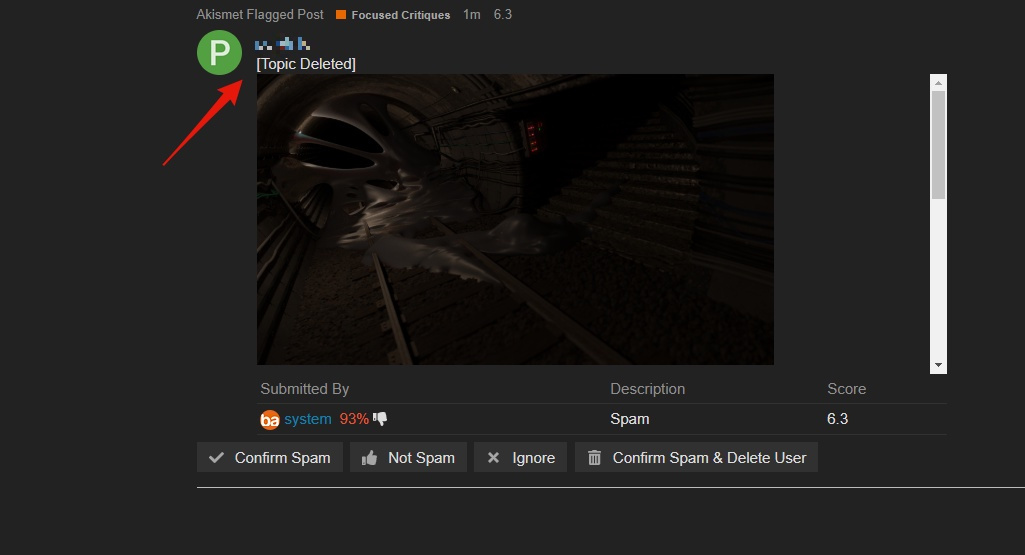
This also made things even more complicated when i as unable to mark it as “Not Spam”, and got prompted with this error:
The way we solved this was to ignore the flag, then locate the deleted thread and un-delete it manually. I dont know if this manual workflow was possible from the beginning, but having the ability to go to the thread in question would certainly be helpful regardless.
I dont know if this is intentional or not, but when a flag is “ignored”, i thought that was only supposed to affect that one person, leaving the flag to be death with by someone else. Please correct me if im wrong. Currently, if someone ignores a flag, it gets ignored for everyone. If this is intentional, then look past this point, however, if its ment to only ignore for you, then thats not working properly.
That being said, i love this update as a whole. Just a few minor things to patch up!
It’s a bit tricky to explain, but you’ll want the error that happened right when you clicked “Not Spam”. You might be able to find it by timestamp. When you’re viewing it, you should see the path similar to /review/(some number)/perform/not_spam.json with an error message.
Alright i have to go, but i’ll try to recreate the scenario once i get home with a new account. If i cant figure it out then i’ll see if Bart can look into it.