¿Cómo publicar imágenes a través de API?

He estado trabajando en un plugin para Obsidian y me he estado dando cabezazos intentando subir imágenes. Esto es lo que tengo hasta ahora:

	async uploadImages(imageReferences: string[]): Promise<string[]> {
		const imageUrls = [];
		for (const ref of imageReferences) {
			const filePath = this.app.metadataCache.getFirstLinkpathDest(ref, this.activeFile.name)?.path;
			if (filePath) {
				const file = this.app.vault.getAbstractFileByPath(filePath) as TFile;
				if (file) {
					try {
						const arrayBuffer = await this.app.vault.readBinary(file);
						const blob = new Blob([arrayBuffer]);
						const boundary = '----WebKitFormBoundary7MA4YWxkTrZu0gW';
						let body = '';

						body += `--${boundary}\r\n`;
						body += `Content-Disposition: form-data; name=\"type\"\r\n\r\n`;
						body += "composer\r\n";
						body += `--${boundary}\r\n`;
						body += `Content-Disposition: form-data; name=\"synchronous\"\r\n\r\n`;
						body += "true\r\n";

						body += `--${boundary}\r\n`;
						body += `Content-Disposition: form-data; name=\"files[]\"; filename=\"${file.name}\"\r\n`;
						body += `Content-Type: image/jpg\r\n\r\n`
						body += blob + '\r\n';
						body += `--${boundary}--\r\n`;
						console.log(body)
						const formData = new TextEncoder().encode(body)

						const url = `${this.settings.baseUrl}/uploads.json`;
						const headers = {
							"Api-Key": this.settings.apiKey,
							"Api-Username": this.settings.disUser,
							"Content-Type": `multipart/form-data; boundary=${boundary}`
						};

						const response = await requestUrl({
							url: url,
							method: "POST",
							body: formData,
							throw: false,
							headers: headers,
						});

						//const response = await fetch(url, {
						//	method: "POST",
						//	body: formData,
						//	headers: new Headers(headers),
						//});

						console.log(`Upload Image response: ${response.status}`);
						//if (response.ok) {
						if (response.status == 200) {
							const jsonResponse = response.json();
							console.log(`Upload Image jsonResponse: ${JSON.stringify(jsonResponse)}`);
							imageUrls.push(jsonResponse.url);
						} else {
							new NotifyUser(this.app, `Error uploading image: ${response.status}`).open();
							console.error(`Error uploading image: ${JSON.stringify(response.json)}`);
							//console.error("Error uploading image:", response.status, await response.text());
						}
					} catch (error) {
						new NotifyUser(this.app, `Exception while uploading image: ${error}`).open();
						console.error("Exception while uploading image:", error);
					}
				} else {
					new NotifyUser(this.app, `File not found in vault: ${ref}`).open();
					console.error(`File not found in vault: ${ref}`);
				}
			} else {
				new NotifyUser(this.app, `Unable to resolve file path for: ${ref}`).open();
				console.error(`Unable to resolve file path for: ${ref}`);
			}
		}
		return imageUrls;
	}

Estoy construyendo un multipart/form-data porque requestURL() no puede aceptar un formData() como parámetro. Solo string o arrayBuffer. No puedo usar fetch() ya que obtengo un error CORS. Con este código (y muchos ajustes menores al body) estoy obteniendo el siguiente error:

Error uploading image: {“errors”:[“You supplied invalid parameters to the request: Discourse::InvalidParameters”],“error_type”:“invalid_parameters”}
1 me gusta

Creo que voy a proceder y actualizar, ya que ahora estoy recibiendo un mensaje de error diferente:

	async uploadImages(imageReferences: string[]): Promise<string[]> {
		const imageUrls = [];
		for (const ref of imageReferences) {
			const filePath = this.app.metadataCache.getFirstLinkpathDest(ref, this.activeFile.name)?.path;
			if (filePath) {
				const file = this.app.vault.getAbstractFileByPath(filePath) as TFile;
				if (file) {
					try {
						const imgfile = await this.app.vault.readBinary(file);
						const boundary = genBoundary();
						const sBoundary = '--' + boundary + '\r\n';
						let body = '';
						body += `${sBoundary}Content-Disposition: form-data; name="type"\r\n\r\ncomposer\r\n`;
						body += `${sBoundary}Content-Disposition: form-data; name="synchronous"\r\n\r\ntrue\r\n`;
						body += `${sBoundary}Content-Disposition: form-data; name="files[]"; filename="${file.name}"\r\nContent-Type: image/jpg`;
						console.log(body);

						const eBoundary = '\r\n--' + boundary + '--\\r\n';
						const bodyArray = new TextEncoder().encode(body);
						const endBoundaryArray = new TextEncoder().encode(eBoundary);

						const formDataArray = new Uint8Array(bodyArray.length + imgfile.byteLength + endBoundaryArray.length);
						formDataArray.set(bodyArray, 0);
						formDataArray.set(new Uint8Array(imgfile), bodyArray.length);
						formDataArray.set(endBoundaryArray, bodyArray.length + imgfile.byteLength);

						const url = `${this.settings.baseUrl}/uploads.json`;
						const headers = {
							"Api-Key": this.settings.apiKey,
							"Api-Username": this.settings.disUser,
							"Content-Type": `multipart/form-data; boundary=${boundary}`
						};

						const response = await requestUrl({
							url: url,
							method: "POST",
							body: formDataArray.buffer,
							throw: false,
							headers: headers,
						});

						console.log(`Upload Image response: ${response.status}`);
						if (response.status == 200) {
							const jsonResponse = response.json();
							console.log(`Upload Image jsonResponse: ${JSON.stringify(jsonResponse)}`);
							imageUrls.push(jsonResponse.url);
						} else {
							new NotifyUser(this.app, `Error uploading image: ${response.status}`).open();
							console.error(`Error uploading image: ${JSON.stringify(response.json)}`);
						}
					} catch (error) {
						new NotifyUser(this.app, `Exception while uploading image: ${error}`).open();
						console.error("Exception while uploading image:", error);
					}
				} else {
					new NotifyUser(this.app, `File not found in vault: ${ref}`).open();
					console.error(`File not found in vault: ${ref}`);
				}
			} else {
				new NotifyUser(this.app, `Unable to resolve file path for: ${ref}`).open();
				console.error(`Unable to resolve file path for: ${ref}`);
			}
		}
		return imageUrls;
	}

El mensaje de error que estoy recibiendo ahora es:

Exception while uploading image: SyntaxError: Unexpected token ‘I’, “Invalid request” is not valid JSON

Esto me confunde porque la API indica que necesitamos enviar multipart/form-data, pero dice que es JSON inválido. ¿Quizás está relacionado con requestAPI()?

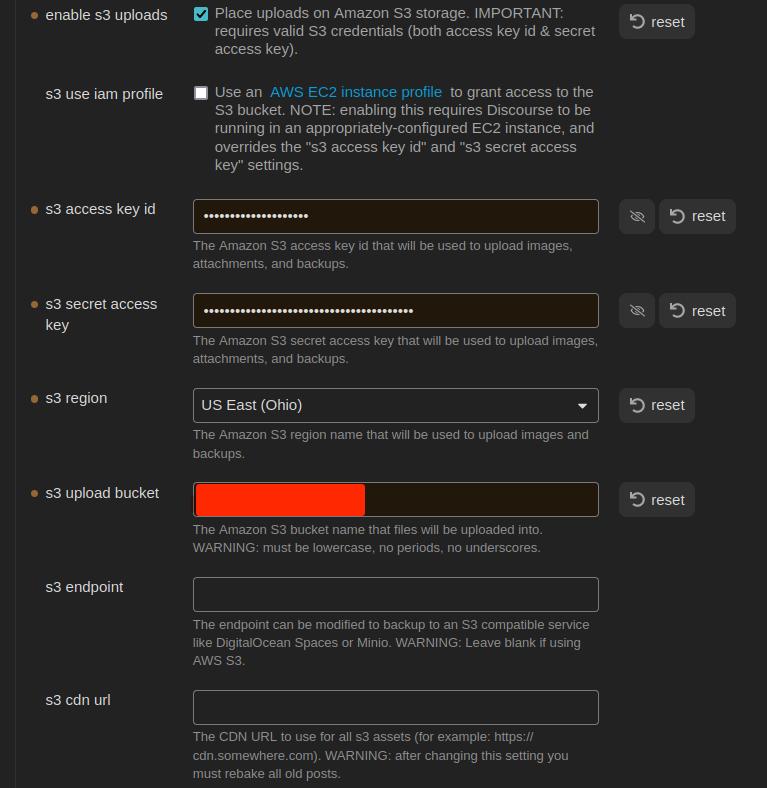
Así que pensé en probar un enfoque diferente utilizando el almacenamiento S3. Seguí las instrucciones aquí para configurar un bucket AWS S3. Aquí están mis configuraciones:

Y aquí está mi código:

	async uploadExternalImage(imageReferences: string[]): Promise<string[]> {
		const imageUrls: string[] = [];
		for (const ref of imageReferences) {
			const filePath = this.app.metadataCache.getFirstLinkpathDest(ref, this.activeFile.name)?.path;
			if (filePath) {
				const file = this.app.vault.getAbstractFileByPath(filePath) as TFile;
				if (file) {
					try {
						const url = `${this.settings.baseUrl}/uploads/generate-presigned-put.json`;
						//const imgfile = await this.app.vault.readBinary(file);
						const img = {
							type: "composer",
							file_name: file.name,
							file_size: file.stat.size,
						}
						console.log(JSON.stringify(img));
						const headers = {
							"Content-Type": "application/json",
							"Api-Key": this.settings.apiKey,
							"Api-Username": this.settings.disUser,
						};
						const response = await requestUrl({
							url: url,
							method: "POST",
							body: JSON.stringify(img),
							throw: false,
							headers: headers
						})
						console.log(response.json)
					} catch (error) {
						console.error(`Error uploading: ${error}`);
						//console.log(response.json)
					}
				} else {
					console.error('error')
				}
			} else {
				console.error('error')
			}
		}
		return imageUrls;
	}

Ahora, me doy cuenta de que esto actualmente no funcionará porque aún no estoy subiendo el archivo. Por lo que leí en la documentación, enviaría un objeto JSON que contiene el tipo, el nombre del archivo y el tamaño del archivo. La API debería responder con una clave y una URL para que yo la use para la transferencia real del archivo. Pero en este punto, estoy obteniendo el siguiente error:

{
    "errors": [
        "La URL o el recurso solicitado no se pudieron encontrar."
    ],
    "error_type": "not_found"
}

[
“La URL o el recurso solicitado no se pudieron encontrar.”
]

Revisé mi clave API para asegurarme de que tuviera permisos, los tiene. Pero creé una nueva de todos modos. Y una global. Ninguna está funcionando. Mismo código de error. ¿Qué estoy haciendo mal?

Editar, aquí está el objeto img:

{"type":"composer","file_name":"face2.jpg","file_size":17342}

No estoy muy familiarizado con ese ecosistema, pero ¿quizás esto ayude?

Error CORS…

¿Seguiste

?

1 me gusta

Estoy adivinando un poco aquí, pero no creo que configurar CORS funcione para este caso. El origen (al menos desde la aplicación de escritorio de Obsidian) es 'app://obsidian.md'. Creo que CORS solo se puede configurar en Discourse para tratar con solicitudes HTTP.

@maxtim, ¿necesitas que esto funcione desde el móvil, o sería suficiente poder publicar en Discourse desde la aplicación de escritorio? Estoy adivinando de nuevo, pero… entiendo que la aplicación de escritorio es una aplicación Electron. Se ejecuta en una combinación de Chromium y Node.js. Podrías usar node-fetch para hacer solicitudes del lado del servidor a Discourse. Si eso funciona, se encargaría del problema de CORS y te permitiría usar FormData en las solicitudes.

Lo intenté (proverbialmente lanzar fideos mojados para ver qué se pega). Pero ya era aprensivo y @simon tiene razón.

Idealmente, el plugin también estaría disponible en el móvil. Pero por ahora, si solo funciona en el escritorio, es lo que hay.

Por supuesto, otra solución podría ser: Obsidian Vault en el móvil → sincronizar con el escritorio → cli para subir a Discourse. Pero eso parece un poco complicado.

Básicamente, la situación ideal es que el foro de Discourse reemplace al Obsidian Vault. De esa manera, los usuarios que prefieren el foro, pueden usar el foro. Los usuarios que prefieren (o de hecho necesitan una solución sin conexión) pueden usar Obsidian. Ya tengo algunas ideas sobre cómo podría funcionar una sincronización bidireccional. Pero creo que primero hay que gestionar las imágenes/archivos de alguna manera.

Editar:
Estoy bastante convencido de que esto funcionará, pero no consigo que los parámetros sean correctos:

					try {
						const imgfile = await this.app.vault.readBinary(file);
						const boundary = genBoundary();
						const sBoundary = '--' + boundary + '\r\n';
						let body = '';
						body += `${sBoundary}Content-Disposition: form-data; name=\"type\"\r\n\r\ncomposer\r\n`;
						body += `${sBoundary}Content-Disposition: form-data; name=\"synchronous\"\r\n\r\ntrue\r\n`;
						body += `${sBoundary}Content-Disposition: form-data; name=\"files[]\"; filename=\"${file.name}\"\r\nContent-Type: image/jpg\r\n`;

						const eBoundary = '\r\n--' + boundary + '--' + '\r\n';
						const bodyArray = new TextEncoder().encode(body);
						const endBoundaryArray = new TextEncoder().encode(eBoundary);

						const formDataArray = new Uint8Array(bodyArray.length + imgfile.byteLength + endBoundaryArray.length);
						formDataArray.set(bodyArray, 0);
						formDataArray.set(new Uint8Array(imgfile), bodyArray.length);
						formDataArray.set(endBoundaryArray, bodyArray.length + imgfile.byteLength);

						const url = `${this.settings.baseUrl}/uploads.json`;
						const headers = {
							"Api-Key": this.settings.apiKey,
							"Api-Username": this.settings.disUser,
							"Content-Type": `multipart/form-data; boundary=${boundary}`
						};

						const response = await requestUrl({
							url: url,
							method: "POST",
							body: formDataArray,
							throw: false,
							headers: headers,
						});

						if (response.status == 200) {
							const jsonResponse = response.json();
							console.log(`Upload Image jsonResponse: ${JSON.stringify(jsonResponse)}`);
							imageUrls.push(jsonResponse.url);
						} else {
							new NotifyUser(this.app, `Error uploading image: ${response.status}`).open();
							console.error(`Error uploading image: ${JSON.stringify(response.json)}`);
						}

¡¡Lo hice!!

	async uploadImages(imageReferences: string[]): Promise<string[]> {
		const imageUrls = [];
		for (const ref of imageReferences) {
			const filePath = this.app.metadataCache.getFirstLinkpathDest(ref, this.activeFile.name)?.path;
			if (filePath) {
				const file = this.app.vault.getAbstractFileByPath(filePath) as TFile;
				if (file) {
					try {
						const imgfile = await this.app.vault.readBinary(file);
						const boundary = genBoundary();
						const sBoundary = '--' + boundary + '\r\n';
						const imgForm = `${sBoundary}Content-Disposition: form-data; name=\"file\"; filename=\"${file.name}\"\r\nContent-Type: image/${file.extension}\r\n\r\n`;


						let body = '';
						body += `\r\n${sBoundary}Content-Disposition: form-data; name=\"type\"\r\n\r\ncomposer\r\n`;
						body += `${sBoundary}Content-Disposition: form-data; name=\"synchronous\"\r\n\r\ntrue\r\n`;

						const eBoundary = '\r\n--' + boundary + '--\\r\n';
						const imgFormArray = new TextEncoder().encode(imgForm);
						const bodyArray = new TextEncoder().encode(body);
						const endBoundaryArray = new TextEncoder().encode(eBoundary);

						const formDataArray = new Uint8Array(imgFormArray.length + imgfile.byteLength + bodyArray.length + endBoundaryArray.length);
						formDataArray.set(imgFormArray, 0);
						formDataArray.set(new Uint8Array(imgfile), imgFormArray.length);
						formDataArray.set(bodyArray, imgFormArray.length + imgfile.byteLength);
						formDataArray.set(endBoundaryArray, imgFormArray.length + bodyArray.length + imgfile.byteLength);

						const url = `${this.settings.baseUrl}/uploads.json`;
						const headers = {
							"Api-Key": this.settings.apiKey,
							"Api-Username": this.settings.disUser,
							"Content-Type": `multipart/form-data; boundary=${boundary}`,
						};

						const response = await requestUrl({
							url: url,
							method: "POST",
							body: formDataArray.buffer,
							throw: false,
							headers: headers,
						});

						if (response.status == 200) {
							const jsonResponse = response.json;
							console.log(`Upload Image jsonResponse: ${JSON.stringify(jsonResponse)}`);
							imageUrls.push(jsonResponse.url);
						} else {
							new NotifyUser(this.app, `Error uploading image: ${response.status}`).open();
							console.error(`Error uploading image: ${JSON.stringify(response.json)}`);
						}
					} catch (error) {
						new NotifyUser(this.app, `Exception while uploading image: ${error}`).open();
						console.error("Exception while uploading image:", error);
					}
				} else {
					new NotifyUser(this.app, `File not found in vault: ${ref}`).open();
					console.error(`File not found in vault: ${ref}`);
				}
			} else {
				new NotifyUser(this.app, `Unable to resolve file path for: ${ref}`).open();
				console.error(`Unable to resolve file path for: ${ref}`);
			}
		}
		return imageUrls;
	}

El problema era el orden en que estaba construyendo los datos del formulario. Necesito que sea:

  • parámetros de imagen
  • binario de imagen
  • parámetros

Anteriormente, ponía los parámetros antes de la imagen.
Lo resolví analizando una carga exitosa usando python:

import requests
from requests_toolbelt.multipart.encoder import MultipartEncoder
from requests.models import PreparedRequest


class Discourse:
    def __init__(self):
        self.base_url = "CENSORED"
        self.api_key = "CENSORED"
        self.api_username = "CENSORED"
        self.category = 2

    def post_uploads(self, file_path):
        headers = {
            "Content-Type": "multipart/form-data",
            "Api-Key": self.api_key,
            "Api-Username": self.api_username
        }

        multi = MultipartEncoder(
            fields = {
                'file': ('filename', open(file_path, 'rb'), 'image/jpg'),
                'type': 'composer',
                'synchronous': 'true'
            }
        )

        headers['Content-Type'] = multi.content_type

        request = requests.Request(
            method = "POST",
            url = f"{self.base_url}/uploads.json",
            headers = headers,
            data = multi
        )
        prepared_request = request.prepare()

        print("Headers:")
        for k, v in prepared_request.headers.items():
            print(f"{k}: {v}")

        print(multi.to_string())

        response = requests.post(
            f"{self.base_url}/uploads.json",
            headers=headers,
            params=params,
            data=m
        )

        return response.json()


if __name__ == "__main__":
    ds = Discourse()
    response = ds.post_uploads("/home/tfinley/Pictures/face2.jpg")
    print(response)

Ahora, ¿cómo elimino las cargas huérfanas? ^_o

3 Me gusta

Según mi entendimiento, Discourse se encargará de eso por ti:

Sí, lo vi. GG EZ WP

Llego tarde a la fiesta, pero he escrito una API de Discourse de terceros para nodejs anteriormente:

Con esta biblioteca puedes crear subidas fácilmente. Simplemente haz esto:

const { DiscourseApi } = require("node-discourse-api");
const api = new DiscourseApi("https://discourse.example.com");
api.options.api_username = "API_USERNAME";
api.options.api_key = "API_KEY";

api.createUpload(file_path_or_buffer, { filename: "filename" })

(Nota: Esta biblioteca no está completa)

2 Me gusta

This topic was automatically closed 30 days after the last reply. New replies are no longer allowed.