Как отправлять изображения через API?

Я работаю над плагином для Obsidian и уже бьюсь головой об стену, пытаясь загрузить изображения. Вот что у меня пока есть:

	async uploadImages(imageReferences: string[]): Promise<string[]> {
		const imageUrls = [];
		for (const ref of imageReferences) {
			const filePath = this.app.metadataCache.getFirstLinkpathDest(ref, this.activeFile.name)?.path;
			if (filePath) {
				const file = this.app.vault.getAbstractFileByPath(filePath) as TFile;
				if (file) {
					try {
						const arrayBuffer = await this.app.vault.readBinary(file);
						const blob = new Blob([arrayBuffer]);
						const boundary = '----WebKitFormBoundary7MA4YWxkTrZu0gW';
						let body = '';

						body += `--${boundary}\r\n`;
						body += `Content-Disposition: form-data; name="type"\r\n\r\n`;
						body += "composer\r\n";
						body += `--${boundary}\r\n`;
						body += `Content-Disposition: form-data; name="synchronous"\r\n\r\n`;
						body += "true\r\n";

						body += `--${boundary}\r\n`;
						body += `Content-Disposition: form-data; name="files[]"; filename="${file.name}"\r\n`;
						body += `Content-Type: image/jpg\r\n\r\n`
						body += blob + '\r\n';
						body += `--${boundary}--\r\n`;
						console.log(body)
						const formData = new TextEncoder().encode(body)

						const url = `${this.settings.baseUrl}/uploads.json`;
						const headers = {
							"Api-Key": this.settings.apiKey,
							"Api-Username": this.settings.disUser,
							"Content-Type": `multipart/form-data; boundary=${boundary}`
						};

						const response = await requestUrl({
							url: url,
							method: "POST",
							body: formData,
							throw: false,
							headers: headers,
						});

						//const response = await fetch(url, {
						//	method: "POST",
						//	body: formData,
						//	headers: new Headers(headers),
						//});

						console.log(`Upload Image response: ${response.status}`);
						//if (response.ok) {
						if (response.status == 200) {
							const jsonResponse = response.json();
							console.log(`Upload Image jsonResponse: ${JSON.stringify(jsonResponse)}`);
							imageUrls.push(jsonResponse.url);
						} else {
							new NotifyUser(this.app, `Error uploading image: ${response.status}`).open();
							console.error(`Error uploading image: ${JSON.stringify(response.json)}`);
							//console.error("Error uploading image:", response.status, await response.text());
						}
					} catch (error) {
						new NotifyUser(this.app, `Exception while uploading image: ${error}`).open();
						console.error("Exception while uploading image:", error);
					}
				} else {
					new NotifyUser(this.app, `File not found in vault: ${ref}`).open();
					console.error(`File not found in vault: ${ref}`);
				}
			} else {
				new NotifyUser(this.app, `Unable to resolve file path for: ${ref}`).open();
				console.error(`Unable to resolve file path for: ${ref}`);
			}
		}
		return imageUrls;
	}

Я формирую multipart/form-data, потому что requestURL() не принимает formData() в качестве параметра. Только string или arrayBuffer. Я не могу использовать fetch(), так как получаю ошибку CORS. С этим кодом (и множеством мелких правок в body) я получаю следующую ошибку:

Ошибка загрузки изображения: {“errors”:[“Вы передали недопустимые параметры запроса: Discourse::InvalidParameters”],“error_type”:“invalid_parameters”}
Думал, что обновлюсь, так как теперь получаю другое сообщение об ошибке:

	async uploadImages(imageReferences: string[]): Promise<string[]> {
		const imageUrls = [];
		for (const ref of imageReferences) {
			const filePath = this.app.metadataCache.getFirstLinkpathDest(ref, this.activeFile.name)?.path;
			if (filePath) {
				const file = this.app.vault.getAbstractFileByPath(filePath) as TFile;
				if (file) {
					try {
						const imgfile = await this.app.vault.readBinary(file);
						const boundary = genBoundary();
						const sBoundary = '--' + boundary + '\r\n';
						let body = '';
						body += `${sBoundary}Content-Disposition: form-data; name="type"\r\n\r\ncomposer\r\n`;
						body += `${sBoundary}Content-Disposition: form-data; name="synchronous"\r\n\r\ntrue\r\n`;
						body += `${sBoundary}Content-Disposition: form-data; name="files[]"; filename="${file.name}"\r\nContent-Type: image/jpg`;
						console.log(body);

						const eBoundary = '\r\n--' + boundary + '--\r\n';
						const bodyArray = new TextEncoder().encode(body);
						const endBoundaryArray = new TextEncoder().encode(eBoundary);

						const formDataArray = new Uint8Array(bodyArray.length + imgfile.byteLength + endBoundaryArray.length);
						formDataArray.set(bodyArray, 0);
						formDataArray.set(new Uint8Array(imgfile), bodyArray.length);
						formDataArray.set(endBoundaryArray, bodyArray.length + imgfile.byteLength);

						const url = `${this.settings.baseUrl}/uploads.json`;
						const headers = {
							"Api-Key": this.settings.apiKey,
							"Api-Username": this.settings.disUser,
							"Content-Type": `multipart/form-data; boundary=${boundary}`
						};

						const response = await requestUrl({
							url: url,
							method: "POST",
							body: formDataArray.buffer,
							throw: false,
							headers: headers,
						});

						console.log(`Upload Image response: ${response.status}`);
						if (response.status == 200) {
							const jsonResponse = response.json();
							console.log(`Upload Image jsonResponse: ${JSON.stringify(jsonResponse)}`);
							imageUrls.push(jsonResponse.url);
						} else {
							new NotifyUser(this.app, `Error uploading image: ${response.status}`).open();
							console.error(`Error uploading image: ${JSON.stringify(response.json)}`);
						}
					} catch (error) {
						new NotifyUser(this.app, `Exception while uploading image: ${error}`).open();
						console.error("Exception while uploading image:", error);
					}
				} else {
					new NotifyUser(this.app, `File not found in vault: ${ref}`).open();
					console.error(`File not found in vault: ${ref}`);
				}
			} else {
				new NotifyUser(this.app, `Unable to resolve file path for: ${ref}`).open();
				console.error(`Unable to resolve file path for: ${ref}`);
			}
		}
		return imageUrls;
	}

Сообщение об ошибке, которое я получаю сейчас:

Исключение при загрузке изображения: SyntaxError: Unexpected token ‘I’, “Invalid request” is not valid JSON

Это меня сбивает с толку, так как в документации API указано, что необходимо отправлять multipart/form-data, но система говорит, что JSON невалиден? Возможно, это связано с requestAPI()

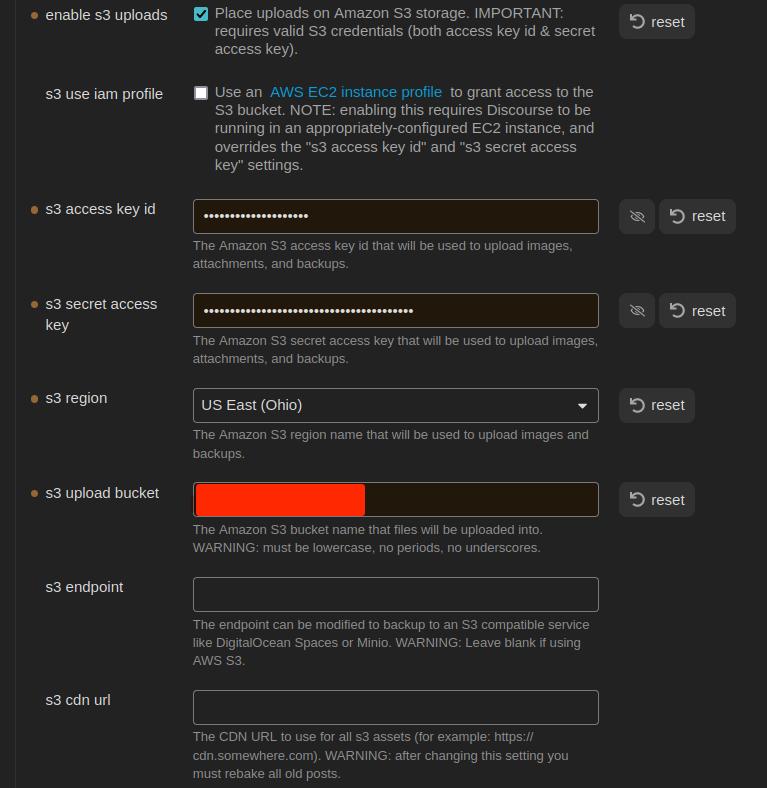
Итак, я решил попробовать другой подход, используя хранилище S3. Я следовал инструкциям здесь, чтобы настроить бакет AWS S3. Вот мои настройки:

А вот мой код:

	async uploadExternalImage(imageReferences: string[]): Promise<string[]> {
		const imageUrls: string[] = [];
		for (const ref of imageReferences) {
			const filePath = this.app.metadataCache.getFirstLinkpathDest(ref, this.activeFile.name)?.path;
			if (filePath) {
				const file = this.app.vault.getAbstractFileByPath(filePath) as TFile;
				if (file) {
					try {
						const url = `${this.settings.baseUrl}/uploads/generate-presigned-put.json`;
						//const imgfile = await this.app.vault.readBinary(file);
						const img = {
							type: "composer",
							file_name: file.name,
							file_size: file.stat.size,
						}
						console.log(JSON.stringify(img));
						const headers = {
							"Content-Type": "application/json",
							"Api-Key": this.settings.apiKey,
							"Api-Username": this.settings.disUser,
						};
						const response = await requestUrl({
							url: url,
							method: "POST",
							body: JSON.stringify(img),
							throw: false,
							headers: headers
						})
						console.log(response.json)
					} catch (error) {
						console.error(`Ошибка загрузки: ${error}`);
						//console.log(response.json)
					}
				} else {
					console.error('ошибка')
				}
			} else {
				console.error('ошибка')
			}
		}
		return imageUrls;
	}

Теперь я понимаю, что это пока не сработает, потому что я еще не загружаю файл. Из того, что я прочитал в документации, я должен отправить JSON-объект, содержащий type, file_name и file_size. API должен ответить ключом и URL, которые я буду использовать для фактической передачи файла. Но на данном этапе я получаю следующую ошибку:

{
    "errors": [
        "Запрошенный URL или ресурс не найден."
    ],
    "error_type": "not_found"
}
[
    "Запрошенный URL или ресурс не найден."
]

Я проверил свой API-ключ, чтобы убедиться, что у него есть разрешения — они есть. Но я всё равно создал новый. И глобальный тоже. Ни один не работает. Тот же код ошибки. Что я делаю не так?

Редактирование: вот объект img:

{"type":"composer","file_name":"face2.jpg","file_size":17342}

Я не очень хорошо знаком с этой экосистемой, но, возможно, это поможет?

Ошибка CORS…

Вы следовали инструкции по настройке CORS?

?

Я немного гадает, но, думаю, что настройка CORS в данном случае не сработает. Источник (по крайней мере, из десктопного приложения Obsidian) — 'app://obsidian.md'. Я думаю, что CORS можно настроить в Discourse только для обработки HTTP-запросов.

@maxtim, вам нужно, чтобы это работало с мобильных устройств, или достаточно будет возможности публиковать в Discourse только с десктопного приложения? Опять же, немного гадая… насколько я понимаю, десктопное приложение построено на Electron. Оно работает на комбинации Chromium и Node.js. Возможно, вы сможете использовать node-fetch для выполнения серверных запросов к Discourse. Если это сработает, проблема с CORS будет решена, и вы сможете использовать FormData в запросах.

Я решил попробовать (в переносном смысле — бросил «мокрые лапши», чтобы посмотреть, что прилипнет). Но я уже был настороже, и @simon прав.

В идеале плагин должен быть доступен и на мобильных устройствах. Но пока, если мы получим только версию для десктопа, то и это уже хорошо.

Конечно, ещё один возможный вариант: хранилище Obsidian на мобильном → синхронизация с десктопом → CLI для загрузки в Discourse. Но это кажется немного запутанным.

В общем, идеальная ситуация — это когда форум Discourse заменяет хранилище Obsidian. Тогда пользователи, предпочитающие форум, смогут им пользоваться, а те, кто предпочитает (или действительно нуждается в офлайн-решении), смогут использовать Obsidian. У меня уже есть некоторые идеи, как может работать двусторонняя синхронизация. Но, думаю, сначала нужно решить, как обрабатывать изображения и файлы.

Редактирование:

Я довольно уверен, что это сработает, но не могу, кажется, правильно задать параметры:

					try {
						const imgfile = await this.app.vault.readBinary(file);
						const boundary = genBoundary();
						const sBoundary = '--' + boundary + '\r\n';
						let body = '';
						body += `${sBoundary}Content-Disposition: form-data; name="type"\r\n\r\ncomposer\r\n`;
						body += `${sBoundary}Content-Disposition: form-data; name="synchronous"\r\n\r\ntrue\r\n`;
						body += `${sBoundary}Content-Disposition: form-data; name="files[]"; filename="${file.name}"\r\nContent-Type: image/jpg\r\n`;

						const eBoundary = '\r\n--' + boundary + '--\r\n';
						const bodyArray = new TextEncoder().encode(body);
						const endBoundaryArray = new TextEncoder().encode(eBoundary);

						const formDataArray = new Uint8Array(bodyArray.length + imgfile.byteLength + endBoundaryArray.length);
						formDataArray.set(bodyArray, 0);
						formDataArray.set(new Uint8Array(imgfile), bodyArray.length);
						formDataArray.set(endBoundaryArray, bodyArray.length + imgfile.byteLength);

						const url = `${this.settings.baseUrl}/uploads.json`;
						const headers = {
							"Api-Key": this.settings.apiKey,
							"Api-Username": this.settings.disUser,
							"Content-Type": `multipart/form-data; boundary=${boundary}`
						};

						const response = await requestUrl({
							url: url,
							method: "POST",
							body: formDataArray,
							throw: false,
							headers: headers,
						});

						if (response.status == 200) {
							const jsonResponse = response.json();
							console.log(`Загрузка изображения: jsonResponse: ${JSON.stringify(jsonResponse)}`);
							imageUrls.push(jsonResponse.url);
						} else {
							new NotifyUser(this.app, `Ошибка загрузки изображения: ${response.status}`).open();
							console.error(`Ошибка загрузки изображения: ${JSON.stringify(response.json)}`);
						}

Ага!! Я сделал это!

	async uploadImages(imageReferences: string[]): Promise<string[]> {
		const imageUrls = [];
		for (const ref of imageReferences) {
			const filePath = this.app.metadataCache.getFirstLinkpathDest(ref, this.activeFile.name)?.path;
			if (filePath) {
				const file = this.app.vault.getAbstractFileByPath(filePath) as TFile;
				if (file) {
					try {
						const imgfile = await this.app.vault.readBinary(file);
						const boundary = genBoundary();
						const sBoundary = '--' + boundary + '\r\n';
						const imgForm = `${sBoundary}Content-Disposition: form-data; name="file"; filename="${file.name}"\r\nContent-Type: image/${file.extension}\r\n\r\n`;


						let body = '';
						body += `\r\n${sBoundary}Content-Disposition: form-data; name="type"\r\n\r\ncomposer\r\n`;
						body += `${sBoundary}Content-Disposition: form-data; name="synchronous"\r\n\r\ntrue\r\n`;

						const eBoundary = '\r\n--' + boundary + '--\r\n';
						const imgFormArray = new TextEncoder().encode(imgForm);
						const bodyArray = new TextEncoder().encode(body);
						const endBoundaryArray = new TextEncoder().encode(eBoundary);

						const formDataArray = new Uint8Array(imgFormArray.length + imgfile.byteLength + bodyArray.length + endBoundaryArray.length);
						formDataArray.set(imgFormArray, 0);
						formDataArray.set(new Uint8Array(imgfile), imgFormArray.length);
						formDataArray.set(bodyArray, imgFormArray.length + imgfile.byteLength);
						formDataArray.set(endBoundaryArray, imgFormArray.length + bodyArray.length + imgfile.byteLength);

						const url = `${this.settings.baseUrl}/uploads.json`;
						const headers = {
							"Api-Key": this.settings.apiKey,
							"Api-Username": this.settings.disUser,
							"Content-Type": `multipart/form-data; boundary=${boundary}`,
						};

						const response = await requestUrl({
							url: url,
							method: "POST",
							body: formDataArray.buffer,
							throw: false,
							headers: headers,
						});

						if (response.status == 200) {
							const jsonResponse = response.json;
							console.log(`Загрузка изображения: ${JSON.stringify(jsonResponse)}`);
							imageUrls.push(jsonResponse.url);
						} else {
							new NotifyUser(this.app, `Ошибка загрузки изображения: ${response.status}`).open();
							console.error(`Ошибка загрузки изображения: ${JSON.stringify(response.json)}`);
						}
					} catch (error) {
						new NotifyUser(this.app, `Исключение при загрузке изображения: ${error}`).open();
						console.error("Исключение при загрузке изображения:", error);
					}
				} else {
					new NotifyUser(this.app, `Файл не найден в хранилище: ${ref}`).open();
					console.error(`Файл не найден в хранилище: ${ref}`);
				}
			} else {
				new NotifyUser(this.app, `Не удалось определить путь к файлу для: ${ref}`).open();
				console.error(`Не удалось определить путь к файлу для: ${ref}`);
			}
		}
		return imageUrls;
	}

Проблема заключалась в порядке формирования multipart/form-data. Мне нужно было, чтобы данные шли в следующем порядке:

  • параметры изображения
  • бинарные данные изображения
  • параметры

Раньше я ставил параметры перед данными изображения.

Я решил это, проанализировав успешную загрузку с помощью Python:

import requests
from requests_toolbelt.multipart.encoder import MultipartEncoder
from requests.models import PreparedRequest


class Discourse:
    def __init__(self):
        self.base_url = "CENSORED"
        self.api_key = "CENSORED"
        self.api_username = "CENSORED"
        self.category = 2

    def post_uploads(self, file_path):
        headers = {
            "Content-Type": "multipart/form-data",
            "Api-Key": self.api_key,
            "Api-Username": self.api_username
        }

        multi = MultipartEncoder(
            fields = {
                'file': ('filename', open(file_path, 'rb'), 'image/jpg'),
                'type': 'composer',
                'synchronous': 'true'
            }
        )

        headers['Content-Type'] = multi.content_type

        request = requests.Request(
            method = "POST",
            url = f"{self.base_url}/uploads.json",
            headers = headers,
            data = multi
        )
        prepared_request = request.prepare()

        print("Headers:")
        for k, v in prepared_request.headers.items():
            print(f"{k}: {v}")

        print(multi.to_string())

        response = requests.post(
            f"{self.base_url}/uploads.json",
            headers=headers,
            params=params,
            data=m
        )

        return response.json()


if __name__ == "__main__":
    ds = Discourse()
    response = ds.post_uploads("/home/tfinley/Pictures/face2.jpg")
    print(response)

Теперь как удалить орфанные загрузки ^_o

Насколько я понимаю, Discourse сделает это за вас:

Да, видел это. GG EZ WP

Я опоздал на вечеринку, но я уже писал сторонний API для Discourse для Node.js:

С помощью этой библиотеки вы можете легко создавать загрузки. Просто выполните следующее:

const { DiscourseApi } = require("node-discourse-api");
const api = new DiscourseApi("https://discourse.example.com");
api.options.api_username = "API_USERNAME";
api.options.api_key = "API_KEY";

api.createUpload(file_path_or_buffer, { filename: "filename" })

(Примечание: эта библиотека не завершена)