Non sono sicuro se questo sia già apparso altrove (i termini di ricerca, profilo colore incorporato, restituiscono risultati non correlati.. ).
Gestisco un forum di fotografia su software libero su discuss.pixls.us. Come puoi immaginare, abbiamo utenti molto esigenti su come vengono visualizzate le loro immagini.
Recentemente abbiamo riscontrato un problema in una discussione sulla gestione del colore:
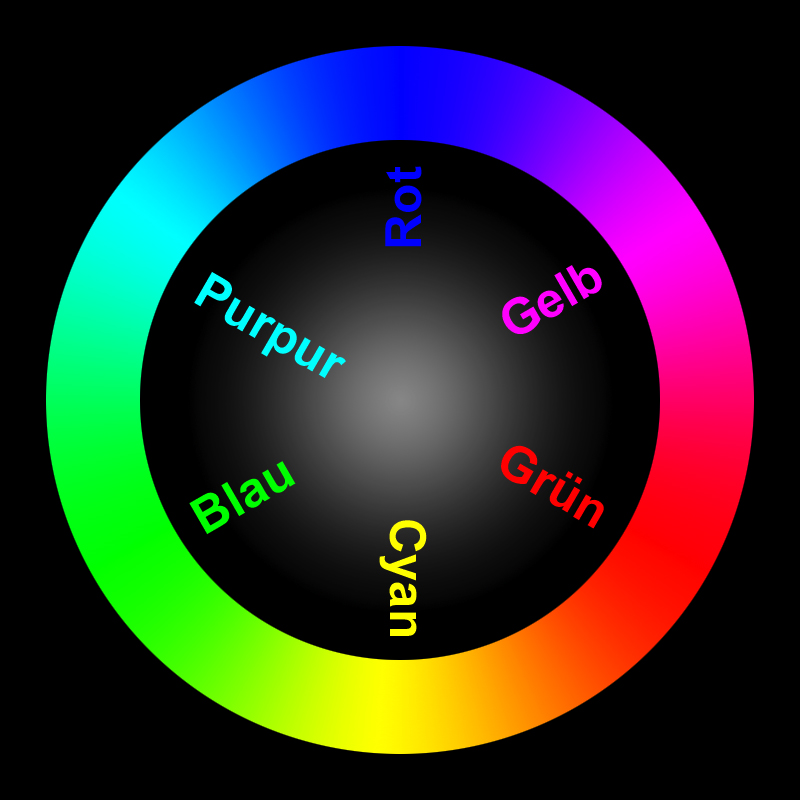
Uno dei fotografi ha notato che la funzionalità di recupero delle immagini collegate e il loro salvataggio locale sembra rimuovere le informazioni sul colore dalle immagini. Sebbene questo possa andare bene per risparmiare spazio nella maggior parte dei forum, per un forum di fotografia è piuttosto doloroso.
Per illustrare, questa immagine ha un profilo colore incorporato ruotato. Dovrebbe mostrare (Rot = Rosso, Grün = Verde, Blau = Blu):
Il processo di elaborazione delle immagini viene effettuato con ImageMagick? In tal caso, è stato considerato l’aggiunta di un’opzione per convertire le immagini caricate in sRGB e contrassegnarle come tali prima del salvataggio?
(Sarei felice di indagare ulteriormente se qualcuno potesse indicarmi le parti di codice pertinenti che gestiscono la conversione delle immagini al momento del caricamento?)
@zogstrip - is the conversion being done using imagemagick? If so, would you mind pointing me to the relevant section?
It appears that we may only need an option to convert any images to sRGB if they have a different profile embedded, and then either strip the profile or specify that the image is now sRGB.
I was thinking about this and this seems very specific to a photography forum. If they want to keep all the metadata/color profile, they can just set SiteSetting.strip_image_metadata to false. For majority of the images, keeping the exif or iptc metadata isn’t going to be very useful.
Interesting @Patrick_David, so this is not really a bug… it is a feature request to allow for fidelity when stripping exif tags (or simply misunderstanding an existing feature)
I am going to close this for now, but feel free to open a new topic if you find setting strip_image_metadata to false unacceptable.
 ).
).