This discussion revolves around adding a “Personal Message” button to Discourse topics, specifically near the original poster’s (OP) first post, to simplify private messaging for users who may not know how to access it via the user card. lhkjacky initially proposed the idea and shared a workaround using the discourse-custom-topic-button plugin, but noted it redirected users instead of opening the message editor inline like the user card’s “Message” button. merefield responded by sharing an open-source plugin, discourse-pm-topic-author, which successfully added the button to the first post. lhkjacky requested a refinement to hide the button for the OP, which merefield implemented via JavaScript commit. However, a bug emerged for non-logged-in users, causing blank posts — quickly fixed in another commit. Later, sallypf sought to install the plugin but encountered issues: the plugin toggle was greyed out, and the button didn’t appear. She clarified she wanted the button next to the OP’s first post, not every post. merefield confirmed the plugin’s scope and offered to revive or improve it if sponsored. pfaffman suggested building a custom Glimmer component for flexibility, though noted the lack of dynamic username injection in the PM URL. tobiaseigen questioned the UX rationale, suggesting user education via banners or welcome messages instead, but sallypf explained her forum’s focus on private messaging, making visibility critical. The thread ends with merefield offering sponsorship-based development to revive the plugin.
And use the url of example.com/new-message?username=<TOPIC_USERNAME>&title=Re:<TOPIC_TITLE>
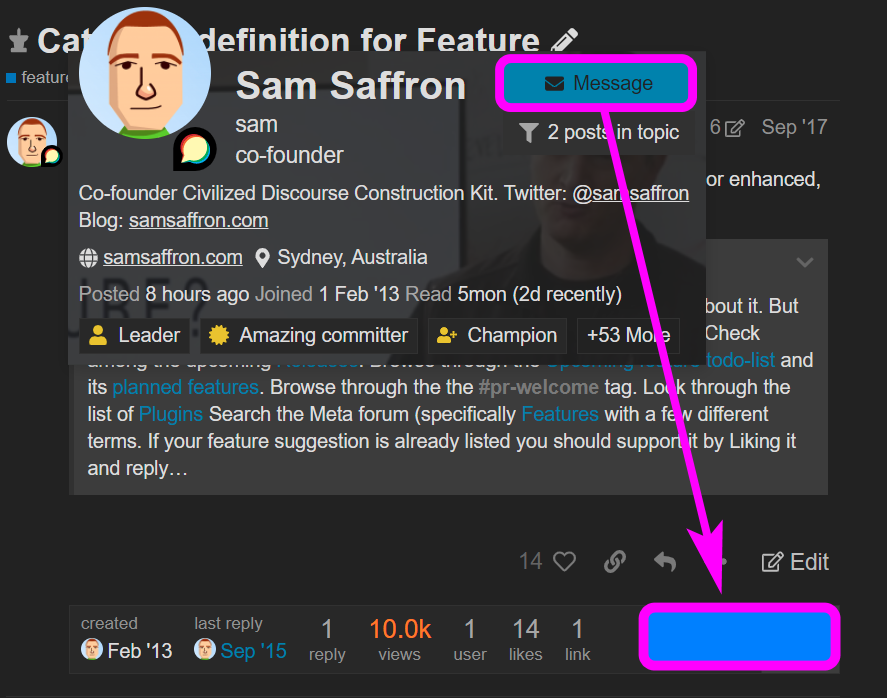
However, when user click on the button, it jump to the front page immediately, before the Message editor show up. It doesn’t act the same as the “Message” button in user card. If you click on the “Message” button in user card, it show up the message editor immediate without jumping to other page.
Do you think it is possible to make the custom button (new-message url) act the same as the Message button in user card ?
Do you think I can add {{#if this.user.can_send_private_message_to_user}}
to “pm-topic-author.hbs” , so that the button won’t show up if the user is the same as the OP ?
However, it seem after updated, the plugin cause some error for non-login user. When non-login user visit the page, it get a blank post. It only show the title, category, tag, but everything below is empty .
Thanks for the reply. It is beyond my capabilities.
There was a plugin for this exact requirements, seems to have been scraped Add a "Personal Message" button on Post this is what I was looking for.
Hi Sally! I’m wondering why you would want to do this. Don’t you want your members to reply to the topic to have a conversation together? Adding a link like that will also clutter the interface and distract your members.
Why is it not enough for you that, when you click on the avatar/username, you can see a usercard pop up which has the button to send the member a message directly?
I’m trying to build a messaging system where users can post in the forum but the main feature is sending messages to each other. So I want Message button to be visible. Any new user will take time to figure out how to send message.
That’s an interesting use of Discourse! You might get by just doing more to educate your members how to access the user card to reply via personal message (or chat? are you also using chat?). You could create a persistent banner across the top, for instance. And explain how to access it in your welcome message.
If you absolutely need this button and you have a budget, you could post to Marketplace and maybe someone here can build it for you.
Hi Robert, Yes that’s exactly what I want, to add the Message button next to OP’s first post.
The problem is that plugin doesn’t work, it doesn’t show Message button. I’ve installed it. I can see that the On button is greyed on Plugins page for this plugin, not sure what that means?
Would you be able to revive this plugin? Please? If you get some free time.



 - introduced that in last change. Hopefully that resolves it for you


