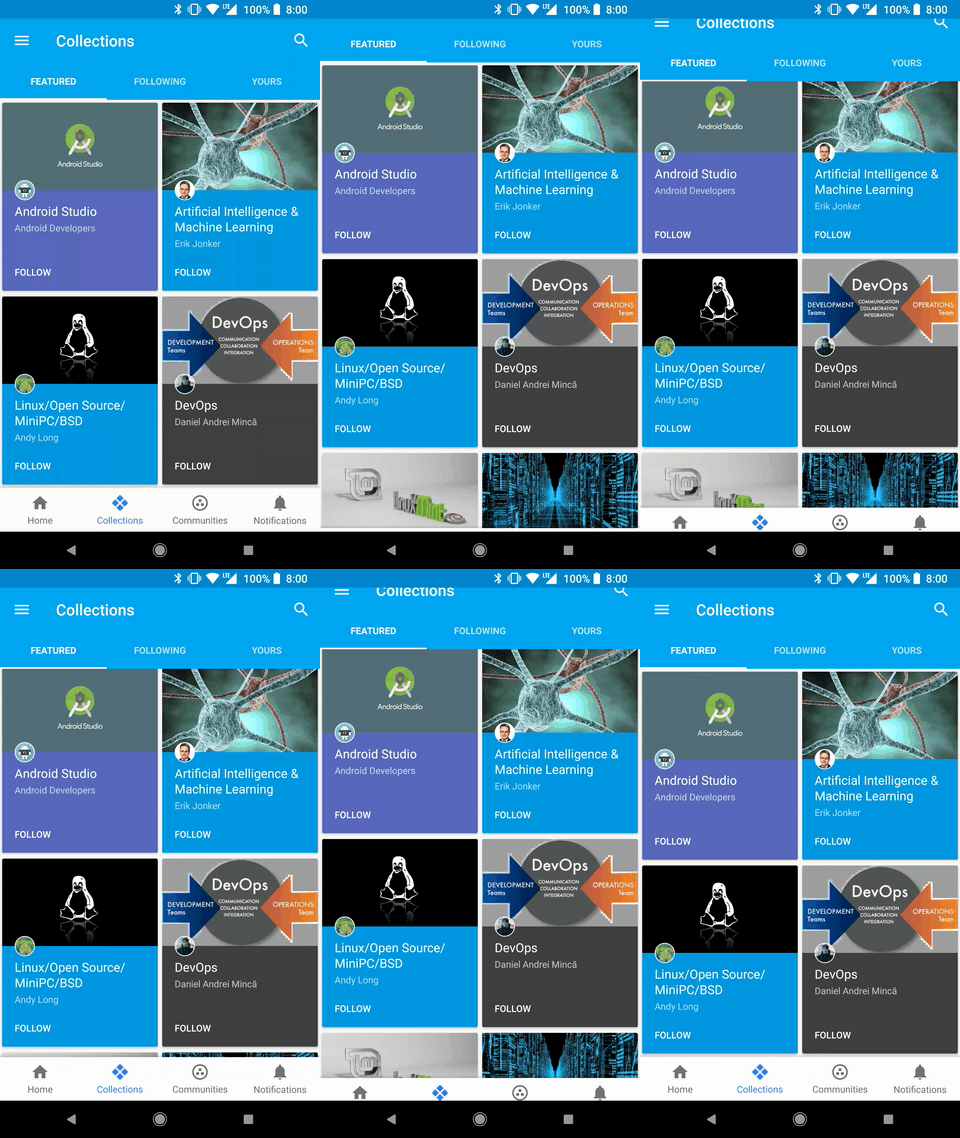
See the readme file in the theme’s GitHub repository.
Ideas to improve this theme are very welcome
Update 24/12/2018:
You no longer need to overwrite any code in order to customize this theme. It’s now shipped with theme settings that allow customization for each of the 6 tabs with ability to disable any tab. See the readme file for details.
يتوقع كود JavaScript الخاص بالمكون في عدة أماكن وجود مستخدم مسجل الدخول، لذا لن يكون استخدام CSS كافيًا لإظهار الشريط للمستخدمين المجهولين. توصيتي هنا هي أن تقوم بفرع المكون وتعديله ليظهر للمستخدمين المجهولين.
يحتوي نواة Discourse على مسار أنيق هو /new-topic، وهدفه تمكين فتح محرر الرسائل عبر رابط URL. لذا، كل ما عليك فعله هو استخدام هذا المسار كرابط URL للعلامة التي ستفتح المحرر.
يسعدني أن مجتمعك يستمتع بهذا المكوّن ويجده مفيدًا، شكرًا لك! أنا مؤيد لإضافة هذه الميزة إلى المكوّن، لكنني لا أستطيع تنفيذها حاليًا (ربما بعد بضعة أشهر). ومع ذلك، إذا أراد شخص آخر العمل على هذه الميزة في هذه الأثناء، فسأكون سعيدًا تمامًا بدمج طلب سحب (pull request) يتضمن هذه الميزة.
نعم، البيانات المطلوبة معروضة في كائن currentUser ويمكن الوصول إليها بسهولة. معظم العمل المطلوب لهذه الميزة هو 1) تحديد التبويب (أو التبويبات) التي سيتم عرض الشارات عليها، و2) تحديد موقع الشارات بشكل صحيح باستخدام CSS.
نعم، هذه هي الخصائص الصحيحة التي نحتاج إلى استهلاكها، ولكن نظرًا لأن Discourse هو تطبيق Ember، فإننا عادةً لا نرصد أحداث DOM لتحديث واجهة المستخدم. بدلاً من ذلك، يجب أن نستخدم ما يسميه Ember بـ ‘الخصائص المحسوبة’.
يُعرّف المكون بالفعل خاصية محسوبة هنا، لذا يمكنك استخدامها كمثال. بمجرد تعريف الخاصية المحسوبة التي تحدد ما إذا كان يجب عرض شارة الإشعارات أم لا (بناءً على خصائص مثل currentUser.unread_high_priority_notifications وما إلى ذلك)، ستحتاج إلى استخدام هذه الخاصية المحسوبة في قالب Handlebars في نفس الرابط في الأسفل.
ملاحظة: تنفيذ هذه الميزة في مكون منفصل أمر معقد، لذا فإن كل ما ذكرته هنا يفترض أنك تنفّذها داخل المكون نفسه وليس في مكون منفصل.
شريط التبويب يظهر بخلفية بيضاء حتى في الوضع الداكن. لقد قمت بالتحديث من النسخة التجريبية 2.7.0 بيتا 1 إلى النسخة التجريبية 2.7.0 بيتا 3، وبعد ذلك بدأ ظهور الخلفية البيضاء. قبل ذلك، كان كل شيء يعمل بشكل ممتاز. حاولت أيضًا إزالة جميع مكونات السمة الأخرى وإزالة جميع التخصيصات للتأكد من عدم وجود أي شيء يتسبب في هذه المشكلة مع شريط التبويب. ولكن حتى في نسخة Discourse الأساسية، يظهر شريط التبويب بخلفية بيضاء في الوضع الداكن. هل يمكن لأحد النظر في هذا الأمر من فضلك؟
يبدو أن هذا التبويب يتسبب في تغطية شريط تقدم الموضوع لزر الرد في بعض الحالات (على سبيل المثال، يمكنني تكرار هذه المشكلة باستخدام Chrome لمحاكاة iPhone SE)
كما ترون، يتم تغطية زر الرد بواسطة شريط التقدم. لكن إذا قمت بتعطيل الشريط، فسيتم العمل بشكل صحيح. أعتقد أن السبب هو أن موضع زر التقدم نسبي، لكنني لا أعرف كيفية إصلاح ذلك.
@haroldfy لا أستطيع إعادة إنتاج هذه المشكلة هنا في Meta أو منشئ السمات. ربما لديك سمات أو تخصيصات أخرى تتداخل؟ يمكنني إلقاء نظرة إذا كان موقعك عامًا.
@littleviolette أحاول تجنب إضافة كود يستهدف عناصر مكون آخر قدر الإمكان. في هذه الحالة، يمكنك إنشاء مكون منفصل يحتوي على هذا CSS لدفع زر ToC فوق الشريط: