別のサイトにDiscourseトピックのリストを埋め込む

Discourse の最新ビルドを取得すれば、簡単な JavaScript と HTML を使って、他のサイトにトピック一覧を 埋め込む機能 が利用可能になります。

この機能の一般的なユースケースは、ブログやコンテンツ中心のサイトなどです。画面のサイドにトピック一覧を表示するウィジェットを配置したい場合に便利です。カテゴリ、タグ、または 他の公開されている フィルタオプションのいずれかで絞り込むことができます。

トピック一覧の埋め込み方

まず、embed topics list サイト設定を有効にする必要があります。

次に、HTML に Discourse のトピックを埋め込むために必要な JavaScript を含む <script> タグを追加します。これは通常スクリプトを追加する場所であればどこでも構いません。例:

<script src="http://URL/javascripts/embed-topics.js"></script>

URL は、サブフォルダがある場合はそれを含めたフォーラムのアドレスに置き換えてください。

その後、HTML ドキュメントの <body> 内に、埋め込みたいトピック一覧を示す d-topics-list タグを追加します。ここでも URL をベース URL に置き換える必要があります。

<d-topics-list discourse-url="URL" category="1234" per-page="5"></d-topics-list>

discourse-url(必須)を除く、指定したすべての属性はトピック検索のクエリパラメータに変換されます。したがって、タグでトピックを検索したい場合は、以下のように記述できます。

<d-topics-list discourse-url="URL" tags="cool"></d-topics-list>

クエリパラメータにアンダースコアが含まれている場合は、ダッシュに変換してください。上記の例では、per_pageper-page になっていることに気づかれたかもしれません。

SameSite コンテキスト(つまり、埋め込みサイトとフォーラムが親ドメインを共有している場合)では、Discourse はフォーラムにログインしているかどうかを認識し、その結果を適切に表示します。ログイン時にセキュリティが設定されたカテゴリなどが表示されても驚かないでください。匿名ユーザーには表示されません。

パラメータ一覧

template: complete または basic(デフォルト)。basic はトピックタイトルのリストのみですが、complete はタイトル、ユーザー名、ユーザーのアバター、作成日時、トピックのサムネイル画像を含みます。

per-page: 数値。返すトピックの数を制御します。

category: 数値。トピックを単一のカテゴリに制限します。対象カテゴリの id を指定してください。

allow-create: ブール値。有効にすると、埋め込み部分に「新規トピック」ボタンが表示されます。

tags: 文字列。指定したタグに関連付けられたトピックに制限します。

top_period: all, yearly, quarterly, monthly, weekly, daily のいずれか。有効にすると、その期間の「人気」トピックを返します。

ここにサンプルサイトを作成しました。

https://embed.eviltrout.com

ブラウザでソースを表示してコードを確認できるほか、ソース全体も GitHub にあります。

これは非常に新しい機能ですので、フィードバックや要望をお待ちしています。

リストのスタイリング

既存のテーマ機能を使用して、埋め込みリストにカスタムスタイルを追加できます。

例えば、デフォルトでは complete テンプレートを使用する埋め込みリストは以下のようになります。
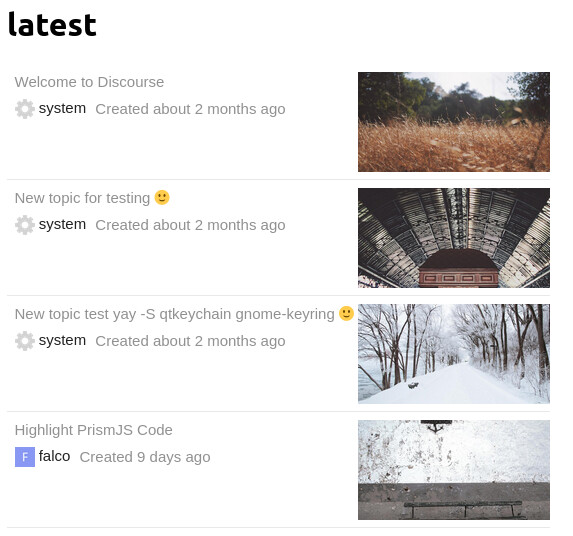
これを例えばグリッドのように表示したい場合は、テーマ > Common > Embedded CSS にカスタム SCSS を追加します。

.topics-list {
  display: grid;
  grid-template-columns: repeat(2, 1fr);
  
  .topic-list-item { 
    .main-link {
      border: 1px dotted gray;
      padding: 0;
    }
  
    .topic-column-wrapper {
      flex-direction: column-reverse;
      
      .topic-column.details-column {
        width: 100%;
      }
        
      .topic-column.featured-image-column .topic-featured-image img {
        max-width: initial;
        max-height: initial;
        width: 100%;
      }
    }
  }
}

これにより、以下のように表示されます。

「いいね!」 95

Hey folks! We’re looking to have the links open in a new tab (so target="_blank" instead of target="_parent"). Is there an easy way to do this given the iframe?

「いいね!」 2

I don’t know if it’s what you’re looking for, but something like this should work to open links in new tabs. CORS has to be enabled for the external domain. I tried it this way because I wanted to filter out a pinned topic.

// `fetch` might require a polyfill
const targetEl = document.getElementById("forumTopics");

function renderTemplate(topicsArr) {
    const items = topicsArr.map(
        (topic) => `<li><a href="${topic[1]}" target="_blank">${topic[0]}</li>`
    );

    targetEl.innerHTML = `<ul>${items.join("\n")}</ul>`;
}

// tack `.json` on to any topic list
fetch("https://forum.example.com/latest.json")
    .then((res) => res.json())
    .then((json) => {
        const topics = json.topic_list.topics
            .slice(1, 6)
            .map((t) => [
                t.title,
                `https://forum.example.com/t/${t.slug}/${t.id}`,
            ]);

        renderTemplate(topics);
    });
「いいね!」 3

Thanks! I like this idea, but based on this post What are the risks of enabling Cross-origin resource sharing (DISCOURSE_ENABLE_CORS) I’m thinking that enabling CORS isn’t the best idea.

「いいね!」 2

You are only supposed to enable CORS for sites you trust. Enabling CORS for every source is defeating the purpose of it.

「いいね!」 6

I only enabled CORS for other sites I control. The goal was to load a list of forum topics in our other sites with frontend code. That method probably wouldn’t work for letting random sites embed the posts.

Edit: if you copy/paste that code watch out for .slice(1, 6) because it removes one of the topics. (I think that was the pinned topic that I wanted to remove.)

「いいね!」 3

Cool, this is something we can try then - I don’t have a site other than localhost for now (during testing) which is why I was hesitant to add it. But if I can find someone that has a place, we can give it a go. Thanks for your help!

「いいね!」 4

Hey @j127

we are currently facing the same issue and want to open links in new tab.
Just quick question.

Where exactly do you put the code that you provided

@eviltrout Any idea why in my case the CSS styles are not appearing?

「いいね!」 2

That code is just a quick example of the general idea. I don’t think fetch works in all browsers. I can rewrite it in ES5 if you want.

Is your site WordPress or some kind of headless WordPress?

「いいね!」 4

It appears to work in all modern browsers, and Discourse doesn’t support IE11 any more…

「いいね!」 4

My site is just regular wordpress, not headless.

「いいね!」 1

Can I use this to embed a list of Discourse Topics in another Discourse instance? Or is there a smarter way to do that?

My use case is having a ‘bridge’ between two instances as a temporary measure until they can be merged in future. It would be nice to have this automated and dynamic.

「いいね!」 2

If you don’t care about IE, then that snippet should work. (CORS has to be enabled for the external domain in the Discourse settings.)

To test it, open any page on this forum and paste the snippet below in the browser console. I changed the target element to document.body, so it will replace the entire page with the list for forum topics. For a real site, just change the target element to document.getElementById("#someId") and then put a div with that ID on the page somewhere. The script will fill it with the list of topics.

// `fetch` might require a polyfill unless you don't care about IE
// const targetEl = document.getElementById("forumTopics");

// this replaces the body of the page, just as an example
const targetEl = document.body;

// put your forum's URL here to test it on your own forum
const baseForumURL = `https://meta.discourse.org`;

// how many topics you want to show
const numTopics = 6;

function renderTemplate(topicsArr) {
    const items = topicsArr.map(
        (topic) => `<li><a href="${topic[1]}" target="_blank">${topic[0]}</li>`
    );

    targetEl.innerHTML = `<ul>${items.join("\n")}</ul>`;
}

// tack `.json` on to any topic list
fetch(`${baseForumURL}/latest.json`)
    .then((res) => res.json())
    .then((json) => {
        const topics = json.topic_list.topics
            .slice(0, numTopics)
            .map((t) => [
                t.title,
                `${baseForumURL}/t/${t.slug}/${t.id}`,
            ]);

        renderTemplate(topics);
    });

Example: if the target div somewhere on your WP site looks like this

<div id="forumTopics">
    <!-- the forum posts will appear here -->
</div>

then the JavaScript could target that ID like this:

// look for this line in the original example I posted
const targetEl = document.getElementById("forumTopics");
「いいね!」 4

By that you mean the code in the first post or the snippet in post 50? And no, I don’t care about IE. No need to cater to that dinosaur :).
In my case the CSS is not loaded for my snippet in any browser.

So this is JS and I have to put <script> tag around it when implementing it to wordpress, correct?

「いいね!」 2

It has been a while since I used WordPress. Is it something that you’re adding to a theme’s HTML? If yes, then wrap my code in a script tag and put the <div> wherever you want the posts to appear.

I think you could drop the code below right into the HTML of a WordPress template wherever you want the posts to appear. Be sure to update the line that has the URL of the forum. If it doesn’t work, let me know. (It’s untested.)

Click here for the code
<div id="forumTopics"></div>
<script>
// put your forum's URL here to test it on your own forum
const baseForumURL = `https://forum.example.com`;

// how many topics you want to show
const numTopics = 6;

const targetEl = document.getElementById("forumTopics");
// If the posts don't load for some reason, you could show a link to the forum
targetEl.innerHTML = `<a class="link-to-discourse" href="${baseForumURL}/">View the latest forum posts</a>`;

function renderTemplate(topicsArr) {
    const items = topicsArr.map(
        (topic) => `<li><a href="${topic[1]}" target="_blank">${topic[0]}</li>`
    );

    targetEl.innerHTML = `<ul>${items.join("\n")}</ul>`;
}

// tack `.json` on to any topic list
fetch(`${baseForumURL}/latest.json`)
    .then((res) => res.json())
    .then((json) => {
        const topics = json.topic_list.topics
            .slice(0, numTopics)
            .map((t) => [
                t.title,
                `${baseForumURL}/t/${t.slug}/${t.id}`,
            ]);

        renderTemplate(topics);
    });
</script>
「いいね!」 3

Thx, appreciate the full snippet

After initial test, only a link is displayed. But I think CORS is disabled, so gonna have my host enable that.
Meanwhile, how can I make the script only display post with a specific tag and from a specific category?

「いいね!」 2

I’m not sure, but I think the format is
https://forum.example.com/tags/c/<catgory_name>/<tag_name>

Example: the category is “support” and the tag is “css”:
https://meta.discourse.org/tags/c/support/css

To turn it into JSON, add .json on the end:
https://meta.discourse.org/tags/c/support/css.json

So in the fetch function, instead of /latest.json, use something like /tags/c/support/css.json.

(Untested.)

「いいね!」 3

And if I want to embed 5 topics in the Discourse-instance itself?

I make a topic. Make it a wiki. I publish it as a page. How do I embed the five latest topics from a specific category/tag or use the template this feature supports?

Thanks.

「いいね!」 1

トップトピックのクエリパラメータは何ですか?order="top"を試しましたが、特定の期間に基づいてフォーラムと同じようにトップトピックを返していません。フォーラムのフィルター結果をどのように再現できますか?Discourseのフィルターオプションが受け取る属性値はどこで確認できますか?ありがとうございます!

「いいね!」 2

埋め込みコンテンツのフォントスタイルを変更することは可能でしょうか?d-topics-list iframe html .topics-list .topic-list-item のような CSS セレクターを試してみましたが、うまくいきませんでした。ご教示をよろしくお願いいたします!

「いいね!」 2