Hi there. I work for a university in IT. We’d like to create private discourse categories (which would map to courses), where only members of the course and the instructors would have access.
Wondering if anyone else is doing this currently and could share their experiences. Thanks!
Given the quality of the forums included in the LMSes I’ve had the misfortune to be exposed to over the years, Discourse would be an intergalactic leap forward in user experience.
We’ve got plenty of educational institutions amongst our hosted customer base, although I don’t see any obviously listed on our customers page. I’d be surprised if some of them weren’t using Discourse as a course discussion system. Hopefully one or more admins from those sites hang around here and can add their thoughts.
We have two approaches that both seem to work out:
For a mathematics preparatory course, we have one permanent Discourse instance that we re-use every year. This makes sense for us, because the course is organized by a team of volunteers, and there is both a large overlap between two consecutive years’ teams, and often a bit to discuss between courses. We archive and tag all topics before the preparations for a new course start. You can read a bit about my journey to do this here:
For other courses, we use one Discourse instance for each iteration. So far, we’ve been simply shutting them down in the end, but in the future, I want to use multisite so I can keep the old instances running without causing significant additional load.
We use a custom course management system that manages submissions, grades, exams and so on. This CMS has a built-in phpBB-based forum, but also supports Discourse SSO – so in the courses where we use Discourse, the “Forum” link in the CMS simply triggers an SSO login to the (login required) Discourse instance for this course. The Discourse instance has a site customization which adds a navigation bar on top, allowing you to get back to the CMS.
I’m sure one large Discourse instance with subcategories could work too, but we’ve made a really good experience with our one-instance-per-course approach.
Hi, Jeff. I was once an instructional technology professor in colleges of education. In my last gig, I taught my classes with Discourse (which is part of why I now make my living with Discourse).
I organized assignments (or quests) in read-only categories and instructed students to reply-as-linked-topic (now on the link icon below a post) and put their post into the category for their class with a particular tag for that assignment. This made it easy for students to comment on each others work and for me to see whether students had done the work. I would their topic if they had completed the assignment, and wrote a script that would see that students had done the assignment and gave different grades if I had liked it and if other students had. It’s probably not helpful, but you can have it.
Having the assignments in their own categories made it easy to re-run a course and to use an assignment in multiple courses. The other cool thing is that when it was obvious that an assignment was badly worded or otherwise needed changing, I could change it immediately, making life better for the slackers who did the work late, and meaning that all those changes to assignments that I might otherwise have intended to do before next semester were, in fact, done.
You can see a syllabus for the last class I taught and this one too. This also worked really well, since the assignments were separate from the course, there wasn’t the copy-the-old-course-to-the-new-one at the start of each semester. All that was needed was to copy the syllabus and change the dates on it.
My courses were all (and remained for a time) public. Changing that is just a matter of changing the permissions on the categories, though. I think that I just put a link to the course in the school’s LMS to get people to sign up. You could use groups to invite students to the course and control access.
Still getting our feet wet with the tool, but leaning toward making each course a private category (or maybe sub-category?), with permissions granted to a group that contains the students, instructors, and TAs for that course.
We could be running hundreds of courses each semester, which means we’d end up with loads of (private) categories. That could eventually be a problem for us, as it looks like there could be issues with having much more than 1000 categories (?), based on what I’m seeing in this topic:
So perhaps we’d need to archive these off at some point…but we’re not going to hit that limit overnight.
We’d definitely need to bump up the default character limit for group names to accommodate unique names for courses/sections, and it looks like this is doable. Hurray!
@pfaffman thanks for sending along your examples! We’ll give those a closer look and let you know what questions come up. And thanks, @fefrei for sharing how you’re approaching this at your institution. Plenty to think about!
Ciao Jay, ho provato ad aprire questi link ma ho ricevuto un messaggio “Questa connessione non è privata”. È ancora possibile vedere come hai organizzato il tuo corso? Sto valutando se posso ospitare il programma del corso su Discourse, simile a piattaforme come Thinkific.
Sì, ho lasciato morire quel sito e ora penso che ci siano modi migliori per fare quello che ho fatto allora.
Tuttavia, ritengo che avere gruppi di argomenti con quello che voi chiamate “compiti” in una categoria in sola lettura, in modo che le persone creino un argomento con la loro “risposta” in una categoria con un tag che indica il compito, sia fattibile, magari con un tema per migliorare l’esperienza utente.
Ci sono anche alcuni trucchi per creare collegamenti per avviare un nuovo argomento che potrebbero aiutare, ad esempio.
La mia maggiore difficoltà è che non riesco a ordinare gli argomenti all’interno di una categoria. C’è qualcosa di davvero soddisfacente nel seguire un corso in ordine e spuntare visivamente ogni suo elemento. Mi chiedo se sia possibile farlo. Sto anche pensando a un componente del tema che mostri che hai apprezzato un argomento nella pagina dell’elenco degli argomenti, poiché potrebbe essere il modo più semplice per utilizzare le funzionalità esistenti e ottenere quella soddisfazione immediata di aver completato un argomento. Oppure, potrebbe essere aggiunta una barra laterale? Sarei felice di ricevere idee.
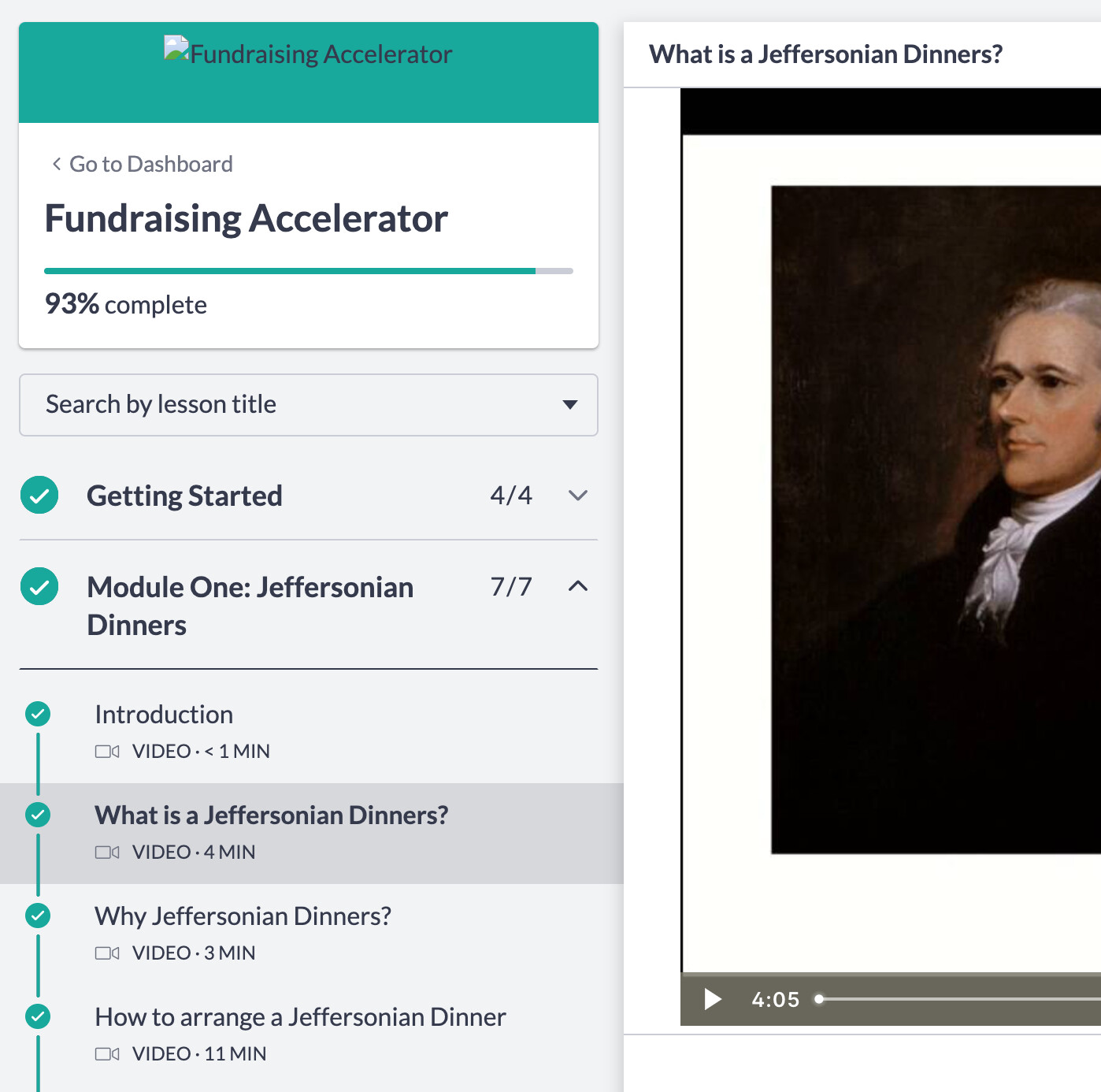
Ecco uno screenshot dell’interfaccia utente di Thinkific.
Interfaccia utente a due colonne
In alto a sinistra
Fundraising Accelerator
Completato al 93%
In basso a sinistra
Casella di ricerca per titolo della lezione
Titolo “Getting Started”, spunta verde a sinistra, indicatore 4/4 a destra, freccia di espansione
Titolo “Module One: Jeffersonian Dinners”, spunta verde a sinistra, indicatore 7/7 a destra, freccia di nascondimento
Sotto il titolo “Module One: Jeffersonian Dinners” e con carattere più piccolo
Titolo “Introduction”
Titolo “What is a Jeffersonian Dinners?”, evidenziato per indicare che siamo su quell’argomento
“Why Jeffersonian Dinners?”
“How to arrange a Jeffersonian Dinner”
Colonna destra
“What is a Jeffersonian Dinner?” Contiene una lezione video che mostra un ritratto di Thomas Jefferson
C’è una discussione qui su come mantenere gli argomenti in ordine, ma sembra solo un workaround meno che ideale.
Anch’io ci ho pensato; alla fine ho deciso di usare un argomento come home del corso invece di una categoria, così posso strutturarlo con un indice dei contenuti come preferisco.
Sì, stavo pensando anche io a questa soluzione. Hai fatto qualcosa di particolare per rendere quell’argomento rintracciabile e visibile? Hai qualche idea? Le mie idee attuali sono:
Idea #1: Strutturare l’argomento home del corso come una checklist. Utilizzare Reply Template in modo che gli studenti possano creare la propria checklist. Insegnare loro a contrassegnare l’argomento con un segnalibro o ad assegnarlo a se stessi per trovarlo più facilmente. In questo modo, il loro argomento personale del corso può anche servire come diario di apprendimento, dove possono rispondere con riflessioni, ecc.
Idea #2: Aggiungere un link all’argomento home del corso nella descrizione della categoria e utilizzare uno dei molti componenti di tema per i banner delle categorie, come Pavilion, per rendere facile cliccare sull’argomento home del corso. Questa soluzione manca del componente checklist, ma ha il vantaggio di rendere facile aggiornare l’home del corso, con le modifiche visibili a tutti. Questo argomento può anche servire come thread per gli annunci.
Idea #3: Creare un argomento home del corso e poi utilizzare un componente della barra laterale come Topic List Sidebars o sviluppare qualcosa tramite Layouts Plugin, ma cosa succede se qualcuno accede al corso da mobile? Nessuno di questi componenti della barra laterale sembra rendere facile la visualizzazione su dispositivi mobili.
Questo mi sta aiutando a riflettere sulle funzionalità che potrebbero essere necessarie per i corsi.
Mi piace l’idea di rendere la categoria in sola lettura, ma vorrei prima osservare come le persone interagiscono con i corsi, dato che sono pubblici e auto-diretti.
Quello che ho fatto è stato utilizzare un argomento come programma, come suggerito. Dato che nel mio corso gli studenti seguivano lo stesso calendario, ho compresso o espanso i contenuti in modo che le informazioni della settimana corrente fossero più facili da trovare.
Ho anche utilizzato distintivi personalizzati per monitorare ciò che avevano completato. Ogni compito (o “sfida”, come li chiamavo nel mio corso) era associato a un tag, quindi quando pubblicavano con quel tag (e, credo, quando “mi piaceva” l’argomento), ricevevano il distintivo. In questo modo potevo tenere traccia dei compiti svolti. Avevo uno script che individuava il distintivo e aggiornava una cella in un foglio di calcolo, che poi potevo caricare direttamente nel registro voti del LMS.
Beh, in un certo senso “automatizzato”. Penso di aver fatto qualcosa come scaricare un file dall’LMS, poi richiamare uno script che verificava se il badge (o l’argomento?) era presente e inseriva un “credito pieno” se l’avevano completato, e poi potevo ricaricare quel file sull’LMS. Non era un sistema che mi aspettassi che qualcun altro usasse, almeno nella sua forma originale. Ma è stato molto tempo fa e sia l’API che le mie competenze sono piuttosto diverse ora.
Ah, ma la parte dei badge era automatizzata. Non è stato troppo difficile scrivere l’SQL per assegnare i badge (dovresti essere self-hosted o su un piano che permette di creare SQL personalizzato per i badge). Ma l’interfaccia di automazione potrebbe essere un altro modo per accedere a tutto ciò, forse.
Qualcuno ha trovato un modo per utilizzare i commenti di Discourse per le lezioni di Thinkific? Stiamo attualmente migrando a Thinkific e ci chiediamo come collegare le lezioni agli argomenti, proprio come fa WP Discourse.

 their topic if they had completed the assignment, and wrote a script that would see that students had done the assignment and gave different grades if I had liked it and if other students had. It’s probably not helpful, but