Мы представляем новый тип type: objects для поддерживаемых типов настроек темы, который можно использовать для замены существующего типа json_schema, который мы планируем вскоре устареть.
Определение настройки темы типа objects
Чтобы создать настройку темы типа objects, сначала определите ключ верхнего уровня, как и для любой другой настройки темы, который будет использоваться как имя настройки.
links: ...
Затем добавьте ключевые слова type, default и schema к настройке.
links:
  type: objects
  default: []
  schema: ...
type: objects указывает, что это настройка типа objects, а аннотация default: [] устанавливает значение по умолчанию настройки в виде пустого массива. Обратите внимание, что значение по умолчанию также может быть установлено в виде массива объектов, что мы продемонстрируем после определения schema.
Чтобы определить схему, сначала задайте name схемы следующим образом:
links:
  type: objects
  default: []
  schema:
    name: link
Далее мы добавим ключевое слово properties к схеме, которое позволит нам определить и проверить, как должен выглядеть каждый объект.
links:
  type: objects
  default: []
  schema:
    name: link
    properties:
      name: ...
В приведенном выше примере мы указываем, что объект link имеет свойство name. Чтобы определить тип ожидаемых данных, каждое свойство должно определять ключевое слово type.
links:
  type: objects
  default: []
  schema:
    name: link
    properties:
      name:
        type: string
Приведенное выше определение схемы указывает, что объект link имеет свойство name типа string, что означает, что для свойства будут приняты только строковые значения. В настоящее время поддерживаются следующие типы:
string: Значение свойства хранится как строка.integer: Значение свойства хранится как целое число.float: Значение свойства хранится как число с плавающей точкой.boolean: Значение свойства равноtrueилиfalse.upload: Значение свойства — это URL вложения.enum: Значение свойства должно быть одним из значений, определенных в ключевом словеchoices.links: type: objects default: [] schema: name: link properties: name: type: enum choices: - name 1 - name 2 - name 3categories: Значение свойства — это массив допустимых идентификаторов категорий.groups: Значение свойства — это массив допустимых идентификаторов групп.tags: Значение свойства — это массив допустимых имен тегов.
После определения схемы значение по умолчанию настройки можно установить, определив массив в YAML следующим образом:
links:
  type: objects
  default:
    - name: link 1
      title: link 1 title
    - name: link 2
      title: link 2 title
  schema:
    name: link
    properties:
      name:
        type: string
      title:
        type: string
Обязательные свойства
Все определенные свойства по умолчанию являются необязательными. Чтобы пометить свойство как обязательное, просто добавьте аннотацию required: true. Свойство также можно пометить как необязательное, добавив аннотацию required: false.
links:
  type: objects
  default: []
  schema:
    name: link
    properties:
      name:
        type: string
        required: true
      title:
        type: string
        required: false
Пользовательские проверки
Для некоторых типов свойств имеется встроенная поддержка пользовательских проверок, которые можно объявить, добавив аннотацию validations к свойству.
links:
  type: objects
  default: []
  schema:
    name: link
    properties:
      name:
        type: string
        required: true
        validations:
          min: 1
          max: 2048
          url: true
Проверки для типов string
min_length: Минимальная длина свойства. Значение ключевого слова должно быть целым числом.max_length: Максимальная длина свойства. Значение ключевого слова должно быть целым числом.url: Проверяет, что свойство является допустимым URL. Значение ключевого слова может бытьtrueилиfalse.
Проверки для типов integer и float
min: Минимальное значение свойства. Значение ключевого слова должно быть целым числом.max: Максимальное значение свойства. Значение ключевого слова должно быть целым числом.
Проверки для типов tags, groups и categories
min: Минимальное количество записей для свойства. Значение ключевого слова должно быть целым числом.max: Максимальное количество записей для свойства. Значение ключевого слова должно быть целым числом.
Вложенная структура объектов
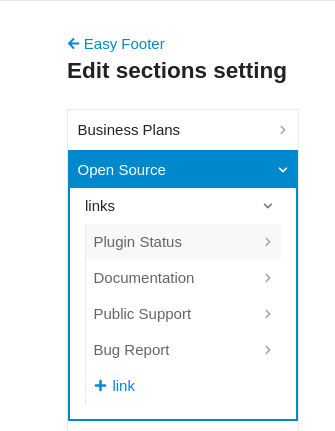
Объект также может иметь свойство, содержащее массив объектов. Чтобы создать вложенную структуру объектов, свойство можно также аннотировать как type: objects с соответствующим определением schema.
sections:
  type: objects
  default:
    - name: section 1
      links:
        - name: link 1
          url: /some/url
        - name: link 2
          url: /some/other/url
  schema:
    name: section
    properties:
      name:
        type: string
        required: true
      links:
        type: objects
        schema:
          name: link
          properties:
            name:
              type: string
            url:
              type: string
Описание настройки и локализация
Чтобы добавить описание настройки в локали en, создайте файл locales/en.yml со следующим форматом, учитывая следующую настройку темы типа objects.
sections:
  type: objects
  default:
    - name: section 1
      links:
        - name: link 1
          url: /some/url
        - name: link 2
          url: /some/other/url
  schema:
    name: section
    properties:
      name:
        type: string
        required: true
      links:
        type: objects
        schema:
          name: link
          properties:
            name:
              type: string
            url:
              type: string
en:
  theme_metadata:
    settings:
      sections:
        description: Это описание для настройки темы sections
        schema:
          properties:
            name:
              label: Имя
              description: Описание свойства
            links:
              name:
                label: Имя
                description: Описание свойства
              url:
                label: URL
                description: Описание свойства
Этот документ находится под контролем версий — предложите изменения на GitHub.




 . It was more of an attempt to see if it was possible, but not a reasonable approach.