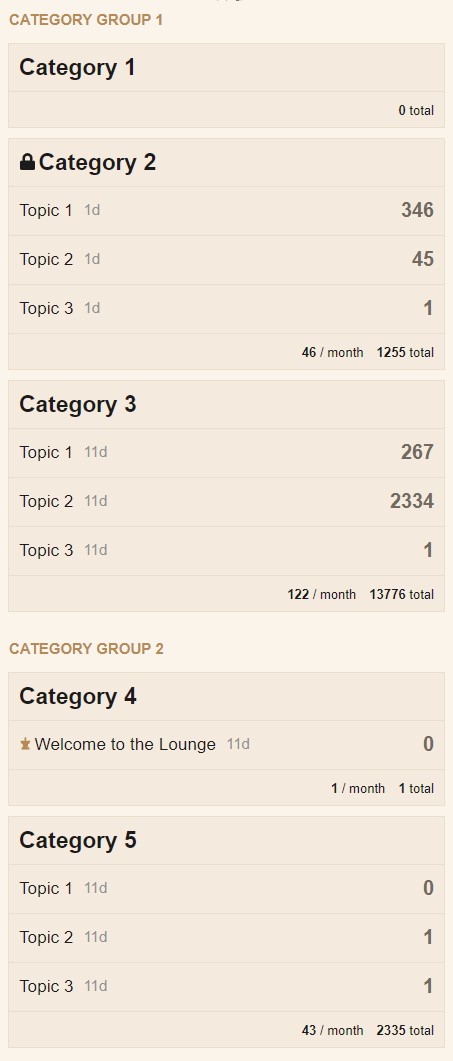
조금 늦게 올립니다  하지만 다른 분들께 도움이 될 수 있을 것 같습니다. 몇 가지 사항을 말씀드리면 다음과 같습니다:
- 모든 CSS 코드가 필요한 것은 아니며, 특히 테이블 행의 테두리와 배경색은 필요 없으므로 원하는 대로 자유롭게 조정해 주세요.
- 테이블 행에는 음수 마진(negative margins)을 사용할 수 없고 다른 레이아웃 문제도 있어, 일반 테이블 레이아웃을 플렉스(flex)로 변경해야 했습니다. 또한 더 유연합니다
- Category Group 1과 Category Group 2를 원하는 카테고리 그룹 이름으로 대체해 주세요.
- 제 예시에서는 카테고리 ID 2와 4를 사용했습니다. 따라서 크롬 개발자 도구를 사용하여 검사(아래 그림 참조)하여 올바른 카테고리 ID를 찾아 제 예시에서
[data-category-id="2"]와[data-category-id="4"]를 해당 ID로 대체해 주세요.

이 코드를 공통(Common) 탭 안에 붙여넣으세요:
.category-list{
    display: flex;
    flex-direction: column;
}
.category-list thead tr{
    display: flex;
}
.category-list .topics {
    width: 95px;
    margin-left: auto;
    min-width: 95px;
    white-space: nowrap;
}
.category-list tbody tr {
    background-color: var(--primary-very-low);
    box-sizing: border-box;
    display: flex;
}
body .category-list [data-category-id="2"],body .category-list [data-category-id="4"] {
    position: relative;
    margin-top: 50px;
}
body [data-category-id="2"]::before {
    content: "Category Group 1";
}
body [data-category-id="4"]::before {
    content: "Category Group 2";
}
body [data-category-id="2"]::before,body [data-category-id="4"]::before {
    position: absolute;
    top: -35px;
    left: 0;
    font-weight: bold;
    font-size: 15px;
    text-transform: uppercase;
    color: var(--primary-medium);
}
이 코드를 데스크톱(Desktop) 탭 안에 붙여넣으세요:
.category-list tbody tr {
    margin-bottom: 15px;
    border: 1px solid var(--primary-low);
}
이 코드를 모바일(Mobile) 탭 안에 붙여넣으세요:
body .category-list-item.category .posts {
    width: auto;
    margin-left: auto;
}
body .category-list-item>footer,body .subcategory-list-item>footer{
    background-color: var(--primary-very-low);
}
.categories-list .category-list th {
    padding: 0;
}
.category-list-item>footer .category-stat, .subcategory-list-item>footer .category-stat {
    float: right;
}
.category-list-item>footer .category-stat:first-child, .subcategory-list-item>footer .category-stat:first-child{
    margin-right: 0;
}
body .category-list-item.category tr:first-of-type{
    padding: 10px 0;
    border-bottom: 1px solid var(--primary-low);
}
body tr.category-topic-link:last-of-type{
    border-bottom: 1px solid var(--primary-low);
}
body .categories-list .category-list th {
    padding: 0;
}
body .category-list-item {
    border-top: none;
    margin-bottom: 10px;
}
body .category-list-item {
    padding: 0;
    border: 1px solid var(--primary-low)!important;
}
.category-list-item>footer, .subcategory-list-item>footer {
    border-top: none;
}
데스크톱과 모바일 해상도에서의 모습은 다음과 같습니다: