Это руководство описывает, как настроить провайдера Microsoft Teams, включенного в discourse-chat-integration.
Настройка Microsoft Teams
В Microsoft Teams:
-
В левой вертикальной панели навигации нажмите кнопку с многоточием (…) и выберите из меню Workflows.
-
Нажмите кнопку + Build from scratch в правом верхнем углу страницы Workflows.
-
В модальном окне пользовательского рабочего процесса найдите
webhookи выберите триггер When a Teams webhook request is received. -
В поле Who can trigger the flow выберите
Anyone.[1] -
Нажмите + New step.
-
Далее найдите
cardи выберите действие Post card in a chat or channel. -
Заполните поля следующим образом:


-
Post as: Выберите, от кого должны исходить сообщения; вы можете оставить значение по умолчанию или выбрать
User, чтобы сообщение появлялось от вашего имени. -
Post in: Выберите
Channel, после чего появятся дополнительные поля:- Team: Выберите нужную команду.
- Channel: Выберите нужный канал.
- Adaptive Card: Кликните в поле ввода, чтобы открыть всплывающее окно (описано на следующем шаге).

-
Кликните внутри поля Adaptive Card, чтобы открыть всплывающее окно [2] для вставки динамического содержимого или выражения. Переключитесь на вкладку Expression и введите
triggerBody()в поле выражения. -
Нажмите Save.
-
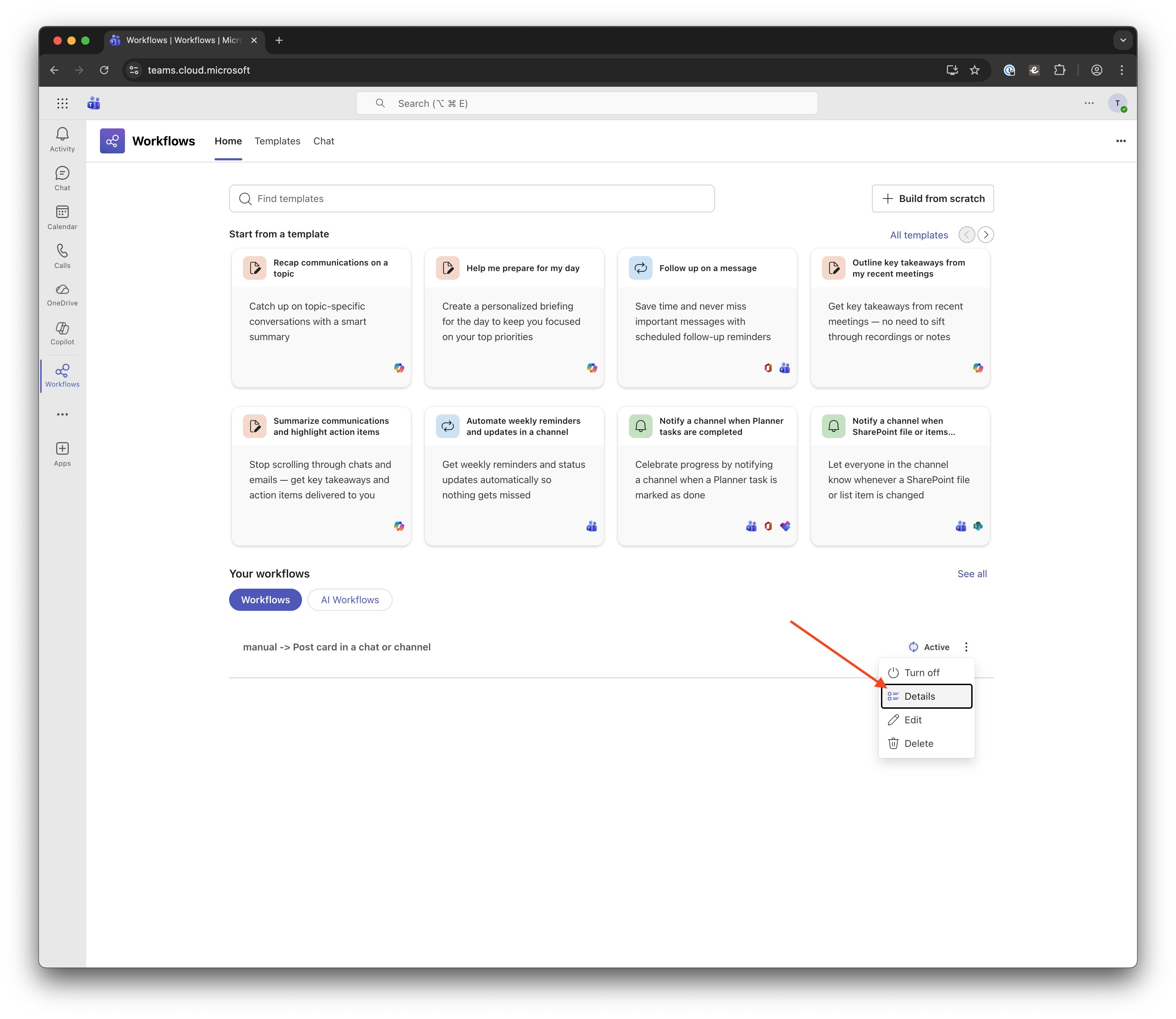
Теперь в вашем списке должен появиться рабочий процесс с именем
manual → Post card in a chat or channel. Нажмите кнопку с вертикальным многоточием на этом рабочем процессе и выберите из выпадающего меню Details. -
На этой странице нажмите Copy webhook link, чтобы скопировать ссылку для следующих шагов. По желанию вы можете изменить имя рабочего процесса, чтобы оно отражало его назначение для других членов вашей команды.



Настройка Discourse
Теперь вернемся к Discourse:
-
В административной панели Discourse включите настройку
Chat integration enabled, чтобы активировать плагин Chat Integration, и настройкуChat integration Teams enabled, чтобы добавить поддержку Microsoft Teams. -
В боковой панели найдите раздел Plugins и нажмите Chat Integrations, затем нажмите + Create Channel.
-
В модальном окне Edit Channel заполните поля следующим образом:


- Name: Введите имя, которое четко указывает, к какому каналу Microsoft Teams вы подключаетесь; оно не обязательно должно точно совпадать.
- Webhook URL: Вставьте URL вебхука, скопированный на шаге 11 раздела настройки Teams выше.
-
Нажмите Save Channel.

Тестирование интеграции
Теперь давайте убедимся, что всё работает как ожидалось.
-
В Discourse на newly созданном канале нажмите Test.
-
Найдите тему по ID, заголовку или URL; выберите нужную тему и нажмите Send Test Message.
-
В Microsoft Teams в канале должно появиться новое сообщение с информацией из темы:


Опционально: Настройка правил для вашего канала
Теперь, когда вы убедились, что всё работает, вы можете вернуться в Discourse и настроить дополнительные правила для вашего канала, чтобы кастомизировать сообщения.
Отладка
Если вы не видите сообщение в Microsoft Teams, как ожидалось, перейдите на страницу Workflow Details (см. шаг 10 в разделе настройки Teams выше) и проверьте раздел Run history. Там должны быть отображены логи каждого запуска сообщения.

Нажмите на неудачный запуск, который переведет вас в область Power Automate, где вы увидите сообщение об ошибке в верхней части страницы. (На скриншоте ниже запуск был успешным, но стрелка указывает, где появится ошибка при неудачном запуске.)

Здесь должно быть подробно описано проблему, которую вы затем можете исправить или сообщить нам здесь, чтобы мы могли помочь.
- Discourse в настоящее время не поддерживает аутентифицированные вебхуки для Teams, поэтому работает только опция “Anyone”.
если всплывающее окно не появляется, временно введите что-либо в поле Adaptive Card, сохраните рабочий процесс, снова откройте его для редактирования, и всплывающее окно должно появиться ↩︎

