Activer un CDN pour votre Discourse

Vous souhaitez utiliser un CDN pour accélérer l’accès mondial aux actifs courants sur votre forum Discourse ? Vous voudrez peut-être opter pour une solution complète et consulter Set up file and image uploads to S3 (voir aussi Configure an S3 compatible object storage provider for uploads).

Si vous souhaitez un CDN sans la complexité supplémentaire d’S3 et d’avoir deux CDN, ce guide est pour vous. Le CDN réduira une partie de la charge sur votre serveur en permettant au CDN de servir ces actifs afin que le serveur n’ait pas à le faire. Il peut également accélérer les choses en livrant les fichiers depuis un emplacement plus proche de l’utilisateur final.

Inscrivez-vous auprès du CDN de votre choix – CDCK/discourse.org a utilisé et recommande fortement Fastly.

La configuration ressemblera à ceci :
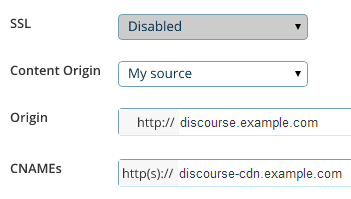
Ce que vous recherchez se résume à trois paramètres principaux :

  1. L’adresse d’origine, qui est l’URL où votre forum est actuellement situé discourse.example.com. C’est à partir de là que le CDN tirera tout son contenu original lors de la première requête.

  2. Le CNAME, qui est le nom « convivial » pour votre CDN que vous configurerez dans votre DNS, par exemple discourse-cdn.example.com

  3. L’URL du CDN, qui est le nom « peu convivial » de l’endroit d’où proviendront les actifs CDN mis en cache via le réseau mondial de serveurs distribués du CDN. Il ressemblera à 637763234.cdn-provider.com

Vous devrez modifier votre DNS pour mapper le CNAME à l’URL du CDN, comme ceci :

discourse-cdn.example.com IN CNAME 637763234.cdn-provider.com

(Une fois que vous avez modifié le DNS, laissez un peu de temps pour la propagation.)

La partie configuration de Discourse est assez simple. Décommentez la ligne CDN dans votre app.yml et mettez à jour avec le CNAME que vous venez de configurer dans votre DNS :

    ## L'adresse CDN http ou https pour cette instance Discourse (configurée pour tirer)
    DISCOURSE_CDN_URL: https://discourse-cdn.example.com

:warning: L’URL du CDN doit inclure un protocole (https:// ou http://). Les URL relatives au protocole (commençant par //) ne sont plus prises en charge et provoqueront l’arrêt de la construction du conteneur.

(Si vous ne voyez pas cette ligne dans votre app.yml, ajoutez-la sous les autres variables DISCOURSE_)

Comme pour toutes les autres modifications de votre app.yml, vous devez reconstruire le conteneur pour refléter les changements :

./launcher rebuild app

Une fois la reconstruction terminée, naviguez vers votre instance Discourse dans le navigateur. Affichez la source et recherchez « cdn ». Vous verrez que les actifs du site proviennent désormais de votre CDN :

<script src="https://discourse-cdn.codinghorror.com/assets/preload_store-4ea79c2f435becca86ac97a9c038f9c7.js"></script>
<script src="https://discourse-cdn.codinghorror.com/assets/locales/en-7084a68855205a9128245d2d0ce94ed9.js"></script>

Ce sujet couvre le scénario le plus courant d’accélération des actifs statiques. Consultez ce sujet pour l’accélération CDN du site complet (actifs dynamiques et statiques) (comme celui fourni par Cloudflare). Cloudflare fonctionne différemment d’un CDN traditionnel, ce n’est donc pas un bon sujet pour discuter de Cloudflare.

Autres CDN signalés comme fonctionnant incluent :

43 « J'aime »

I’m sorry guys, I’m trying to figure out how to do this, and I’m drawing a blank. I’ve tried to follow your instructions, but I think the Fastly site must have changed since you created the screenshot, because I can’t find where to enter in the details you’ve presented.

:confused: :confounded:

Minor update - this is the screen I get when I trying to use the service

It doesn’t match up with your example, so I don’t know what goes where.

Fastly is more sophisticated than the general CDN it supports accelerating both dynamic and static content.

To configure.

  1. Plug in the IP address of your Discourse web server in “Server Address”
  2. Plug in your desired domain name in “Domain name”
  3. Point your DNS CNAME for your domain at global.prod.fastly.net per: http://docs.fastly.com/guides/getting-started/cname-instructions-for-most-providers

That is it you should be done, no changes needed on Discourse side.

7 « J'aime »

I wonder how to deal with CDN provider does not support https…

There is a cloud storage provider can just acted as CDN. But their spider don’t like SSL. There are APIs for upload assets. I would think the easiest way is to write a plugin to monitor public folder and upload them instantly…

That sounds like a push CDN to me, which was supported in the past but not currently.

This should also work with other CDNs? Like S3?

S3 is not a CDN, but it should work with Amazon CloudFront and any other Pull compatible CDN.

5 « J'aime »

If you want an inexpensive CDN, I think MaxCDN might be what you’re looking for. It is a pull-compatible CDN.

However, going to Fastly’s website from a quick google search led me to Fastly’s pricing page in a snap.

MaxCDN goes by a somewhat different pay model (as far as I can see in comparing with Fastly) which is easier to budget with.

1 « J'aime »

I’m new to Discourse and I’ve been trying to configure it with Cloudflare. This tutorial focuses on fastly. I have used Cloudflare on my Wordpress sites in the past and it was quite simple. Typically, Cloudflare scans your website and all you have to do is change your DNS to what Cloudflare provides. My question is… do the same steps I just mentioned apply to discourse? If yes… what so I do with the CDN URL in app.yml? Thanks guys.

1 « J'aime »

You do not have to spend time designating which files to cache. CloudFlare’s technology builds the cache for you based on your traffic and what objects on your site are safe to serve from the edge.

Just be sure you do not enable any JavaScript weirdness / modifications in CloudFlare, as it will break the crap out of Discourse if you do.

8 « J'aime »

Anyone have any experience with Cachefly?

They’re running a pay-as-you-go plan with no minimum spend, which seems to be the only one of their peers, since Fastly has a minimum $50/mo spend requirement. https://www.cachefly.com/plans-pricing/pay-as-you-go-cdn/

I’ve heard their name often before and I think they’re up there in the top tier CDN? Just checking others’ experience first…

Cachefly are good, have never used them but heard plenty good things

2 « J'aime »

Does anyone have any experience in using KeyCDN with Discourse?

They support HTTP/2, have 22 PoPs, and are amongst the cheapest CDN on the market (starting $0.04/GB). If all works well with Discourse it would definitely be something worth looking into.

Yes, I using KeyCDN on my discourse: http://reactvn.org/. It’s working perfectly.

These are the steps to use KEYCDN:

  1. Register [KEYCDN] 1 account: Fill in your e-mail can register, you can using without having to recharge.

  2. Create a pull zone: https://www.keycdn.com/support/create-a-pull-zone/

  3. Create a Zonealias: https://www.keycdn.com/support/create-a-zonealias/

  4. Config Discourse: Modify app.yml, DISCOURSE_CDN_URL point to your CDN URL or an alias. Enable a CDN for your Discourse

7 « J'aime »

Any one knows how to configure with http://www.coralcdn.org/ ?

Is there any way to change the CDN url without having to rebuild the Docker container or is updating the app.yml and rebuilding currently the only way?

No, that is the only way.

1 « J'aime »

Why not use CloudFlare? They don’t charge for bandwidth at all. (Plus a bunch of other features, like free SSL).

3 « J'aime »

You can use Cloudflare along with another CDN. You don’t get full CDN advantages with Cloudflare unless you pay, and for serving up lots of images, attachments, or other media you’ll want a dedicated CDN to reduce the server load.

after enable CDN, i can not visit my site any more.

I have this error in my log:

nginx: [emerg] host not found in upstream "avatars.discourse.org" in /etc/nginx/conf.d/discourse.conf:247