إطلاق Font Awesome 5 وأيقونات SVG

انظر أيضًا: We're upgrading our icons to Font Awesome 6!

سنقوم قريبًا بدمج فرع في master يرقّي Discourse إلى Font Awesome 5.5.0 (النسخة المجانية) ويحوّل استخدام الأيقونات إلى صيغة SVG بدلاً من خط الأيقونات. يُعدّ هذا التغيير جوهريًا، ويوفر العديد من الفوائد، مع تغيير واحد مهم للمطورين.

إليك ملخص سريع للتغييرات:

  • استخدام أيقونات SVG سيوفر أيقونات أكثر حدة، أفضل في إمكانية الوصول، وأسهل في التخصيص. راجع هذه المقالة على GitHub لمزيد من التفاصيل.
  • نظرًا لأن مجموعة أيقونات Font Awesome نمت لتضم أكثر من 1300 أيقونة في الإصدار 5، فقد قمنا ببناء واجهة برمجة تطبيقات داخلية توفّر للعملاء مجموعة فرعية من جميع أيقونات FA، أي فقط الأيقونات المستخدمة في هذه النسخة من Discourse.
  • المجموعة الفرعية، لحسن الحظ، أصغر حجمًا: فهي تعمل بالفعل هنا في Meta، وحجمها 27.5 كيلو بايت فقط مقارنة بـ 75.7 كيلو بايت لخط أيقونات FA 4.7.
  • يمكن للإضافات والقوالب (بما في ذلك مكونات القوالب) إضافة أيقونات FA إضافية إلى المجموعة.
  • ستُدرج أيقونات تميّز المجموعات والشارات تلقائيًا في المجموعة، ويمكن لمديري الموقع أيضًا استخدام إعداد موقع جديد يُسمى svg icon subset لتسجيل الأيقونات المختارة وإضافتها إلى المجموعة الفرعية لموقعهم.
  • تغيير كاسر: لم يعد بإمكان مطوري الإضافات والقوالب استخدام <i class="fa fa-icon"></i> أو تجاوز محددات الوهمي :before للإشارة إلى الأيقونات أو استبدالها. يجب استبدال ذلك باستخدام دوال Discourse التي تقوم بحقن أيقونات SVG في الصفحة.

فيما يلي تعليمات حول كيفية تحديث الإضافات والقوالب لاستخدام الأيقونات من المجموعة الجديدة.

ما الجديد في Font Awesome 5

أدخل Font Awesome 5 العديد من الأيقونات الجديدة، بالإضافة إلى بعض التغييرات في التسمية. لمناقشة شاملة للتغييرات، يرجى الاطلاع على وثائق ترقية Font Awesome. التغيير الرئيسي هو أن الأيقونات في FA تأتي الآن بأساليب منفصلة. هناك ثلاثة أساليب:

  1. صلب (افتراضي) – fas
  2. عادي – far
  3. علامات تجارية – fab

بالنسبة للأسلوب العادي أو أسلوب العلامات التجارية، يقدم FA 5 بادئات فئة جديدة، وهي “far” و “fab” على التوالي. لاستخدام أيقونة من الأسلوب العادي أو أسلوب العلامات التجارية، يجب علينا إذن استخدام اصطلاح التسمية الجديد هذا: "far fa-address-book" أو "fab fa-facebook". (يمكن الإشارة إلى الأيقونات الصلبة ببساطة كما كان من قبل “fa-icon-name”).

للسماح بتجميع الأساليب الثلاثة في رسم متجه واحد (SVG sprite)، يتم تحويل الأيقونات في الأسلوب العادي وأسلوب العلامات التجارية في Discourse داخليًا إلى far-icon-name و fab-icon-name. يمكن للإضافات والقوالب وتمييزات المجموعات والشارات استخدام اصطلاح التسمية القياسي لـ FontAwesome 5. يجب على مسؤولي الموقع الذين يضيفون أيقونات إلى المجموعة عبر إعداد الموقع svg icon subset استخدام اصطلاح التسمية الداخلي.

المطورون: كيفية استخدام أو إضافة أيقونة SVG إلى إضافة أو قالب

  1. إضافة أيقونات جديدة

    الإضافات:

    سجّل الأيقونة في ملف plugin.rb الخاص بإضافتك:

    register_svg_icon "user-times" if respond_to?(:register_svg_icon)
    

    (ملاحظة: يجب عليك إعادة تشغيل خادم Rails الخاص بك في بيئة التطوير الخاصة بك حتى ينفذ هذا التغيير.)

    القوالب أو المكونات:

    أضف سلسلة أو إعداد قائمة يحتوي اسمه على _icon، على سبيل المثال:

    svg_icons: 
      default: 'question-circle|wallet'
      type: 'list'
      list_type: 'compact'
    

    وسيقوم Discourse بتضمين الأيقونة (الأيقونات) المحددة في إعداد القالب هذا في المجموعة الفرعية.

  2. استخدام الأيقونات في جافا سكريبت الخاص بك

    الإضافات:

    import { iconNode } from "discourse-common/lib/icon-library";
    ...
    let icon = iconNode('user-times');
    

    أو استخدم دالة المساعدة iconHTML

    import { iconHTML } from "discourse-common/lib/icon-library";
    ...
    let icon = iconHTML('user-times');
    

    القوالب أو المكونات:

    const { iconNode } = require("discourse-common/lib/icon-library");
    ...
    let icon = iconNode('user-times');
    

    أو استخدم دالة المساعدة iconHTML

    const { iconHTML } = require("discourse-common/lib/icon-library");
    ...
    let icon = iconHTML('user-times');
    

    يمكن أن تتقبل دوال المساعدة أيضًا معلمة ثانية تحتوي على خصائص مثل العنوان أو الفئة. يعمل هذا بنفس الطريقة في الإضافات والقوالب / المكونات، على سبيل المثال:

    iconHTML('user-times', { class: "reply-to-glyph" })
    
  3. استخدام الأيقونات في قوالب Handlebars الخاصة بك
    في قوالب Handlebars، يمكنك استخدام d-icon، مثل هذا:

    {{d-icon 'user-times'}}
    

    يعمل هذا أيضًا بنفس الطريقة في الإضافات والقوالب / المكونات

إضافة أيقونات مخصصة

إذا كنت ترغب في الحصول على المزيد من الأيقونات غير المتوفرة في Font Awesome، يمكنك إضافة أيقونات SVG خاصة بك في إضافة أو قالب. راجع هذا الرسم المتجه (SVG sprite) كمثال لكيفية هيكلة الرسم المتجه الخاص بك. (هو في الأساس قائمة من عناصر <symbol>، لكل منها معرف فريد خاص به.)

في القوالب والمكونات: أضف الرسم المتجه (SVG sprite) في مجلد /assets، وراجعه في about.json باستخدام اسم المتغير icons-sprite. بالنسبة لرسم متجه يُسمى my-icons.svg، يجب أن يتضمن ملف assets.json الخاص بك هذا:

"assets": {
   "icons-sprite": "/assets/my-icons.svg"
}

يمكنك أيضًا إضافة الرسم المتجه إلى قالب أو مكون عبر واجهة المستخدم. عند القيام بذلك، تأكد من تعيين اسم متغير SCSS إلى icons-sprite. لقطة شاشة:

في الإضافات: ما عليك سوى تضمين ملف رسم متجه (SVG sprite) في مجلد plugins/your-plugin-name/svg-icons. أعد تشغيل خادمك (إذا كنت في وضع التطوير) أو أعد بناء الموقع إذا كنت في حاوية Docker، وستصبح أيقوناتك المخصصة متاحة تلقائيًا.

لتجنب أي تداخل محتمل مع معرفات أيقونات Font Awesome، يجب عليك إضافة بادئة لمعرفات الأيقونات المخصصة في إضافتك أو قالبك.

80 إعجابًا

Could someone elaborate on how to update a theme component? I’m very green at this and haven’t been able to make sense of all this. I’m currently using as such:

<a href="javascript:history.back()" class="app-go-back"><i class="fas fa-arrow-left" aria-hidden="true"></i></a>

This may be unrelated, but the following css has broken since the latest build:

.b-header .nav-pills > li:nth-child(3) a::before{
	content: "\f1ea";
}

As you can see here, only this one icon has broken, I double checked and f1ea is still valid in FA5. Is there a better way to achieve this with the new changes?

إعجابَين (2)

From what I can see all of the icons are broken:

إعجابَين (2)

Hmm interesting, they must be cached on my side. Is the option of using this gone now @pmusaraj?

إعجابَين (2)

For HTML code directly, you can replace:

<i class="fas fa-arrow-left" aria-hidden="true"></i>

with:

<svg class="fa d-icon d-icon-arrow-left svg-icon svg-node" aria-hidden="true"><use xlink:href="#arrow-left"></use></svg>

Note that “arrow left” is in two places, in the class and in the <use> tag. Also, this icon is in the solid style in FA5, but for icons in regular or brands, you need to use the prefixes far- and fab-, respectively.

In your header links, you can’t use :before anymore, because SVG sprites can’t be added to pseudo selectors. But you can use this component: Header submenus (it’s been updated recently, and is FA5-compatible).

15 إعجابًا

Good job. :ok_hand:

How can I change this code to work with Font Awesome 5?

 a[href="/new"]:before {
      display: inline-block;
      font-family: FontAwesome;
      font-style: normal;
      font-weight: normal;
      line-height: 1;
      -moz-osx-font-smoothing: grayscale;
      content: "\f0ca";
      margin-right: 3px
    }
إعجابَين (2)

What is creating this a[href="/new"] element? If you are adding it in your theme, via JS, then it’s easier to add the icon there, instead of using the CSS pseudo selector. One of iconHTML or iconNode above should do the trick.

5 إعجابات

I’m very confused. I tried this and it worked:

But when I switched “left” to “right” in both places, it didn’t work. Am I missing something? Here’s the code I tried:

<svg class="fa d-icon d-icon-arrow-right svg-icon svg-node" aria-hidden="true"><use xlink:href="#arrow-right"></use></svg>

(I was actually trying to get the church icon to work, so if that’s going to require something else, let me know.)

إعجاب واحد (1)

The arrow-right icon is not included by default (because it isn’t used elsewhere in Discourse), so you will need to add it to the svg icons subset site setting. Same for the church icon. (FA5 comes with thousands of icons, so we use a subset to avoid loading all the icons all the time. It saves precious bytes :slight_smile:)

17 إعجابًا

Makes complete sense. Thanks much.

إعجابَين (2)

I was banging my head against the wall trying to figure out why the right arrow wasn’t displaying last night! FYI I don’t if this is because it is a work in progress, but the instructions say to use far but this did not display the icon, I had to add it as fa-right-arrow for it to display.

3 إعجابات

Sorry about that, I have updated the description text for that setting to include: “Use prefix ‘fa-’ for solid icons, ‘far-’ for regular icons and ‘fab-’ for brand icons.”

8 إعجابات

I want to add icons to the navigation bar – and I used a[href="/new"] for meta.discourse.org/new or a[href="/categories"] for meta.discourse.org/categories

// Add Font Awesome 5 Icons to the navigation bar

a[href="/new"]:before {
  font-family: "Font Awesome 5 Free";
  font-weight: 900;
  content: "\f007";
  display: inline-block;
  font-style: normal;
  font-variant: normal;
  text-rendering: auto;
  line-height: 1;
  margin-right: 3px;
  -webkit-font-smoothing: antialiased;
}

But I’m doing something wrong and it’s not working.

إعجابَين (2)

We are no longer using Font Awesome as a font, so using the old method of pseudo selectors in CSS will not work.

If you don’t want to touch javascript and want a CSS-only solution, you can use an SVG as an image:

a[href="/new"]:before {
   content: url(/link-to-file.svg);
  // display inline-block, etc still needed
}

or you can inline the SVG’s code (which I believe has some compatibility issues with older browsers)

a[href="/new"]:before {
   content: url('data:image/svg+xml; utf8, <svg xmlns="http://www.w3.org/2000/svg" aria-hidden="true" data-prefix="fas" data-icon="grin-tongue-wink" class="svg-inline--fa fa-grin-tongue-wink fa-w-16" role="img"  height="25" width="25" viewBox="0 0 496 512"><path fill="white" d="M344 184c-13.3 0-24 10.7-24 24s10.7 24 24 24 24-10.7 24-24-10.7-24-24-24zM248 8C111 8 0 119 0 256c0 106.3 67 196.7 161 232-5.6-12.2-9-25.7-9-40v-45.5c-24.7-16.2-43.5-38.1-47.8-63.8-2-11.8 9.3-21.5 20.7-17.9C155.1 330.5 200 336 248 336s92.9-5.5 123.1-15.2c11.5-3.7 22.6 6.1 20.7 17.9-4.3 25.7-23.1 47.6-47.8 63.8V448c0 14.3-3.4 27.8-9 40 94-35.3 161-125.7 161-232C496 119 385 8 248 8zm-56 225l-9.5-8.5c-14.8-13.2-46.2-13.2-61 0L112 233c-8.5 7.4-21.6.3-19.8-10.8 4-25.2 34.2-42.1 59.9-42.1S208 197 212 222.2c1.6 11.1-11.6 18.2-20 10.8zm152 39c-35.3 0-64-28.7-64-64s28.7-64 64-64 64 28.7 64 64-28.7 64-64 64zm-50.9 102.6c-14.4-6.5-31.1 2.2-34.6 17.6l-1.8 7.8c-2.1 9.2-15.2 9.2-17.3 0l-1.8-7.8c-3.5-15.4-20.2-24.1-34.6-17.6-.9.4.3-.2-18.9 9.4v63c0 35.2 28 64.5 63.1 64.9 35.7.5 64.9-28.4 64.9-64v-64c-19.5-9.6-18.2-8.9-19-9.3z"></path></svg>');
}
8 إعجابات

I’ve hacked my way through this and I’ve got everything working again except the right arrow on my mobile navigation component for the app, I can’t get it to right align to save my life. I tried using flex with flex-end to no avail. Please forgive my horrible attempt at this…

Here is my components code:
/body

/body
<div id="mobilenav">
<a href="javascript:history.back()" class="app-go-back">Back</a>
<a href="javascript:history.forward()" class="app-go-forward">Forward</a>
		<div id="mobilenavleft">
			<svg class="fa d-icon d-icon-arrow-left svg-icon svg-node" aria-hidden="true">
			<use xlink:href="#arrow-left"></use>
		</svg>
	</div>
		<div id="mobilenavright">
			<svg class="fa d-icon d-icon-arrow-right svg-icon svg-node" aria-hidden="true">
			<use xlink:href="#arrow-right"></use>
	</svg>
</div>
CSS
@media only screen and (min-width:1024px) {
div#mobilenav {
            display: none !important;
        }
}

/* move up compose window on mobile */
@media only screen and (max-width:1024px) {
#reply-control.open.edit-title {
            margin-bottom: 29px;
            height: 85%;
            margin-top: -29px;
        }

.timeline-container.timeline-fullscreen.show {
            margin-bottom: 29px;
        }
#reply-control.open {
            margin-bottom: 29px;
        }
.docked-composer .docked-editor {
    margin-bottom: 29px;
}
#topic-progress {
    margin-bottom: 33px;
}
.sticky-footer {
    margin-bottom: 33px;
}
}

/* display on ipad in landscape orientation */
@media only screen 
and (min-device-width : 768px) 
and (max-device-width : 1024px) 
and (orientation : landscape) {
div#mobilenav {
            display: block;
        }
}

div#mobilenav {
box-shadow: 0px -1px 5px 0px rgba(0,0,0,0.15);
position: fixed;
bottom: 0px;
width: 100%;
height: auto;
border: none;
z-index: 99999999999;
background-color: #2A2B2F;
}

.app-go-forward {
text-align: right;
padding: 5px 3%;
width: 44%;
float: right;
display: inline-block;
}

.app-go-back {
text-align: left;
padding: 5px 7%;
width: 44%;
float: left;
display: inline-block;
}

div#mobilenav {
display: flex;
flex-direction: row;
flex-wrap: nowrap;
}

div#mobilenavleft {
box-shadow: 0px -1px 5px 0px rgba(0,0,0,0.15);
position: fixed;
bottom: 0px;
width: 1%;
height: auto;
border: none;
z-index: 99999999999;
padding-bottom: 4px;
padding-left: 5px;
}

div#mobilenavright {
box-shadow: 0px -1px 5px 0px rgba(0,0,0,0.15);
position: fixed;
bottom: 0px;
width: 1%;
height: auto;
border: none;
z-index: 99999999999;
padding-bottom: 4px;
padding-right: 5px;
justify-content: flex-end;
}

If anyone wants to help, my site is here and this component only displays below 1024px obviously. The left arrow looks perfect and the right arrow should mirror this.

إعجاب واحد (1)

It’s because you’re using position: fixed on the arrow, if you add

div#mobilenavright {
  right: 5px;
}

Then it should be where you want it.

Sidenote: You don’t really need to use position: fixed for those arrows at all because they’re already within a fixed container, if you put the arrows inside of your a tags containing the “forward” and “back” text the layout might be a bit easier to manage in general.

10 إعجابات

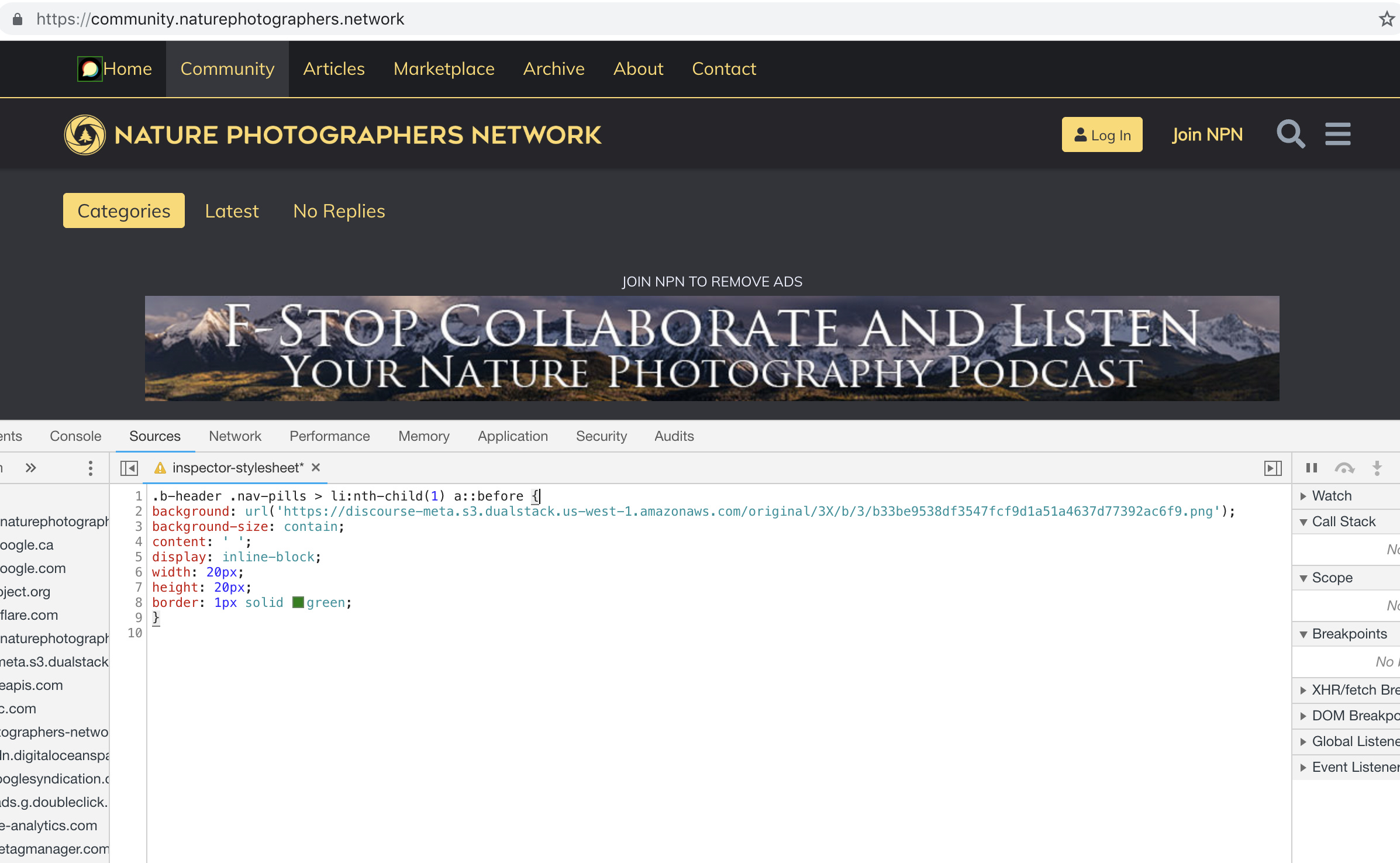
I’m trying to use this with the Brand Header Theme Component but not having any success with this:

.b-header .nav-pills > li:nth-child(1) a::before{
content: url(https://npn.sfo2.cdn.digitaloceanspaces.com/misc/home-solid.svg);
display: inline-block;
width: 20px;
height: 20px;}

I’ve also tried:

.b-header .nav-pills > li:nth-child(1) a::before {
display: block;
  content: ' ';
  background-image: url('https://npn.sfo2.cdn.digitaloceanspaces.com/misc/home-solid.svg');
  background-size: 20px 20px;
  height: 20px;
  width: 20px;
}

Anyone have ideas?

إعجابَين (2)

Something is wrong with your SVG image. The screenshot below works with the Discourse logo, but not with that SVG file:

إعجابَين (2)

It might be because the SVG doesn’t have any height/width defined (in the SVG markup itself, not the CSS)

Can you right click this one below, save it, and try again… I’ve added some dimensions to it.

home-solid

8 إعجابات

This does seem to work, dare I ask how? Also, fill: does not seem to work on this to change the color, it just displays as black.

For reference, my code:

.b-header .nav-pills > li:nth-child(1) a::before {
display: inline-block;
content: ' ';
background: url('https://d11a6trkgmumsb.cloudfront.net/original/3X/a/6/a61b08e7f318170faee755cb6dcd48d6f6d7413d.svg');
background-size: contain;
height: 20px;
width: 20px;
border: 1px solid blue;
fill: blue;

}

إعجابَين (2)