Habilitar una CDN para tu Discourse

¿Así que desea utilizar una CDN para acelerar el acceso mundial a los recursos comunes en su foro de Discourse? Es posible que desee ir a por todas y consultar Set up file and image uploads to S3 (consulte también Configure an S3 compatible object storage provider for uploads).

Si desea una CDN sin la complejidad adicional de S3 y tener dos CDNs, esta es la guía para usted. La CDN reducirá parte de la carga de su servidor al permitir que la CDN sirva esos activos para que el servidor no tenga que hacerlo. También puede acelerar las cosas al entregar los archivos desde una ubicación más cercana al usuario final.

Regístrese con la CDN de su elección: CDCK/discourse.org ha utilizado y recomienda encarecidamente Fastly.

La configuración se verá algo así:
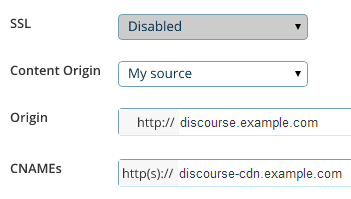
Lo que está buscando son tres configuraciones principales:

  1. La dirección de origen, que es la URL donde se encuentra actualmente su foro discourse.example.com. Aquí es de donde la CDN extraerá todo su contenido original en la primera solicitud.

  2. El CNAME, que es el nombre “amigable” para su CDN que configurará en su DNS, por ejemplo, discourse-cdn.example.com

  3. La URL de la CDN, que es el nombre “poco amigable” de dónde vendrán los activos de la CDN almacenados en caché a través de la red mundial de servidores distribuidos de la CDN. Se verá como 637763234.cdn-provider.com

Deberá editar su DNS para mapear el CNAME a la URL de la CDN, de la siguiente manera:

discourse-cdn.example.com IN CNAME 637763234.cdn-provider.com

(Una vez que haya editado el DNS, dele un poco de tiempo para que se propague).

La parte real de la configuración de Discourse es bastante sencilla. Descomente la línea de la CDN en su app.yml y actualícela con el CNAME que acaba de configurar en su DNS:

## La dirección http o https de la CDN para esta instancia de Discourse (configurada para extraer)
DISCOURSE_CDN_URL: https://discourse-cdn.example.com

:warning: La URL de la CDN debe incluir un protocolo (https:// o http://). Las URL relativas al protocolo (que comienzan con //) ya no son compatibles y harán que la compilación del contenedor se interrumpa.

(Si no ve esta línea en su app.yml, agréguela debajo de las otras variables DISCOURSE_)

Como con cualquier otro cambio en su app.yml, debe reconstruir el contenedor para reflejar los cambios:

./launcher rebuild app

Una vez que haya reconstruido, navegue a su instancia de Discourse en el navegador. Vea el código fuente y busque “cdn”. Verá que los activos de los sitios web ahora provienen de su CDN:

<script src="https://discourse-cdn.codinghorror.com/assets/preload_store-4ea79c2f435becca86ac97a9c038f9c7.js"></script>
<script src="https://discourse-cdn.codinghorror.com/assets/locales/en-7084a68855205a9128245d2d0ce94ed9.js"></script>

Este tema cubre el escenario más común de aceleración de activos estáticos. Consulte este tema para la aceleración de CDN de sitio completo (tanto de activos dinámicos como estáticos) (como la proporcionada por Cloudflare). Cloudflare funciona de manera diferente a una CDN tradicional, por lo que este no es un buen tema para discutir Cloudflare.

Otras CDN que se ha informado que funcionan incluyen:

43 Me gusta

I’m sorry guys, I’m trying to figure out how to do this, and I’m drawing a blank. I’ve tried to follow your instructions, but I think the Fastly site must have changed since you created the screenshot, because I can’t find where to enter in the details you’ve presented.

:confused: :confounded:

Minor update - this is the screen I get when I trying to use the service

It doesn’t match up with your example, so I don’t know what goes where.

Fastly is more sophisticated than the general CDN it supports accelerating both dynamic and static content.

To configure.

  1. Plug in the IP address of your Discourse web server in “Server Address”
  2. Plug in your desired domain name in “Domain name”
  3. Point your DNS CNAME for your domain at global.prod.fastly.net per: http://docs.fastly.com/guides/getting-started/cname-instructions-for-most-providers

That is it you should be done, no changes needed on Discourse side.

7 Me gusta

I wonder how to deal with CDN provider does not support https…

There is a cloud storage provider can just acted as CDN. But their spider don’t like SSL. There are APIs for upload assets. I would think the easiest way is to write a plugin to monitor public folder and upload them instantly…

That sounds like a push CDN to me, which was supported in the past but not currently.

This should also work with other CDNs? Like S3?

S3 is not a CDN, but it should work with Amazon CloudFront and any other Pull compatible CDN.

5 Me gusta

If you want an inexpensive CDN, I think MaxCDN might be what you’re looking for. It is a pull-compatible CDN.

However, going to Fastly’s website from a quick google search led me to Fastly’s pricing page in a snap.

MaxCDN goes by a somewhat different pay model (as far as I can see in comparing with Fastly) which is easier to budget with.

1 me gusta

I’m new to Discourse and I’ve been trying to configure it with Cloudflare. This tutorial focuses on fastly. I have used Cloudflare on my Wordpress sites in the past and it was quite simple. Typically, Cloudflare scans your website and all you have to do is change your DNS to what Cloudflare provides. My question is… do the same steps I just mentioned apply to discourse? If yes… what so I do with the CDN URL in app.yml? Thanks guys.

1 me gusta

You do not have to spend time designating which files to cache. CloudFlare’s technology builds the cache for you based on your traffic and what objects on your site are safe to serve from the edge.

Just be sure you do not enable any JavaScript weirdness / modifications in CloudFlare, as it will break the crap out of Discourse if you do.

8 Me gusta

Anyone have any experience with Cachefly?

They’re running a pay-as-you-go plan with no minimum spend, which seems to be the only one of their peers, since Fastly has a minimum $50/mo spend requirement. https://www.cachefly.com/plans-pricing/pay-as-you-go-cdn/

I’ve heard their name often before and I think they’re up there in the top tier CDN? Just checking others’ experience first…

Cachefly are good, have never used them but heard plenty good things

2 Me gusta

Does anyone have any experience in using KeyCDN with Discourse?

They support HTTP/2, have 22 PoPs, and are amongst the cheapest CDN on the market (starting $0.04/GB). If all works well with Discourse it would definitely be something worth looking into.

Yes, I using KeyCDN on my discourse: http://reactvn.org/. It’s working perfectly.

These are the steps to use KEYCDN:

  1. Register [KEYCDN] 1 account: Fill in your e-mail can register, you can using without having to recharge.

  2. Create a pull zone: https://www.keycdn.com/support/create-a-pull-zone/

  3. Create a Zonealias: https://www.keycdn.com/support/create-a-zonealias/

  4. Config Discourse: Modify app.yml, DISCOURSE_CDN_URL point to your CDN URL or an alias. Enable a CDN for your Discourse

7 Me gusta

Any one knows how to configure with http://www.coralcdn.org/ ?

Is there any way to change the CDN url without having to rebuild the Docker container or is updating the app.yml and rebuilding currently the only way?

No, that is the only way.

1 me gusta

Why not use CloudFlare? They don’t charge for bandwidth at all. (Plus a bunch of other features, like free SSL).

3 Me gusta

You can use Cloudflare along with another CDN. You don’t get full CDN advantages with Cloudflare unless you pay, and for serving up lots of images, attachments, or other media you’ll want a dedicated CDN to reduce the server load.

after enable CDN, i can not visit my site any more.

I have this error in my log:

nginx: [emerg] host not found in upstream "avatars.discourse.org" in /etc/nginx/conf.d/discourse.conf:247