Discourse フォーラムのメールによる返信設定を行いたいとのことですね。
メールによる返信は、discourse.org でホストされているすべてのサイトで、デフォルトで事前設定され、有効になっています。以下のガイドは、自己ホストしている場合にのみ適用されます。
朗報です!一般的なコンシューマー向けメールサービス(GMail、Outlook、Yahoo Mailなど)には全く適さない送信メールとは異なり、受信のメールによる返信は、通常、発生量が非常に少ないです。非常に多くの人が通知メールに返信しているような、巨大なフォーラムでない限り、例えば Gmail を使用しても安全でしょう。
あるいは、この目的に GMail を使用するのに抵抗がある場合は、Configure direct-delivery incoming email for self-hosted sites with Mail-Receiver を使用して、独自の受信メールサービスを設定できます。
それでは、GMail を例にとって設定方法を説明します。
-
新しい GMail アカウントを作成します。完全に新しいメールアカウントを設定しない場合、古いメールが POP3 経由で同期され、予期せぬ問題が発生し、バウンス通知メールが送信されることになります!
-
新しいアカウントに
discourse-replies@example.comや、私の場合はreplies@example.comのようなユーザー名を割り当てます(通常の GMail アカウントを使用している場合は、ここで@example.comを@gmail.comに置き換えてください)。強力なパスワードを設定します。 -
http://mail.google.com からこのアカウントにログインします。利用規約に同意し、CAPTCHA を入力し、デフォルトのウェブインターフェースを読み込みます。テストメールを送信し、テストメールを受信してみましょう。動作を確認してください。
-
Gmail では POP3s アクセスはデフォルトでオフになっているため、[設定]、[転送と POP/IMAP] からオンにします。
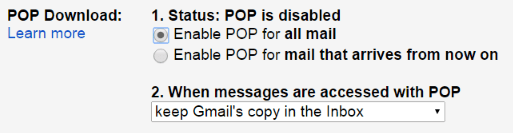
デフォルトではすべての受信メールが保持されますが、必要に応じて調整できます。
-
Discourse の設定にアクセスし、[Email] タブを確認します。
-
次の設定を変更します。
reply_by_email_addressにreplies+%{reply_key}@example.comを入力しますpop3_polling_usernameにreplies@example.comを入力しますpop3_polling_passwordにそのメールアカウントのパスワードを入力しますpop3_polling_hostをpop.gmail.comに設定しますpop3_polling_enabledを true に設定しますreply_by_email_enabledを true に設定します
このアカウントに対して一定量のポーリングが発生しますが、低く安全な量に設定されています。pop3_polling_period_mins 設定でポーリング間隔を設定できます。
メールサービスが プラスアドレス指定(アドレスタグ) をサポートしていることを前提としていますので、設定を開始する前に確認してください。Gmail はもちろんサポートしています。
すべてが機能していれば、すべての通知メールのフッターに、ウェブサイトにアクセスするか、メールで返信することで応答できる旨が表示されるはずです。
返信するには、このメールに返信するか、ブラウザで {topic URL} にアクセスしてください。
もし、うまくいかない場合:
-
ウェブブラウザで Discourse の
/logsパスを確認し、メール関連のエラーメッセージを探してください。 -
ウェブブラウザでメールアカウントにログインし、エラーや通知がないか確認してください。
追加のアドレスに送信されたメールの転送
例えば、「replies@your.domain」アカウントからメールをポーリングしており、「help@your.domain」や「dev@your.domain」に送信された受信メールを設定したいとします。
「help@your.domain」および「dev@your.domain」に送信されたすべてのメールを、「replies@your.domain」に転送する必要があります。Gmail を使用している場合、他のアカウントに受信メールを自動的に転送する方法についての優れたチュートリアルがあります。
その後、Discourse は「reply@discourse.org」アカウントから定期的にメールをポーリングし、対応する category、group、topic、または message にメールを配信します。
潜在的な問題
-
サーバーの場所と異なる国から Gmail アカウントにサインアップした場合に問題が発生することが確認されています。たとえば、英国から Gmail アカウントを作成したが、サーバーが米国にある場合などです。
-
GMail アカウント(例:@gmail.com)または Google Workspace メールボックス(例:@yourdomain.com の Google メールボックス)を使用している場合は、アカウントのパスワードの代わりにステップ 6 で使用するアプリパスワードを作成する必要があります。
こちらも参照してください: Troubleshoot reply by email
ℹ 2022年5月30日以降、Google の **安全性の低いアプリからのアクセス** オプションはサポートされなくなったため、アプリパスワードを使用し、そのためには二要素認証を有効にする必要があります。