gormus
8월 10, 2024, 1:30오후
1
주제 필터를 사용하여 사용자 정의 주제 목록을 만들 수 있습니다. 목록은 선택된 페이지의 선택된 플러그인 아웃렛에 표시할 수 있습니다.
필요한 만큼 많은 수의 목록을 생성하고, 제목을 정의하며, 몇 개의 주제를 나열할지, 쿼리에 어떤 필터를 사용할지, 무엇보다도 어떤 페이지에 어디에 표시할지 설정할 수 있습니다.
실험적인 주제 목록 필터 기능과 지원되는 필터를 확인하세요:
최근에 혁신적인 /filter 경로를 도입하여 주제 목록을 더 정교하게 필터링할 수 있게 되었습니다. 특히, 이는 검색과 필터링 모두를 위한 통합된 주제 필터링 언어로 나아가는 첫 번째 단계입니다. 또한, 주제 목록 필터링을 위한 전용 경로는 사이드바의 커스터마이징 기능을 향상시킵니다. 이제 사용자는 사이드바 내에 커스텀 섹션 링크 로 링크를 포함시킬 수 있습니다.
/filter 에는 사용자가 주제 목록을 필터링하기 위한 쿼리 문자열을 입력할 수 있는 입력 필드가 있습니다.
예를 들어, category:documentation tag:how-to+email 은
제목 : 선택 가능한 제목 텍스트입니다. 제공되면 주제 목록 위에 표시됩니다.
길이 : 표시할 주제 수입니다.
쿼리 : 목록을 필터링할 쿼리입니다.
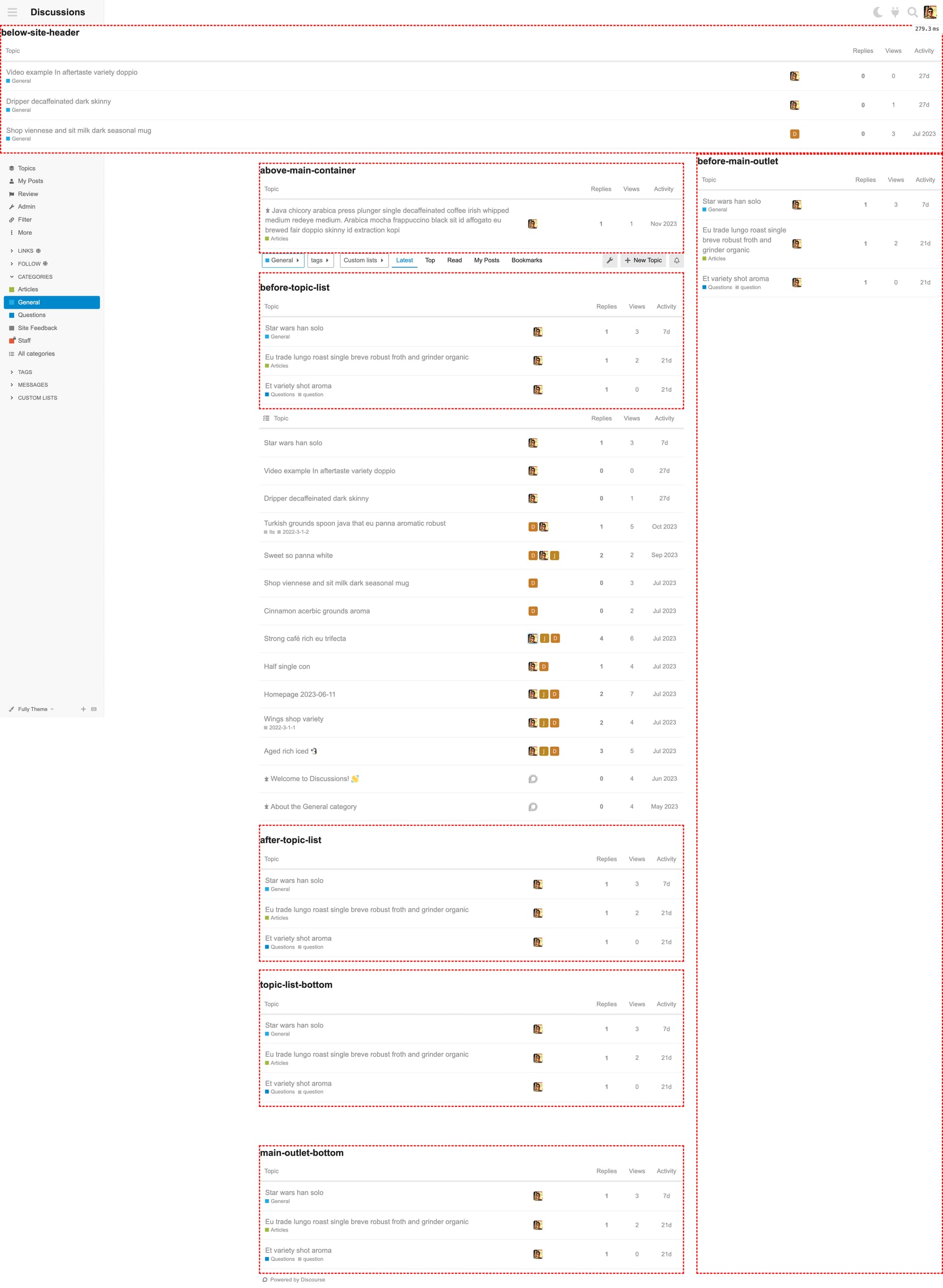
플러그인 아웃렛 : 큐레이션된 주제 목록은 다음 플러그인 아웃렛/리전에 배치할 수 있습니다:
below-site-headerabove-main-containerbefore-topic-listafter-topic-listtopic-list-bottommain-outlet-bottombefore-main-outlet
표시 위치 : 목록을 표시할 페이지입니다.
everywhere: /admin 페이지를 제외한 모든 페이지에 표시합니다.homepagetop_menu: 활성화된 페이지에 대한 상단 메뉴categories: /categories 페이지.latest: /latest 페이지.topnewunreadreadpostedbookmarkshotselected_categories:selected_tags
선택된 카테고리 : 표시 위치 설정이 selected_categories로 설정되면 이 필드에서 선택된 카테고리가 사용됩니다. 주제 목록은 해당 카테고리 페이지에서만 표시됩니다.
선택된 태그 : 표시 위치 설정이 selected_tags로 설정되면 이 필드에서 선택된 태그가 사용됩니다. 주제 목록은 해당 태그 페이지에서만 표시됩니다.
사용 가능한 모든 플러그인 아웃렛은 주위 빨간 점선으로 표시되어 렌더링됩니다.
Featured Lists 테마 컴포넌트에서 영감을 받았습니다. 하지만 결국 제 프로젝트에는 더 유연하고 주관적이지 않은 솔루션이 필요했습니다.
반드시 확인해 보세요:
25개의 좋아요
Heliosurge
8월 11, 2024, 12:25오전
2
정말 멋진 것 같습니다.
컴포넌트를 스타일링할 수 있도록 동일한 타깃팅 가능한 클래스를 사용하나요?
여러 아웃렛에 커스텀 목록의 예제를 몇 개 추가해 주실 수 있을까요?
감사합니다
1개의 좋아요
gormus
8월 11, 2024, 11:34오전
3
네, 필터링된 토픽 목록 테이블은 메인 토픽 목록 테이블과 동일한 CSS 클래스를 사용합니다. 또한, 모든 플러그인 아웃렛에서 토픽 목록 테이블을 커스터마이징하는 데 도움이 되는 클래스가 포함된 감싸는 DIV 요소도 있습니다.
아래에서 계층 구조를 확인할 수 있으며, .topic-list가 TABLE 요소의 기본 식별자임을 유의하세요. 필요할 경우 특정 플러그인 아웃렛을 타겟팅하여 다른 스타일을 적용할 수도 있습니다. 두 번째 코드 블록을 참고하세요.
.filtered-topics-list {
    &__wrapper {
    }

    &__header {
        h2 {
        }
    }

    &__content.topic-list {
    }
}

.filtered-topics-list {
    &.below-site-header,
    &.above-main-container,
    &.before-topic-list,
    &.after-topic-list,
    &.topic-list-bottom,
    &.main-outlet-bottom,
    &.before-main-outlet {

        &__wrapper {
        }

        &__header {
            h2 {
            }
        }

        &__content.topic-list {
        }
    }
}
그것을 보여드릴 데모 사이트는 없지만, 다양한 필터링된 토픽 목록과 함께 사용 가능한 모든 플러그인 아웃렛을 보여주는 스크린샷을 공유했습니다.
주변의 빨간색 점선 경계는 무시해 주세요. 테이블과 해당 영역을 강조하기 위해 제가 추가한 것입니다.
2개의 좋아요
저는 /latest를 홈페이지로 사용하고 있습니다. 이 컴포넌트를 사용하여 특정 카테고리의 최신 주제를 홈페이지에 추가했지만, Discourse의 표준적이고 무한 스크롤되는 최신 주제 컴포넌트를 제거하고 싶습니다. CSS로 이를 시도했으나 다른 페이지에도 영향을 미치고 있습니다. CSS 셀렉터를 사용하여 홈페이지에만 해당 최신 주제 컴포넌트를 타겟팅하는 것이 가능한가요?
3개의 좋아요
manuel
9월 3, 2024, 7:24오전
5
3개의 좋아요
jrgong
9월 15, 2024, 12:14오후
6
버그를 발견했습니다(또는 의도된 동작인가요?):
카테고리에서 기본 목록 필터: 하위 카테고리 없음을 설정하면 어떤 아웃렛에서도 필터링된 주제 목록이 표시되지 않습니다.
최신 안정판 3.3.1에서 테스트했습니다.
3개의 좋아요
gormus
9월 15, 2024, 1:10오후
7
안녕하세요 @jrgong , 프리셋 스크린샷을 공유해 주시겠어요?
2개의 좋아요
jrgong
10월 6, 2024, 9:16오전
9
한 가지 더 질문이 있습니다: 특정 카테고리에서 필터링된 목록을 표시할 때 핵심 주제 목록을 숨기는 가장 좋은 방법은 무엇일까요?
제가 CSS를 통해 찾은 유일한 방법은 span 태그를 대상으로 하는 것이지만, 다른 상황에서 트리거될 수 있습니다:
span + table.topic-list.topic-thumbnails-grid {
  display: none;
}
gormus
10월 12, 2024, 4:30오후
10
@jrgong 님, 말씀하신 내용을 확인했습니다.
카테고리 및 하위 카테고리를 생성합니다. 예: 상위 카테고리와 상위 카테고리 > 하위 카테고리
상위 카테고리 설정을 편집합니다 (/c/top-level-category/edit/settings)외관(Appearance) 섹션에서 기본 목록 필터 설정을 찾습니다.
값을 모든 주제에서 하위 카테고리 없음으로 변경합니다.
필터링된 주제 목록(Filtered Topics Lists) 컴포넌트에서 새로운 프리셋을 구성하여 해당 상위 카테고리 및 하위 카테고리에서 내용을 표시하도록 설정합니다.
표시 위치 = 선택된 카테고리로 설정선택된 카테고리 = 상위 카테고리, 하위 카테고리로 설정플러그인 아웃렛 = (어떤 것이든)으로 설정
각 카테고리 페이지를 확인합니다
두 카테고리 페이지 모두에서 설정된 플러그인 아웃렛에 구성된 프리셋 결과가 표시되어야 합니다.
기본 목록 필터 = 하위 카테고리 없음이 설정된 카테고리는 하위 카테고리가 있든 없든 필터링된 주제 목록이 표시되지 않습니다.그러나 표시 위치 = 모든 곳으로 설정하면 필터링된 주제 목록이 선택된 아웃렛에 표시됩니다.
There is currently a routing bug reproducible under fairly specific conditions:
Prerequisites
Category with a subcategory
Default List Filter category setting should be “no subcategories” for the parent category
Solved plugin installed
show_filter_by_solved_status site setting enabled
enable solved globally or at least for the involved categories
If you
have an events_calendar_categories set
in that category’s settings set Default List Filter to be no subcategories
then the events calendar is not displayed.
I discovered this when making a subcategory to house expired events (as an alternative to deleting them).
2개의 좋아요
MihirR
6월 13, 2025, 2:34오후
11
커스텀 필드를 추가할 때, 예를 들어 X라는 이름의 필터에 최근 10개 주제를 설정했다고 가정해 보겠습니다. 이 10개 주제를 스크롤해서 지나친 후, 최신(Latest) 목록이 시작되면 그중 하나 이상의 주제가 여전히 남아 있다면, 두 목록 모두에 표시됩니다. 최신 목록이나 필터에서 이러한 중복된 주제를 숨기는 방법이 있을까요?
1개의 좋아요
agemo
8월 18, 2025, 1:03오후
12
훌륭한 플러그인 기능입니다!
Q: 플러그인 아웃렛: before-main-outlet
이것이 어떻게 표시되는지 모르겠습니다. 화면에 보이지 않네요. 레이턴 그래픽처럼 화면 오른쪽에 위치하려면 표준 테마에서 무언가를 활성화/비활성화해야 하나요?
agemo
8월 19, 2025, 9:59오전
13
음, 찾았거나 적어도 잠깐 보긴 했어요. 무한 스크롤의 하단에 표시되고 있거든요. 시각 가이드에서 예상했거나 기대했던 오른쪽 쪽이 아니에요.
오브젝트 설정 편집기에서 설정을 저장한 후, 해당 컴포넌트의 관리자 페이지에서 페이지가 무한히 복제되었습니다.
Moin
12월 22, 2025, 9:22오전
15
브라우저 콘솔에 표시된 오류는 원인을 파악하는 데 도움이 될 수 있습니다.
1개의 좋아요