Incorporare un elenco di argomenti Discourse in un altro sito

Se scarichi le ultime build di Discourse, otterrai la possibilità di incorporare elenchi di argomenti in altri siti tramite un semplice JavaScript e HTML.

Il caso d’uso tipico è un blog o un altro sito basato sui contenuti, dove desideri un widget sul lato dello schermo che elenchi gli argomenti. Puoi filtrare per categoria, tag o qualsiasi altra opzione di filtro pubblica disponibile.

Come incorporare un elenco di argomenti

Per prima cosa, devi abilitare l’impostazione del sito embed topics list.

Successivamente, nel tuo HTML aggiungi un tag <script> che includa il JavaScript necessario per incorporare gli argomenti di Discourse. Puoi aggiungerlo ovunque aggiungi normalmente gli script. Ad esempio:

<script src="http://URL/javascripts/embed-topics.js"></script>

Sostituisci URL con l’indirizzo del forum, inclusa la sottocartella se esiste.

Dopo di ciò, nel <body> del tuo documento HTML, aggiungi un tag d-topics-list per indicare l’elenco degli argomenti che desideri incorporare. Anche qui dovrai sostituire URL con il tuo URL di base:

<d-topics-list discourse-url="URL" category="1234" per-page="5"></d-topics-list>

Qualsiasi attributo che fornisci (tranne discourse-url, che è obbligatorio) verrà convertito nei parametri di query per la ricerca degli argomenti. Quindi, se volessi cercare argomenti per tag, potresti fare così:

<d-topics-list discourse-url="URL" tags="cool"></d-topics-list>

Se un parametro di query contiene caratteri di sottolineatura, convertili in trattini. Nell’esempio sopra, avrai probabilmente notato che per_page è diventato per-page.

In contesti SameSite (cioè quando il sito che incorpora e il tuo forum condividono un dominio padre), Discourse saprà se hai effettuato l’accesso al forum e mostrerà i risultati di conseguenza. Non sorprenderti se vedi categorie sicure e simili quando sei loggato: gli utenti anonimi non potranno farlo!

Elenco dei parametri

template: Può essere complete o basic (predefinito). Mentre basic è solo un elenco di titoli degli argomenti, complete include titolo, nome utente, avatar dell’utente, data di creazione e miniatura dell’argomento.

per-page: Numero. Controlla quanti argomenti restituire.

category: Numero. Restringe gli argomenti a una singola categoria. Passa l’id della categoria di destinazione.

allow-create: Booleano. Se abilitato, l’incorporamento avrà un pulsante “Nuovo argomento”.

tags: Stringa. Restringe gli argomenti a quelli associati a questo tag.

top_period: Uno tra all, yearly, quarterly, monthly, weekly, daily. Se abilitato, restituirà gli argomenti “Top” del periodo.

Esempi

Ho creato un sito di esempio qui:

https://embed.eviltrout.com

Dovresti essere in grado di visualizzare il codice sorgente nel tuo browser per vedere il codice, ma anche l’intero sorgente è su GitHub:

Questa è una funzionalità nuovissima, quindi qualsiasi feedback o richiesta sarebbe apprezzato.

Stile dell’elenco

Puoi utilizzare la nostra funzionalità tema esistente per aggiungere stili personalizzati per l’elenco incorporato.

Ad esempio, per impostazione predefinita, il nostro elenco incorporato che utilizza il modello complete appare così:
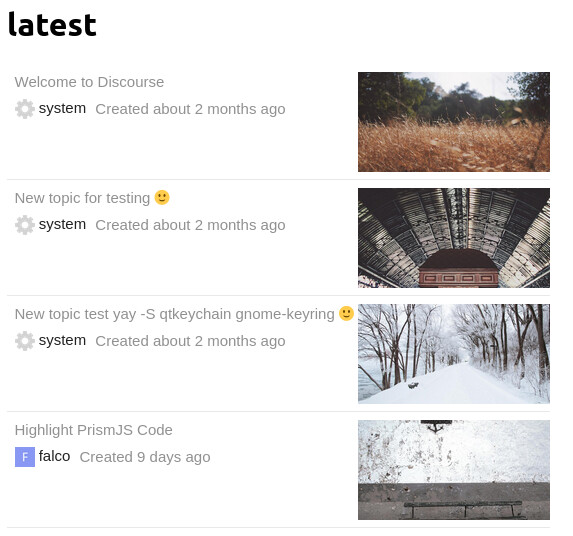
Se desideri che appaia, ad esempio, come una griglia, puoi aggiungere SCSS personalizzato a Tema > Comune > CSS incorporato:

.topics-list {
  display: grid;
  grid-template-columns: repeat(2, 1fr);
  
  .topic-list-item { 
    .main-link {
      border: 1px dotted gray;
      padding: 0;
    }
  
    .topic-column-wrapper {
      flex-direction: column-reverse;
      
      .topic-column.details-column {
        width: 100%;
      }
        
      .topic-column.featured-image-column .topic-featured-image img {
        max-width: initial;
        max-height: initial;
        width: 100%;
      }
    }
  }
}

Il che lo farà apparire così:

95 Mi Piace

Hey folks! We’re looking to have the links open in a new tab (so target="_blank" instead of target="_parent"). Is there an easy way to do this given the iframe?

2 Mi Piace

I don’t know if it’s what you’re looking for, but something like this should work to open links in new tabs. CORS has to be enabled for the external domain. I tried it this way because I wanted to filter out a pinned topic.

// `fetch` might require a polyfill
const targetEl = document.getElementById("forumTopics");

function renderTemplate(topicsArr) {
    const items = topicsArr.map(
        (topic) => `<li><a href="${topic[1]}" target="_blank">${topic[0]}</li>`
    );

    targetEl.innerHTML = `<ul>${items.join("\n")}</ul>`;
}

// tack `.json` on to any topic list
fetch("https://forum.example.com/latest.json")
    .then((res) => res.json())
    .then((json) => {
        const topics = json.topic_list.topics
            .slice(1, 6)
            .map((t) => [
                t.title,
                `https://forum.example.com/t/${t.slug}/${t.id}`,
            ]);

        renderTemplate(topics);
    });
3 Mi Piace

Thanks! I like this idea, but based on this post What are the risks of enabling Cross-origin resource sharing (DISCOURSE_ENABLE_CORS) I’m thinking that enabling CORS isn’t the best idea.

2 Mi Piace

You are only supposed to enable CORS for sites you trust. Enabling CORS for every source is defeating the purpose of it.

6 Mi Piace

I only enabled CORS for other sites I control. The goal was to load a list of forum topics in our other sites with frontend code. That method probably wouldn’t work for letting random sites embed the posts.

Edit: if you copy/paste that code watch out for .slice(1, 6) because it removes one of the topics. (I think that was the pinned topic that I wanted to remove.)

3 Mi Piace

Cool, this is something we can try then - I don’t have a site other than localhost for now (during testing) which is why I was hesitant to add it. But if I can find someone that has a place, we can give it a go. Thanks for your help!

4 Mi Piace

Hey @j127

we are currently facing the same issue and want to open links in new tab.
Just quick question.

Where exactly do you put the code that you provided

@eviltrout Any idea why in my case the CSS styles are not appearing?

2 Mi Piace

That code is just a quick example of the general idea. I don’t think fetch works in all browsers. I can rewrite it in ES5 if you want.

Is your site WordPress or some kind of headless WordPress?

4 Mi Piace

It appears to work in all modern browsers, and Discourse doesn’t support IE11 any more…

4 Mi Piace

My site is just regular wordpress, not headless.

1 Mi Piace

Can I use this to embed a list of Discourse Topics in another Discourse instance? Or is there a smarter way to do that?

My use case is having a ‘bridge’ between two instances as a temporary measure until they can be merged in future. It would be nice to have this automated and dynamic.

2 Mi Piace

If you don’t care about IE, then that snippet should work. (CORS has to be enabled for the external domain in the Discourse settings.)

To test it, open any page on this forum and paste the snippet below in the browser console. I changed the target element to document.body, so it will replace the entire page with the list for forum topics. For a real site, just change the target element to document.getElementById("#someId") and then put a div with that ID on the page somewhere. The script will fill it with the list of topics.

// `fetch` might require a polyfill unless you don't care about IE
// const targetEl = document.getElementById("forumTopics");

// this replaces the body of the page, just as an example
const targetEl = document.body;

// put your forum's URL here to test it on your own forum
const baseForumURL = `https://meta.discourse.org`;

// how many topics you want to show
const numTopics = 6;

function renderTemplate(topicsArr) {
    const items = topicsArr.map(
        (topic) => `<li><a href="${topic[1]}" target="_blank">${topic[0]}</li>`
    );

    targetEl.innerHTML = `<ul>${items.join("\n")}</ul>`;
}

// tack `.json` on to any topic list
fetch(`${baseForumURL}/latest.json`)
    .then((res) => res.json())
    .then((json) => {
        const topics = json.topic_list.topics
            .slice(0, numTopics)
            .map((t) => [
                t.title,
                `${baseForumURL}/t/${t.slug}/${t.id}`,
            ]);

        renderTemplate(topics);
    });

Example: if the target div somewhere on your WP site looks like this

<div id="forumTopics">
    <!-- the forum posts will appear here -->
</div>

then the JavaScript could target that ID like this:

// look for this line in the original example I posted
const targetEl = document.getElementById("forumTopics");
4 Mi Piace

By that you mean the code in the first post or the snippet in post 50? And no, I don’t care about IE. No need to cater to that dinosaur :).
In my case the CSS is not loaded for my snippet in any browser.

So this is JS and I have to put <script> tag around it when implementing it to wordpress, correct?

2 Mi Piace

It has been a while since I used WordPress. Is it something that you’re adding to a theme’s HTML? If yes, then wrap my code in a script tag and put the <div> wherever you want the posts to appear.

I think you could drop the code below right into the HTML of a WordPress template wherever you want the posts to appear. Be sure to update the line that has the URL of the forum. If it doesn’t work, let me know. (It’s untested.)

Click here for the code
<div id="forumTopics"></div>
<script>
// put your forum's URL here to test it on your own forum
const baseForumURL = `https://forum.example.com`;

// how many topics you want to show
const numTopics = 6;

const targetEl = document.getElementById("forumTopics");
// If the posts don't load for some reason, you could show a link to the forum
targetEl.innerHTML = `<a class="link-to-discourse" href="${baseForumURL}/">View the latest forum posts</a>`;

function renderTemplate(topicsArr) {
    const items = topicsArr.map(
        (topic) => `<li><a href="${topic[1]}" target="_blank">${topic[0]}</li>`
    );

    targetEl.innerHTML = `<ul>${items.join("\n")}</ul>`;
}

// tack `.json` on to any topic list
fetch(`${baseForumURL}/latest.json`)
    .then((res) => res.json())
    .then((json) => {
        const topics = json.topic_list.topics
            .slice(0, numTopics)
            .map((t) => [
                t.title,
                `${baseForumURL}/t/${t.slug}/${t.id}`,
            ]);

        renderTemplate(topics);
    });
</script>
3 Mi Piace

Thx, appreciate the full snippet

After initial test, only a link is displayed. But I think CORS is disabled, so gonna have my host enable that.
Meanwhile, how can I make the script only display post with a specific tag and from a specific category?

2 Mi Piace

I’m not sure, but I think the format is
https://forum.example.com/tags/c/<catgory_name>/<tag_name>

Example: the category is “support” and the tag is “css”:
https://meta.discourse.org/tags/c/support/css

To turn it into JSON, add .json on the end:
https://meta.discourse.org/tags/c/support/css.json

So in the fetch function, instead of /latest.json, use something like /tags/c/support/css.json.

(Untested.)

3 Mi Piace

And if I want to embed 5 topics in the Discourse-instance itself?

I make a topic. Make it a wiki. I publish it as a page. How do I embed the five latest topics from a specific category/tag or use the template this feature supports?

Thanks.

1 Mi Piace

What is the query parameter for top topics? I tried order="top" but it is not returning the top topics the same way the forum does based on a particular period. How can I replicate the forum filter result? Where can I look up the attribute values Discourse’s filter options take? Thank you!

2 Mi Piace

Is it possible to change the font style of the embedded content? I tried CSS selectors like d-topics-list iframe html .topics-list .topic-list-item without success. Appreciate the pointer in advance!

2 Mi Piace