Ein CDN für dein Discourse aktivieren

Sie möchten also ein CDN verwenden, um den weltweiten Zugriff auf gängige Assets in Ihrem Discourse-Forum zu beschleunigen? Möglicherweise möchten Sie alles auf einmal erledigen und Set up file and image uploads to S3 (siehe auch Configure an S3 compatible object storage provider for uploads).

Wenn Sie ein CDN ohne die zusätzliche Komplexität von S3 und die Nutzung von zwei CDNs wünschen, ist dies der richtige Leitfaden für Sie. Das CDN reduziert die Last auf Ihrem Server, indem es dem CDN ermöglicht, diese Assets bereitzustellen, sodass der Server dies nicht tun muss. Es kann auch die Geschwindigkeit erhöhen, indem die Dateien von einem Standort geliefert werden, der näher am Endbenutzer liegt.

Registrieren Sie sich bei dem CDN Ihrer Wahl – CDCK/discourse.org hat Fastly genutzt und empfiehlt es nachdrücklich.

Die Konfiguration wird in etwa so aussehen:
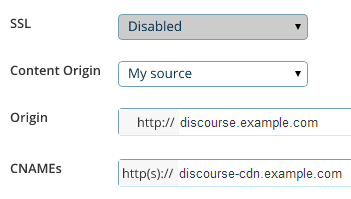
Sie suchen nach drei Haupteinstellungen:

  1. Die Origin-Adresse (Ursprungsadresse), d. h. die URL, unter der sich Ihr Forum derzeit befindet, z. B. discourse.example.com. Von hier aus zieht das CDN bei der ersten Anforderung alle ursprünglichen Inhalte.

  2. Der CNAME, d. h. der „freundliche“ Name für Ihr CDN, den Sie in Ihren DNS-Einstellungen festlegen, z. B. discourse-cdn.example.com

  3. Die CDN-URL, d. h. der „unfreundliche“ Name für den Ort, von dem die zwischengespeicherten CDN-Assets über das weltweite Netzwerk verteilter Server des CDN stammen. Er wird wie 637763234.cdn-provider.com aussehen.

Sie müssen Ihre DNS-Einträge bearbeiten, um den CNAME der CDN-URL zuzuordnen, wie folgt:

discourse-cdn.example.com IN CNAME 637763234.cdn-provider.com

(Nachdem Sie die DNS-Einträge bearbeitet haben, geben Sie ihm etwas Zeit, um sich zu verbreiten.)

Der eigentliche Discourse-Teil der Einrichtung ist recht einfach. Kommentieren Sie die CDN-Zeile in Ihrer app.yml aus und aktualisieren Sie sie mit dem CNAME, den Sie gerade in Ihren DNS-Einstellungen festgelegt haben:

    ## Die http oder https CDN-Adresse für diese Discourse-Instanz (für das Abrufen konfiguriert)
    DISCOURSE_CDN_URL: https://discourse-cdn.example.com

:warning: Die CDN-URL muss ein Protokoll enthalten (https:// oder http://). Protokoll-relative URLs (beginnend mit //) werden nicht mehr unterstützt und führen zum Abbruch des Container-Builds.

(Wenn Sie diese Zeile in Ihrer app.yml nicht sehen, fügen Sie sie unter den anderen DISCOURSE_-Variablen hinzu.)

Wie bei allen anderen Änderungen an Ihrer app.yml müssen Sie den Container neu erstellen, um die Änderungen zu übernehmen:

./launcher rebuild app

Sobald Sie neu erstellt haben, rufen Sie Ihre Discourse-Instanz im Browser auf. Zeigen Sie den Quellcode an und suchen Sie nach „cdn“. Sie werden sehen, dass Website-Assets nun von Ihrem CDN stammen:

<script src="https://discourse-cdn.codinghorror.com/assets/preload_store-4ea79c2f435becca86ac97a9c038f9c7.js"></script>
<script src="https://discourse-cdn.codinghorror.com/assets/locales/en-7084a68855205a9128245d2d0ce94ed9.js"></script>

Dieses Thema behandelt das häufigere Szenario der Beschleunigung statischer Assets. Siehe dieses Thema für die Beschleunigung der gesamten Website (sowohl dynamische als auch statische Assets) über ein CDN (wie es von Cloudflare bereitgestellt wird). Cloudflare funktioniert anders als ein herkömmliches CDN, daher ist dies kein geeignetes Thema für die Diskussion von Cloudflare.

Andere CDNs, die Berichten zufolge funktionieren, umfassen:

43 „Gefällt mir“

I’m sorry guys, I’m trying to figure out how to do this, and I’m drawing a blank. I’ve tried to follow your instructions, but I think the Fastly site must have changed since you created the screenshot, because I can’t find where to enter in the details you’ve presented.

:confused: :confounded:

Minor update - this is the screen I get when I trying to use the service

It doesn’t match up with your example, so I don’t know what goes where.

Fastly is more sophisticated than the general CDN it supports accelerating both dynamic and static content.

To configure.

  1. Plug in the IP address of your Discourse web server in “Server Address”
  2. Plug in your desired domain name in “Domain name”
  3. Point your DNS CNAME for your domain at global.prod.fastly.net per: http://docs.fastly.com/guides/getting-started/cname-instructions-for-most-providers

That is it you should be done, no changes needed on Discourse side.

7 „Gefällt mir“

I wonder how to deal with CDN provider does not support https…

There is a cloud storage provider can just acted as CDN. But their spider don’t like SSL. There are APIs for upload assets. I would think the easiest way is to write a plugin to monitor public folder and upload them instantly…

That sounds like a push CDN to me, which was supported in the past but not currently.

This should also work with other CDNs? Like S3?

S3 is not a CDN, but it should work with Amazon CloudFront and any other Pull compatible CDN.

5 „Gefällt mir“

If you want an inexpensive CDN, I think MaxCDN might be what you’re looking for. It is a pull-compatible CDN.

However, going to Fastly’s website from a quick google search led me to Fastly’s pricing page in a snap.

MaxCDN goes by a somewhat different pay model (as far as I can see in comparing with Fastly) which is easier to budget with.

1 „Gefällt mir“

I’m new to Discourse and I’ve been trying to configure it with Cloudflare. This tutorial focuses on fastly. I have used Cloudflare on my Wordpress sites in the past and it was quite simple. Typically, Cloudflare scans your website and all you have to do is change your DNS to what Cloudflare provides. My question is… do the same steps I just mentioned apply to discourse? If yes… what so I do with the CDN URL in app.yml? Thanks guys.

1 „Gefällt mir“

You do not have to spend time designating which files to cache. CloudFlare’s technology builds the cache for you based on your traffic and what objects on your site are safe to serve from the edge.

Just be sure you do not enable any JavaScript weirdness / modifications in CloudFlare, as it will break the crap out of Discourse if you do.

8 „Gefällt mir“

Anyone have any experience with Cachefly?

They’re running a pay-as-you-go plan with no minimum spend, which seems to be the only one of their peers, since Fastly has a minimum $50/mo spend requirement. https://www.cachefly.com/plans-pricing/pay-as-you-go-cdn/

I’ve heard their name often before and I think they’re up there in the top tier CDN? Just checking others’ experience first…

Cachefly are good, have never used them but heard plenty good things

2 „Gefällt mir“

Does anyone have any experience in using KeyCDN with Discourse?

They support HTTP/2, have 22 PoPs, and are amongst the cheapest CDN on the market (starting $0.04/GB). If all works well with Discourse it would definitely be something worth looking into.

Yes, I using KeyCDN on my discourse: http://reactvn.org/. It’s working perfectly.

These are the steps to use KEYCDN:

  1. Register [KEYCDN] 1 account: Fill in your e-mail can register, you can using without having to recharge.

  2. Create a pull zone: https://www.keycdn.com/support/create-a-pull-zone/

  3. Create a Zonealias: https://www.keycdn.com/support/create-a-zonealias/

  4. Config Discourse: Modify app.yml, DISCOURSE_CDN_URL point to your CDN URL or an alias. Enable a CDN for your Discourse

7 „Gefällt mir“

Any one knows how to configure with http://www.coralcdn.org/ ?

Is there any way to change the CDN url without having to rebuild the Docker container or is updating the app.yml and rebuilding currently the only way?

No, that is the only way.

1 „Gefällt mir“

Why not use CloudFlare? They don’t charge for bandwidth at all. (Plus a bunch of other features, like free SSL).

3 „Gefällt mir“

You can use Cloudflare along with another CDN. You don’t get full CDN advantages with Cloudflare unless you pay, and for serving up lots of images, attachments, or other media you’ll want a dedicated CDN to reduce the server load.

after enable CDN, i can not visit my site any more.

I have this error in my log:

nginx: [emerg] host not found in upstream "avatars.discourse.org" in /etc/nginx/conf.d/discourse.conf:247