Abilita una CDN per il tuo Discourse

Quindi desideri utilizzare una CDN per velocizzare l’accesso globale alle risorse comuni sul tuo forum Discourse? Potresti voler fare il grande passo e seguire le istruzioni su Set up file and image uploads to S3 (vedi anche Configure an S3 compatible object storage provider for uploads).

Se desideri una CDN senza la complessità aggiuntiva di S3 e l’avere due CDN, questa è la guida che fa per te. La CDN ridurrà parte del carico sul tuo server consentendo alla CDN di servire tali risorse in modo che il server non debba farlo. Può anche velocizzare le cose consegnando i file da una posizione più vicina all’utente finale.

Registrati con la CDN di tua scelta – CDCK/discourse.org ha utilizzato e raccomanda vivamente Fastly.

La configurazione sarà simile a questa:
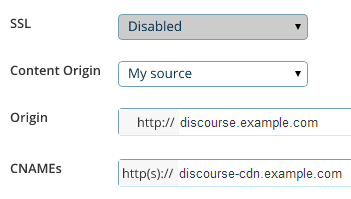
Ciò che stai cercando sono tre impostazioni principali:

  1. L’indirizzo di origine (origin address), che è l’URL in cui si trova attualmente il tuo forum discourse.example.com. È qui che la CDN preleverà tutti i suoi contenuti originali alla prima richiesta.

  2. Il CNAME, che è il nome “amichevole” per la tua CDN che imposterai nel tuo DNS, ad esempio discourse-cdn.example.com

  3. L’URL della CDN (CDN URL), che è il nome “meno amichevole” da cui verranno provenienti gli asset CDN memorizzati nella cache tramite la rete mondiale di server distribuiti della CDN. Sarà simile a 637763234.cdn-provider.com

Dovrai modificare il tuo DNS per mappare il CNAME all’URL della CDN, in questo modo:

discourse-cdn.example.com IN CNAME 637763234.cdn-provider.com

(Una volta modificato il DNS, concedi un po’ di tempo per la propagazione.)

La parte di configurazione effettiva di Discourse è piuttosto semplice. Decommenta la riga della CDN nel tuo app.yml e aggiornala con il CNAME che hai appena impostato nel tuo DNS:

## L'indirizzo CDN http o https per questa istanza Discourse (configurata per il pull)
DISCOURSE_CDN_URL: https://discourse-cdn.example.com

:warning: L’URL della CDN deve includere un protocollo (https:// o http://). Gli URL relativi al protocollo (che iniziano con //) non sono più supportati e causeranno l’interruzione della compilazione del container.

(Se non vedi questa riga nel tuo app.yml, aggiungila sotto le altre variabili DISCOURSE_)

Come per qualsiasi altra modifica al tuo app.yml, devi ricostruire il container per riflettere le modifiche:

./launcher rebuild app

Una volta ricostruito, naviga verso la tua istanza Discourse nel browser. Visualizza la sorgente e cerca “cdn”. Vedrai che gli asset del sito web provengono ora dalla tua CDN:

<script src="https://discourse-cdn.codinghorror.com/assets/preload_store-4ea79c2f435becca86ac97a9c038f9c7.js"></script>
<script src="https://discourse-cdn.codinghorror.com/assets/locales/en-7084a68855205a9128245d2d0ce94ed9.js"></script>

Questo argomento copre lo scenario più comune di accelerazione degli asset statici. Consulta questo argomento per l’accelerazione CDN dell’intero sito (sia dinamica che degli asset statici) (come fornito da Cloudflare). Cloudflare funziona in modo diverso da una CDN tradizionale, quindi questo non è un argomento appropriato per discutere di Cloudflare.

Altre CDN segnalate come funzionanti includono:

43 Mi Piace

I’m sorry guys, I’m trying to figure out how to do this, and I’m drawing a blank. I’ve tried to follow your instructions, but I think the Fastly site must have changed since you created the screenshot, because I can’t find where to enter in the details you’ve presented.

:confused: :confounded:

Minor update - this is the screen I get when I trying to use the service

It doesn’t match up with your example, so I don’t know what goes where.

Fastly is more sophisticated than the general CDN it supports accelerating both dynamic and static content.

To configure.

  1. Plug in the IP address of your Discourse web server in “Server Address”
  2. Plug in your desired domain name in “Domain name”
  3. Point your DNS CNAME for your domain at global.prod.fastly.net per: http://docs.fastly.com/guides/getting-started/cname-instructions-for-most-providers

That is it you should be done, no changes needed on Discourse side.

7 Mi Piace

I wonder how to deal with CDN provider does not support https…

There is a cloud storage provider can just acted as CDN. But their spider don’t like SSL. There are APIs for upload assets. I would think the easiest way is to write a plugin to monitor public folder and upload them instantly…

That sounds like a push CDN to me, which was supported in the past but not currently.

This should also work with other CDNs? Like S3?

S3 is not a CDN, but it should work with Amazon CloudFront and any other Pull compatible CDN.

5 Mi Piace

If you want an inexpensive CDN, I think MaxCDN might be what you’re looking for. It is a pull-compatible CDN.

However, going to Fastly’s website from a quick google search led me to Fastly’s pricing page in a snap.

MaxCDN goes by a somewhat different pay model (as far as I can see in comparing with Fastly) which is easier to budget with.

1 Mi Piace

I’m new to Discourse and I’ve been trying to configure it with Cloudflare. This tutorial focuses on fastly. I have used Cloudflare on my Wordpress sites in the past and it was quite simple. Typically, Cloudflare scans your website and all you have to do is change your DNS to what Cloudflare provides. My question is… do the same steps I just mentioned apply to discourse? If yes… what so I do with the CDN URL in app.yml? Thanks guys.

1 Mi Piace

You do not have to spend time designating which files to cache. CloudFlare’s technology builds the cache for you based on your traffic and what objects on your site are safe to serve from the edge.

Just be sure you do not enable any JavaScript weirdness / modifications in CloudFlare, as it will break the crap out of Discourse if you do.

8 Mi Piace

Anyone have any experience with Cachefly?

They’re running a pay-as-you-go plan with no minimum spend, which seems to be the only one of their peers, since Fastly has a minimum $50/mo spend requirement. https://www.cachefly.com/plans-pricing/pay-as-you-go-cdn/

I’ve heard their name often before and I think they’re up there in the top tier CDN? Just checking others’ experience first…

Cachefly are good, have never used them but heard plenty good things

2 Mi Piace

Does anyone have any experience in using KeyCDN with Discourse?

They support HTTP/2, have 22 PoPs, and are amongst the cheapest CDN on the market (starting $0.04/GB). If all works well with Discourse it would definitely be something worth looking into.

Yes, I using KeyCDN on my discourse: http://reactvn.org/. It’s working perfectly.

These are the steps to use KEYCDN:

  1. Register [KEYCDN] 1 account: Fill in your e-mail can register, you can using without having to recharge.

  2. Create a pull zone: https://www.keycdn.com/support/create-a-pull-zone/

  3. Create a Zonealias: https://www.keycdn.com/support/create-a-zonealias/

  4. Config Discourse: Modify app.yml, DISCOURSE_CDN_URL point to your CDN URL or an alias. Enable a CDN for your Discourse

7 Mi Piace

Any one knows how to configure with http://www.coralcdn.org/ ?

Is there any way to change the CDN url without having to rebuild the Docker container or is updating the app.yml and rebuilding currently the only way?

No, that is the only way.

1 Mi Piace

Why not use CloudFlare? They don’t charge for bandwidth at all. (Plus a bunch of other features, like free SSL).

3 Mi Piace

You can use Cloudflare along with another CDN. You don’t get full CDN advantages with Cloudflare unless you pay, and for serving up lots of images, attachments, or other media you’ll want a dedicated CDN to reduce the server load.

after enable CDN, i can not visit my site any more.

I have this error in my log:

nginx: [emerg] host not found in upstream "avatars.discourse.org" in /etc/nginx/conf.d/discourse.conf:247